3D Youtube Downloader: Download, Features, Windows Versions, and Complete Guide
If you’ve ever wanted to save a YouTube video for offline viewing — maybe a tutorial you’ll need on a flight, a lecture you want to rewatch, or one of those rare 3D clips — you’ve probably come across 3D Youtube Downloader. It’s one of the older, more feature-packed desktop tools built specifically for grabbing videos, playlists, and even subtitles from YouTube and a few other sites. This guide walks through what the software actually does, how to download and install it safely, which Windows versions it supports, and how it stacks up against newer alternatives.
What Is 3D Youtube Downloader?
3D Youtube Downloader Software Overview
3D Youtube Downloader (sometimes written as 3DYD) is a free Windows application that downloads video and audio from YouTube, along with a handful of other platforms like Vimeo and Dailymotion. It’s been around for over a decade and built a loyal following among people who wanted more control than a simple browser extension could offer.
What Is 3D Youtube Downloader Used For?
People typically use it to:
- Save YouTube videos for offline playback
- Download entire playlists or channel uploads at once
- Pull subtitles alongside the video file
- Grab 3D-formatted YouTube clips (a niche but genuine use case)
- Convert downloaded clips into different audio or video formats
How Does 3D Youtube Downloader Work?
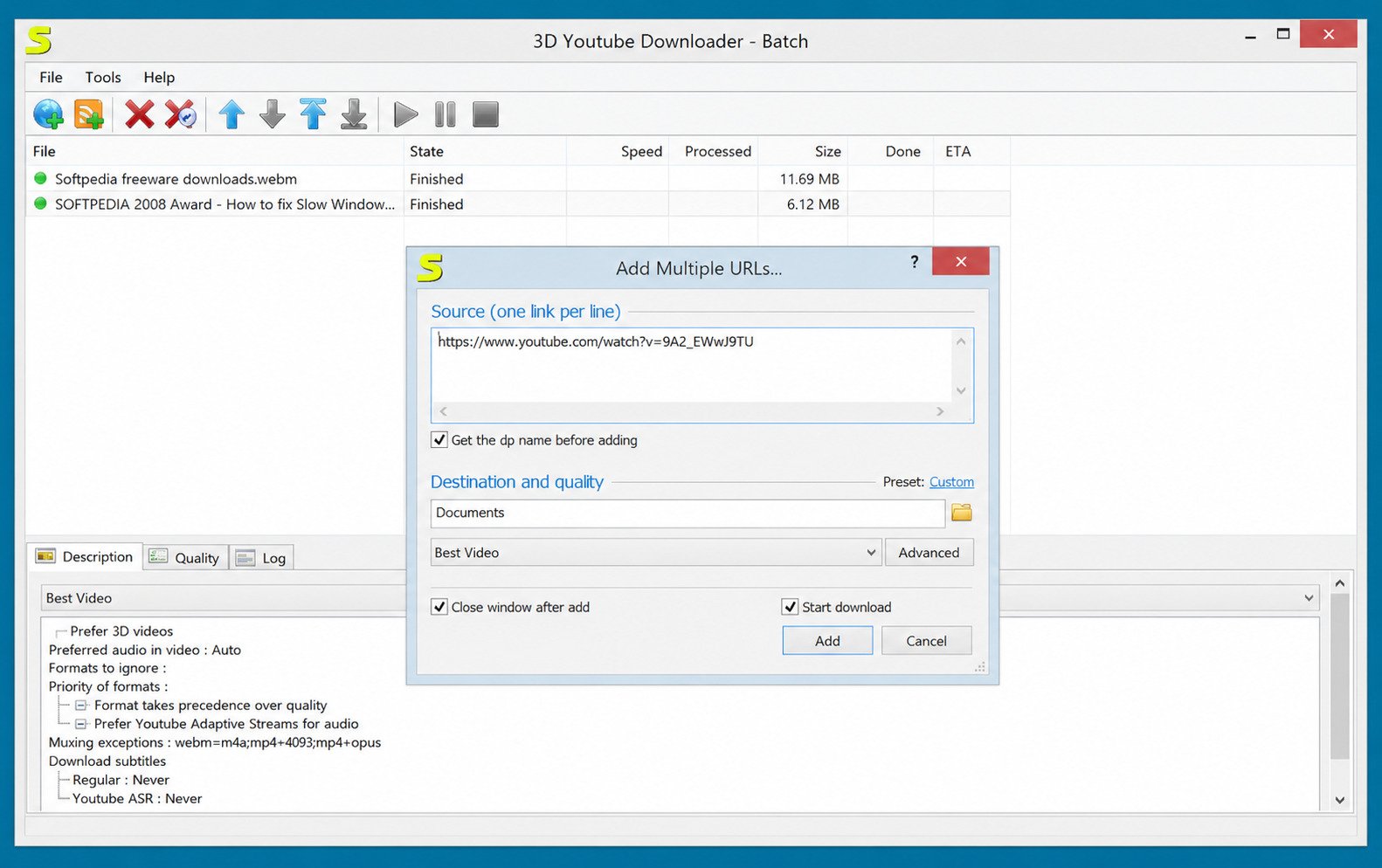
You paste a YouTube link into the program, and it scans the video for every available quality — YouTube can offer dozens of resolution and format combinations for a single clip. The software then either auto-selects the best match for your chosen work mode or lets you pick manually.
3D Youtube Downloader vs Standard YouTube Downloaders
| Feature | 3D Youtube Downloader | Typical Browser Extension |
|---|---|---|
| 3D video support | Yes | Rarely |
| Playlist/channel download | Yes | Limited |
| Subtitle download | Yes | Rarely |
| Built-in format conversion | Yes | No |
| Works without browser | Yes | No |
3D Youtube Downloader Features
YouTube Video Download and Quality Options
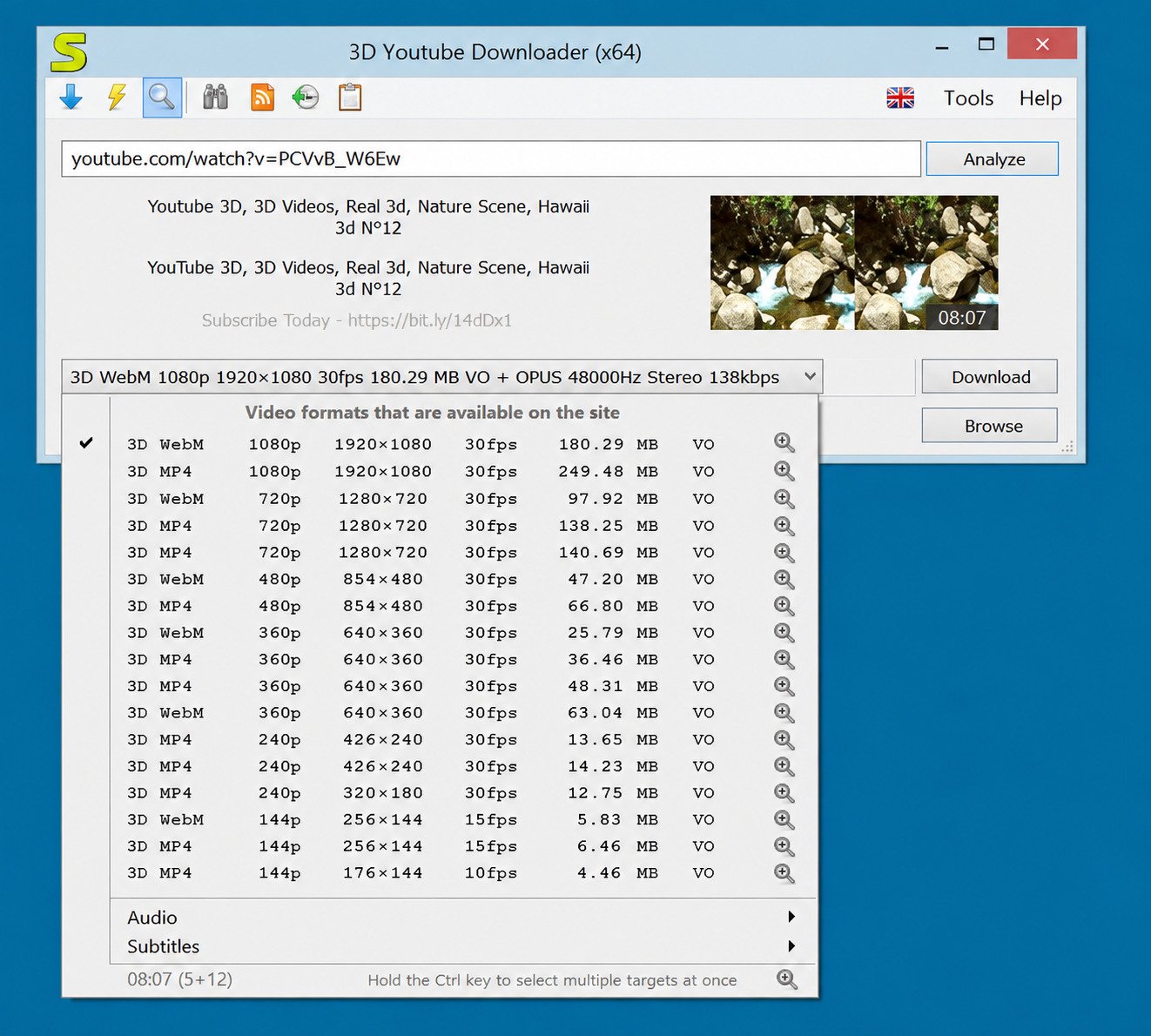
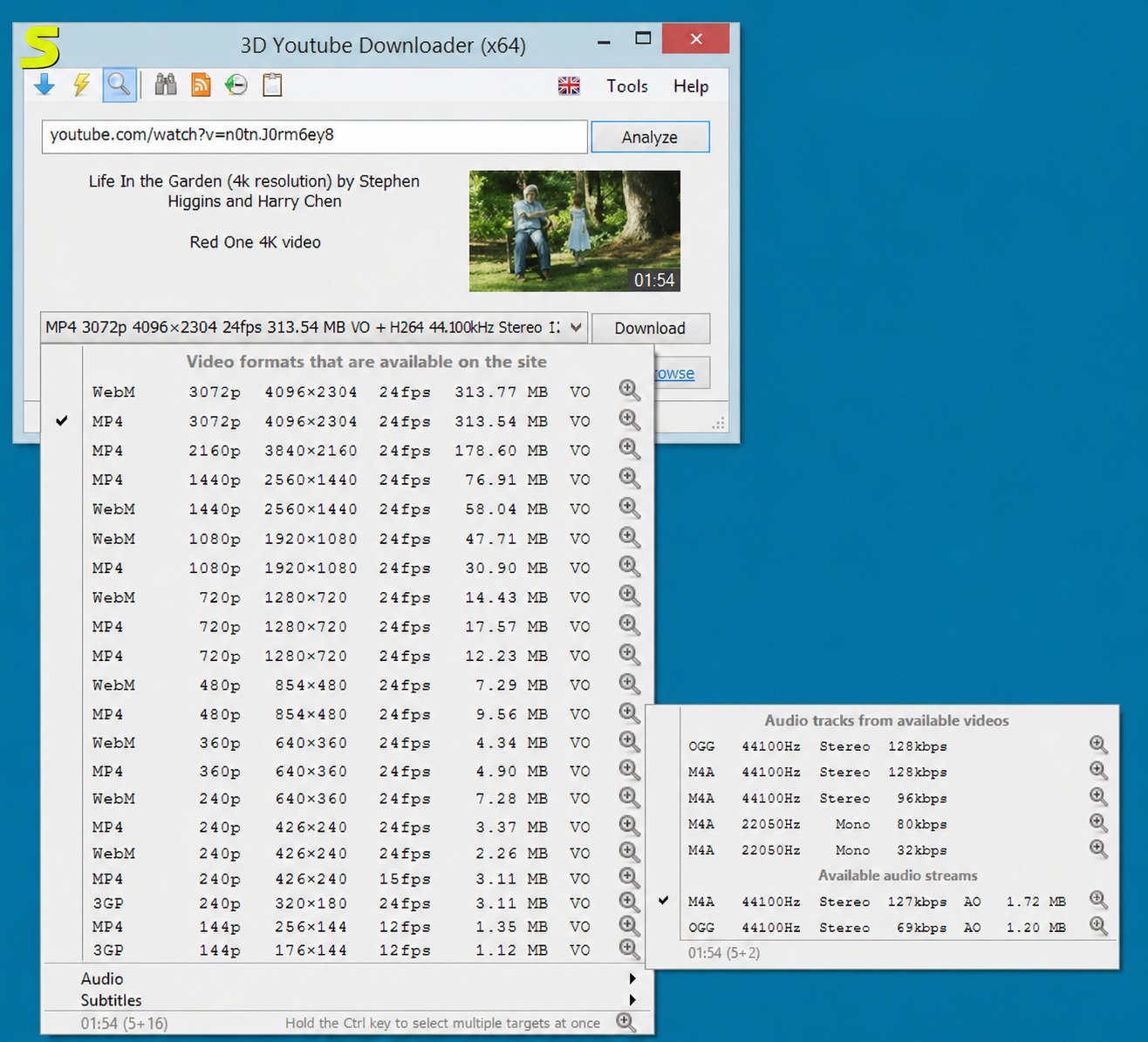
The core strength of this tool is quality selection. Since YouTube serves clips at multiple bitrates and resolutions, 3D Youtube Downloader fetches the full list so you’re never stuck with whatever quality a site decides to give you.
3D YouTube Video Download Support
This is the feature that gives the software its name. It can detect and download 3D-tagged videos from YouTube, which most mainstream downloaders simply ignore.
HD, Full HD, and High-Quality Video Downloads
You can grab clips in 720p, 1080p, and — depending on what the source video offers — higher resolutions too, without any quality loss from re-encoding.
YouTube MP4 and Video Format Support
MP4 is the default and most widely compatible output, but the program also handles WebM and FLV, and converts audio to MP3, AAC, OGG, and a few other formats.
YouTube Video Downloader and Converter
Beyond just downloading, it includes a built-in converter, so you don’t need a second app to change a downloaded WebM file into MP4, for example.
YouTube Playlist and Channel Downloads
Instead of downloading one video at a time, you can feed it a playlist or channel URL and let it queue everything automatically — a genuine time-saver for binge-watchers.
YouTube Subtitle Download Support
Subtitles download alongside the video, which is handy for language learners or anyone who prefers captions for accessibility reasons.
Adaptive Stream and Video Quality Selection
The software supports YouTube’s adaptive streaming format, meaning it can combine separate video and audio streams into a single file at the resolution you choose.
3D Youtube Downloader Download
3D Youtube Downloader Free Download
The software is completely free to use, with no forced trial period or watermark on downloaded files.
3D Youtube Downloader Latest Version Download
The current stable branch (version 1.26.x at the time of writing) includes bug fixes and better compatibility with recent YouTube changes compared to older builds.
3D Youtube Downloader Software Download for PC
It’s built specifically for Windows PCs — there’s no native Mac or Linux build, though some users run it through compatibility layers.
3D Youtube Downloader Installer and Offline Installer
You can choose between a small web installer that downloads files as it installs, or a full offline installer if you want to install it without an active connection.
How to Download 3D Youtube Downloader Safely: always get it from the official site or a reputable software repository, check the file with your antivirus before running it, and avoid third-party “bundled” installers that add browser toolbars.
3D Youtube Downloader for Windows
3D Youtube Downloader for Windows 10
Windows 10 is fully supported, and it’s the version most current users run the software on.
3D Youtube Downloader for Windows 11
The program also runs on Windows 11 without compatibility issues, since it doesn’t rely on any deprecated Windows components.
3D Youtube Downloader Windows 10 Download
Both 32-bit and 64-bit editions of Windows 10 are supported.
3D Youtube Downloader Windows 11 Download
Installation on Windows 11 is identical to Windows 10 — download, run the installer, and follow the setup prompts.
3D Youtube Downloader for Windows 7
Older versions of the software still work on Windows 7, though you won’t get the latest bug fixes if you stick with legacy builds.
3D Youtube Downloader Windows Compatibility
| Windows Version | Supported |
|---|---|
| Windows 11 | Yes |
| Windows 10 | Yes |
| Windows 8.1 | Yes |
| Windows 7 | Yes (older builds) |
3D Youtube Downloader for PC
Download 3D Youtube Downloader for PC
The setup process takes just a couple of minutes: download, install, launch, and paste your first link.
3D Youtube Downloader Free Download for Windows PC
No purchase or subscription is required for the core downloader — the free version covers nearly everything most users need.
3D Youtube Downloader 64-Bit Download
Most modern PCs should use the 64-bit build for better performance and memory handling.
3D Youtube Downloader 32-Bit Download
If you’re on an older 32-bit Windows installation, a compatible build is still available.
Choosing the Right Version for Your PC
Check your system type under Settings > System > About before downloading — installing the wrong architecture can cause the app to fail to launch.
3D Youtube Downloader Portable Version
3D Youtube Downloader Portable Download
A portable edition exists for users who don’t want (or can’t) run a formal installation — useful on work PCs or shared computers.
How the Portable Version Works
You extract the files to a folder and run the executable directly. No registry entries, no background services.
Portable vs Installer Version
| Aspect | Portable | Installer |
|---|---|---|
| Installation required | No | Yes |
| Leaves registry entries | No | Yes |
| Easy to move between PCs | Yes | No |
| Auto-update support | Limited | Yes |
Running 3D Youtube Downloader Without Installation
Just unzip and run — ideal for USB drives or quick one-off use.
3D Youtube Downloader Versions
3D Youtube Downloader Latest Version
The latest stable release continues to receive periodic updates to keep up with changes YouTube makes on its end.
3D Youtube Downloader Old Version Download
Older versions are archived on sites like VideoHelp and Softpedia for users who need a specific legacy build.
3D Youtube Downloader Previous Versions
Version history generally shows incremental bug fixes rather than major feature overhauls, since the core tool has been stable for years.
YoutubeDownloader v1.14
This older build is still floating around on archive sites, though it lacks fixes present in newer releases.
YoutubeDownloader v1.13
An even earlier release, mostly of interest to users running very old Windows installations.
When Should You Use an Older Version?
Only if a newer version has a specific bug affecting your setup, or you’re running an unsupported OS. Otherwise, always prefer the latest release for security and compatibility.
How to Install 3D Youtube Downloader
3D Youtube Downloader Installer Guide
Download the installer, right-click and run as administrator if prompted, and follow the on-screen steps.
How to Install 3D Youtube Downloader on Windows
- Download the installer from a trusted source
- Run the file and accept the license terms
- Choose an install location
- Click Install, then Finish
- Launch the app from your Start menu
3D Youtube Downloader Setup for Beginners
The wizard is straightforward — default settings work fine for most people, so you can click through without adjusting anything.
Troubleshooting Installation Problems
- App won’t launch: confirm you installed the correct 32-bit/64-bit build
- Antivirus flags it: this is common with lesser-known freeware; verify you downloaded from an official source before whitelisting it
- Missing dependencies: install the latest .NET runtime if prompted
How to Use 3D Youtube Downloader
How to Download YouTube Videos With 3D Youtube Downloader
Copy a video’s URL, paste it into the program’s input field, and hit the download button. The app fetches available formats automatically.
How to Choose Video Quality and Format
Switch to advanced mode to see every available resolution and container format before confirming your download.
How to Download HD and 1080p YouTube Videos
Select 1080p (or the highest resolution listed) from the quality dropdown before starting the download.
How to Download 3D Videos From YouTube
Search or paste a link to a 3D-tagged video, and the app will detect and offer the 3D stream alongside standard options.
How to Download YouTube Playlists
Paste the playlist URL instead of a single video link, and the app queues every video in the list.
How to Download YouTube Subtitles
Enable the subtitle option in settings before downloading, and select your preferred subtitle language if multiple are available.
3D Youtube Downloader Video Formats and Conversion
YouTube MP4 Downloader Options
MP4 remains the safest choice for playback compatibility across phones, smart TVs, and media players.
YouTube Video to MP4 Conversion
If a video only downloads in WebM, the built-in converter can re-encode it to MP4 afterward. For heavier re-encoding or compression jobs afterward, a dedicated tool like XMedia Recode pairs well with a downloader.
YouTube MP3 and Audio Download Options
For audio-only downloads, MP3 and AAC are both supported through the conversion mode.
Choosing the Best Video Format and Quality
For general use, MP4 at 1080p balances quality and file size well. For archiving, choose the highest available resolution regardless of format.
YouTube Downloader With Built-In Converter
Not every downloader includes conversion tools — this is one of 3D Youtube Downloader’s more practical advantages over simpler alternatives.
Download 3D Videos From YouTube
How to Download 3D Videos From YouTube
Look for videos tagged as 3D on YouTube, paste the link, and the program will surface the 3D stream option automatically.
YouTube 3D Downloader Features
Beyond basic downloading, the app preserves the stereoscopic format so the file plays correctly on compatible 3D displays.
YouTube 3D Video Quality and Format Options
3D content is generally offered at fewer quality tiers than standard 2D video, so options may be more limited.
Watching Downloaded 3D Videos on Compatible Devices
You’ll need a 3D-capable monitor, TV, or headset, plus a media player that supports stereoscopic playback, such as VLC with the right settings enabled.
3D Youtube Downloader System Requirements
Windows System Requirements
- Windows 7, 8.1, 10, or 11
- 2 GB RAM minimum (4 GB recommended)
- 200 MB or more of free disk space
32-Bit and 64-Bit Compatibility
Both architectures are supported, so pick the build matching your OS version.
Supported Windows Versions
Windows 7 through Windows 11 are all covered, making this one of the more backward-compatible downloader tools still in circulation.
Storage and Hardware Requirements
No dedicated graphics card is needed — this is a lightweight utility, not a video editor.
3D Youtube Downloader Review
3D Youtube Downloader Features and Performance
It performs reliably for standard downloads, with the 3D and playlist support being the standout features compared to lighter-weight tools.
3D Youtube Downloader Pros and Cons
Pros
- Free, no subscription
- Supports 3D video
- Playlist and subtitle support
- Built-in converter
Cons
- Windows-only
- Interface feels dated
- Occasional lag behind YouTube updates
- Bundled-installer risk on third-party sites
Ease of Use and Download Experience
The basic mode is simple enough for beginners, while advanced mode gives power users full control over format and quality.
Is 3D Youtube Downloader Still Useful?
Yes, especially for its niche 3D support and playlist handling, though users wanting a sleeker interface may prefer newer alternatives.
Who Should Use 3D Youtube Downloader?
It suits Windows users who want granular control over downloads and occasionally need 3D video support that most modern tools have dropped.
3D Youtube Downloader Alternatives
Best YouTube Downloader Software for Windows
Popular alternatives include 4K Video Downloader and WinX YouTube Downloader, both of which support high-resolution downloads and batch processing.
Free YouTube Downloader Alternatives for PC
Most competing free tools cover standard downloads well but rarely match 3D Youtube Downloader’s 3D and subtitle feature set.
YouTube Video Downloader vs 3D Youtube Downloader
Generic downloaders often trade advanced features for a simpler interface — a fair trade-off if you don’t need niche functionality.
YouTube Downloader With Converter Alternatives
Few free tools bundle a converter the way 3D Youtube Downloader does, which remains one of its stronger selling points.
Choosing the Best YouTube Downloader for Windows
Base your choice on what actually matters to you: interface polish, format support, or niche features like 3D video.
Is 3D Youtube Downloader Safe and Legit?
Is 3D Youtube Downloader Safe to Use?
The official installer is generally clean, but as with any freeware, always scan downloads and avoid third-party mirrors bundling extra software.
Is 3D Youtube Downloader Legit?
Yes, it’s a long-standing, actively maintained project rather than a fly-by-night app, with a visible version history spanning many years.
How to Download the Software Safely
Stick to the developer’s official page or well-known, reviewed software repositories rather than random download aggregators.
Security Considerations When Using Older Versions
Older builds may lack recent security patches, so update whenever possible instead of relying on archived legacy versions.
A note on terms of service: downloading videos may conflict with a platform’s own terms of service, so it’s best practice to only save content you have permission to use, such as your own uploads or material explicitly marked for offline use. You can review YouTube’s Terms of Service for the platform’s official position on this.
Official download: yd.3dyd.com · Pair with a converter: XMedia Recode
Frequently Asked Questions About 3D Youtube Downloader
Conclusion
3D Youtube Downloader has stuck around for over a decade for good reason. It covers the basics well — video, audio, subtitles, and playlists — while adding niche extras like 3D video support that most competitors dropped years ago. For Windows users who want that level of control, it’s still a solid pick.
That said, no single tool is perfect for everyone. If you value a sleek interface over deep customization, it’s worth comparing it against a couple of alternatives before settling in. Either way, download from official sources, keep the app updated, and you’ll get a dependable downloading experience.
2 Responses