// AI File Repair Software
Wondershare Repairit: Complete Video, Photo, Audio & File Repair Software
Losing a video of your kid’s first steps or watching a client’s project file refuse to open is one of those gut-drop moments nobody forgets. If you’ve landed here searching for a fix, chances are a file on your computer, camera, or SD card just stopped cooperating.
Wondershare Repairit is one of the most talked-about tools built specifically for that problem — repairing corrupted videos, photos, documents, and audio instead of trying to recover files that were deleted. This guide walks through exactly what it does, how it works, which formats it supports, how much it costs, and whether it’s worth downloading.
Visit Wondershare Repairit →01 What Is Wondershare Repairit?
Wondershare Repairit is a data repair application developed by Wondershare, a software company known for tools like Filmora and Recoverit. Unlike data recovery software, which searches drives for files that were deleted or lost, Repairit focuses on files that still exist but won’t open, won’t play, or display errors.
Think of the difference this way: recovery software goes looking for something that’s missing, while repair software fixes something that’s broken but still there. If your MP4 plays audio but shows a black screen, or your Word document throws an “unreadable content” error, that’s squarely Repairit’s territory.
How Does Wondershare Repairit Work?
Repairit uses AI-driven algorithms to analyze the internal structure of a damaged file — things like headers, indexes, and metadata — and rebuild the parts that got corrupted. For video specifically, the software can reference a healthy sample file recorded on the same device to reconstruct missing data more accurately, a process it calls Advanced Repair.
The general workflow is the same across all repair modules:
- Add the corrupted file (drag and drop or browse).
- Scan and repair — the software analyzes and attempts an automatic fix.
- Preview the repaired file before saving.
- Export the fixed version to a location of your choice.
That simplicity is a big part of why non-technical users reach for it instead of manual repair methods or command-line tools.
What Types of Corrupted Files Can Wondershare Repairit Repair?
Repairit is built to handle four main categories, plus a few specialized additions:
- Video files — truncated, frozen, choppy, or files that won’t play at all
- Photos — corrupted JPEGs, RAW files with errors, and images that won’t open
- Documents — Word, Excel, PowerPoint, PDF, and compressed ZIP/RAR files
- Audio files — recordings that stutter, cut out, or refuse to play
According to the developer, Repairit can repair damaged videos, photos, documents, and more than 75 file formats, with support built for files corrupted by system errors, transfer interruptions, or hardware failures.
Is Wondershare Repairit Safe and Legit to Use?
Yes — Repairit is developed by an established software company that’s been in the media and utility space for years. The desktop app is available through official channels including the Microsoft Store, which adds a layer of verification most third-party download sites don’t offer.
Only download from the official Wondershare site or a verified app store listing. Avoid “cracked” or modified versions from torrent sites — these often carry malware. Check the installer’s digital signature before running it on a work machine.
02 Wondershare Repairit Key Features
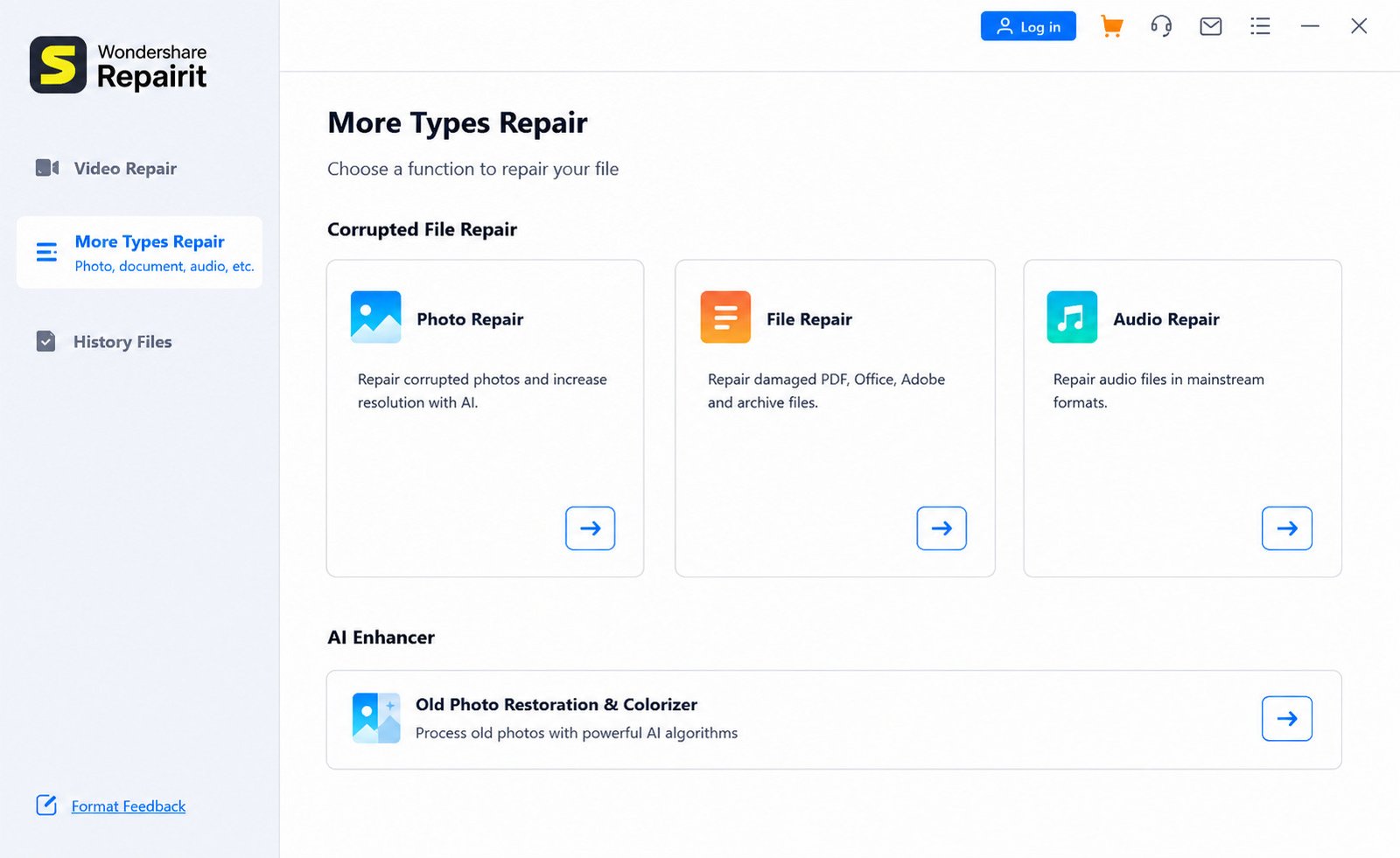
Repairit isn’t a single-purpose tool — it’s more of a toolkit with dedicated modules for different repair scenarios. Here’s a quick snapshot before we go deeper into each one.
| Feature | What It Does | Best For |
|---|---|---|
| Video Repair | Fixes unplayable, choppy, frozen, or corrupted video files | Camera footage, screen recordings, downloaded videos |
| Photo Repair | Restores corrupted or unreadable image files | JPEGs, RAW camera files, pixelated images |
| File Repair | Repairs corrupted documents and archives | Word, Excel, PowerPoint, PDF, ZIP |
| Audio Repair | Fixes stuttering, silent, or corrupted audio | Podcasts, voice memos, music files |
| AI Video Enhancer | Improves resolution, stabilizes shaky footage | Old or low-quality video upscaling |
| AI Photo Enhancer | Sharpens, colorizes, and restores old photos | Scanned family photos, low-res images |
Corrupted Video Repair and Video Fixing
This is Repairit’s flagship function. It targets common failure symptoms — files that won’t open in any player, videos that play audio with no picture, playback that stutters or freezes, and footage with visible glitches or color distortion. The software supports both a Quick Repair mode for everyday corruption and an Advanced Repair mode for severe damage.
Photo Repair and Damaged Image Recovery
The photo module handles corrupted JPEGs, unreadable RAW files from DSLR and mirrorless cameras, and images that display as gray boxes, broken thumbnails, or partial pictures.
File Repair for Corrupted Documents
Losing a client presentation the night before a deadline is a special kind of stress. The File Repair module targets Word documents that won’t open, Excel spreadsheets showing formula errors, PowerPoint decks that crash on launch, and PDFs with unreadable content — plus corrupted ZIP and RAR archives.
Audio Repair for Damaged Audio Files
Podcasters, musicians, and anyone who relies on voice recordings will find this useful. It reduces pops and clicks, decreases background noise, and improves overall clarity across compressed and lossless formats alike.
AI Video Enhancer and Video Quality Improvement
Beyond repair, Repairit includes enhancement tools that go a step further than fixing corruption. The AI Video Enhancer can sharpen blurry footage, reduce noise, and upscale resolution — useful for old home videos never recorded in high definition to begin with.
AI Photo Enhancer and Old Photo Restoration
Similarly, the AI Photo Enhancer reconstructs facial detail, removes blur and noise, upscales low-resolution images, and colorizes black-and-white photos, making it genuinely useful for restoring decades-old family photographs.
03 Wondershare Repairit Video Repair
Video repair deserves its own deep dive since it’s the most commonly searched — and most frustrating — repair scenario people run into.
How to Repair a Corrupted Video File
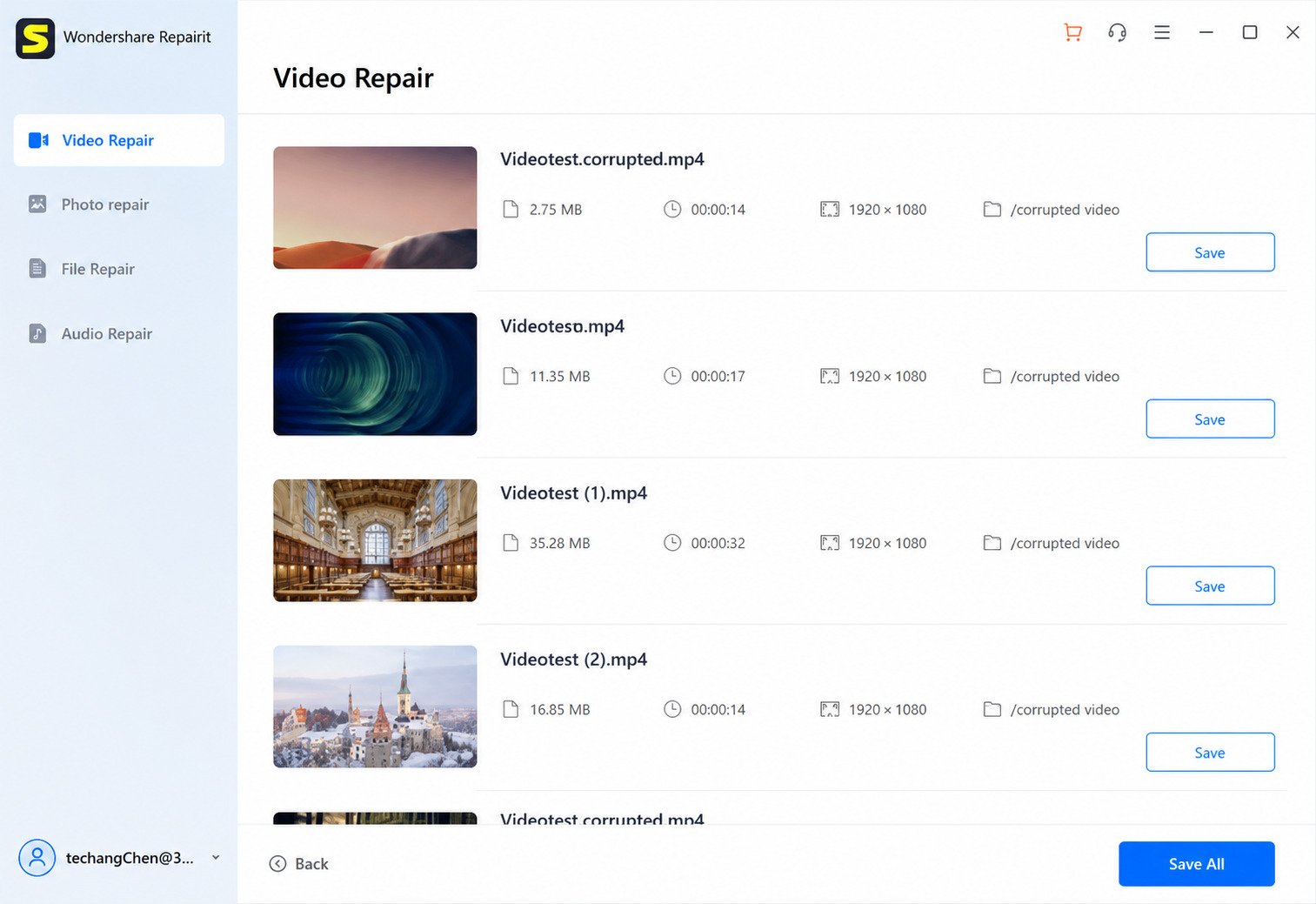
- Open Repairit and select Video Repair from the home screen.
- Click Add and select the damaged video file (or drag it into the window).
- Click Repair to start the automatic scan and fix process.
- Preview the result to confirm the video plays correctly.
- Click Export and choose a save location.
If the file is only mildly corrupted, this quick pass usually resolves the issue within a few minutes.
Fix Corrupted, Broken, and Unplayable Videos
Videos typically break in one of a few predictable ways: the file won’t open at all, it opens but shows a black or green screen, the audio plays with no video, or playback is choppy with visible artifacts. Repairit’s engine identifies which type of structural damage is present — usually in the file’s header, index, or moov atom — and rebuilds it accordingly.
Repair MP4, MOV, MKV, AVI, and M2TS Video Files
These five formats cover the overwhelming majority of consumer and prosumer video, and Repairit supports repair across all of them, along with additional formats like M4V, MTS, 3GP, FLV, MXF, and INSV.
GoPro and DJI Corrupted Video Repair
Action cameras and drones are notorious for producing corrupted footage — usually from a card running out of write speed mid-recording, or the device losing power unexpectedly. Repairit has dedicated support for both GoPro and DJI drone footage.
How to Fix an Unplayable Video
If a video won’t open in any media player whatsoever, that’s usually a sign of header or container-level corruption rather than a codec issue. Before trying repair software, test the file in more than one player (VLC handles damaged files better than most). If it still fails everywhere, the file needs structural repair, not just a different player.
Advanced Video Repair for Severely Damaged Videos
When quick repair isn’t enough, Advanced Repair steps in. You provide a short, healthy clip recorded on the exact same device and format. Repairit studies that sample’s internal structure and uses it as a reference to rebuild the corrupted file — noticeably raising the success rate for badly damaged footage.
04 Wondershare Repairit Photo Repair
How to Repair Corrupted Photos
The photo repair flow mirrors the video process: add the file, run the scan, preview the result, and export. Repairit also supports batch repair, meaning you can queue up dozens of damaged images from an SD card and fix them in one pass.
Repair Corrupted JPG and JPEG Files
JPEGs are the most common photo format and also one of the most sensitive to corruption — a single bad byte in the header can make an otherwise intact image unreadable. Repairit rebuilds the JPEG structure so the image data underneath becomes visible again.
Fix Damaged, Blurry, and Pixelated Photos
Not every photo problem is outright corruption. Some images open fine but appear pixelated, blocky, or blurry due to compression damage or a bad transfer. The AI enhancement tools layered into the photo module can clean these up alongside true corruption repair.
AI Photo Restoration for Old and Damaged Photos
This is where Repairit crosses from “repair” into “restoration.” Scanned prints with creases, faded color, or scratches can be processed through the AI restoration engine to bring back detail that manual editing would take hours to recreate.
How to Restore Old Damaged Photos
- Import the scanned or digitized photo into Repairit.
- Select the Photo Enhancer or Old Photo Restoration option.
- Let the AI process color correction, scratch removal, and detail enhancement.
- Compare before/after in the preview pane.
- Export the restored version at full resolution.
05 Wondershare Repairit File Repair
Repair Corrupted Word Documents and Other Files
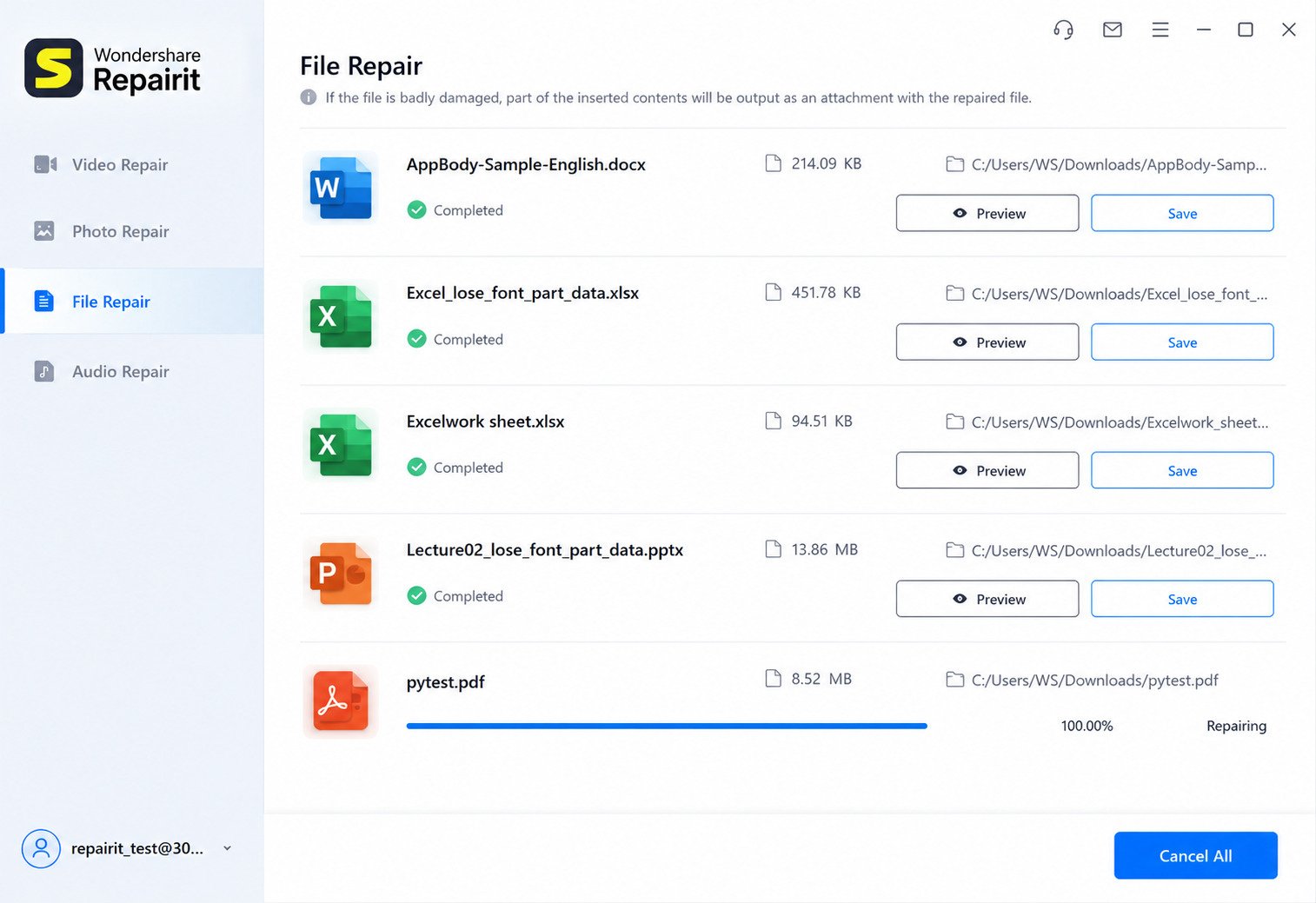
Office documents corrupt for a range of reasons: a crash mid-save, a bad transfer over email or cloud storage, or a virus scan interrupting a write operation. The document module targets Word, Excel, and PowerPoint files specifically, aiming to restore original formatting rather than just extracting raw text.
How to Fix Corrupted Files
Beyond Repairit itself, a few general troubleshooting steps are worth trying first for a document that won’t open:
- Try opening the file on a different computer
- Use the “Open and Repair” option built into Microsoft Office
- Check if a backup or auto-recover version exists
- If none of that works, run it through Repairit’s File Repair module
Repair Damaged and Unreadable Documents
For PDFs specifically, common failure signs include blank pages, “file damaged” error messages, or missing fonts and images. Repairit’s PDF repair function targets structural corruption in the PDF’s internal object structure to restore readability.
Can Wondershare Repairit Restore Corrupted Data?
Repairit repairs existing but damaged files — it does not recover files that were deleted from a drive. If your file is missing entirely rather than corrupted, you’d need a dedicated data recovery tool instead (Wondershare makes one called Recoverit).
06 Wondershare Repairit Audio Repair
Repair Corrupted and Unplayable Audio Files
Audio corruption commonly shows up as silence where there should be sound, sudden stuttering, or a file that simply won’t load in any player. Repairit’s audio module allows users to add, repair, and save audio files in MP3, M4A, WAV, AAC, and FLAC formats.
Fix Damaged Audio Recordings
For recordings with quality issues rather than outright corruption — background hiss, clicks, pops, or uneven levels — the same module applies AI-based cleanup. Podcasters and musicians have flagged this as useful for salvaging live or field recordings.
07 Supported File Formats and Devices
Supported Video Formats and Codecs
Repairit covers the vast majority of formats you’ll run into in everyday use, including MP4, MOV, MKV, AVI, M2TS, M4V, MTS, 3GP, FLV, MXF, and INSV (the panoramic format used by Insta360 cameras).
Supported Photo and Image Formats
On the photo side, support extends beyond standard JPEG to RAW formats from major camera brands — CR3, CR2, NEF, NRW, RAF, DNG, ARW, and GPR — which matters a lot for photographers, since RAW corruption is far more common than most people expect.
Supported Document and File Types
Document support spans Word (DOC/DOCX), Excel (XLS/XLSX), PowerPoint (PPT/PPTX), PDF, and compressed formats like ZIP and RAR. The file repair engine also supports Adobe Photoshop PSD and PSB files, along with Illustrator AI files from version 9.0 onward.
Supported Cameras, Storage Devices, and Media Sources
Repairit isn’t limited to files sitting on your desktop. It’s designed to work with footage and images pulled straight from DSLR cameras, drones, sports cameras, panoramic cameras, monitoring systems, dash cams, SD cards, hard drives, SSDs, and USB drives.
08 Wondershare Repairit for Windows and Mac
Wondershare Repairit for Windows 11 and Windows 10
The Windows version installs like any standard desktop application and is also distributed through the Microsoft Store, which adds an extra layer of trust for users wary of downloading executables from third-party sites.
Wondershare Repairit for Mac
The Mac version offers the same core repair modules, adapted for macOS’s file system and permission structure. Apple’s stricter security model means Mac users may need to grant explicit disk access permissions the first time they run a scan.
Wondershare Repairit System Requirements
| Requirement | Windows | Mac |
|---|---|---|
| OS Version | Windows 10 / 11 | macOS 10.13 and later |
| RAM | 4 GB minimum (8 GB recommended) | 4 GB minimum (8 GB recommended) |
| Free Disk Space | 200 MB+ (more for large batches) | 200 MB+ (more for large batches) |
| Processor | Intel or AMD, dual-core or better | Intel or Apple Silicon |
Actual requirements can shift slightly between version updates, so it’s worth checking the current system requirements page before installing on an older machine.
09 Wondershare Repairit Download and Installation
Wondershare Repairit Free Download for PC
Repairit offers a free download that lets you scan files and preview repair results before committing to a paid plan — useful for confirming the software can actually fix your file before you pay for anything.
Download Wondershare Repairit for Windows
The Windows installer is available directly from Wondershare’s official site or through the Microsoft Store listing, which handles updates automatically once installed.
Download Wondershare Repairit for Mac
The Mac version is downloaded as a standard .dmg installer from the official Wondershare site.
How to Install Wondershare Repairit
- Download the installer from the official Wondershare website.
- Run the installer and follow the on-screen prompts.
- Launch the application and select the repair module you need.
- Sign in or create a Wondershare account if prompted.
Wondershare Repairit Latest Version and Updates
Wondershare regularly ships updates that expand format support and improve repair accuracy. Recent update cycles have added Adobe PSD/PSB and Illustrator AI file repair, additional video and image format support, and quality improvements to the video repair engine.
10 How to Use Wondershare Repairit
How to Repair a Corrupted Video with Wondershare Repairit
Open the Video Repair module, add your file, run the scan, preview, and export — using Advanced Repair with a sample clip if the standard pass doesn’t fully fix the footage.
How to Repair Damaged Photos with Wondershare Repairit
Select Photo Repair, import the image (or a full batch), let the AI process the file, and export the restored version once the preview looks correct.
How to Repair Corrupted Files and Documents
Choose File Repair, add the Word, Excel, PowerPoint, PDF, or archive file, run the automated repair, and save the output to a new location so the original damaged file remains untouched as a backup.
How to Repair Audio Files with Wondershare Repairit
Open Audio Repair, add the affected recording, allow the software to process noise, clicks, and playback errors, then export the cleaned-up file.
11 Common Wondershare Repairit Problems and Solutions
Wondershare Repairit Not Opening or Not Working
- Restart your computer and relaunch the app
- Reinstall the latest version from the official site
- Temporarily disable antivirus software that may be blocking it
- Check that your OS meets the minimum system requirements
Video Repair Fails or Cannot Repair the File
Some corruption is simply too severe for automatic repair. Switching to Advanced Repair mode with a healthy sample file often succeeds where Quick Repair fails, since it gives the AI a reference structure to rebuild from.
Repaired Video Still Will Not Play
If a “repaired” file still won’t play, try a different media player first (VLC is generally more forgiving than default OS players). If it plays there but not elsewhere, the issue may be codec support on the original player rather than the repair itself.
Troubleshooting Corrupted File Repair Issues
For documents specifically, if repair doesn’t fully restore formatting, try exporting to a different file format (for example, saving a Word repair as a PDF) as a fallback to at least preserve the readable content.
12 Wondershare Repairit Free Trial and Pricing
Is Wondershare Repairit Free?
Repairit offers a free tier that lets you scan files and preview whether a repair is possible. Full export and advanced repair features require a paid monthly, annual, or one-time perpetual license.
What Does the Wondershare Repairit Free Trial Include?
The free version is primarily useful for confirming the software can fix your file before paying — you can run the scan and see a preview, but full-resolution export is typically gated behind a subscription.
Wondershare Repairit License and Paid Version Options
According to third-party pricing breakdowns, full access starts around $39.99 per month, with annual and one-time purchase options also available. Exact pricing tiers change periodically, so it’s worth checking Wondershare’s official pricing page for current numbers before purchasing.
13 Wondershare Repairit Pros and Cons
Advantages
- Covers video, photo, document, and audio repair in one app
- Simple three-step workflow for non-technical users
- Batch repair saves time on multiple corrupted files
- Broad format support, including professional RAW and video
- Advanced Repair mode improves results for severe corruption
- Available on both Windows and Mac
Limitations
- Full repair and export require a paid subscription
- Extremely severe corruption isn’t always fixable
- Advanced Repair needs a healthy sample file, not always available
- Repairs existing files only — won’t recover deleted data
14 Wondershare Repairit Alternatives
Best Wondershare Repairit Alternatives for Video Repair
If Repairit doesn’t fully solve your problem, a few other tools are commonly compared against it, including Stellar Repair for Video, DiskInternals Video Repair, and free options like VLC’s built-in repair function for certain AVI corruption cases.
Wondershare Repairit vs Other Video and Photo Repair Software
| Tool | File Types | Batch Repair | Free Tier | Platforms |
|---|---|---|---|---|
| Wondershare Repairit | Video, photo, document, audio | Yes | Scan/preview only | Windows, Mac |
| Stellar Repair for Video | Video only | Yes | Scan/preview only | Windows, Mac |
| DiskInternals Video Repair | Video only | Limited | Scan/preview only | Windows |
| VLC (manual repair) | Limited AVI/MP4 | No | Fully free | Windows, Mac, Linux |
When to Choose an Alternative Repair Tool
If you’re dealing exclusively with video and don’t need document or audio repair, a video-specific tool might be more cost-effective. But if you regularly deal with a mix of file types, an all-in-one tool like Repairit tends to save more time overall.
15 How to Download 3D YouTube Videos
If your corrupted-file troubleshooting started because a downloaded video wouldn’t play properly, it’s worth ruling out the download process itself as the source of the problem. For anyone specifically downloading 3D or immersive YouTube content, this guide to 3D YouTube video downloading walks through getting a clean, complete file in the first place — which can save you a repair step entirely.
16 Frequently Asked Questions About Wondershare Repairit
Open Repairit’s Video Repair module, add the damaged file, run the automatic scan, and export the fixed version. If it’s still broken, try Advanced Repair with a healthy sample clip.
MP4 is one of the most widely supported formats in Repairit — add the file to the Video Repair module and let the AI rebuild the damaged header or index structure.
MOV files (common with iPhone and many cameras) follow the same repair process as MP4 within Repairit’s Video Repair tool.
Use the Photo Repair module, import the image or full batch, and let the software rebuild the file’s internal structure before exporting.
Yes, through its AI Photo Enhancer, which reduces blur and pixelation separately from true corruption repair.
Yes, the File Repair module supports Word documents along with Excel, PowerPoint, PDF, and ZIP/RAR archives.
Not always. Extremely severe corruption can be beyond any repair software’s capability, which is why previewing results before paying is worth doing.
// Final Verdict
File corruption always seems to happen at the worst possible moment — right before a deadline, right after a once-in-a-lifetime trip, or right when you finally sat down to edit that footage. Wondershare Repairit won’t fix every single file that comes its way, but its combination of video, photo, document, and audio repair in one app makes it a genuinely practical first stop.
If you’re dealing with a corrupted file right now, the smartest move is trying the free scan first. You’ll know within minutes whether Repairit can bring your file back — and whether it’s worth reaching for your wallet at all.
2 Responses