Software Guide
YT Downloader: Download, Features, Setup, and Alternatives
Ever tried saving a YouTube video for offline viewing and ended up lost in a maze of sketchy websites and pop-up ads? You’re not alone. That’s exactly why tools like YT Downloader exist — to make grabbing your favorite videos and audio tracks simple, fast, and hassle-free.
In this guide, we’ll walk through everything about YT Downloader: what it does, how to install it, how to use it for 4K and MP3 downloads, and which alternatives are worth checking out if it doesn’t fit your needs.
What Is YT Downloader?
YT Downloader is a desktop application built specifically to help users save YouTube videos and audio files directly to their computer. It works as a YouTube video and audio downloader, letting you pull content in formats like MP4 and MP3 without needing a browser extension.
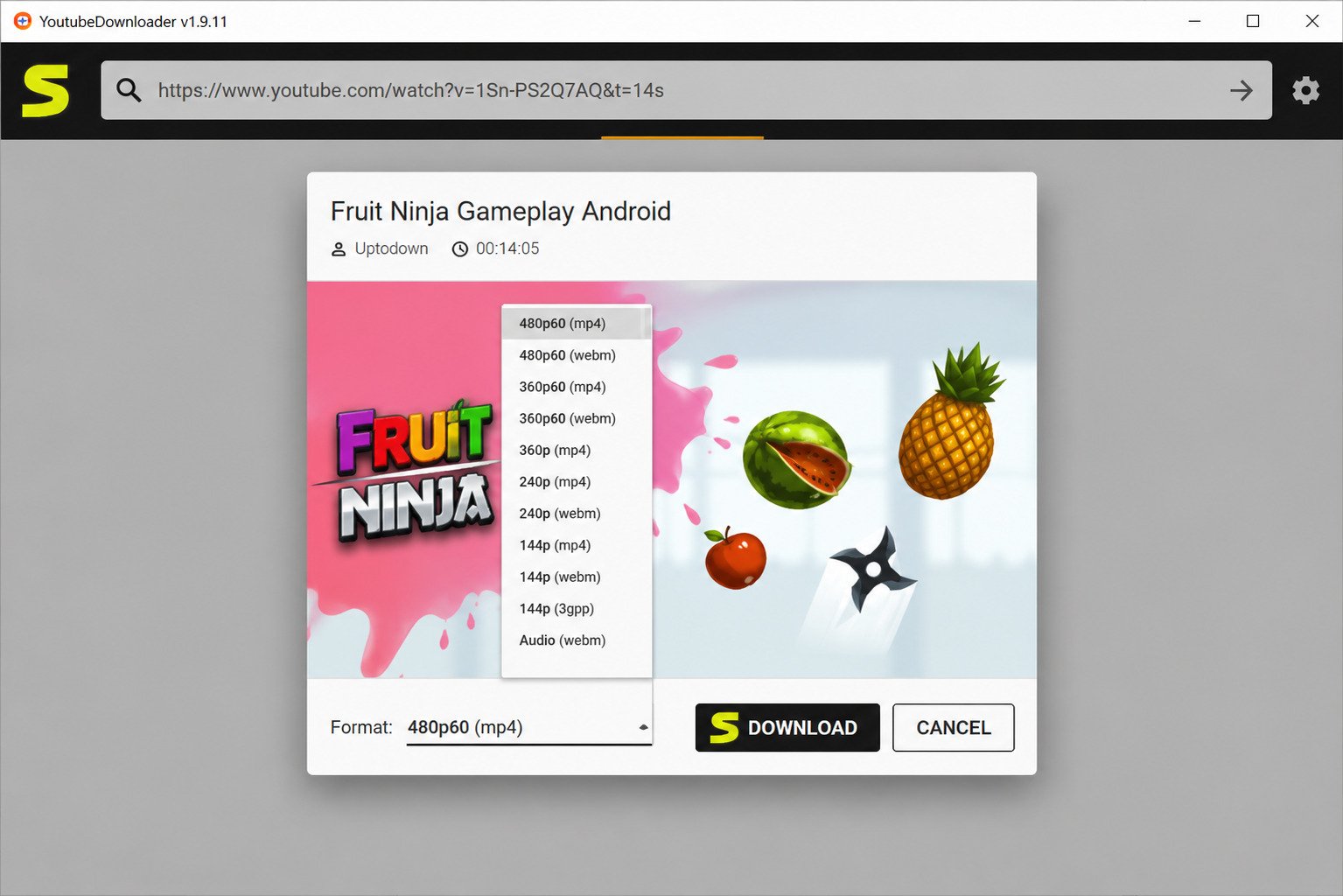
YT Downloader Overview
At its core, YT Downloader is lightweight software designed for one job: converting online YouTube links into downloadable files. It’s been around for years and has built a loyal user base among people who need offline access to videos regularly.
What Does YT Downloader Do?
The software takes a YouTube video URL, processes it, and gives you the option to save it as a video file or extract just the audio. Think of it as a bridge between the YouTube server and your local storage.
How Does YT Downloader Work?
You paste a link, choose your preferred quality and format, then hit download. Behind the scenes, the app fetches the video stream from YouTube’s servers and converts it into a file your device can play offline.
Who Is YT Downloader For?
- Students saving educational videos for offline study
- Content creators archiving their own uploads
- Travelers who want entertainment without relying on internet access
- Music lovers converting videos into MP3 files
YT Downloader as a YouTube Video and Audio Downloader
Unlike browser-based tools that often stop working after YouTube updates its system, YT Downloader is regularly maintained, which makes it a more reliable long-term option for both video and audio downloads.
YT Downloader Features
YT Downloader packs a solid set of tools into a simple interface. Here’s a quick breakdown of what it offers.
| Feature | Description |
|---|---|
| YouTube Video Downloader | Save full YouTube videos in various resolutions |
| YouTube Audio Downloader | Extract audio-only files from videos |
| MP4 Downloader | Save videos in the widely supported MP4 format |
| MP3 Downloader | Convert YouTube audio into MP3 files |
| 4K Support | Download videos in ultra-high definition when available |
| URL-Based Downloads | Paste a link and download without extra steps |
YouTube Video Downloader
This is the main function most people use it for — grabbing full videos to watch later without an internet connection.
YouTube Audio Downloader
If you just want the sound (like a podcast clip or a song), YT Downloader can strip the audio and save it separately.
YouTube MP4 Downloader
MP4 is the most universally compatible video format, working across phones, tablets, smart TVs, and computers, which is why it’s the default output option.
YouTube MP3 Downloader
For music fans, converting a YouTube video into an MP3 means you get a lightweight audio file perfect for playlists.
4K YouTube Video Downloads
When the original video supports it, YT Downloader can pull 4K resolution files, though this depends heavily on what YouTube offers for that specific video.
1080p and HD Video Downloads
Most standard downloads fall into the 1080p or HD range, offering a good balance between quality and file size.
Download YouTube Videos by URL
There’s no need to install a browser plugin — simply copy the video’s link and paste it into the app.
Download YouTube Videos From Links
This link-based system works for both regular videos and, in most cases, playlists too.
High-Quality Video and Audio Downloads
The software prioritizes giving users the best available quality YouTube provides for that particular upload.
Free YouTube Video Download Options
The core version of YT Downloader is free to use, though some advanced features may require a one-time purchase or upgrade.
YT Downloader Supported Video and Audio Formats
Knowing which formats you can use helps you pick the right output for your device or purpose.
Download YouTube Videos as MP4
MP4 remains the go-to choice because nearly every device on the planet supports it without extra software.
Download YouTube Audio as MP3
MP3 is the standard for audio-only files — small in size and playable almost anywhere.
YouTube to MP4 Conversion
The conversion process typically takes just a few minutes, depending on the video length and your internet speed.
YouTube to MP3 Conversion
Converting to MP3 strips out the video track entirely, which also means faster download times.
YouTube Audio Download and Extraction
This feature is popular among people saving lectures, interviews, or music without needing the visual component.
Choosing the Right Video or Audio Quality
| Use Case | Recommended Format | Recommended Quality |
|---|---|---|
| Watching on TV | MP4 | 1080p or 4K |
| Watching on phone | MP4 | 720p or 1080p |
| Listening to music | MP3 | 128–320 kbps |
| Saving storage space | MP3 or 480p MP4 | Lower quality |
YT Downloader for 4K, 1080p, and HD Videos
Can YT Downloader download videos in 4K? Yes, but only if the original YouTube video was uploaded in 4K resolution — the software can’t upscale lower-quality videos.
Download YouTube Videos in 4K
Select the highest available resolution from the quality dropdown before starting your download.
Download YouTube Videos in 1080p
1080p is often the sweet spot: sharp enough for most screens without eating up excessive storage.
Download YouTube Videos in HD
HD downloads (720p and above) work well for phones and tablets where extreme detail isn’t necessary.
YouTube 4K Downloader Settings
Make sure your app is updated to the latest version, since older versions sometimes lose access to newer quality options.
What Video Quality Can YT Downloader Support?
It supports everything from low-resolution 144p up to 4K, depending entirely on what’s available on YouTube’s end.
How to Download High-Quality YouTube Videos
- Copy the video URL
- Paste it into YT Downloader
- Choose the highest quality listed
- Select MP4 format
- Click download
YT Downloader Download

YT Downloader Free Download
You can find the official download from the developer’s website — always avoid third-party download portals that repackage the installer with extra software.
YT Downloader Latest Version
Always grab the newest version to ensure compatibility with YouTube’s current site structure, since older builds tend to break frequently.
YT Downloader Download for PC
The desktop version is built primarily for Windows PCs, offering more stability than browser-based alternatives.
YT Downloader Download for Windows
It supports both 32-bit and 64-bit systems, so check your system type before installing.
How to Choose the Correct YT Downloader Version
If you’re running an older Windows machine, look for a legacy version listed on the official site to avoid compatibility issues.
Things to Check Before Installing YT Downloader
- Confirm you’re downloading from the official source
- Check your antivirus software isn’t blocking the installer
- Make sure you have enough free storage space
- Verify your Windows version matches system requirements
YT Downloader for Windows
YT Downloader Windows 11
The software runs smoothly on Windows 11, with no major compatibility issues reported by users.
YT Downloader Windows 10
Windows 10 remains the most commonly used platform for this app, and it’s fully supported.
YouTube Downloader for Windows PC
Windows users generally have the smoothest experience since the app was originally built with this operating system in mind.
YouTube Video Downloader for Windows
Video downloads on Windows are typically fast, assuming a stable internet connection.
YouTube Audio Downloader for Windows
Audio extraction works identically to video downloads, just with a smaller output file.
YT Downloader System Compatibility
| Requirement | Minimum Spec |
|---|---|
| Operating System | Windows 10 or 11 |
| RAM | 2GB or higher |
| Storage | 100MB free (plus space for downloads) |
| Internet | Stable broadband connection |
How to Install YT Downloader
YT Downloader Installation Guide
Download the installer, run it, and follow the on-screen prompts — the whole process usually takes under two minutes.
How to Install YT Downloader on Windows
- Download the setup file
- Double-click to launch the installer
- Accept the terms and conditions
- Choose your install location
- Click “Install” and wait for completion
YT Downloader Setup Guide
Once installed, launch the app and you’ll see a clean interface with a URL input box front and center.
How to Configure YT Downloader
Head into the settings menu to set your default download folder, preferred format, and quality preferences.
Recommended Settings After Installation
- Set MP4 as your default video format
- Choose a dedicated downloads folder
- Enable automatic updates if available
How to Use YT Downloader
How to Download a YouTube Video
Copy the video link from YouTube, paste it into the app, select your format and quality, then click download.
How to Download YouTube Videos by URL
This URL-based method is the primary way the app functions — there’s no browser sign-in required.
How to Copy a YouTube Video Link
Click the “Share” button under any YouTube video, then select “Copy Link.”
How to Select Video Quality
A dropdown menu appears after pasting the URL, showing every quality option YouTube has made available for that video.
How to Select MP4 Format
MP4 is usually pre-selected by default, but you can switch formats using the settings panel before downloading.
How to Start a YouTube Video Download
Once your settings are confirmed, click the download button and monitor the progress bar.
How to Choose a Download Folder
You can set a custom save location in the preferences menu, which is handy for organizing files by type.
How to Download YouTube Videos in 4K
Copy the YouTube Video URL
Grab the link straight from the address bar or the share menu.
Select 4K Video Quality
If the video was uploaded in 4K, it’ll show up as an option in the quality dropdown.
Choose the MP4 Format
MP4 handles 4K files well and keeps compatibility across most modern devices.
Start the 4K YouTube Download
Click download and be patient — 4K files are significantly larger and take longer.
Why 4K Quality May Not Always Be Available: not every video is uploaded in 4K, so if it’s missing from the list, the original file simply doesn’t support it.
How to Download YouTube Videos as MP4
YouTube to MP4 Download
This remains the most requested feature, since MP4 works virtually everywhere without conversion.
Download YouTube Video to MP4
Just select MP4 in the format menu before hitting download — no extra steps needed.
How to Save MP4 Videos to Your Computer
Once downloaded, the file lands in your chosen folder, ready to open with any standard media player.
How to Download YouTube Audio as MP3
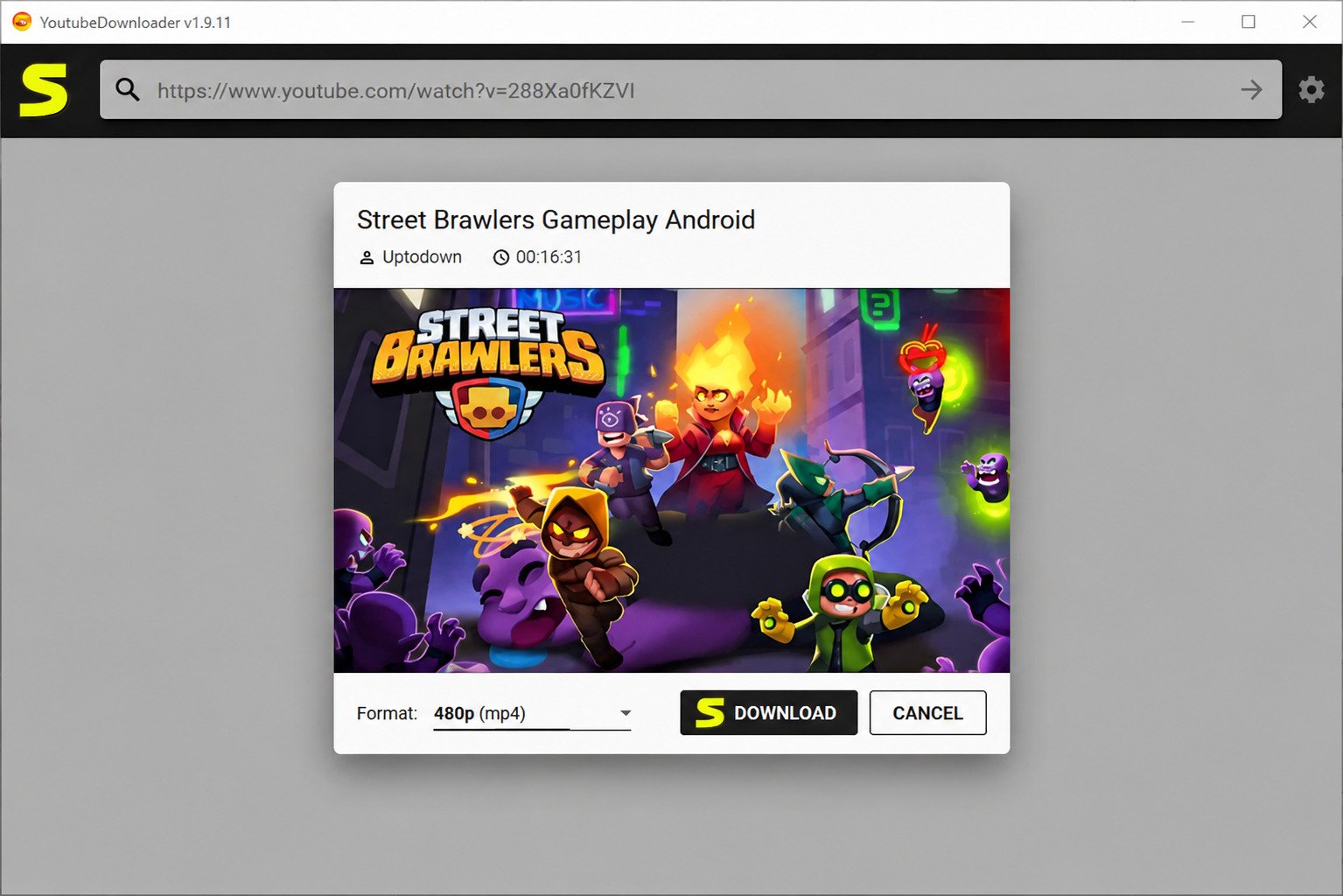
YouTube to MP3 Download
Select “Audio Only” and choose MP3 as your format for a clean, video-free file.
Download MP3 From YouTube
The process mirrors video downloads but skips the visual data entirely, resulting in smaller files.
How to Extract Audio From a YouTube Video
- Paste the video URL
- Switch to “Audio” mode
- Choose MP3 format
- Select your bitrate
- Click download
Choosing MP3 Audio Quality
Higher bitrates (like 320kbps) sound better but take up more space — 128kbps is fine for casual listening.
How to Download YouTube Videos on a Phone
Since YT Downloader is a desktop app, phone downloads require a slightly different approach.
How to Download YouTube Videos to Android
Some mobile-friendly apps or browser tools work similarly, letting you paste a link and save directly to your gallery.
How to Save a YouTube Video to Your Phone
Once downloaded on a computer, you can transfer the file via cable, cloud storage, or USB.
Download YouTube Videos to Your Phone for Free
Free mobile options exist, but always double-check app permissions before installing anything from unfamiliar sources.
Can You Download YouTube Videos for Free?
Yes, YT Downloader’s core features are free, though quality caps or ads may apply depending on the version.
Free YouTube Downloader Options
Plenty of free tools exist beyond YT Downloader, each with slightly different limitations on speed or resolution.
Free YouTube Video Downloader vs Paid Software
Paid versions typically remove ads, unlock faster speeds, and offer batch downloading.
What to Consider When Using Free Download Tools
- Check for bundled software during installation
- Read reviews before downloading unfamiliar apps
- Avoid tools that ask for unnecessary personal information
Is YT Downloader Safe to Use?
Generally, yes — as long as you download it from the official source and keep your antivirus updated.
YT Downloader Safety and Privacy
The app doesn’t require a YouTube login, which reduces privacy risks compared to browser extensions that request account access.
How to Identify a Safe YouTube Downloader
Look for HTTPS on the download page, verified reviews, and a clear privacy policy.
Avoiding Suspicious Download Websites
Never download from pop-up ads or unfamiliar mirror sites claiming to host the “official” installer.
Checking Downloaded Files for Security Risks
Run a quick antivirus scan on the installer before opening it, just as a precaution.
Privacy Considerations When Using Online Downloaders
Online tools that don’t require installation can be convenient, but they sometimes come loaded with intrusive ads.
YouTube Downloading and Copyright Considerations
It’s important to stay on the right side of copyright law when downloading content.
Downloading Your Own YouTube Videos
If it’s your own upload, you’re free to download and store it however you like.
Downloading Videos With Permission
Always get consent from the content creator before saving and redistributing their work.
Respecting Copyright and Creator Rights
Downloading copyrighted material without permission can violate both YouTube’s rules and copyright law.
YouTube Terms and Download Restrictions
According to YouTube’s official Terms of Service, downloading content is only permitted when a download button or link is offered by YouTube itself.
YT Downloader Troubleshooting
Running into issues? Here’s a quick reference table for common problems.
| Problem | Likely Cause | Fix |
|---|---|---|
| App not working | Outdated version | Update to the latest release |
| Download not starting | Invalid URL | Re-copy the correct video link |
| Download fails midway | Weak internet connection | Switch to stable Wi-Fi |
| 4K not available | Video wasn’t uploaded in 4K | Choose highest available quality instead |
| No audio in video | Format conversion error | Re-download using default MP4 settings |
| Poor audio quality | Low bitrate selected | Choose a higher MP3 bitrate |
YT Downloader Is Not Working
Try restarting the app or reinstalling the latest version if it suddenly stops responding.
YouTube URL Is Not Recognized
Make sure you copied the full link, including “https://” at the beginning.
YouTube Download Fails at a Certain Percentage
This usually points to a connectivity hiccup — pause and resume, or restart the download entirely.
YT Downloader Download Speed and Performance
What Affects YouTube Download Speed?
Your internet connection, video length, and selected quality all play a role in download times.
How to Improve Download Performance
- Use a wired connection instead of Wi-Fi when possible
- Close other bandwidth-heavy apps
- Download during off-peak hours
Managing Multiple YouTube Downloads
Running several downloads at once can slow each one down, so it’s often faster to queue them instead.
YT Downloader vs Online YouTube Downloaders
| Factor | Desktop (YT Downloader) | Online Downloaders |
|---|---|---|
| Installation | Required | Not required |
| Speed | Generally faster | Depends on server load |
| Ads | Minimal | Often heavy |
| Batch downloads | Supported | Rarely supported |
| Safety | More controlled | Varies by site |
Which Type of YouTube Downloader Should You Choose?
If you download frequently, desktop software like YT Downloader saves time. For occasional, one-off downloads, an online tool might be quicker.
Popular YouTube Downloader Alternatives
If YT Downloader isn’t quite right for you, there are several solid alternatives worth exploring.
| Tool | Best For | Platform |
|---|---|---|
| 4K YouTube Downloader | High-resolution downloads | Windows, Mac |
| Y2Mate | Quick online conversions | Browser-based |
| SaveFrom | Simple link-based downloads | Browser-based |
| SaveTube | Lightweight online tool | Browser-based |
| SSYouTube | Fast MP4 downloads | Browser-based |
For a dedicated desktop alternative built for handling multiple formats smoothly, you might also want to check out this 3D YouTube Downloader guide, which covers another solid option worth comparing. If you’d rather work with an actively maintained open-source project, the YoutubeDownloader project on GitHub is also worth a look.
4K YouTube Downloader
Known for strong resolution support, this tool is a favorite among users who prioritize video quality above all else.
Y2Mate
A browser-based option that’s fast but sometimes cluttered with ads.
SaveFrom
Popular for its simplicity — just paste the link and download.
SaveTube
A lightweight alternative that works well for quick, occasional downloads.
SSYouTube
Works by editing the URL directly, a trick many users find convenient.
YT Downloader Comparisons
YT Downloader vs 4K YouTube Downloader
Both handle high-resolution downloads well, but 4K YouTube Downloader is often praised for slightly better playlist support.
YT Downloader vs Y2Mate
YT Downloader offers a cleaner desktop experience, while Y2Mate is faster for quick, single downloads online.
YT Downloader vs SaveFrom
SaveFrom skips installation entirely, making it a good pick for one-time use.
Best YT Downloader Alternative by Use Case
| Use Case | Best Alternative |
|---|---|
| 4K downloads | 4K YouTube Downloader |
| Quick online downloads | Y2Mate |
| No installation needed | SaveFrom |
| MP3 conversions | SSYouTube |
| Windows desktop use | YT Downloader |
Frequently Asked Questions About YT Downloader
It’s a desktop tool that lets you download YouTube videos and audio in formats like MP4 and MP3.
Yes, the basic version is free, with optional upgrades for extra features.
Yes, as long as you download it from the official website and scan the installer before running it.
Yes, it runs smoothly on both Windows 10 and Windows 11.
Yes, but only when the original video was uploaded in 4K resolution.
Yes, it can extract audio and save it as an MP3 file in just a few clicks.
4K YouTube Downloader and SaveFrom are both strong alternatives, depending on whether you prefer desktop or browser-based tools.
YT Downloader Pros and Cons
Advantages
- Free to use with no login required
- Supports MP4 and MP3 formats
- Works with 4K, 1080p, and HD quality
- Simple, beginner-friendly interface
Limitations
- Desktop-only, no dedicated mobile app
- 4K availability depends on the original video
- Occasional updates needed to match YouTube changes
Who Should Use YT Downloader?
Anyone who regularly saves YouTube content for offline viewing will find it a reliable, no-fuss option.
Who Should Consider an Alternative?
If you need mobile downloads or prefer avoiding installations altogether, an online tool might suit you better.
YT Downloader Final Verdict
Is YT Downloader Worth Using?
For Windows users who want a straightforward way to save YouTube videos and audio, YT Downloader delivers solid, dependable performance without unnecessary complications.
Final Recommendation
It handles the basics — MP4, MP3, and quality selection — better than most free tools out there, making it a smart pick for everyday downloading needs.
Conclusion
At the end of the day, downloading YouTube content doesn’t need to feel complicated or risky. Tools like YT Downloader make the whole process straightforward, whether you’re saving a tutorial, archiving your own videos, or converting a song into MP3 for offline listening.
Just remember to download responsibly, respect creator rights, and always grab your software from trusted sources. With the right tool and a little know-how, offline access to your favorite YouTube content is only a few clicks away.