Outbyte Driver Updater Download, Features, Setup, and Alternatives
Your PC stutters during video calls, your headphones crackle, and Wi-Fi drops for no reason. Nine times out of ten, someone will tell you it’s a driver problem — and tools like Outbyte Driver Updater promise to fix all of it with one click.
This guide covers what the software actually does, how to install and use it, what it costs, and — just as importantly — the safety concerns you should understand before installing any driver updater. The goal here is an honest picture, not a sales pitch.
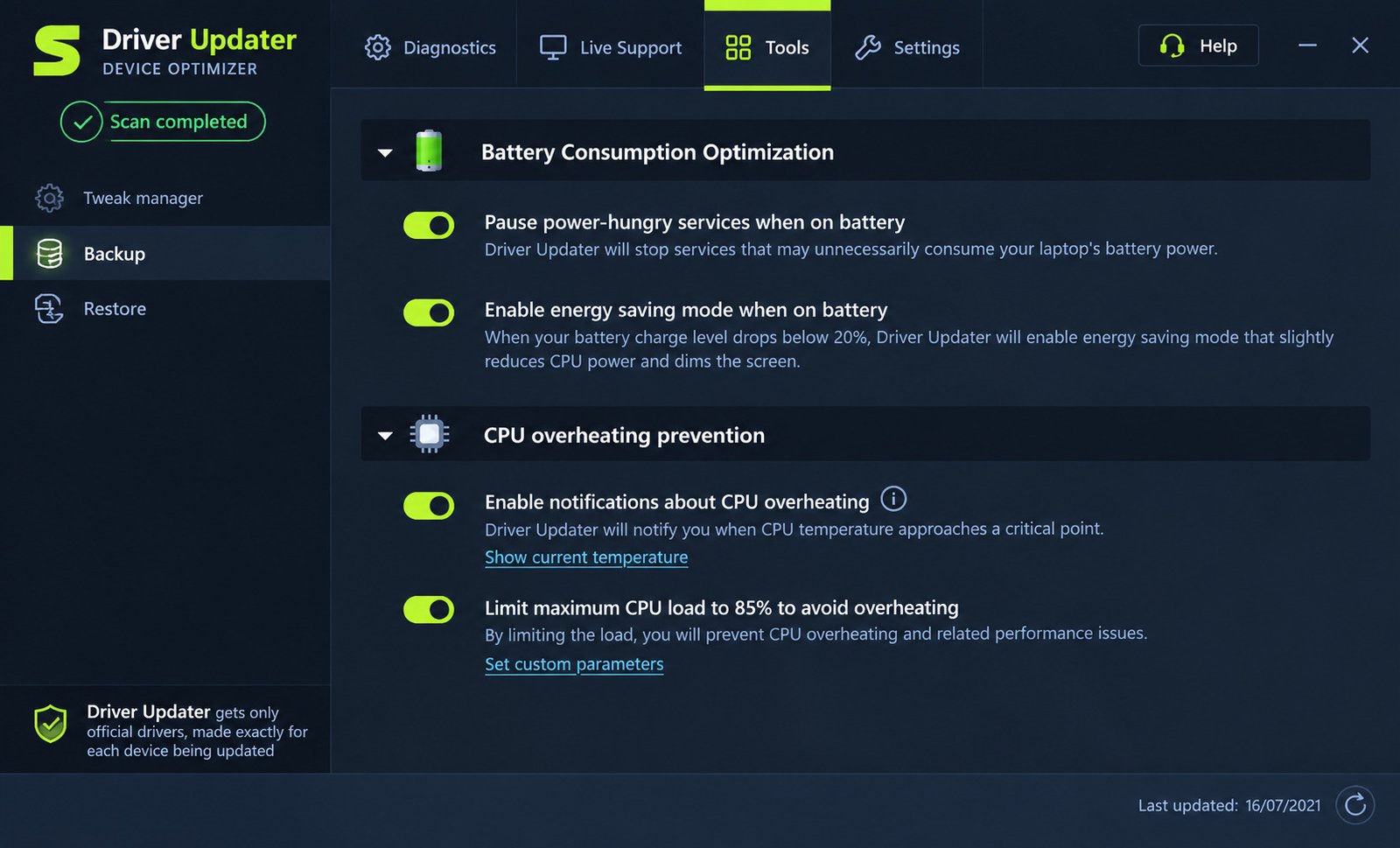
What Is Outbyte Driver Updater and How Does It Work?
Quick answer: Outbyte Driver Updater is paid Windows software from Outbyte Computing Pty Ltd that scans your PC for outdated, missing, or corrupted device drivers and installs replacements from its own driver database.
Outbyte Driver Updater as a Windows Driver Update Tool
The program compares the drivers installed on your system against its catalog, then flags anything it considers out of date. You review the list and choose what to update.
Driver Scanner, Checker, and Detection Software
Scanning is free. Updating in bulk is not. This freemium model is standard across the category and worth understanding before you install.
Automatic Driver Updates and Driver Management
Outbyte can create a system restore point during installation and back up drivers before replacing them. That backup step is the single most important safety feature in any tool like this.
Who Is Outbyte Driver Updater For?
| User type | Is it a good fit? |
|---|---|
| Non-technical users with old laptops | Possibly, with caution |
| Gamers chasing GPU performance | No — use NVIDIA/AMD apps directly |
| People who know their exact hardware | No — manufacturer sites are better |
| Anyone on a fresh Windows install | Windows Update usually suffices |
Outbyte Driver Updater Features
Automatic Driver Scanning and Detection
A full scan takes a few minutes and inventories every device on the system — chipset, network, audio, graphics, storage, and peripherals.
Detect Outdated and Missing Drivers
Results are grouped by device with current and available versions shown side by side. Missing drivers for unrecognized hardware are listed separately.
One-Click Driver Updates
Paid users can update everything at once. Practical advice: don’t. Update in small batches so you can identify the culprit if something breaks.
Driver Management and Update Tools
An Ignore List lets you exclude specific devices permanently — useful for hardware where you know the manufacturer’s driver is better than anything a database will offer.
Driver Repair and Recovery Features
Automatic backups run before each update, and a restore function rolls individual drivers back. This is where the software earns most of its value.
Driver Database and Hardware Compatibility
Outbyte states it recommends official drivers for detected hardware. Coverage is broad but not exhaustive — obscure or very new devices may not be matched.
Scan and Detect Outdated or Missing Drivers
Scan Your PC for Outdated Drivers
Launch the app and the scan starts automatically. Close other programs first so the process doesn’t compete for resources.
Detect Missing Device Drivers
Devices showing as “Unknown Device” in Device Manager are the real wins here. Identifying mystery hardware manually is genuinely tedious.
Check Windows and Hardware Drivers
Cross-check anything flagged against Device Manager. Right-click a device, choose Properties, and read the Driver tab for the installed version and date.
Identify Driver Compatibility Problems
Knowing your exact components makes every driver decision safer. A hardware detection utility such as Futuremark SystemInfo identifies your CPU, GPU, and motherboard precisely, so you can verify a recommendation before accepting it.
Find and Fix Outdated Drivers
Important context: an old driver date is not automatically a problem. A stable 2022 chipset driver may be exactly what your machine should keep running.
Automatic Driver Updates With Outbyte
Automatically Update PC and Windows Drivers
Updates download and install in sequence, with reboots sometimes required. Save open work before starting.
Update All Drivers Automatically
Bulk updating is convenient and risky in equal measure. If five drivers change and the PC misbehaves afterward, diagnosing which one caused it becomes guesswork.
Automatic Driver Scanning and Detection
Scheduled scans can run on a set interval. For most home users, monthly is more than enough.
One-Click Driver Update Process
- Run the scan
- Review each recommendation individually
- Confirm the backup option is enabled
- Update two or three drivers
- Reboot and test before continuing
Automatic Driver Updates in Windows 10 and Windows 11
Windows already delivers many drivers through Windows Update. Running a second updater on top can create version conflicts, where each tool tries to install a different build.
Windows Driver Updates and Device Support
Outbyte Driver Updater for Windows 11
Supported, including recent Windows 11 builds. Note that Windows 11 handles driver delivery more aggressively than earlier versions, reducing what third-party tools add.
Outbyte Driver Updater for Windows 10
Fully supported. Windows 10 reached end of support in October 2025, so machines still running it benefit more from driver maintenance than up-to-date systems do.
Update Device Drivers on Windows
| Method | Best for | Risk |
|---|---|---|
| Windows Update | Most users | Very low |
| Manufacturer’s site | Exact hardware match | Low |
| GPU vendor app | Graphics only | Low |
| Third-party updater | Unknown devices | Moderate |
Update PC and Computer Drivers
Prebuilt machines from Dell, HP, or Lenovo have their own support utilities. Those pull drivers tested against your exact model — a meaningful advantage.
Hardware and Device Driver Management
Keep a written note of which drivers you changed and when. It takes thirty seconds and saves hours if something goes wrong later.
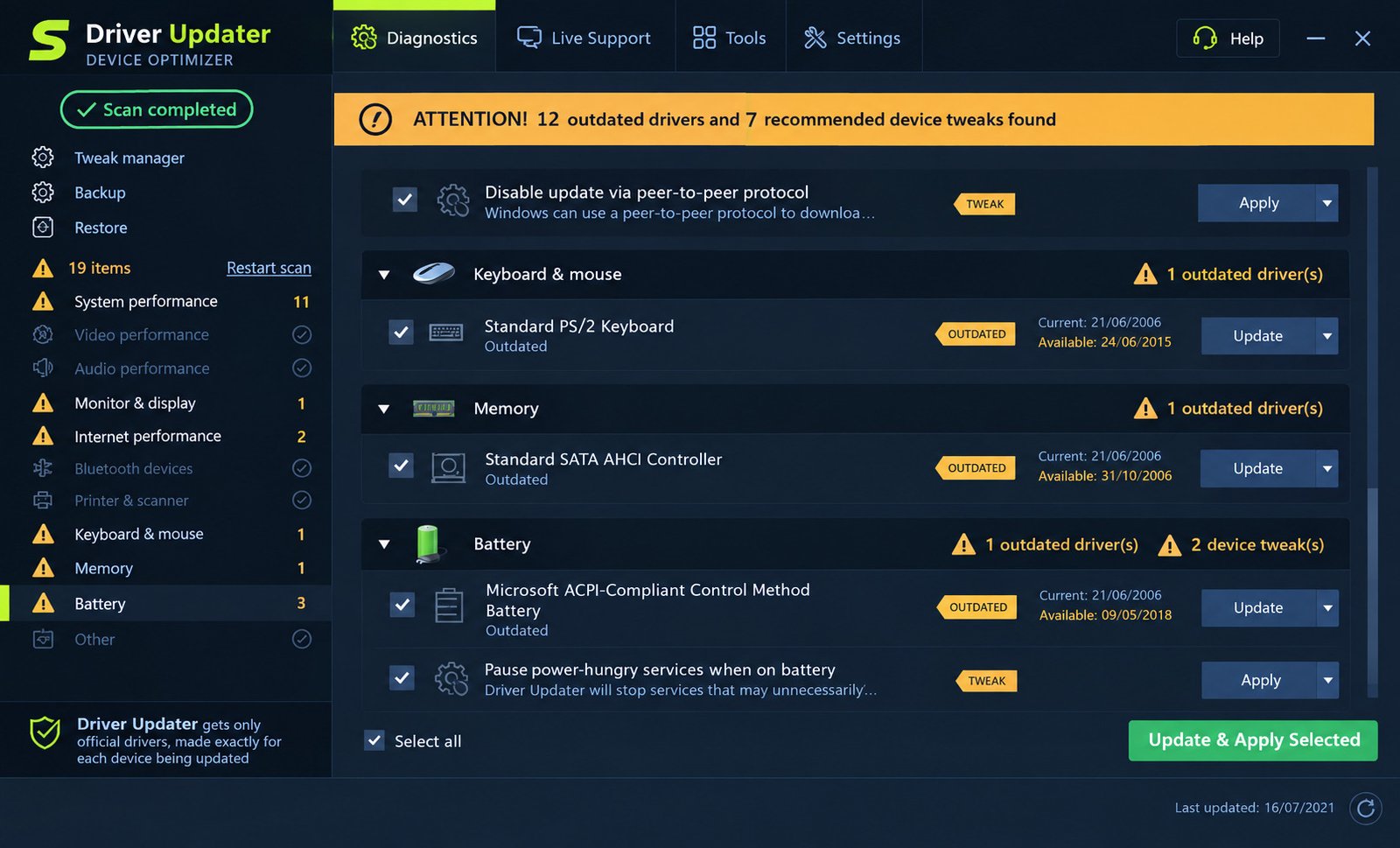
Graphics, GPU, and Display Driver Updates
Graphics Driver Updater and GPU Driver Updates
Graphics drivers matter more than any other category for performance. They also break things most often.
Video and Display Driver Updates
Strong recommendation: update GPU drivers through NVIDIA App, AMD Adrenalin, or Intel Driver & Support Assistant instead. They ship the newest builds first and are free.
Scan and Update Graphics Drivers
If you do use Outbyte for graphics, check the version it offers against the vendor’s site. Third-party databases often lag behind by weeks.
Windows Graphics Driver Management
Black screens after a GPU update are common. Booting into Safe Mode and rolling back through Device Manager is the standard fix.
Audio and Sound Driver Updates
Audio Driver Updater and Scanner
Realtek and Intel audio drivers are frequently flagged as outdated. Many laptops use customized OEM versions that generic updates can overwrite.
Sound Driver Updates on Windows
If your sound works, think carefully before changing anything. Audio is one of the most common categories where an “upgrade” makes things worse.
Update Windows Audio Drivers
After any audio update, test speakers, headphone jack, microphone, and Bluetooth separately. Problems often appear in only one path.
Fix Common Audio Driver Problems
- No sound after update → roll back in Device Manager
- Microphone stopped working → check privacy settings first
- Crackling audio → try disabling audio enhancements
- Wrong output device → reselect in sound settings
Network, Wi-Fi, and Ethernet Driver Updates
Network Driver Updater
Handle network drivers with extra care. A failed update can leave you offline and unable to download the fix.
Wi-Fi and Wireless Driver Updates
Download a backup copy of your Wi-Fi driver to a USB stick before updating it. This one precaution prevents the worst-case scenario.
Ethernet and LAN Driver Updates
Ethernet drivers are generally stable and rarely need changing. Update only if you have a specific problem.
Network Adapter Driver Management
Device Manager’s Roll Back Driver button is available for a limited window after an update. Use it quickly if connectivity breaks.
Update Network Drivers on Windows
Wi-Fi 6E and Wi-Fi 7 adapters genuinely benefit from newer drivers. Older 802.11ac hardware usually doesn’t.
Driver Backup, Restore, and Recovery
Back Up Windows and PC Drivers
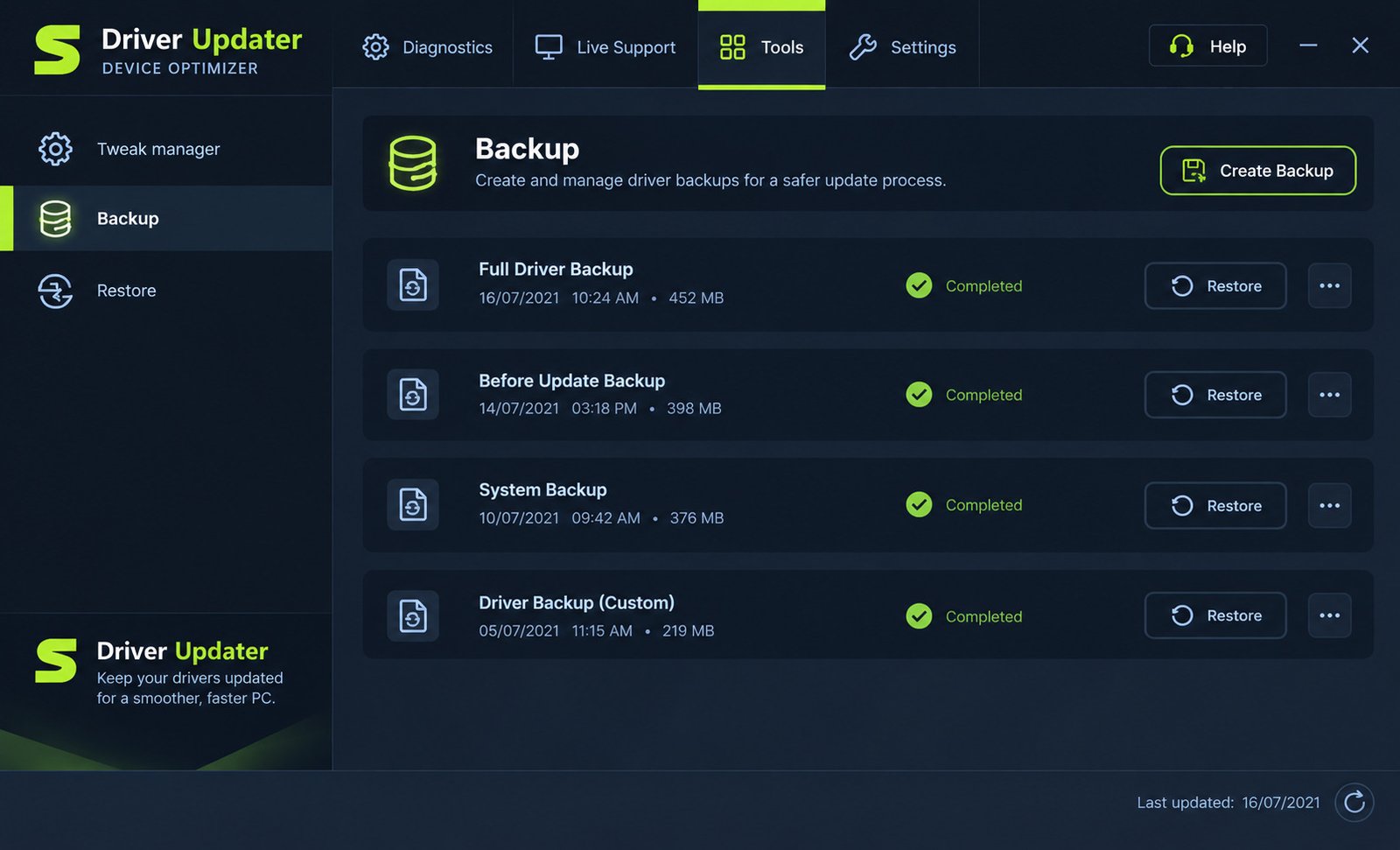
Outbyte can back up selected drivers or all of them. Do a full backup before your first update session.
Restore Device Drivers
Restoring is done from within the app, device by device. Test that the restore function works before you need it urgently.
Driver Backup and Restore
Keep backups somewhere other than the system drive. A backup stored only on C: is no help if Windows won’t boot.
Driver Recovery and System Protection
Create a manual System Restore point in Windows before any batch of updates. It’s independent of the software and covers more than drivers alone.
Outbyte Driver Updater Download and Latest Version
Outbyte Driver Updater Download for Windows
Download only from outbyte.com. Third-party mirrors for utility software are a well-known bundling vector.
Outbyte Driver Updater Free Download
The installer is free and the scan is free. Fixing what it finds requires a subscription — expect that upfront.
Outbyte Driver Updater Latest Version
Outbyte updates the application regularly and it checks for its own updates automatically. There’s no manual version hunting required.
Outbyte Driver Updater Windows 11 Download
The same installer covers Windows 11, 10, 8, and 7. There is no separate Windows 11 build.
Outbyte Driver Updater Installer
During setup, read every screen rather than clicking through. Decline optional extras, and take the offer to create a restore point.
Outbyte Driver Updater System Requirements
Windows Compatibility and Supported Versions
| Requirement | Detail |
|---|---|
| OS | Windows 7, 8, 8.1, 10, 11 |
| Architecture | 32-bit and 64-bit |
| RAM | 2 GB minimum |
| Disk space | ~100 MB plus backups |
| Internet | Required |
| Rights | Administrator account |
Hardware and Software Requirements
The application itself is lightweight. Driver backups consume the real space — allow a few gigabytes if you back up everything.
Driver and Internet Requirements
A stable connection matters. An interrupted driver download can leave a device in a half-installed state.
How to Install and Set Up Outbyte Driver Updater
Outbyte Driver Updater Installation
Run the installer as administrator. If your antivirus objects, read the next major section before deciding what to do.
Install Outbyte Driver Updater on Windows
- Download from the official site
- Run the installer with admin rights
- Accept the system restore point option
- Decline any bundled extras
- Launch and let the first scan finish
Outbyte Driver Updater Setup
In Settings, enable automatic backups before updating. Turn off aggressive notification prompts if you find them intrusive.
Run Your First Driver Scan
Read the results carefully rather than clicking “update all.” Many entries will be drivers that are working perfectly well.
Configure Driver Updates and Scanning
Add your GPU and any OEM-customized devices to the Ignore List, then manage those through their own vendor tools.
Outbyte Driver Updater Tutorial: How to Update Drivers
How to Scan for Outdated Drivers
Open the app, start the diagnostic, and wait. Results appear grouped by hardware category with version comparisons.
How to Update Windows Drivers
Select one driver, confirm backup is on, click update, then reboot if prompted. Repeat. Slow is safe.
How to Update All PC Drivers
If you insist on bulk updating, do it when you have time to troubleshoot — not fifteen minutes before a meeting.
How to Find Missing Device Drivers
Open Device Manager first and note anything with a yellow warning triangle. Those are the entries genuinely worth fixing.
How to Manage Driver Updates Safely
- Back up before every session
- Change a few drivers at a time
- Reboot and test between batches
- Keep Wi-Fi drivers on external media
- Skip anything that’s working fine
Driver Problems, Errors, and Troubleshooting
Outbyte Driver Updater Not Working
Run as administrator, check your internet connection, and confirm your antivirus isn’t blocking it. Reinstalling resolves most launch failures.
Outbyte Driver Updater Installation Error
Usually antivirus interference or an incomplete download. Re-download from the official site before trying anything else.
Outbyte Driver Updater Download Error
Corporate firewalls and some DNS filters block the download servers. Test on a different network.
Outbyte Driver Updater Update Error
A failed driver install often means Windows is protecting a signed OEM driver. That’s usually the correct outcome, not a bug.
Drivers Not Updating or Update Failed
Some devices are locked by the manufacturer. Laptop touchpads and OEM audio chips are frequent examples.
Windows Driver Update Problems
If Windows keeps reinstalling an older driver, Windows Update is overriding your change. You can pause driver delivery through Group Policy on Pro editions.
Missing and Outdated Driver Problems
Genuinely missing drivers are best solved by identifying the hardware ID in Device Manager and searching it directly.
Driver Conflicts and Compatibility Issues
Two updaters running together cause the most conflicts. Pick one approach and uninstall the rest.
Outbyte Driver Updater Free, Trial, Pricing, and License
Is Outbyte Driver Updater Free?
No. The scan is free; updating requires payment. There’s no permanently free full version.
Outbyte Driver Updater Free Version and Trial
Outbyte advertises a short free trial that doesn’t require a credit card. Trial terms change often, so check the official site before assuming.
Outbyte Driver Updater Pricing and Subscription
| Plan | Price |
|---|---|
| Introductory offer | ~$14.98 for first 3 months |
| Standard renewal | $29.95 per 3 months |
| Money-back guarantee | 30 days |
This is a recurring subscription, roughly $120 per year at the standard rate. Set a calendar reminder before renewal if you only need it once.
Outbyte Driver Updater License and Activation
A license key arrives by email after purchase. Paste it into the activation window inside the app.
Outbyte Driver Updater Serial and Product Key
Avoid cracked keys and keygens entirely. Pirated copies of PC utilities are among the most commonly malware-laden downloads on the internet.
Is Outbyte Driver Updater Safe and Legit?
Direct answer: It is a real product from a registered company, not malware. However, several security vendors classify it as a potentially unwanted program (PUP), and you should know that before installing.
Is Outbyte Driver Updater Safe to Install?
The installer is digitally signed and the company is legitimate. The concerns are about business practices and necessity, not hidden malicious code.
Outbyte Driver Updater and Malware or Virus Concerns
Malwarebytes maintains a detection called PUP.Optional.Outbyte, describing a family of programs that charge for services already built into Windows. A handful of other engines flag it similarly; the large majority do not.
Some users also report that scan results overstate how many problems exist. Treat any alarming number as marketing until you verify it in Device Manager.
Driver Sources, Downloads, and Software Trust
Microsoft’s own guidance is consistent: get drivers from Windows Update or your hardware manufacturer’s support page. Third-party updaters carry a real, if small, risk of installing a mismatched driver.
What to Check Before Updating Automatically
- Does the device actually have a problem?
- Is the offered version newer than the vendor’s?
- Is a backup and restore point in place?
- Can you recover if the network adapter fails?
If you can’t answer all four, don’t update that driver yet.
Outbyte Driver Updater Review: Features, Performance, and Usability
Driver Scanning and Update Experience
The interface is clean and the scan is fast. For someone who finds Device Manager intimidating, the experience is genuinely approachable.
Automatic Driver Management
Backup and restore work as advertised, and the Ignore List is well implemented. These are the features that justify the tool’s existence.
Windows Compatibility and Ease of Use
Broad Windows support and a simple layout make it usable by non-technical people. Live support is limited to paying customers.
Outbyte Driver Updater Pros and Cons
PROS
- Simple, beginner-friendly interface
- Automatic driver backup and restore
- Finds unidentified hardware quickly
- 30-day money-back guarantee
CONS
- Subscription pricing, not a one-time purchase
- Flagged as a PUP by several security vendors
- Duplicates what Windows Update already does
- Scan results can overstate urgency
Is Outbyte Driver Updater Worth Using?
For most people, no — Windows Update plus your manufacturer’s site covers it. For someone with several unknown devices and no patience for manual hunting, it can save real time.
Outbyte Driver Updater Alternatives and Competitors
Outbyte Driver Updater Alternative for Windows
The strongest alternative isn’t software at all: Windows Update plus Device Manager, backed by your PC maker’s support page.
Free Outbyte Driver Updater Alternatives
- Snappy Driver Installer Origin — free, open source, no upsells
- NVIDIA App / AMD Adrenalin / Intel DSA — free, vendor-official
- Dell SupportAssist, HP Support Assistant, Lenovo Vantage — free, model-specific
Free Driver Updater Software for Windows
Snappy Driver Installer Origin is the community favourite precisely because it has no subscription, no nag screens, and no paid tier.
Driver Updater Software Alternatives
Driver Booster, Driver Easy, and DriverMax occupy the same commercial space with similar freemium structures and similar PUP classifications.
Driver Management and Update Alternatives
Manufacturer utilities are underrated. They ship drivers validated against your exact model, which no generic database can promise.
Outbyte Driver Updater vs Other Driver Updaters
Outbyte Driver Updater vs Driver Booster
Driver Booster has a larger database and a free tier that updates drivers. Outbyte’s interface is cleaner; Driver Booster is pushier with upsells.
Outbyte Driver Updater vs Driver Easy
Driver Easy’s free version allows manual downloads at reduced speed. Outbyte gates updates behind payment more firmly.
Outbyte Driver Updater vs DriverMax
DriverMax offers a limited number of free updates per day. Both are subscription-based beyond that.
Outbyte Driver Updater vs Snappy Driver Installer
Snappy is completely free and offline-capable, but its interface is dated and unforgiving. It’s the power user’s choice.
Outbyte Driver Updater vs AVG Driver Updater
AVG carries stronger brand recognition and similar pricing. Functionally, the two are close to interchangeable.
Outbyte Driver Updater vs Avast Driver Updater
Avast and AVG share a parent company and largely the same engine. Choosing between them comes down to price at the moment of purchase.
Frequently Asked Questions About Outbyte Driver Updater
Scanning Windows PCs for outdated, missing, or corrupted drivers and installing replacements automatically.
No. Scanning is free, but updating drivers requires a paid subscription starting around $29.95 per three months.
It isn’t malware, but several security vendors including Malwarebytes classify it as a potentially unwanted program.
Yes, and on Windows 10, 8, and 7 as well, in both 32-bit and 64-bit editions.
Yes. Windows 10 machines past end of support are the users most likely to see a benefit.
It can attempt bulk updates, though some OEM-locked devices will refuse. Updating in small batches is safer.
Yes. Identifying unknown hardware is its most genuinely useful function.
Yes. It backs up drivers before updating and can restore them individually if a change causes problems.
Usually antivirus blocking, missing administrator rights, or a connection issue. Reinstalling from the official site fixes most cases.
Windows Update, your manufacturer’s support utility, vendor GPU apps, or the free Snappy Driver Installer Origin.
Final Verdict: Should You Use Outbyte Driver Updater?
Outbyte Driver Updater is a competent, well-designed tool that solves a problem most people don’t actually have. If your PC runs fine, Windows Update and your manufacturer’s support page will keep it that way for free.
Where it earns its place is on older machines full of unidentified hardware, in the hands of someone who’d rather not spend an afternoon in Device Manager.
If you do try it, go in with clear eyes. Back everything up first, update a few drivers at a time, and cancel before renewal if you only needed one cleanup.
The best driver is usually the one already working. Change it because something is broken — not because a scan told you the number was high.
Learn more directly from the developer: Outbyte Driver Updater official page.
One Response