Octopus Deploy: Deployment Automation, CI/CD, DevOps, Features, Pricing, and Complete Guide
If you have ever watched a release night turn into a stressful scramble of manual scripts, late-night server logins, and crossed fingers, you already know why deployment automation exists. Octopus Deploy is one of the most trusted names in that space, built specifically to take the chaos out of shipping software. In this guide, you will learn exactly what Octopus Deploy is, how it fits into a modern CI/CD pipeline, how to install and configure it, what it costs, and how it stacks up against alternatives like Jenkins, GitHub Actions, and Azure DevOps.
Whether you are a solo developer trying to automate your first release or a platform engineer evaluating enterprise-grade release orchestration, this article walks you through everything in plain, practical language.
Deployment automation has quietly become one of the most important pieces of modern software engineering. As teams ship more frequently and manage more environments, the gap between “code that works on my machine” and “code that reliably runs in production” keeps widening. Tools like Octopus Deploy exist precisely to close that gap, giving engineering teams a repeatable, visible, and controllable process instead of a patchwork of scripts and tribal knowledge. By the end of this guide, you’ll understand not just what Octopus Deploy does, but whether it’s the right fit for your own team’s release process.
What Is Octopus Deploy?
Octopus Deploy is a deployment automation and release management platform that takes over once your code has been built. It sits between your build server and your live infrastructure, controlling exactly how, when, and where a new release goes out.
Instead of engineers manually copying files, restarting services, or running one-off scripts, Octopus turns the entire release process into a repeatable, auditable workflow. Every deployment follows the same steps, every time, whether it’s going to a test environment or production.
What Is Octopus Deploy Used For?
Teams use Octopus Deploy to:
- Automate application releases across multiple environments (Dev, QA, Staging, Production)
- Standardize deployments for Windows, Linux, cloud, and container-based workloads
- Manage runbooks for operational tasks like database maintenance or scheduled restarts
- Enforce approval gates before code reaches production
- Keep a clear audit trail of who deployed what, when, and where
It’s especially popular with organizations running complex, multi-service applications where a single “click deploy” script isn’t enough to keep things safe and consistent.
Beyond raw automation, Octopus is also used as a governance layer. Many organizations need proof that a change was tested, approved, and deployed in a specific order for compliance audits, internal security reviews, or simply peace of mind. Octopus captures that history automatically, so teams aren’t scrambling to reconstruct “what happened” after an incident.
How Does Octopus Deploy Work?
At a high level, Octopus Deploy works in three stages. First, your CI tool (Jenkins, GitHub Actions, Azure DevOps, TeamCity, or similar) builds and packages your application. Second, that package is pushed to Octopus, which stores it as a versioned release. Third, Octopus deploys that release through each environment in sequence, running whatever steps you’ve defined — copying files, running scripts, updating Kubernetes manifests, or triggering database migrations.
Because the same release package moves through every environment unchanged, you get a genuine guarantee: what you tested in staging is exactly what ships to production.
Octopus Deploy as a Continuous Delivery and Release Automation Tool
Unlike a pure CI tool, Octopus specializes in the “last mile” of software delivery. It’s built around the concept of continuous delivery — every change is deployable at any time, but a human (or an automated gate) decides when it actually goes live. This makes it a natural fit for teams that want automation without giving up control over production releases.
Fully automated pipelines sound appealing, but for many businesses — especially those handling money, health data, or critical infrastructure — a human checkpoint before production isn’t a bottleneck, it’s a safety net. Octopus was designed around that reality rather than assuming every team wants zero-touch deployment.
Octopus Deploy Features
Automated Deployment and Release Management
At its core, Octopus automates the repetitive, error-prone parts of shipping software. Deployment processes are defined once as a series of steps, then reused for every release. This removes the “it worked when I ran it manually” problem that plagues so many teams.
Continuous Delivery and Continuous Deployment Features
Octopus supports both models:
| Model | What It Means | Best For |
|---|---|---|
| Continuous Delivery | Every build is deployable, but a human approves the final push | Regulated or production-sensitive environments |
| Continuous Deployment | Every passing build goes live automatically | SaaS teams shipping many times a day |
Approval workflows, scheduled deployments, and automatic promotion between environments are all built in, so teams can pick the model that fits their risk tolerance.
Environment Management and Deployment Targets
Octopus lets you define environments like Dev, Test, Staging, and Production, then assign deployment targets — the actual servers, containers, or cloud services — to each one. A single release can automatically progress through every environment in order, with different rules and approvals at each stage.
This structure also makes it easy to spot problems early. If a release fails validation in Test, it simply never gets the chance to reach Staging or Production — the pipeline enforces that boundary automatically rather than relying on someone remembering to check.
Octopus Deploy Variables and Configuration Management
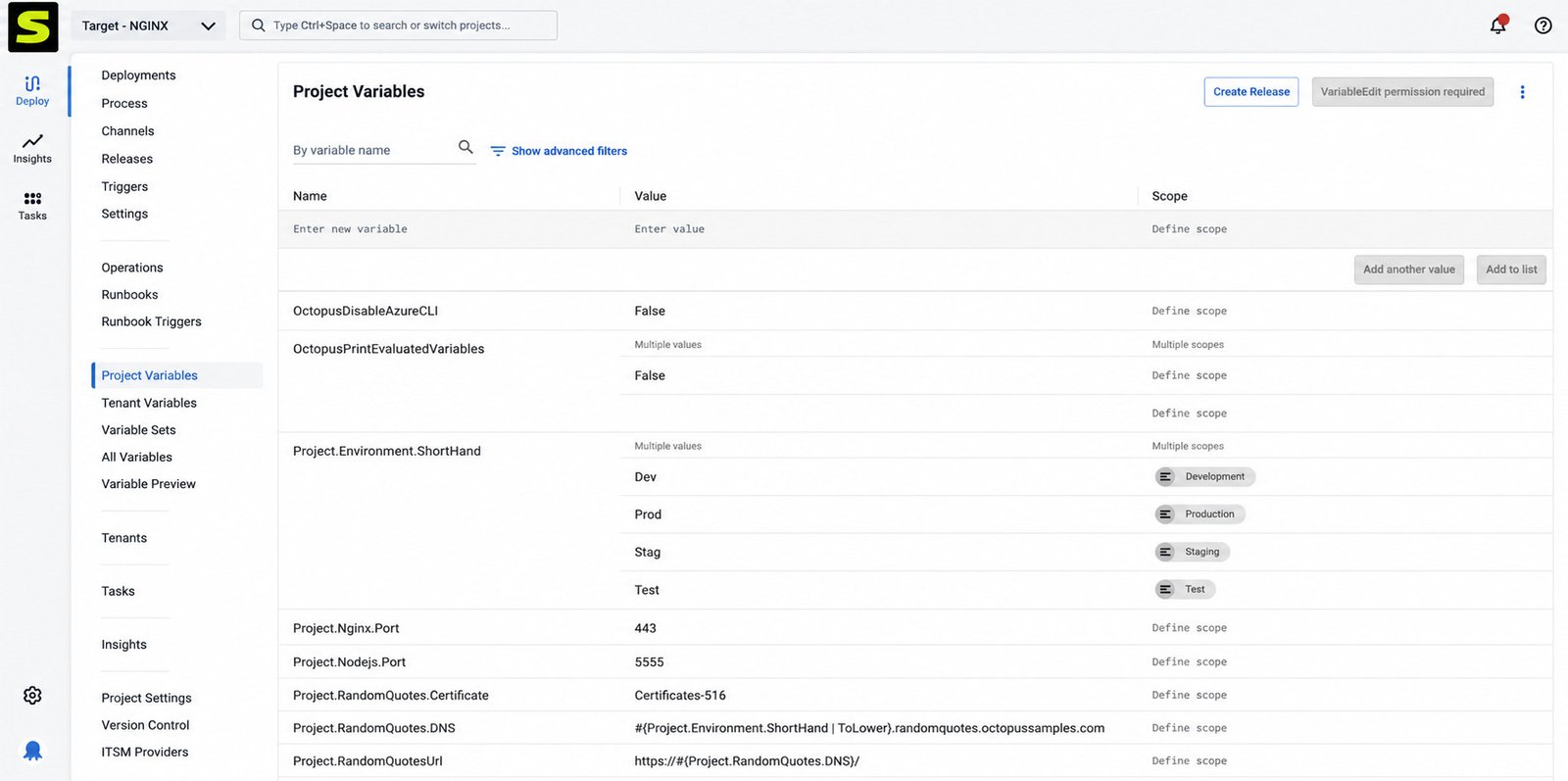
One of Octopus’s most-loved features is scoped variables. You define a variable once (like a database connection string) and give it different values per environment. This means the same deployment process works everywhere, without hardcoding environment-specific values into scripts.
Variables can also be scoped by role, machine, tenant, or channel, which becomes essential once a project grows beyond a handful of environments. Teams that previously maintained separate configuration files per environment often describe this as the single feature that saved them the most time after switching to Octopus.
Deployment Automation for Complex Software Applications
Large applications rarely deploy as a single unit — they involve microservices, databases, background workers, and shared infrastructure. Octopus handles this with multi-tenancy and orchestration features that let you coordinate dozens of interdependent components in the correct order, with rollback options if something goes wrong.
For example, a single retail platform might involve a web frontend, an inventory service, a payments service, and a background job runner — each with its own release cadence. Octopus can coordinate all four so a release only proceeds once its dependencies have deployed successfully, avoiding the kind of partial rollout that causes hard-to-diagnose production incidents.
Octopus Deploy and CI/CD
How Octopus Deploy Fits Into a CI/CD Pipeline
Octopus is not a replacement for your CI server, it’s a partner to it. Your CI tool handles building, testing, and packaging code. Octopus takes that finished package and handles everything after: versioning, environment progression, and the actual release to live systems.
Octopus CI/CD Workflow Explained
A typical workflow looks like this:
- A developer pushes code to a Git repository.
- The CI server builds, tests, and packages the application.
- The package is pushed to Octopus as a new release.
- Octopus deploys the release to Dev automatically.
- After tests pass, the release is promoted to Staging, then Production, with approvals as needed.
Continuous Delivery With Octopus Deploy
Because Octopus treats each release as an immutable, versioned artifact, teams get genuine confidence that what passed testing is what ships. This traceability is a core reason many regulated industries — finance, healthcare, government — choose Octopus over simpler scripting approaches.
It also pays off during incident response. When something goes wrong in production, being able to pull up the exact release, its contents, and every environment it passed through can turn a multi-hour investigation into a five-minute lookup.
DevOps Automation and Release Orchestration
Octopus goes beyond simple deployment by adding runbook automation for operational tasks (like clearing a cache or rotating a certificate) and release orchestration across dozens of services at once, which is where a lot of DevOps teams get real time back.
Runbooks in particular deserve a mention: they let operations teams package up recurring maintenance tasks — like rotating credentials or clearing a stuck queue — into the same safe, auditable process used for deployments, instead of relying on a wiki page and a steady hand.
How to Download and Install Octopus Deploy
Octopus Deploy Download and Software Installation
Octopus Deploy is available in two forms: Octopus Cloud, a fully managed SaaS version, and Octopus Server, a self-hosted installation for Windows or Linux. You can download Octopus Server directly from the official Octopus website.
Octopus Deploy Free Download Options
Octopus offers a genuinely usable free tier for both Cloud and Server editions, aimed at small teams and individual developers, plus a 30-day free trial of the Enterprise tier with no credit card required.
How to Install Octopus Deploy Server
- Download the Octopus Server installer for Windows or the Linux package.
- Run the installer and follow the setup wizard.
- Configure your SQL Server database connection (required for Server installs).
- Create your first admin user account.
- Access the Octopus web portal through your browser to finish setup.
Octopus Deploy System Requirements and Setup
Octopus Server runs on Windows Server or Linux, and requires a SQL Server database (or Octopus’s built-in options for smaller setups) for storing configuration and deployment history. For most small-to-mid-size teams, a modest VM with a few CPU cores and 8GB of RAM is enough to get started comfortably.
Larger organizations running Octopus at scale typically separate the database from the application server and add a second Octopus node for high availability, so a single machine failure doesn’t interrupt release capability during a critical deployment window.
How to Set Up Octopus Deploy
Octopus Deploy Getting Started Guide
Once installed, the first things to configure are your spaces (isolated workspaces for teams or projects), environments, and deployment targets. Octopus’s setup wizard walks new users through most of this on first login.
Octopus Deploy Setup for Beginners
If you’re new to the platform, start small:
- Create one project
- Define two environments (Dev and Production)
- Connect a single deployment target
- Build a simple deployment process with two or three steps
Getting a basic pipeline working end-to-end before adding complexity saves a lot of confusion later.
Resist the urge to model your entire production topology on day one. Most teams find it far easier to expand a working two-environment pipeline than to debug a ten-environment setup that never quite worked correctly from the start.
Creating Your First Project and Deployment Process
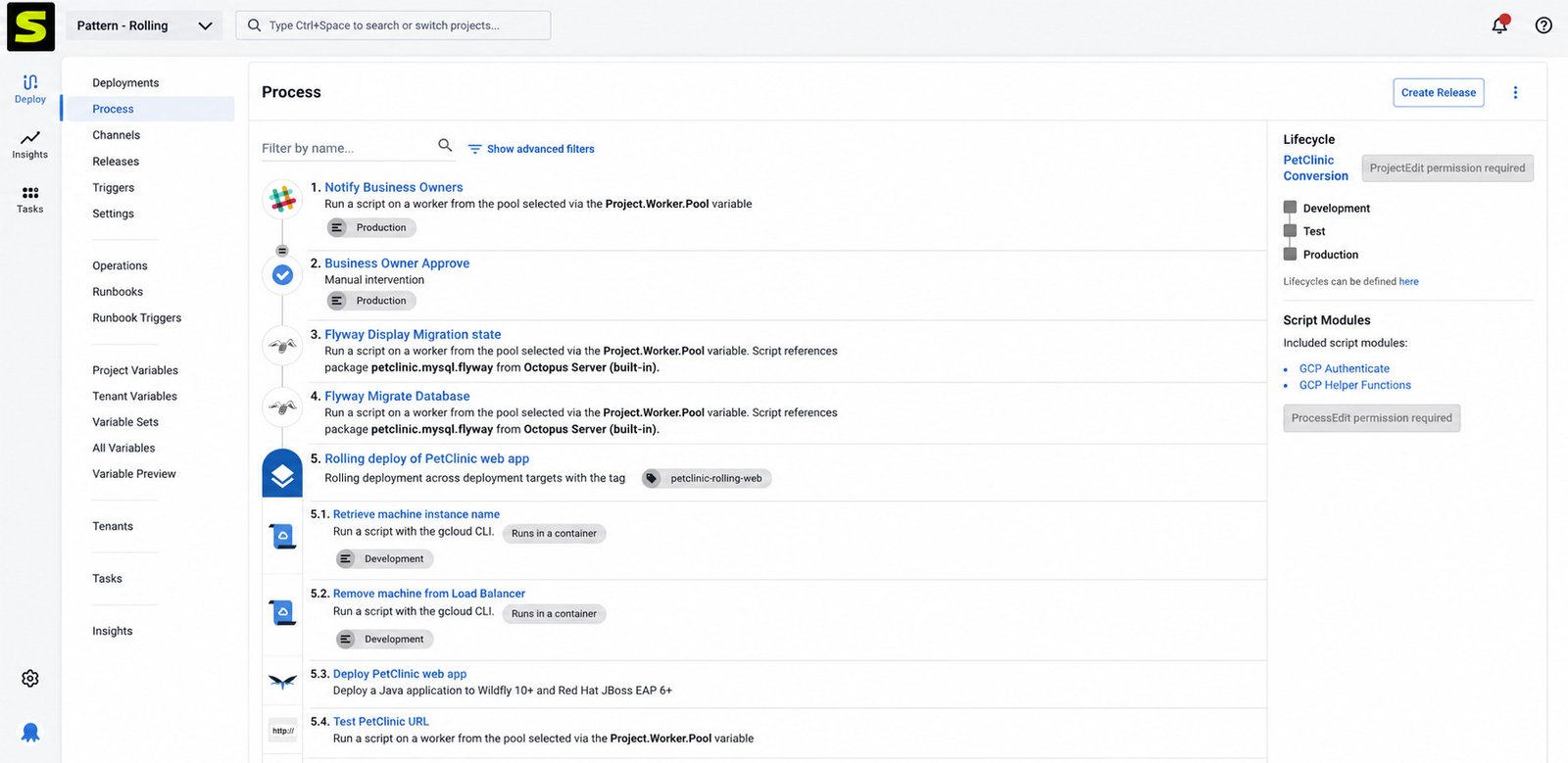
A project in Octopus contains everything about how one application gets deployed — its steps, variables, and release history. The deployment process is a visual, step-based builder where you drag in actions like “Deploy a Package,” “Run a Script,” or “Deploy to Kubernetes.”
Configuring Environments, Targets, and Variables
Once your project exists, add your environments in the order releases should flow through them, register your deployment targets (servers, Kubernetes clusters, or cloud services), and define any variables your deployment steps need — database URLs, API keys, feature flags, and so on.
It helps to think of this stage as building the “map” your releases will travel through. Once the map is correct, every future release just follows it automatically, which is exactly the point.
How to Use Octopus Deploy
Octopus Deploy Tutorial for Beginners
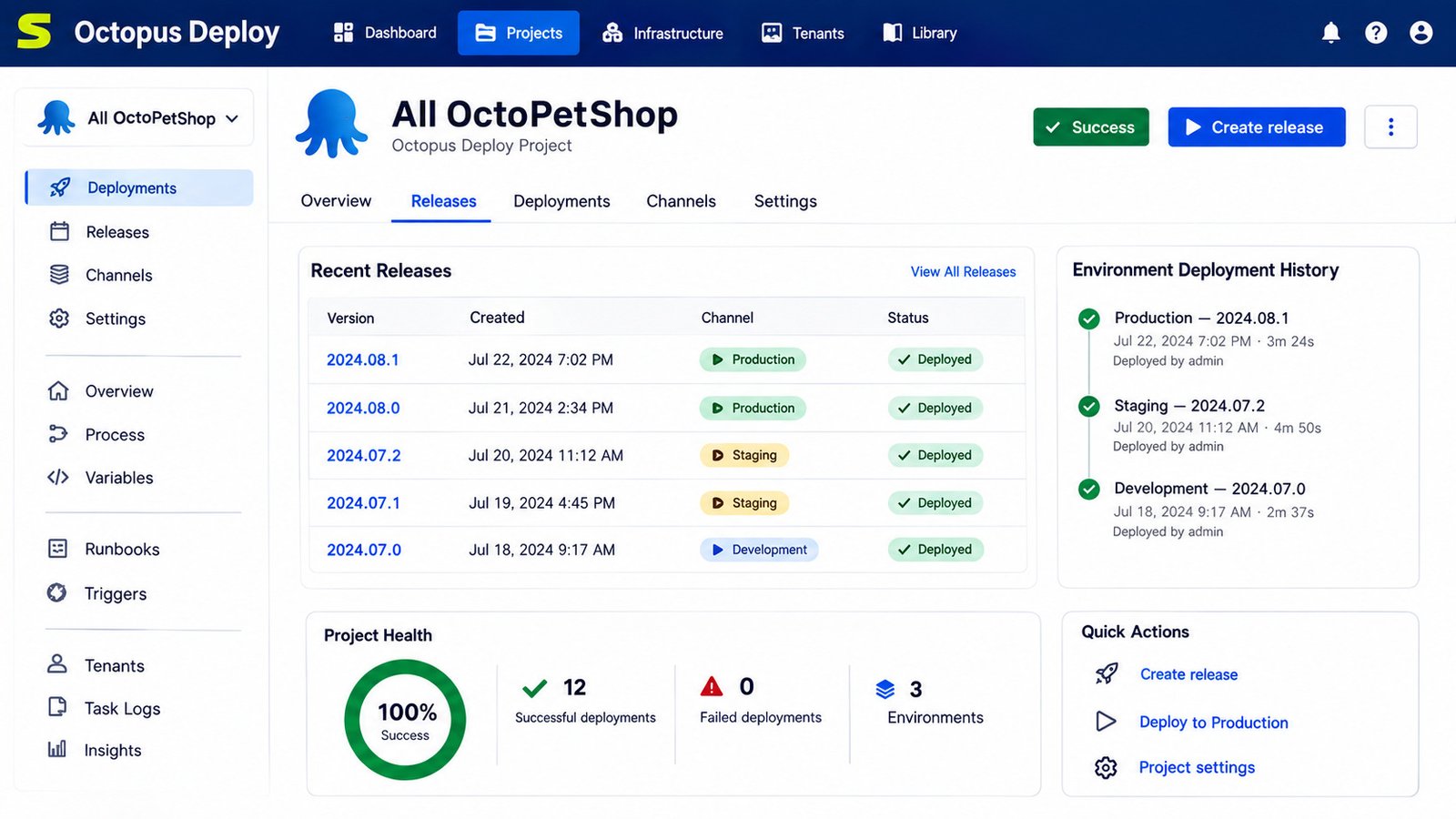
Using Octopus day-to-day generally means: create a release, deploy it to the first environment, check the results, then promote it forward. The dashboard gives a clear visual of where every release currently sits.
New users often appreciate that the dashboard doubles as a communication tool — instead of a project manager asking “is this live yet?” in a chat channel, anyone with access can simply look at the release timeline and see for themselves.
Creating and Managing Deployment Processes
Deployment processes are edited visually, step by step. You can reorder steps, add conditional logic, and reuse process templates across multiple projects so you’re not rebuilding the same logic repeatedly.
How to Deploy an Application With Octopus Deploy
- Push your package (from your CI tool or manually) to the Octopus built-in repository.
- Create a new release in your project.
- Choose the target environment.
- Click deploy, or let scheduled/automatic rules trigger it.
- Monitor real-time logs as each step executes.
Managing Releases and Deployment Lifecycles
Every release keeps a full history: what changed, who approved it, and where it has been deployed. If something breaks, teams can roll back to a previous known-good release in a couple of clicks rather than scrambling to reverse-engineer a fix.
This lifecycle view is also where compliance-minded teams get real value, since every state change — from “created” to “deployed” to “rolled back” — is timestamped and tied to a specific user automatically.
Octopus Deploy Deployment Automation Tutorial
Building an Automated Deployment Workflow
Start by mapping out your release path — which environments a change passes through and what gates exist between them. Then translate that map directly into Octopus’s environment and lifecycle settings so the tool enforces your process automatically.
Octopus Deploy Continuous Delivery Tutorial
For teams practicing continuous delivery, the goal is a pipeline where every merged change is automatically deployed to Dev and Staging, with only the final Production step requiring manual approval. This balances speed with safety.
Automating Multi-Environment Software Deployments
Octopus’s channels and lifecycles features let you control exactly which releases are allowed into which environments — for example, only stable-tagged builds may reach Production, while feature branches stay confined to Dev.
Monitoring and Managing Deployment Results
Every deployment produces detailed logs, and Octopus’s dashboard highlights failures immediately, with links straight to the failing step so engineers aren’t hunting through raw log files.
Octopus Deploy Integrations
Octopus Deploy and Jenkins
Octopus integrates with Jenkins through a dedicated plugin, letting Jenkins handle build and test stages while Octopus takes over packaging, versioning, and deployment.
Octopus Deploy and GitHub Actions
An official GitHub Action lets teams push build artifacts straight from a GitHub Actions workflow into Octopus, triggering a release automatically on every merge.
Octopus Deploy and Azure DevOps
Octopus has deep, native integration with Azure DevOps Pipelines, making it a popular pairing for organizations already standardized on Microsoft’s DevOps stack.
Octopus Deploy and GitLab CI
GitLab pipelines can call the Octopus CLI or REST API directly to push packages and trigger releases, keeping the same “build in GitLab, deploy with Octopus” separation of concerns.
Using Octopus Deploy API for Automation
Octopus exposes a full REST API and command-line tool (octo / Octopus CLI), so almost anything doable in the web portal can also be scripted — useful for teams building custom automation on top of Octopus.
Octopus Deploy for Cloud and Infrastructure
Octopus Deploy Kubernetes Support
Native Kubernetes support has been part of Octopus since 2018, letting teams deploy Helm charts, raw YAML manifests, and standard Kubernetes objects with the same variable scoping and approval workflows used for traditional deployments.
Octopus Deploy and Docker
Octopus can deploy Docker containers directly, pulling images from any registry and managing container lifecycle alongside the rest of your release process.
Octopus Deploy for Microsoft Azure
Built-in steps support Azure Web Apps, Azure Functions, and other Azure resources, with authentication handled through Azure service principals.
Octopus Deploy for AWS
Octopus includes steps for AWS CloudFormation, ECS, S3, and Lambda, so teams running AWS-native infrastructure can manage deployments without leaving the platform.
Octopus Deploy and Terraform
For infrastructure-as-code workflows, Octopus can run Terraform plans and applies as deployment steps, tying infrastructure changes to the same approval and audit process as application releases.
Octopus Cloud vs Octopus Deploy Server
What Is Octopus Cloud?
Octopus Cloud is the fully managed, SaaS version of the platform. Hosting, upgrades, and backups are handled entirely by Octopus, so teams simply log in and start configuring projects.
Octopus Cloud Features and Deployment Management
Octopus Cloud includes the same core deployment automation features as Server, plus automatic version upgrades and built-in high availability, without requiring any infrastructure management from your team.
Self-Hosted Octopus Deploy Server
Octopus Server runs on your own infrastructure, giving full control over data residency, networking, and upgrade timing — a common requirement for regulated industries or air-gapped environments.
Choosing Between Octopus Cloud and Self-Hosted Deployment
| Factor | Octopus Cloud | Octopus Server |
|---|---|---|
| Hosting | Managed by Octopus | Self-managed |
| Setup effort | Minimal | Requires infrastructure and a database |
| Data control | Limited | Full control |
| Best for | Fast-moving teams, small IT overhead | Regulated industries, on-prem needs |
Octopus Deploy Pricing
Octopus Deploy Pricing Plans
Octopus offers several tiers across both Cloud and Server, generally starting with a genuinely usable free plan, moving through a Professional tier with expanded support hours, and topping out at Enterprise, which adds high availability, advanced integrations (like ServiceNow and Jira Service Management), unlimited instances, and a dedicated Customer Success Manager. The Enterprise tier provides advanced features for teams to scale, including high availability, DevOps Insights, ServiceNow & Jira Service Management integration, unlimited instances, 24/7 support & service credits, and a dedicated Customer Success Manager.
Cloud pricing is typically calculated per deployment target per month, with the per-target cost dropping as your target count grows.
Free and Trial Options
Octopus offers a Free tier for both Cloud and Server, along with a 30-day free trial of the Enterprise tier that requires no credit card. This makes it easy to test real deployment scenarios before committing to a paid plan.
What Affects Octopus Deploy Pricing?
The biggest cost driver is your number of deployment targets — servers, containers, or Kubernetes clusters you’re deploying to. Beyond that, your choice between Cloud and Server, your support tier, and any enterprise add-ons will shift the final price.
Is Octopus Deploy Worth the Cost?
For teams managing more than a handful of environments or services, the time saved from eliminating manual, error-prone deployments usually outweighs the subscription cost quickly. Smaller teams can comfortably start on the free tier and scale up only when they actually need enterprise features.
As a rule of thumb, teams with a handful of deployment targets can often stay comfortably on the free tier for a long time, while organizations scaling past a few dozen targets or requiring premium support should budget for the Professional or Enterprise tier from the outset.
Octopus Deploy Review
Octopus Deploy Features Review
Octopus consistently earns praise for its clean, visual deployment process builder, its scoped variable system, and its reliability handling complex, multi-service releases that would otherwise require custom scripting.
Octopus Deploy Pros and Cons
Pros
- Clear, visual deployment process editor
- Strong environment and variable management
- Native Kubernetes, Docker, Azure, and AWS support
- Solid free tier for smaller teams
- Detailed audit trail and rollback support
Cons
- Can feel like overkill for very simple, single-server apps
- Self-hosted setup requires a SQL Server database and some initial configuration
- Learning curve for teams new to release orchestration concepts
Ease of Use, Automation, and Scalability
New users generally find the interface approachable, especially compared to writing deployment logic from scratch. As deployments scale to dozens of services, the visual approach continues to hold up better than most teams expect.
Who Should Use Octopus Deploy?
Octopus is the strongest fit for teams deploying to multiple environments, running complex or multi-service applications, or operating in industries where an audit trail and approval gates genuinely matter — think finance, healthcare, government, and enterprise SaaS.
Octopus Deploy Alternatives
Best Octopus Deploy Alternatives
Popular alternatives include Jenkins, GitHub Actions, Azure DevOps, GitLab CI, Argo CD, Harness, and Bamboo, each with a different balance of flexibility, hosting model, and learning curve.
Octopus Deploy vs Jenkins
Jenkins is a general-purpose automation server that can handle deployments through plugins and scripting, but it requires significantly more manual setup to reach the same level of environment management and release visibility Octopus provides out of the box.
Octopus Deploy vs Azure DevOps
Azure DevOps Pipelines cover both CI and CD in one product, which appeals to Microsoft-centric teams. Octopus, by contrast, specializes purely in deployment and tends to offer deeper environment progression and variable scoping features.
Octopus Deploy vs GitHub Actions
GitHub Actions is excellent for CI and simple deployments tied tightly to a GitHub repository, but it lacks Octopus’s dedicated release management, multi-environment orchestration, and detailed audit history for complex applications.
Octopus Deploy vs GitLab CI
GitLab CI offers an integrated build-to-deploy pipeline within GitLab itself. Teams with simpler deployment needs may find it sufficient, while those needing advanced environment progression often pair GitLab CI with Octopus.
Octopus Deploy vs Argo CD
Argo CD focuses specifically on GitOps-style Kubernetes deployments. Octopus supports Kubernetes too, but adds broader support for non-Kubernetes infrastructure like traditional Windows and Linux servers.
Harness vs Octopus Deploy
Harness leans heavily on AI-driven automation and verification for cloud-native deployments, while Octopus emphasizes a more direct, visual, and predictable process — a tradeoff between automated intelligence and hands-on control.
Octopus Deploy vs Bamboo
Reviewers generally find Octopus Deploy easier to use and easier to do business with overall compared to Bamboo, though Bamboo has an edge in ease of administration for some teams. Octopus’s free entry tier also gives it an edge for smaller teams evaluating cost.
Octopus Deploy vs Other Deployment Tools
How Octopus Deploy Compares With CI/CD Platforms
Most CI/CD platforms bundle build, test, and deploy into a single tool. Octopus instead specializes in deployment, which means deeper release management features but also the need to pair it with a separate CI tool for building and testing.
Deployment Automation vs Build Automation
It’s a common point of confusion: build automation compiles and packages code, while deployment automation takes that package and gets it running reliably in a live environment. Octopus focuses entirely on the second half of that equation.
Release Automation Tools for DevOps Teams
Release automation tools like Octopus reduce the human error inherent in manual releases by codifying the deployment process itself, not just the code that gets deployed.
How to Choose the Right Deployment Software
Consider your infrastructure mix (cloud, on-prem, or hybrid), the complexity of your applications, your compliance requirements, and how much control you want over the release process before comparing pricing.
Octopus Deploy Consulting Services
When to Consider Octopus Deploy Consulting
Organizations migrating from manual deployment processes, or moving off a legacy CI/CD tool, often bring in consulting support to map their existing release process cleanly onto Octopus’s environment and lifecycle model.
Deployment Automation Implementation Services
Implementation partners typically help design deployment processes, configure environments and targets, and train internal teams on maintaining the pipeline afterward.
CI/CD Pipeline Migration and Optimization
For teams moving from tools like Jenkins or Bamboo, consultants can help re-architect existing pipelines to take full advantage of Octopus’s release and variable management features rather than simply replicating old scripts.
Enterprise DevOps and Release Management Support
Larger organizations often work with Octopus’s own professional services or certified partners for enterprise rollouts involving high availability, compliance requirements, and large-scale multi-team adoption.
Octopus Deploy Company and Platform
Who Owns and Develops Octopus Deploy?
Octopus Deploy was founded by Paul and Sonia Stovell in 2012, after Paul Stovell watched engineers repeatedly struggle with manual, error-prone production deployments. The company is headquartered in South Brisbane, Australia, and remains a privately held company. Octopus has raised around $204 million in funding from investors including Insight Partners and Redgate Software.
Octopus Deploy Company Overview
Octopus grew profitably for years before taking outside investment, and today it’s a member of the Cloud Native Computing Foundation, reflecting its ongoing investment in Kubernetes and container tooling. The company now employs several hundred people and counts thousands of organizations among its customers.
Octopus Deploy Documentation and Learning Resources
Octopus maintains extensive official documentation covering installation, configuration, integrations, and best practices, along with community forums and webinars for teams getting started.
Octopus Deploy News and Product Updates
Octopus ships regular platform updates, historically using a year/release numbering scheme, with recent years focused heavily on expanding Kubernetes, cloud, and infrastructure-as-code support.
Frequently Asked Questions About Octopus Deploy
Octopus Deploy is a deployment automation and release management platform that takes finished software packages and reliably deploys them across environments like Dev, Staging, and Production.
It receives a versioned package from your CI tool, then runs a defined set of deployment steps to move that release through each environment in order, with optional approvals along the way.
It’s a CD (continuous delivery/deployment) tool specifically, not a CI tool, it’s typically paired with a CI server like Jenkins, GitHub Actions, or Azure DevOps that handles the build stage.
Yes, Octopus offers a free tier for both Cloud and Server editions, plus a 30-day free trial of the Enterprise tier with no credit card required.
Download the Octopus Server installer from the official site, run it, connect a SQL Server database, and create your admin account through the setup wizard.
Yes, native Kubernetes and Docker support has been built into Octopus since 2018, including support for Helm charts and raw manifests.
It depends on the need: Jenkins and GitHub Actions excel at CI, while Octopus specializes in deployment and release orchestration, so many teams use them together rather than choosing one over the other.
Conclusion
Deployment shouldn’t feel like a gamble. Octopus Deploy exists to turn what used to be a stressful, manual process into something predictable, auditable, and genuinely calm, whether you’re shipping a single app or coordinating dozens of interconnected services across cloud and on-prem infrastructure.
If you’re evaluating deployment automation tools for your team, starting with Octopus’s free tier is a low-risk way to see whether its approach fits how you work. And if you’re setting up other automation and field tools alongside your DevOps stack, resources like this QGroundControl download guide can help round out your toolkit for related technical projects.
For official documentation, pricing details, and downloads, always refer to the Octopus Deploy official website.
One Response