Hotel Reservation System: Download, Features, Setup, and Alternatives
Picture this: a guest calls at 9 p.m. asking about a room for next weekend, while another is checking availability on your website, and a third just booked through an OTA — all at the same time. Without the right tools, that’s a recipe for a double booking. A good hotel reservation system is what keeps all three of those moving parts in sync, automatically, so nothing slips through the cracks.
What Is a Hotel Reservation System and How Does It Work?
A hotel reservation system is software that manages room bookings, availability, rates, and guest details in one place, instead of juggling spreadsheets, phone logs, and a paper calendar.
Hotel Reservation System vs. Hotel Booking System
These terms get used interchangeably, but there’s a small distinction worth knowing. A reservation system usually refers to the back-end engine managing rooms and rates, while a booking system often points to the guest-facing side — the widget or page where someone actually books a room.
How Does a Hotel Reservation System Work?
At a basic level, the system holds a live map of every room, every date, and every rate. When a booking comes in — from the front desk, your website, or an OTA — it updates that map instantly so the same room can’t be sold twice.
Hotel Reservation Management and Room Booking
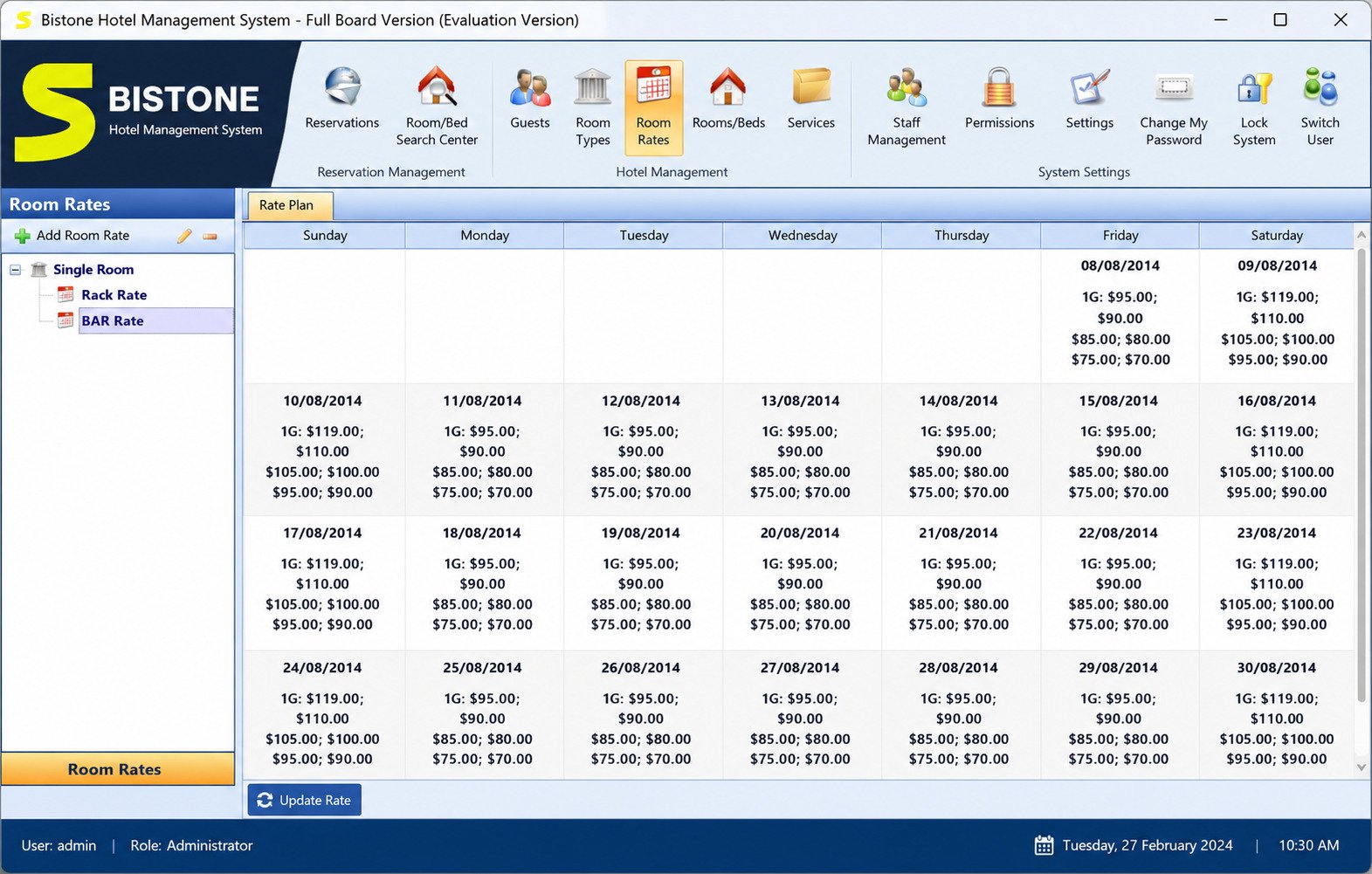
Staff can see who’s checking in today, which rooms are ready, and which are already booked out weeks in advance, all from a single dashboard.
Automated Hotel Reservation Systems for Hotels
Automation is where the real time savings show up: confirmation emails, rate changes, and availability updates all happen without someone manually re-typing the same information into three different systems.
Hotel Reservation System Example and Typical Workflow
- A guest searches dates on your website
- The system checks live availability
- The guest pays online
- A confirmation email goes out
- The front desk sees the new booking appear on their calendar — all within seconds
Hotel Reservation Software and Booking System Features
Hotel Room Booking and Reservation Management
At minimum, expect a room calendar, guest profiles, and the ability to create, modify, or cancel a reservation without digging through old records.
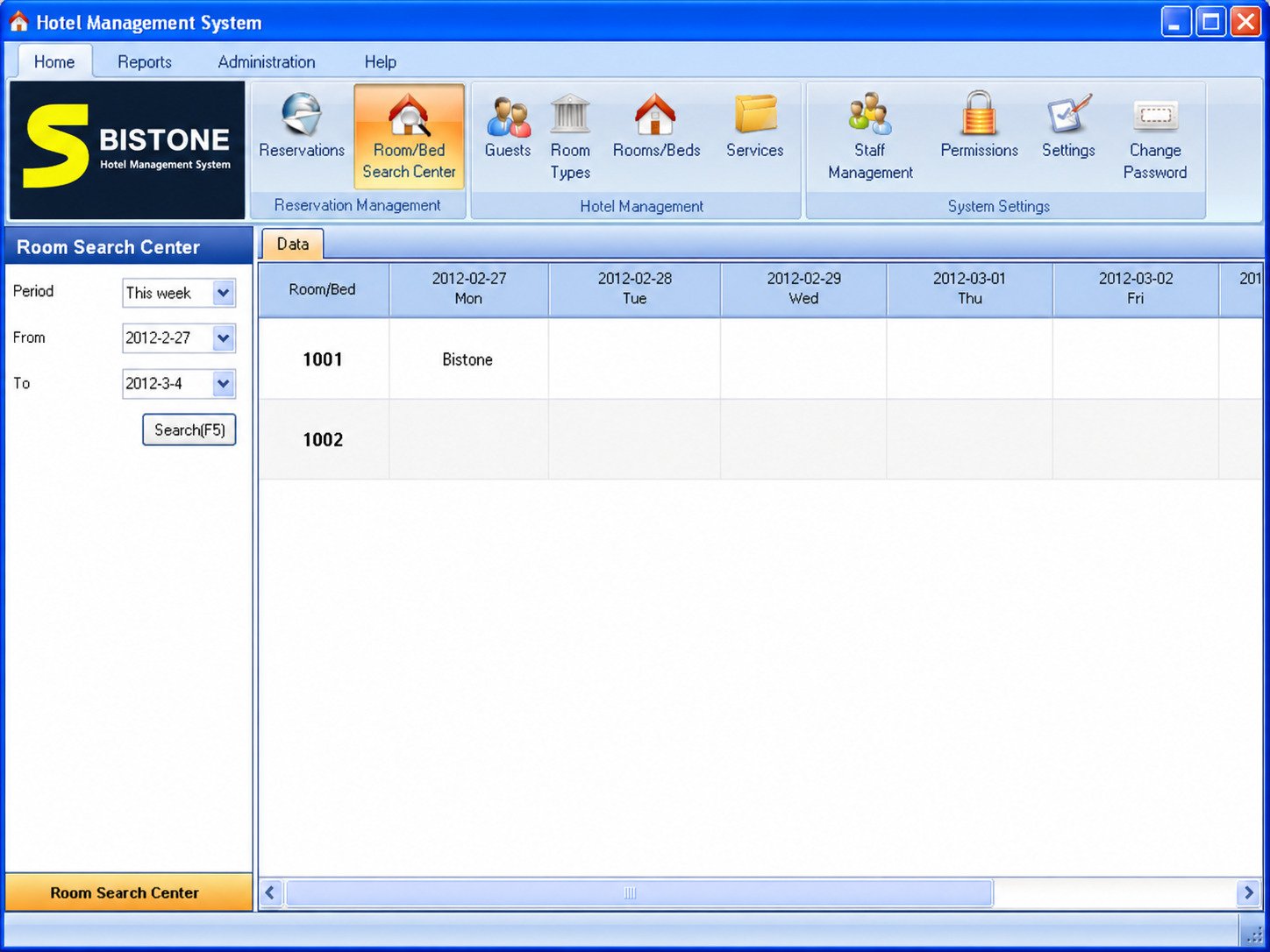
Hotel Reservation Calendar and Room Availability
A visual, color-coded calendar view is one of the most useful features day to day — it shows which rooms are open, occupied, or blocked for maintenance at a glance.
Hotel Guest and Front Desk Management
Front-desk tools typically cover check-in, check-out, room assignment, and guest communication history, so any staff member can pick up where another left off.
Hotel Room Inventory and Availability Management
Inventory management means the system tracks not just rooms, but room types, rate plans, and how many units of each are actually sellable on any given night.
Hotel Booking Confirmations and Notifications
Automatic confirmation emails and SMS reminders cut down on no-shows and reduce the number of “did my booking go through?” calls your staff has to field.
Hotel Payment Management and Online Payments
Most modern systems support online payments through gateways like Stripe or PayPal, letting guests pay a deposit or the full amount at the time of booking.
Hotel Booking Reports and Reservation Analytics
Reports on occupancy rate, average daily rate, and booking source help owners see what’s actually working and where money is quietly leaking to OTA commissions.
Hotel Booking Automation and Reservation Management
Beyond confirmations, automation can also handle dynamic pricing rules, minimum-stay restrictions, and closing out inventory automatically when a property is fully booked.
Hotel Booking Engine and Direct Online Reservations
What Is a Hotel Booking Engine?
A booking engine is the guest-facing tool — usually embedded on your hotel’s website — that lets someone check availability and book directly, without going through a third-party site.
Hotel Booking Engine vs. Reservation System
Think of the reservation system as the engine room and the booking engine as the steering wheel guests use themselves; a full reservation platform typically includes both.
Direct Hotel Booking and Website Reservations
Direct bookings matter because they skip OTA commissions, which commonly run between 15% and 30% per booking — a meaningful chunk of revenue on every reservation.
OTA commissions of 15–30% per booking add up fast. If direct bookings are a small share of your total, a stronger booking engine and website integration is usually the highest-leverage fix.
Online Hotel Booking Engine and Booking Widget
Most booking engines can be embedded as a simple widget or “Book Now” button, so setup doesn’t require rebuilding your entire website.
How to Accept Hotel Bookings Online
You’ll generally need three things: a booking engine, a connected payment gateway, and updated room rates and availability synced to it.
Hotel Website Booking System and Reservation Integration
Integration with your existing website is usually done through a plugin, embed code, or API, depending on which platform your site is built on.
Hotel Reservation System With Payment Gateway
Look for a system that supports the payment processors already popular in your market — a mismatch here is one of the most common setup headaches hoteliers report.
Hotel Management System and PMS Integration
Hotel Property Management System and Reservation Software
A Property Management System (PMS) handles the operational side — housekeeping, front desk, invoicing — while the reservation system feeds it new bookings.
Hotel PMS vs. Hotel Reservation System
A reservation system alone can take bookings; a full PMS goes further, covering day-to-day hotel operations beyond just the booking itself.
Hotel Front Desk and Front Office Software
Front office tools inside a PMS typically manage check-in/out, room status, and guest folios — the running bill tied to a stay.
Hotel Operations, Guest, and Room Management
The best setups tie guest history, room status, and billing together so staff aren’t switching between five different tools during a single check-in.
Hotel Inventory and Booking Management
Inventory and bookings need to stay in lockstep — if a PMS and reservation system don’t talk to each other properly, double bookings creep back in fast.
Hotel Reservation System With Channel Manager
A channel manager connects your reservation system to OTAs like Booking.com and Expedia, syncing rates and availability across all of them automatically.
Hotel Reservation System for Small Hotels and Independent Properties
Small and independent properties don’t need enterprise-grade complexity — they need something quick to learn and priced sensibly.
Little Hotelier, Sirvoy, and Hotelogix are frequently recommended for properties under roughly 30 rooms, since their pricing and setup are built around smaller teams rather than large hotel groups. ThinkReservations and RoomRaccoon are also worth a look for boutique hotels and inns wanting an all-in-one PMS, booking engine, and channel manager without a steep learning curve.
Pricing for small-property tools typically starts around $90 to $110 per month, varying with room count and which modules you need. If ease of use matters more than deep customization, prioritize a clean dashboard and short onboarding — many small properties delay upgrading simply because setup felt intimidating. Boutique properties often value flexibility in guest communication, while guest houses and B&Bs can usually get away with a leaner, cheaper plan given lower booking volumes.
Online Hotel Reservation System for Hotels
Online Hotel Booking and Room Reservation
An online-first setup means guests can book, pay, and receive confirmation without ever calling the front desk.
Online Hotel Reservation Management
Managing bookings online also means staff can update rates and block out rooms remotely, not just from a desk at the property.
Hotel Website Integration and Direct Bookings
The stronger your website integration, the more direct bookings you’ll capture instead of losing that revenue to OTA commissions.
Online Room Booking and Availability Management
Real-time syncing between your website, front desk, and any connected OTAs is the single most important technical requirement here.
Hotel Reservation Software With Online Payments
Guests increasingly expect to pay upfront, and offering that option tends to reduce cancellations and no-shows.
Hotel Booking Software With Booking Engine and Channel Manager
Bundled solutions (booking engine + channel manager + PMS in one subscription) tend to be simpler to manage than stitching together separate tools from different vendors.
Hotel Reservation System With Channel Manager and OTA Integration
What Is a Hotel Channel Manager?
A channel manager is the piece of software that keeps your rates and room availability identical across every OTA and your own website at the same time.
Hotel Channel Management and Online Distribution
Without one, updating a rate change means manually editing it on every single OTA — a slow, error-prone process for any property listed on more than one or two channels.
Hotel Booking Distribution Across OTAs
Distribution across platforms like Booking.com, Expedia, and Airbnb widens your reach, but only if inventory updates instantly to prevent overbooking.
Hotel Reservation Channel Manager Integration
Most reservation systems either include a built-in channel manager or integrate with a dedicated one like SiteMinder.
Hotel OTA Management and Booking Synchronization
Good synchronization means a booking made on any channel — OTA or direct — is reflected everywhere else within moments, not hours.
Free Hotel Reservation Software and Booking Systems
Best Free Hotel Reservation Software
Truly free, full-featured hotel software is rare — most “free” listings are trial versions of paid platforms rather than permanently free tools.
Free Hotel Booking Software for Small Hotels
If budget is the main constraint, an open-source option is usually the more realistic “free” route rather than searching for a free tier of commercial software.
Free Hotel Reservation System for Small Properties
Free and open-source systems shift the cost from a monthly subscription to your own time — you’ll typically need someone comfortable with basic server setup.
Free Room Booking and Reservation Software
QloApps is one of the better-known open-source options, offering a property management system, booking engine, and hotel website builder at no license cost. For a deeper technical comparison of self-hosted tools, this open-source software roundup is worth a look.
Open Source Hotel Reservation Systems
Open-source tools give you full control and no recurring fees, but you’re generally responsible for your own hosting, updates, and security patches.
Pros of Open Source
- No recurring license fee
- Full control over customization
- No vendor lock-in
Cons of Open Source
- You manage hosting and updates
- Security patching is on you
- Support is community-based, not guaranteed
Free Hotel PMS and Management Software
Some vendors offer a free tier for very small properties (often capped at a handful of rooms) as a way to upsell to paid plans later — worth checking before assuming it’s a permanent free option.
Free Hotel Booking Engine Options
A handful of booking-engine plugins offer free versions with basic functionality, usually gating channel management or payment integrations behind a paid upgrade.
Hotel Reservation System for WordPress Websites
Best Hotel Booking Plugin for WordPress
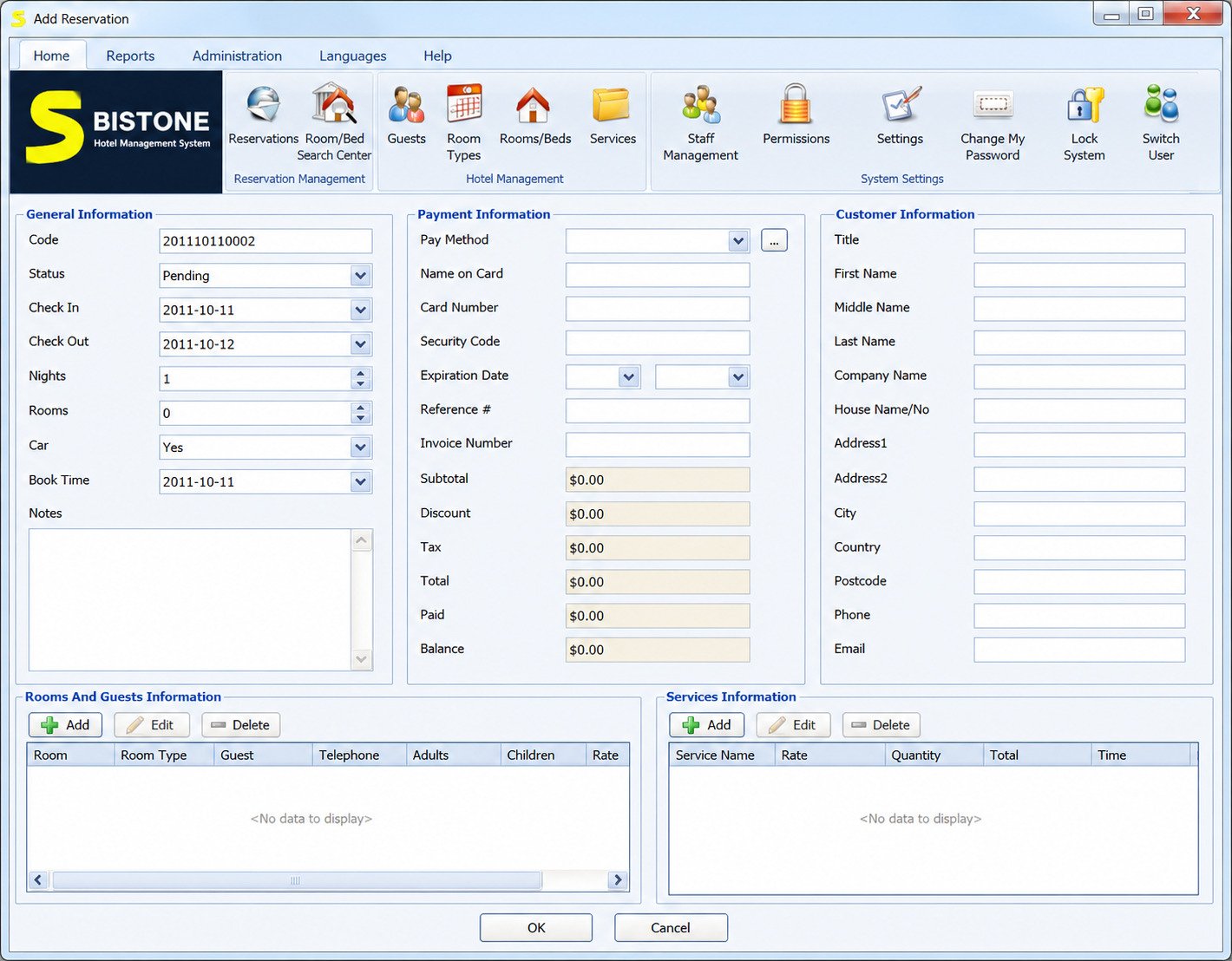
If your hotel’s website already runs on WordPress, a dedicated booking plugin is usually the fastest way to add reservations without switching platforms entirely. Most handle a calendar, room types, and basic payments, with premium add-ons for channel management, and can be dropped into any page using a simple shortcode. Free tiers typically cover a single property with limited room types — fine for a small B&B, tighter for a multi-room hotel. Bistone Soft’s hotel reservation system is one option worth reviewing for WordPress-based sites.
How to Choose the Best Hotel Reservation Software
Match the software to your property size first — an enterprise system built for 200-room chains will feel like overkill for a 15-room inn. From there, a few things matter more than a long feature checklist:
- Ease of setup and support — small teams rarely have a dedicated IT person on hand.
- Payment processor support — confirm your country’s preferred processors are covered before committing.
- Booking engine quality — test how it actually looks and feels on mobile, since that’s what guests interact with.
- Channel manager fit — a built-in one saves paying for and integrating a separate tool if you list on multiple OTAs.
- Room and rate plan limits — some budget tools cap these lower than expected, so check against your actual property.
How to Set Up a Hotel Reservation System
Most platforms follow a similar setup sequence:
- Sign up and add your property details
- Add rooms, room types, and base rates
- Set cancellation and payment policies
- Connect a payment gateway
- Embed the booking engine on your website (via plugin, embed code, or API key)
- Run a full test booking before announcing it publicly
Once live, day-to-day management happens through a single dashboard covering new bookings, cancellations, and rate adjustments. Automation rules — like auto-confirming small bookings or blocking rooms during maintenance — are usually configured once and left running.
Hotel Reservation System for Different Types of Properties
| Property Type | Typical Priority | Example Fit |
|---|---|---|
| Independent hotel | Direct bookings, channel manager | Cloudbeds, RoomRaccoon |
| Boutique hotel | Branding, guest experience | ThinkReservations, Sirvoy |
| Guest house / B&B | Simplicity, low cost | Little Hotelier |
| Motel | Fast check-in, walk-in bookings | Hotelogix |
| Resort | Multi-service bookings (spa, dining) | Larger PMS platforms |
| Vacation rental | Calendar sync across listing sites | Lodgify |
Hotel Reservation System vs. Hotel Booking Engine vs. PMS
Hotel Reservation System vs. Booking Engine
A reservation system is the broader category; a booking engine is one specific piece of it, focused on the guest-facing booking step.
Hotel PMS vs. Reservation System
A PMS covers hotel operations beyond bookings — housekeeping, invoicing, guest folios — while a reservation system is narrowly focused on the booking itself.
Hotel Booking Engine vs. OTA
A booking engine lives on your own website and keeps the commission; an OTA is a third-party marketplace that takes a cut in exchange for extra visibility.
When Should a Hotel Use a Reservation System?
Any property taking more than a handful of bookings a month benefits from one — the moment double bookings or missed reservations start happening, it’s time.
Hotel Reservation Software Comparison and Alternatives
| Software | Best For | Free Trial | Channel Manager |
|---|---|---|---|
| Little Hotelier | Small B&Bs and guesthouses | Yes | Yes |
| Cloudbeds | All-in-one independents under 100 rooms | Yes | Yes |
| Sirvoy | Boutique hotels wanting simplicity | Yes | Yes |
| SiteMinder | Distribution-focused hotels | Yes | Core product |
| QloApps | Budget-conscious, technical teams | Free (open source) | Limited/add-on |
How to Compare Hotel Reservation Software
Weigh setup time, monthly cost, and how well the booking engine performs on mobile — those three factors tend to matter more day-to-day than a long feature checklist.
Frequently Asked Questions About Hotel Reservation Systems
It’s software that manages room bookings, availability, and rates in one place instead of spreadsheets or phone logs.
A reservation system is the back-end engine; a booking system usually refers to the guest-facing tool used to make a booking.
It keeps a live, shared record of room availability that updates instantly whenever a booking is made from any channel.
Popular options include Little Hotelier, Cloudbeds, Sirvoy, RoomRaccoon, and open-source QloApps, depending on property size and budget.
Little Hotelier and Sirvoy are commonly recommended for small, independent properties due to simpler pricing and faster onboarding.
Yes, most modern systems integrate with payment gateways like Stripe or PayPal for deposits or full upfront payment.
Yes, typically through an embeddable booking widget, plugin, or API depending on the website platform.
Yes, many providers offer this as a bundled feature, or support integration with popular standalone PMS platforms.
QloApps is a genuinely free, open-source option; most other “free” listings are trial versions of paid software.
Yes, real-time availability tracking across every room type is one of its core functions.
It’s the guest-facing tool, usually on your website, that lets travelers check availability and book directly.
It’s the software layer that keeps your rates and availability synced across every OTA and your own website simultaneously.
Yes, though you’d be limited to phone or walk-in bookings — you’d lose the ability to accept direct bookings through your website.
Final Verdict: Choosing the Right Hotel Reservation System
There’s no single “best” hotel reservation system — only the one that actually fits your property’s size, budget, and the way your team already works. A 12-room guesthouse and a 90-room independent hotel have genuinely different needs, and the right software should feel like it was built for your situation, not scaled down from something bigger.
Start with what’s actually costing you money or time today — missed bookings, OTA commissions, or manual rate updates — and let that guide which features matter most. Whichever system you choose, the goal stays the same: fewer double bookings, happier guests, and a front desk that isn’t drowning in spreadsheets by Friday afternoon.
For a deeper technical look at self-hosted options, QloApps’ open-source platform is worth reviewing if your team is comfortable managing your own hosting and updates.
2 Responses