Astrophotography Software
DeepSkyStacker: Download, Features, Setup, and Alternatives
You’ve spent hours in the cold pointing a camera at the night sky, and your single best shot still looks grainy and faint compared to those crisp nebula photos online. That gap usually comes down to one thing: stacking. DeepSkyStacker is the free tool most amateur astrophotographers turn to for combining dozens of individual exposures into one clean, detailed image.
This guide walks through what DeepSkyStacker actually does, how calibration frames work, a full setup and stacking workflow, common problems, and how it stacks up against other astrophotography software.
What Is DeepSkyStacker?
DeepSkyStacker is a free Windows application built specifically to combine multiple long-exposure astrophotography images of deep-sky objects — nebulae, galaxies, and star clusters — into a single, cleaner, more detailed final image.
What Does DeepSkyStacker Actually Do?
Rather than editing a single photo, it takes dozens (sometimes hundreds) of individual exposures of the same target, aligns them precisely, and combines them mathematically to boost faint detail while reducing background noise.
Built for Deep-Sky Astrophotography Specifically
It’s worth noting that DeepSkyStacker is optimized for deep-sky targets and isn’t designed for planetary, lunar, or solar imaging, which typically use different stacking techniques entirely.
How Image Stacking Actually Improves Your Photos
Every single exposure contains random sensor noise mixed in with the actual signal from your target. Stacking many frames together averages out that random noise while the real signal — the nebula, galaxy, or star cluster — reinforces itself, producing a dramatically cleaner result than any single shot could achieve.
DeepSkyStacker Features
Automatic Star Detection and Alignment
The software automatically detects stars across your frames and performs sub-pixel alignment, correcting for small tracking errors or field rotation that naturally occur during a long imaging session.
Support for RAW, DSLR, and Multiple File Formats
DeepSkyStacker works with RAW files from most DSLR cameras, along with TIFF, JPEG, FITS, and PNG formats, so you’re not locked into one specific camera or workflow.
Full Calibration Frame Support
Beyond your main images, it accepts dark, flat, and bias/offset calibration frames to correct for sensor noise, vignetting, and dust spots on your optical train.
Batch Processing
You can queue multiple full image sets for processing, which is useful if you’re working through several imaging sessions of the same or different targets.
Comet Mode
For imagers photographing moving objects like comets, DeepSkyStacker includes a dedicated stacking mode that accounts for the object’s motion across frames.
Completely Free
Unlike several higher-end astrophotography suites, DeepSkyStacker is entirely free to download and use, which makes it a common starting point for beginners. Check out the project on GitHub for source and release notes.
Here’s a quick summary of the core feature set:
| Feature | What It Does |
|---|---|
| Star detection & alignment | Automatically registers frames to correct tracking drift |
| Calibration frame support | Uses dark, flat, and bias frames to remove noise/artifacts |
| RAW/DSLR compatibility | Works directly with camera RAW files |
| Multiple stacking methods | Average, median, and sigma-clipping options |
| Batch processing | Queue multiple sessions or targets |
| Comet mode | Stacks images of moving objects |
DeepSkyStacker Download
Getting the Free Download
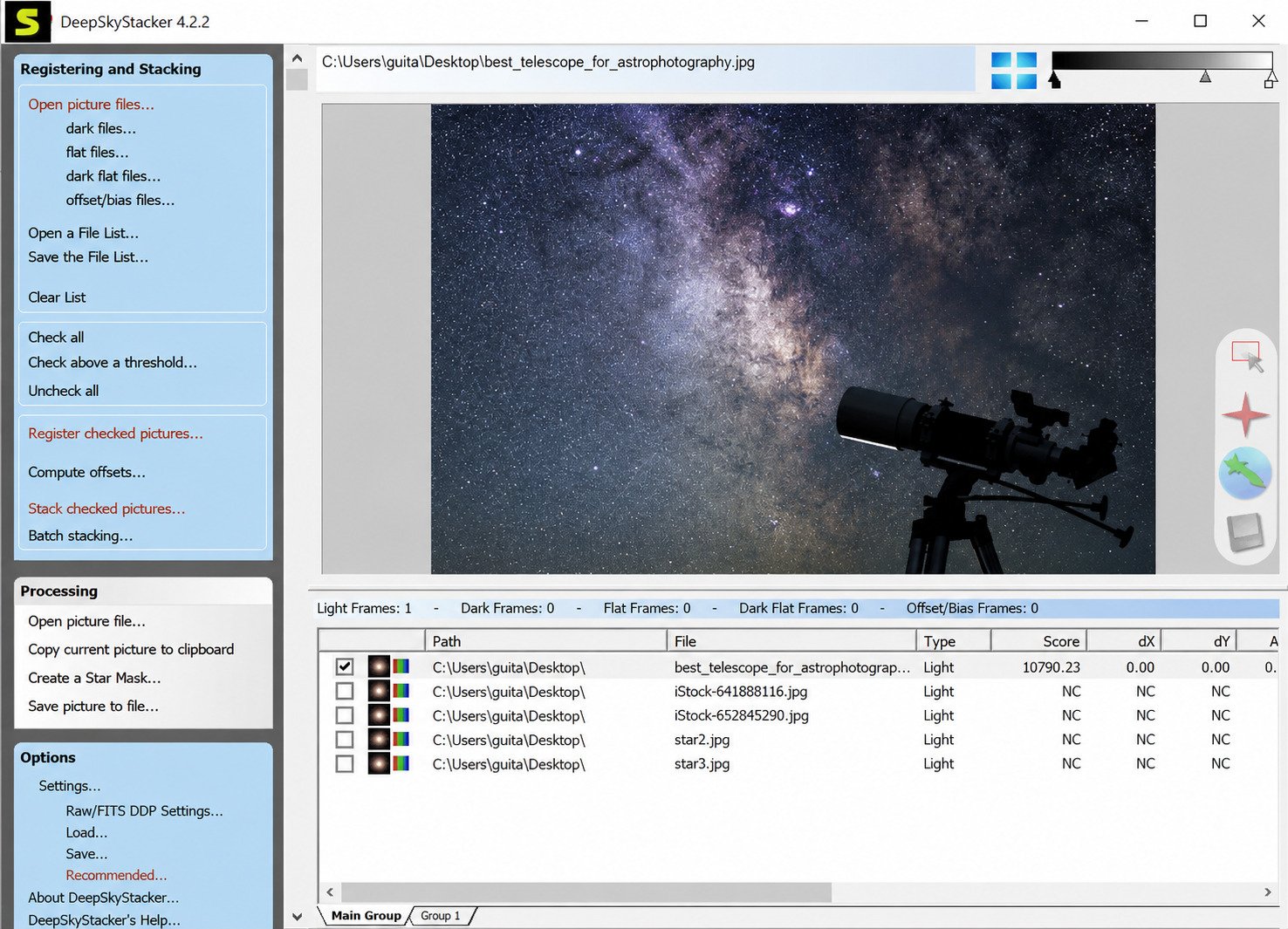
DeepSkyStacker is available as a free download from its official site, with the installer built specifically for Windows systems.
Latest Version
The software continues to receive updates, so it’s worth checking the official download page for the current release before installing, especially if you’re troubleshooting a bug that may already be fixed in a newer build.
Windows Compatibility
DeepSkyStacker runs on both Windows 10 and Windows 11. It’s a lightweight application, so most modern desktops and laptops can run it comfortably, though large stacking jobs benefit from more RAM and faster storage.
How to Install DeepSkyStacker
- Download the installer from the official DeepSkyStacker website.
- Run the setup file and follow the on-screen installation prompts.
- Launch the application once installation completes.
- Organize your image files into separate folders before your first stacking session — lights, darks, flats, and bias frames each in their own folder.
- Confirm your files are in a supported format (RAW files typically give the best results).
Preparing Your Images Before Stacking
Good results start before you even open the software. Capture at least 20 to 30 light frames of your target for meaningful noise reduction, and try to shoot your calibration frames during the same session for the most accurate corrections.
How to Use DeepSkyStacker
Loading Your Light Frames
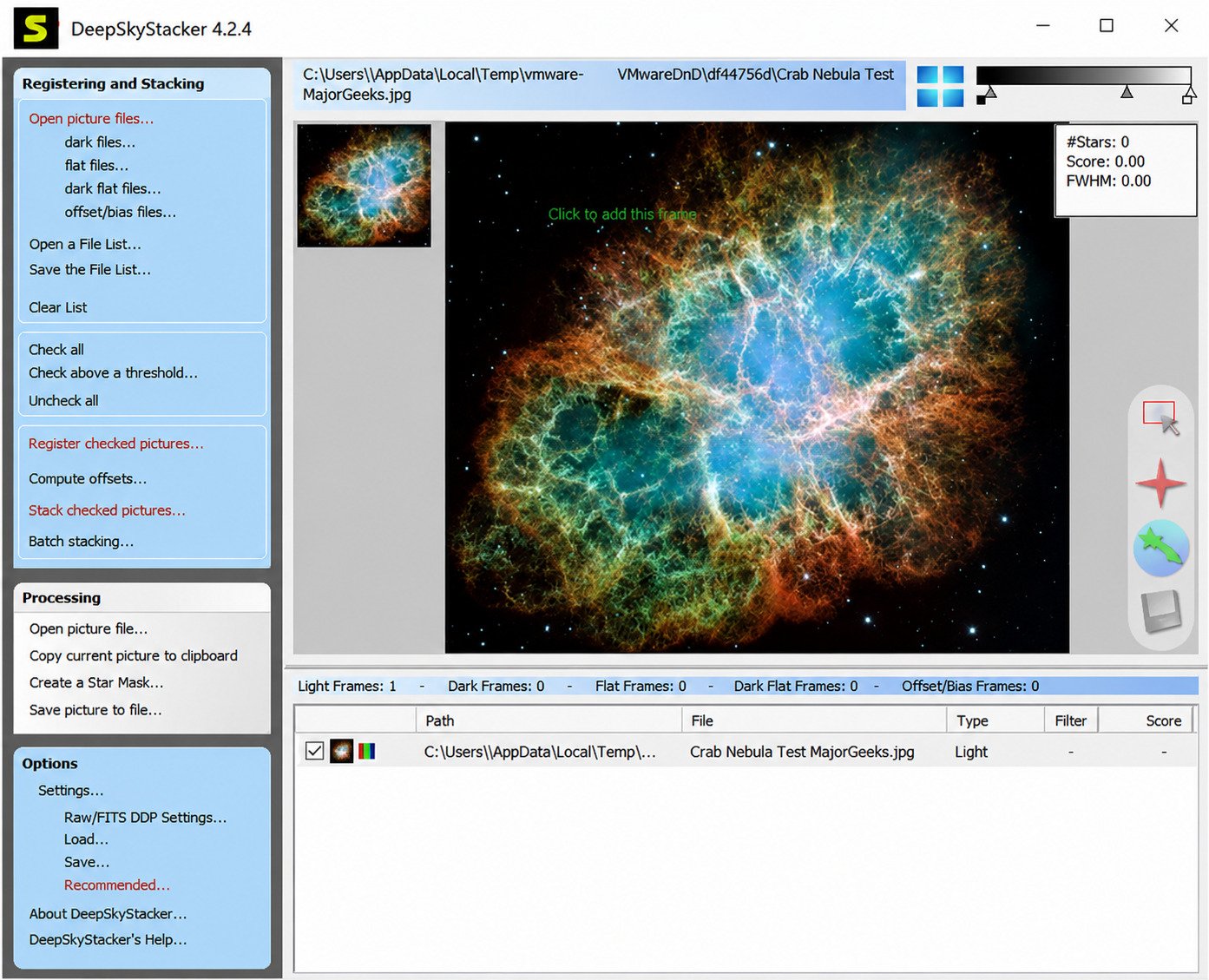
Click “Open Picture Files” and select every light frame from your imaging session — these should all be of the same target, same camera settings, and same orientation.
Adding Calibration Frames
Next, load your dark, flat, and bias frames using their respective buttons. DeepSkyStacker will check that exposure settings, ISO, and temperature roughly match across the set and flag anything mismatched.
Registering and Stacking
Once everything is loaded, DeepSkyStacker automatically registers (aligns) your frames, then stacks them using your chosen method — this is typically a one-click process after setup.
Saving Your Result
The final stacked image can be exported as a TIFF or FITS file, ready for further processing in an editor like Photoshop, GIMP, or PixInsight.
DeepSkyStacker Calibration Frames Explained
Calibration frames are what separate a genuinely clean astrophoto from a noisy one, and understanding each type makes a real difference in your results.
Light Frames
These are your actual exposures of the target object — the nebula, galaxy, or star cluster you’re photographing.
Dark Frames
Captured with the lens cap on, using the same exposure length, ISO, and sensor temperature as your light frames, dark frames record the noise your sensor generates on its own, which DeepSkyStacker then subtracts from your lights.
Flat Frames
These correct for vignetting and uneven illumination caused by dust or smudges in your optical path, typically captured by photographing an evenly lit surface.
Bias (Offset) Frames
Taken at your camera’s shortest possible exposure with the lens capped, bias frames remove the base readout signal your sensor produces every time it’s read, regardless of exposure length.
How They Work Together
| Frame Type | Captures | Corrects For |
|---|---|---|
| Light | Your actual target | N/A — this is the data itself |
| Dark | Sensor noise at matching settings | Thermal/sensor noise |
| Flat | Evenly lit surface | Vignetting, dust spots |
| Bias/Offset | Shortest possible exposure | Sensor readout signal |
How to Stack RAW and DSLR Images
Working With RAW Files
RAW files generally produce the best stacking results because they preserve the most sensor data before any in-camera compression, giving DeepSkyStacker more information to work with during calibration and alignment.
DSLR-Specific Considerations
DeepSkyStacker for Nebulae, Galaxies, and Star Clusters
Whether you’re imaging a bright nebula, a faint distant galaxy, or a dense star cluster, the underlying stacking process stays the same — more well-calibrated light frames generally translates directly into a cleaner, more detailed final image, regardless of target type.
Best DeepSkyStacker Settings and Stacking Tips
Choosing a Stacking Method
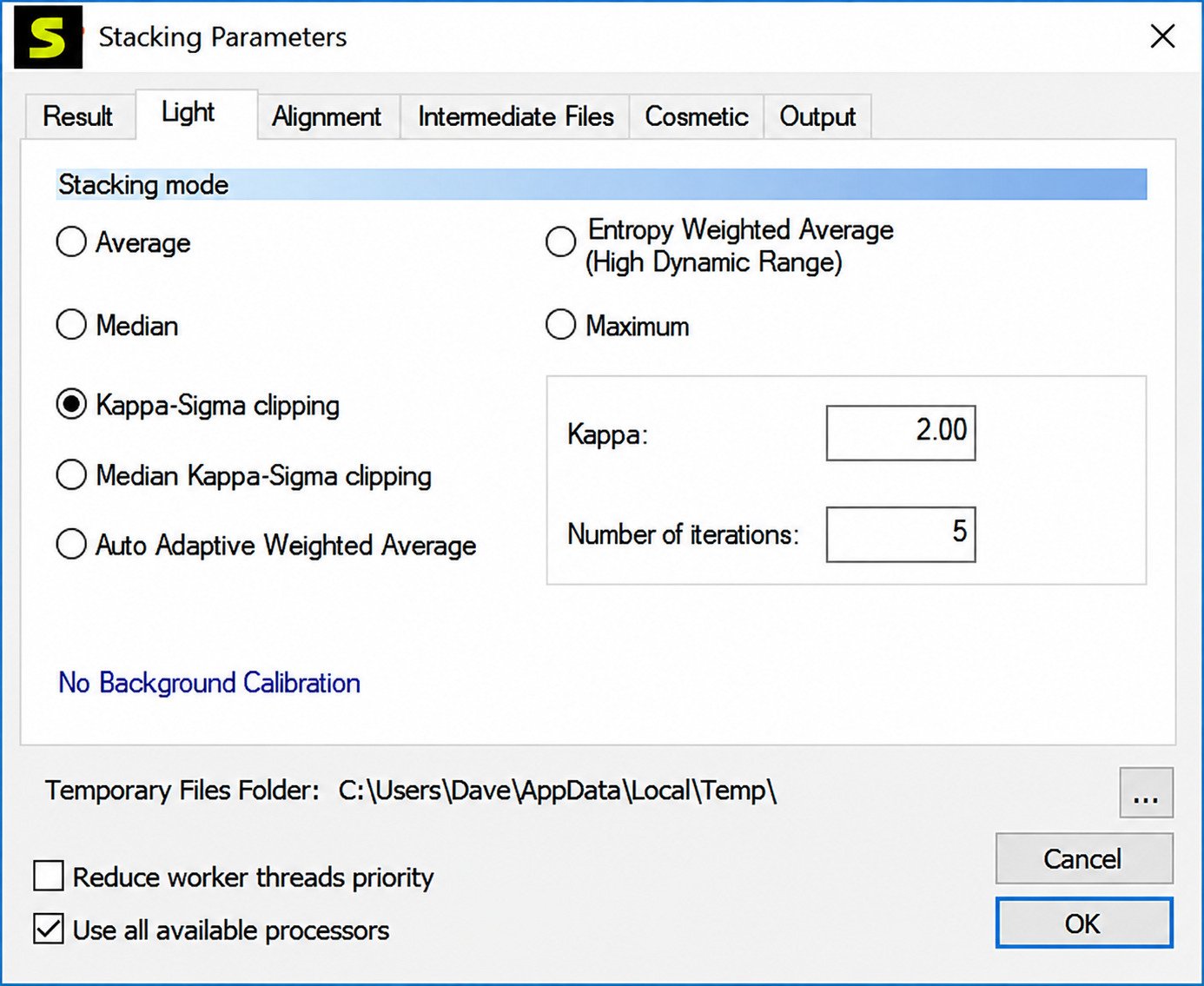
DeepSkyStacker offers several combination methods, including average, median, and Kappa-Sigma clipping — the latter is popular because it automatically rejects outlier pixels (like satellite trails or cosmic ray hits) while preserving genuine detail.
How Many Frames Should You Stack?
More frames generally mean better noise reduction, with most guides recommending at least 20 to 50 light frames as a solid starting point for meaningful improvement.
Reviewing Frame Quality First
Before stacking, it’s worth inspecting your frames and discarding the weakest ones — many imagers keep only their best 80–90% of captures rather than including every single frame regardless of quality.
Troubleshooting: DeepSkyStacker Not Working
Images Won’t Stack
This is often caused by mismatched file formats or corrupted files in your light frame folder — try loading a smaller test batch to isolate the problem file.
DeepSkyStacker Can’t Open RAW Files
Make sure your camera model’s RAW format is supported by your installed version, and check for a software update if a newer camera format isn’t recognized.
Images Aren’t Aligning Correctly
Poor star detection usually results from frames with too few visible stars, heavy clouds, or extreme field rotation — try a different alignment method (Bilinear, Bicubic, or Bisquared) if Automatic isn’t producing good results.
Stacked Image Looks Too Dark or Flat
This is typically a stretching issue rather than a stacking problem — the raw stacked output often looks dim until you apply levels or curves adjustments in a separate image editor.
DeepSkyStacker vs. Other Astrophotography Software
| Software | Cost | Best For |
|---|---|---|
| DeepSkyStacker | Free | Beginners doing deep-sky stacking |
| Siril | Free | More advanced processing with scripting support |
| PixInsight | Paid | Professional-grade processing and calibration |
| Sequator | Free | Simpler nightscape and Milky Way stacking |
| Astro Pixel Processor | Paid | Automated workflows with strong mosaic support |
DeepSkyStacker vs. Siril
Siril is also free and offers more advanced scripting and processing tools, making it a natural next step once you outgrow DeepSkyStacker’s simpler interface.
DeepSkyStacker vs. PixInsight
PixInsight is a paid, professional-grade tool with far deeper processing controls, but it comes with a steeper learning curve and price tag that many beginners don’t need right away.
Strengths
- Completely free with no paid tiers
- Full calibration frame support
- Handles RAW, TIFF, JPEG, FITS, PNG
- Simple, beginner-friendly workflow
- Dedicated comet stacking mode
Limitations
- Windows only
- Not built for planetary or solar imaging
- Less advanced than paid tools like PixInsight
- Output still needs stretching/editing elsewhere
Which Should You Choose?
For anyone just starting out in deep-sky astrophotography, DeepSkyStacker’s combination of being free, beginner-friendly, and genuinely effective makes it the most common recommendation before moving to more advanced software.
Frequently Asked Questions
It’s a free Windows application that combines multiple deep-sky astrophotography exposures into one cleaner, more detailed image.
Yes, it’s completely free to download and use, with no paid tiers or subscriptions.
Load your light frames along with any dark, flat, and bias calibration frames, then let the software automatically register and stack them.
Yes, it supports RAW files from most DSLR cameras alongside TIFF, JPEG, FITS, and PNG formats.
Light frames are your actual target images, while dark, flat, and bias frames each correct for a different type of sensor noise or optical imperfection.
Most guides recommend at least 20 to 50 well-calibrated light frames as a solid starting point for noticeable noise reduction.
Yes, it runs on both Windows 10 and Windows 11 without special configuration.
Is DeepSkyStacker Worth Using?
For anyone starting out in astrophotography, DeepSkyStacker remains one of the most practical entry points precisely because it’s free, focused, and genuinely capable of transforming noisy individual exposures into a real, presentable final image. The calibration frame workflow takes a little getting used to, but once you understand what lights, darks, flats, and bias frames each do, the rest of the process becomes routine.
If you’re building out a broader toolkit of hobby software alongside your astrophotography setup, checking a tool like SteamDB can be handy for keeping track of game pricing and updates during downtime between imaging sessions. Either way, mastering stacking is the single biggest jump in image quality most beginners will make — everything after it is refinement.
One Response