Video Duplicate Finder Download, Features, Setup, and Alternatives
Open your video folder and sort by size. Chances are you’ll spot the same clip three times, once from a phone backup, once from a download, once from an old drive.
Video Duplicate Finder is a free, open-source tool built for exactly this mess. It compares what videos look like, not just what they’re named. That means it can catch copies that ordinary tools miss.
This guide covers how it works, how to install it, how to scan safely, and what to try if it isn’t the right fit.
Quick answer: Video Duplicate Finder (VDF) is a cross-platform app that finds duplicate videos and images by visual similarity. It detects copies with different resolutions, frame rates, or watermarks.
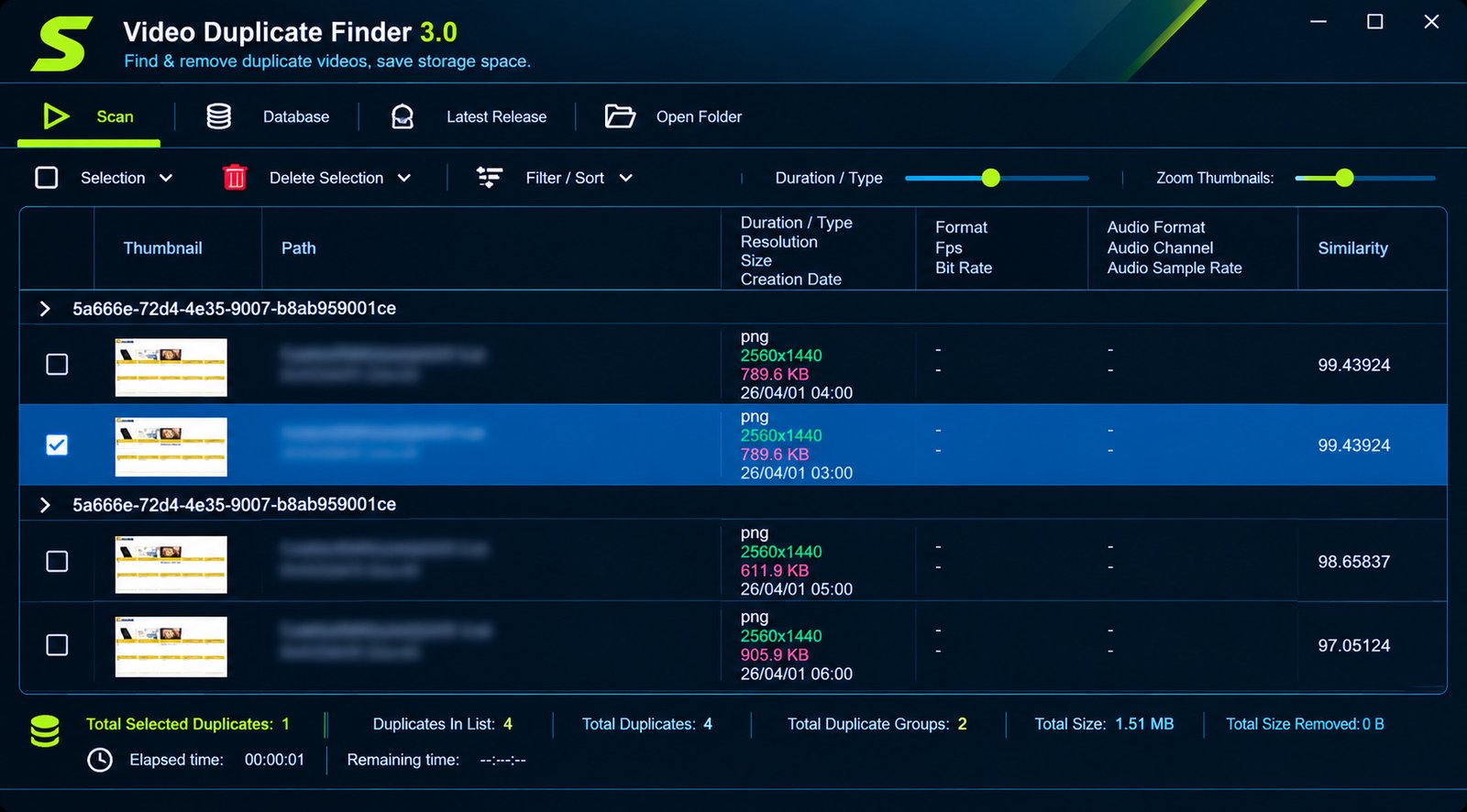
What Is Video Duplicate Finder and How Does It Work?
What Is Video Duplicate Finder Software?
Video Duplicate Finder is a desktop application developed by the GitHub user 0x90d. Its project page describes it as cross-platform software that finds duplicate video and image files based on similarity.
In simple terms, it looks at the picture, not the filename. Two files can have different names, sizes, and formats and still be flagged as the same video.
How Video Duplicate Detection Works
VDF reads frames from each video using FFmpeg, the widely used open-source media toolkit. It turns those frames into compact digital fingerprints and stores them in a local database.
Once fingerprints exist, comparing thousands of files becomes fast. The first scan does the heavy reading. Later scans reuse saved data.
Duplicate Video Detection vs. Simple File Matching
Basic duplicate finders compare file bytes or checksums. That works only when two files are perfectly identical.
Here is how the two approaches differ:
| Feature | Simple File Matching | Content-Based Detection (VDF) |
|---|---|---|
| Finds exact copies | Yes | Yes |
| Finds re-encoded copies | No | Yes |
| Handles different resolutions | No | Yes |
| Handles watermarked versions | No | Yes |
| Speed on first scan | Very fast | Slower |
Who Should Use Video Duplicate Finder?
It suits anyone with a growing media library:
- Photographers and videographers with multiple backups
- Users who download clips from many sources
- Families merging phone footage from several devices
- Editors who keep exports at different quality levels
If you download streaming content with tools like StreamFab, duplicates pile up quickly. A content-based scan helps you reclaim that space.
Video Duplicate Finder Features
Similarity-Based Detection
The core feature is finding videos that are visually alike. The project states that it catches duplicates that differ in resolution, frame rate, and even watermarks.
Partial Clip Detection
Newer versions can also find when a shorter video is an excerpt of a longer one. The project says this uses audio fingerprinting, and results show a clip offset so you know where the excerpt begins.
AI Matching for Edited Copies
VDF also offers an optional neural pass. According to the project wiki, it targets cropped, mirrored, zoomed, letterboxed, or color-graded copies. It’s optional, so you can skip it for quick scans.
Scan Folders, Drives, and Large Collections
You choose where to look, and you can add several folders at once. That includes internal drives, external drives, and network locations you can access.
Multiple Ways to Run It
Besides the desktop app, there’s a command-line version and a Docker-based web interface. The project notes that they share the same scanning engine and database.
| Interface | Best For |
|---|---|
| Desktop app (GUI) | Most home users |
| Command line (CLI) | Automation and scripting |
| Web interface (Docker) | Servers and NAS setups |
How to Find Duplicate Videos on a PC
Short answer: Install VDF, add your video folders, choose a scan profile, press Scan, then review the matches.
Select Folders and Locations to Scan
Start small. Pick one folder, such as “Downloads” or “Camera Uploads,” for your first run.
The wiki’s quick start tells you to add folders under Where to look. You can widen the search once you trust the results.
Scan a Hard Drive, SSD, or USB Drive
The process is the same for any storage type. Connect the drive, add it as a location, and scan.
External drives are usually slower than internal SSDs. Expect longer waits when reading large files over USB.
Find Duplicates by Content
Choose a scan profile under What to look for. The wiki suggests starting with Edited & altered copies if you’re unsure.
This mode compares visual content rather than raw bytes. It’s the reason VDF can match a compressed copy to its original.
How Automatic Scanning Works
After you press Scan, VDF reads each file, builds fingerprints, and compares them. You don’t need to click through each file.
Results appear as pairs or groups, and you decide what to do with them.
How to Find Similar Videos and Compare Video Files
Duplicate Videos vs. Similar Videos
A duplicate is the same video saved more than once. A similar video is close but not identical, like a trimmed version or a lower-quality export.
Both can waste space. Knowing which you have changes what you keep.
How Video Similarity Detection Works
VDF compares fingerprints from several points in each video. If enough of them match within your chosen threshold, the pair is flagged.
A stricter threshold means fewer false matches. A looser one catches more edited copies but needs more review.
Compare Two Video Files
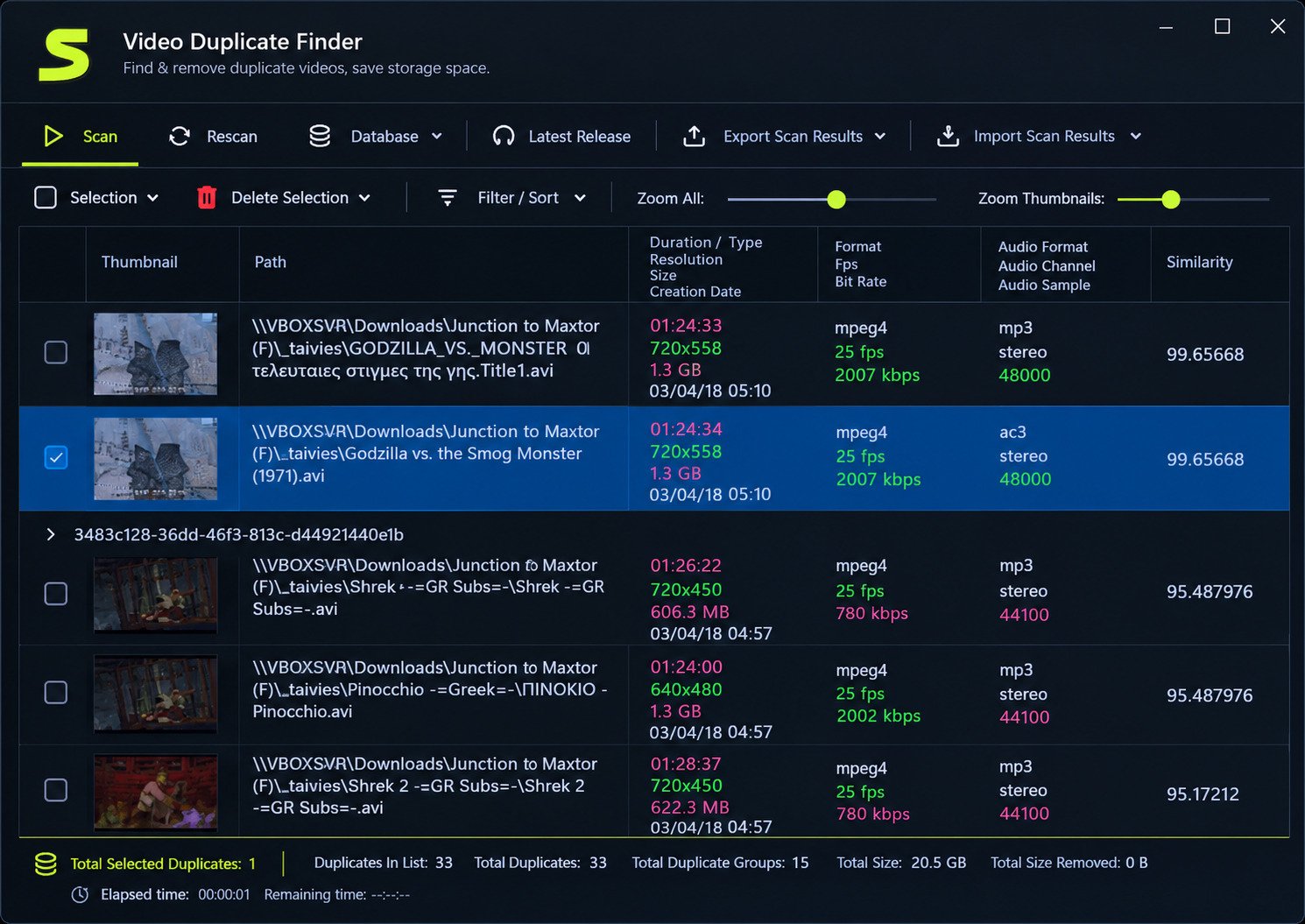
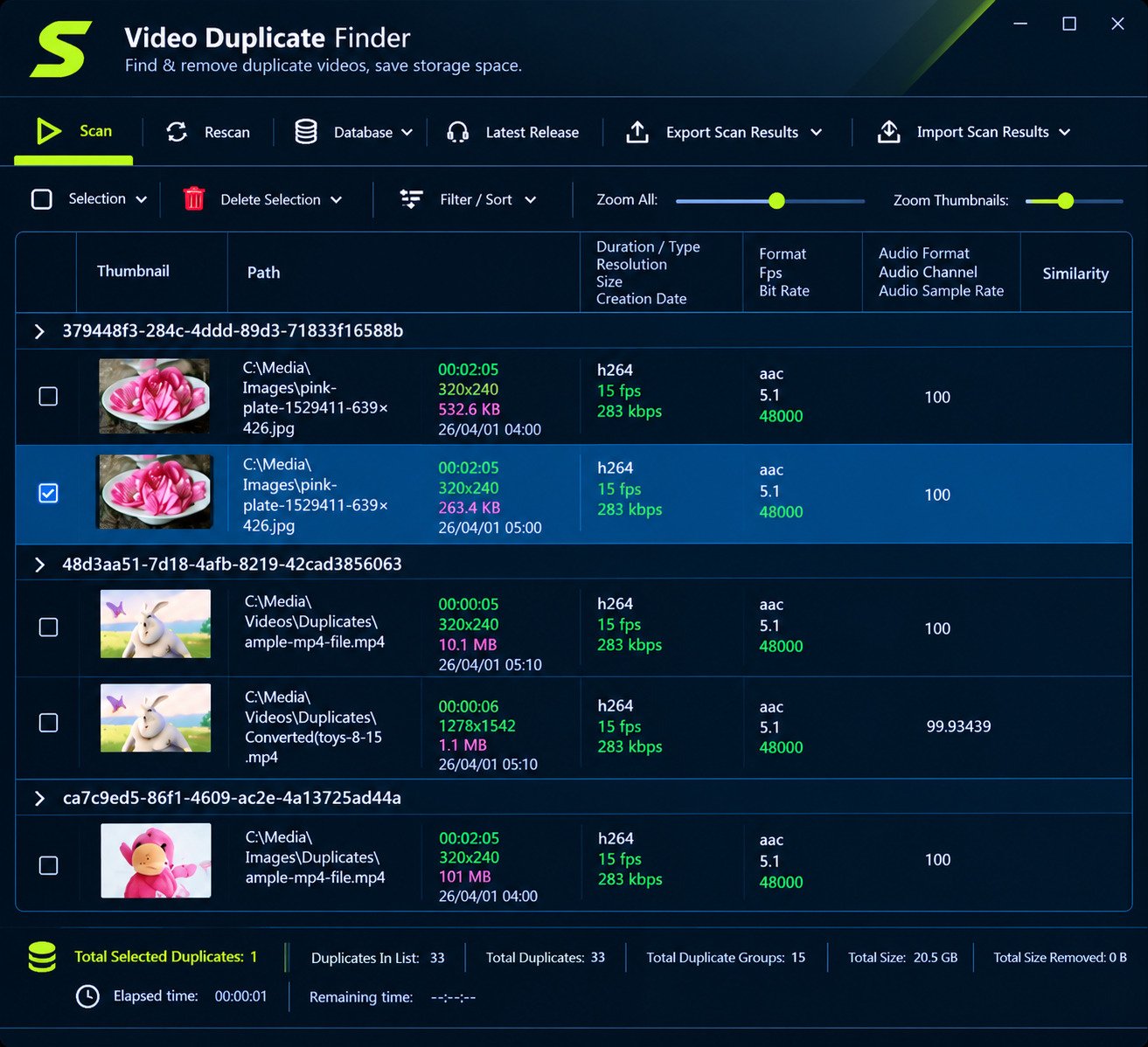
When results show up, you can inspect pairs side by side. Look at resolution, duration, file size, and format.
Then choose which copy stays. Higher resolution and longer duration usually indicate the better file.
When Similarity Detection Beats File Matching
Similarity detection wins in these situations:
- You converted a video from MKV to MP4
- You compressed a file to save space
- A friend sent you a watermarked copy
- You kept both a full video and a shorter clip
Video Duplicate Finder and Supported Video Formats
VDF relies on FFmpeg, which reads most common formats. That includes MP4, AVI, MKV, and MOV. Because matching is content-based, the container matters less than the picture inside.
Scanning Mixed Formats Together
You can scan a folder containing several formats at once. An MP4 and an MKV of the same movie can still be paired.
What to Consider When Comparing Formats
Different formats can hide different quality levels. Before deleting anything, check these points:
- Resolution: 1080p beats 720p
- Bitrate: Higher usually means better detail
- Audio tracks: Some copies carry extra languages or subtitles
- Compatibility: MP4 plays almost everywhere; MKV may need a player like VLC
How to Remove Duplicate Videos Safely
Short answer: Review every match, keep the best-quality copy, and delete the rest only after checking.
Review Matches Before Deleting
Warning: Never delete blindly. A tool can flag two files as similar when they’re actually different episodes or scenes.
Preview both files. Two minutes of checking beats hours of regret.
Keep the Best Version
Use this simple checklist:
- Highest resolution
- Best audio quality
- Correct duration
- No watermark
- Preferred format
Avoid Accidentally Deleting Important Videos
Try these habits:
- Back up irreplaceable footage first
- Test on a small folder
- Send files to the recycle bin instead of permanently deleting, if the option is available
- Start with conservative similarity settings
Free Up Storage Space
Video files are large, so even a few dozen duplicates can free up many gigabytes. Sort results by file size and handle the biggest ones first.
Video Duplicate Finder for Windows
VDF is built to run on Windows, Linux, and macOS. On Windows, you launch the GUI directly from the program folder.
Windows 10 and Windows 11
The project describes itself as cross-platform, but always check the current release notes for exact system requirements. This matters because the project updates regularly and requirements can change.
Windows Scanning Options
You can scan local drives, external drives, and accessible network folders. Just make sure Windows has permission to read them.
Video Duplicate Finder Download and Installation
Where to Download
Caution: Get it only from the official GitHub repository by 0x90d, under Releases. Avoid random download sites, since third-party pages sometimes bundle unwanted software.
Is It Free?
Yes. It’s open-source. The project states it is licensed under AGPLv3, and older listings mention GPLv3, so check the repository for the current license.
Latest Version and Portable Use
Releases are posted on the GitHub page. Desktop builds usually come as an archive you extract and run, which feels portable, though you should read the release notes for details.
How to Install It
- Download the release for your operating system
- Extract the archive
- Launch the app (on Windows, start VDF GUI)
- Let it download FFmpeg and FFprobe if prompted
The wiki says VDF needs both tools and will try to fetch them automatically. If that fails, the README explains manual installation.
Choose a Database Format on First Launch
Newer versions ask you to pick a fingerprint format once:
| Format | Speed | Accuracy | Notes |
|---|---|---|---|
| 16×16 | Fastest | More false positives | pHash unavailable |
| 32×32 (recommended) | Slightly slower first scan | Fewer false positives | pHash available |
Permanent choice: This choice is permanent unless you delete the database, so 32×32 is the safer pick for most people.
How to Use Video Duplicate Finder
Configure and Start
- Open the app
- Add folders under Where to look
- Choose a scan profile under What to look for
- Press Scan
Analyze Results
Sort by size or similarity. Preview both files in each pair, then mark the copy you want to remove.
Settings Worth Knowing
- Similarity threshold: Controls how strict matching is
- Max Parallel: Sets how many files are processed at once
- Scan profile: Decides how deep the comparison goes
The wiki suggests higher parallel values (for example 4 to 8) can work well on local SSD or NVMe drives. Slower or networked drives usually need lower values.
Video Duplicate Finder for Large Video Collections
Why the First Scan Is Slow
The wiki is upfront about this: the first run involves lots of file reading, so it takes longest. Later scans are faster because information is already saved.
Tips for Faster Scanning
- Scan one drive at a time
- Use lower parallel settings on external or network drives
- Close heavy apps while scanning
- Keep the tool’s database so repeat scans reuse it
- Use the supported FFmpeg version if you enable native bindings
Managing Big Libraries
Break a huge library into batches, such as one year or one project at a time. Clean each batch, then move on.
Video Duplicate Finder Review: Features, Performance, and Usability
Strengths
- Content-based detection catches re-encoded copies
- Handles resolution, frame rate, and watermark differences
- Free and open-source
- Works on multiple operating systems
- Optional AI and clip detection for advanced cases
Limitations
- First scan can be slow on big libraries
- Setup involves FFmpeg
- The interface is functional rather than polished
- Loose thresholds require manual review
- Open-source support means community help, not a customer service desk
Overall Verdict
For people who want deep, similarity-based scanning without paying, VDF is a strong choice. Beginners may need a few minutes to learn the settings.
Video Duplicate Finder Troubleshooting
It Won’t Start Scanning
The most common cause is missing FFmpeg or FFprobe. Let the app download them, or install them manually using the README.
Native FFmpeg Binding Errors
The wiki warns that the native binding depends on a specific FFmpeg version. Don’t use the master build. Use the version the project supports.
No Duplicates Found
Try this:
- Loosen the similarity threshold slightly
- Switch to a broader scan profile
- Confirm your folders were actually added
- Check that files aren’t corrupted
Scan Is Slow or Freezes
Lower the Max Parallel value, especially on USB or network storage. Also check that the drive is healthy and has stable power.
Too Many False Matches
Tighten the threshold. If you picked the 16×16 database format, more false positives are expected.
Video Duplicate Finder Alternatives
When to Consider an Alternative
Look elsewhere if you want a simpler interface, a paid support option, or a tool built mainly for photos.
Video-Focused Alternatives
Community lists highlight two similar tools:
| Tool | What It Does |
|---|---|
| Vidupe | Finds duplicate and similar videos using video fingerprinting, with multithreaded scanning |
| Video Simili Duplicate Cleaner | Compares actual video content regardless of format or compression |
Video Finders vs. General Duplicate Finders
General duplicate finders compare exact bytes. They’re great for documents and identical downloads but weak for re-encoded videos.
How to Choose
Ask yourself:
- Do I need similarity matching or only exact copies?
- Am I comfortable installing FFmpeg?
- Do I want free, open-source software?
- How big is my library?
For technical background on the engine VDF relies on, see the official FFmpeg website.
Frequently Asked Questions About Video Duplicate Finder
Yes, it’s open-source and free to download from its official GitHub page.
It’s cross-platform and runs on Windows, but check the latest release notes for exact requirements.
Yes. Add the drive as a scan location, though scans may be slower over USB.
Yes. It compares visual content, so it can catch different resolutions, frame rates, and watermarks.
Yes. Because it uses FFmpeg and compares content, format differences matter far less.
You review the results and choose what to delete. Always check matches before removing files.
Install VDF, add your video folders, pick a scan profile, run the scan, and review the results.
Final Thoughts on Video Duplicate Finder
Duplicate videos quietly eat storage and make libraries harder to manage. Video Duplicate Finder tackles the problem by comparing what videos actually look like, which is why it catches copies that simple tools miss.
Start with one small folder, keep backups of anything precious, and review every match before deleting. Take it slowly and you’ll get your space back without losing a single memory.