TunePat Download, Features, Setup, and Alternatives
If you’re tired of internet dropouts ruining your favorite songs or binge sessions, you’re not alone. Millions of music and video lovers want a reliable way to enjoy streaming content offline without hassle. That’s where TunePat comes in — a powerful downloader and converter designed to help you save music and videos from popular platforms directly to your device.
Whether you’re looking to download Spotify playlists for a road trip or save Netflix shows for a long flight, TunePat promises to make offline entertainment simple and accessible. But does it live up to the hype? In this comprehensive guide, we’ll walk you through everything you need to know about TunePat download options, features, setup process, common issues, and the best alternatives available today.
Let’s dive in and explore whether TunePat is the right tool for your streaming download needs.
What Is TunePat and How Does It Work?
TunePat Overview
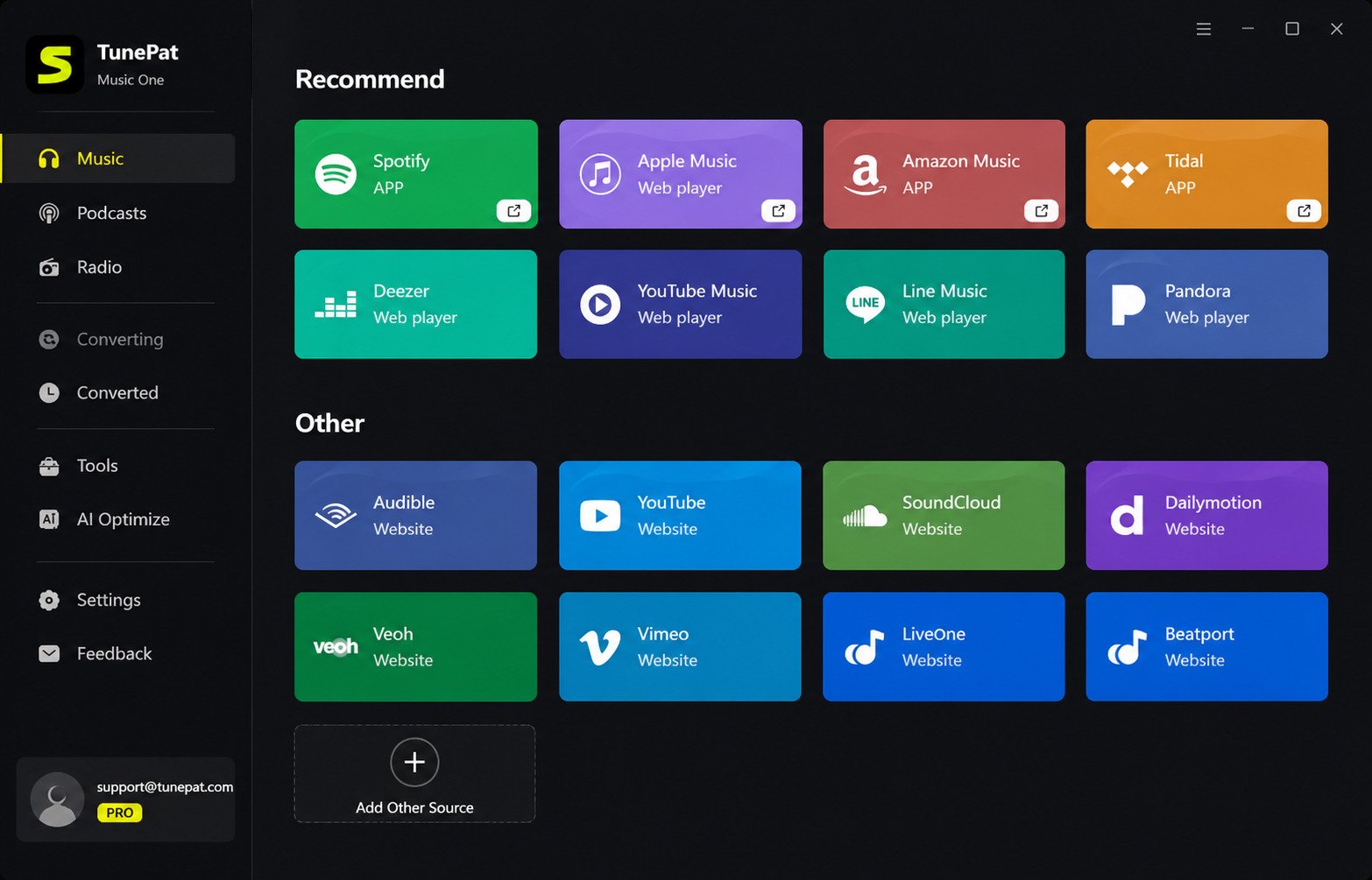
TunePat is a suite of desktop software tools designed to download and convert streaming music and video content from major platforms. The software works by recording and converting protected streaming content into common formats like MP3 and MP4 that you can play on any device.
Unlike simple screen recorders, TunePat uses advanced technology to capture high-quality audio and video while preserving metadata like artist names, album covers, and subtitles. The company offers separate products for different streaming services, each optimized for specific platforms.
TunePat Downloader and Converter Explained
The software functions as both a downloader and converter in one package. When you use TunePat, it accesses streaming content through your existing subscription, captures the stream at high quality, and converts it to a DRM-free format you can keep permanently.
This two-step process happens automatically in the background. You simply select what you want to download, choose your preferred format and quality settings, and let TunePat handle the technical work.
TunePat Music and Video Download Tools
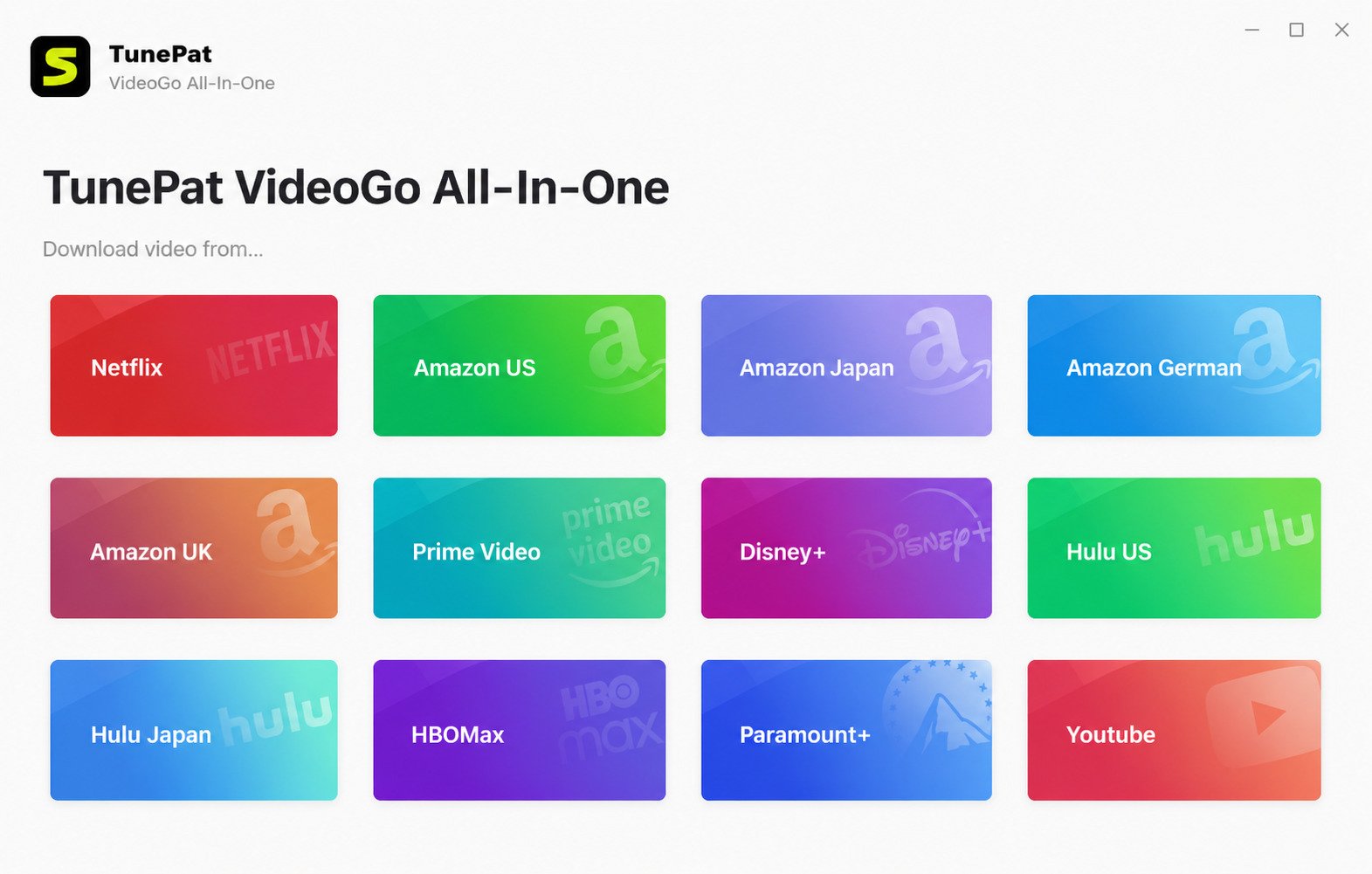
TunePat offers specialized tools divided into two main categories: music downloaders and video downloaders. The music tools support platforms like Spotify, Amazon Music, Apple Music, and YouTube Music. The video tools work with Netflix, Amazon Prime Video, Disney Plus, Hulu, and other streaming services.
Each tool is purpose-built for its target platform, ensuring compatibility with the latest updates and changes streaming services make to their systems.
What Can You Use TunePat For?
People use TunePat for various practical reasons. You might want to listen to Spotify playlists during flights without internet access. Maybe you’re traveling somewhere with poor connectivity and want your favorite shows downloaded beforehand.
Others use it to preserve content that might be removed from streaming platforms, create personal music libraries independent of subscription services, or simply enjoy entertainment on devices that don’t support certain streaming apps.
Is TunePat Safe and Legitimate to Use?
From a technical safety standpoint, TunePat software is clean and doesn’t contain malware or viruses. The company is established and has been operating for several years with regular software updates.
However, the legal gray area concerns downloading copyrighted content. While you’re accessing content through your paid subscription, removing DRM protection and creating permanent copies may violate the terms of service of streaming platforms. TunePat positions itself as a tool for personal backup and offline listening within the bounds of your existing subscriptions.
Know the risk before you convert. Always review your streaming service’s terms of use and local copyright laws before using download tools like TunePat.
TunePat Features
Music Downloader and Converter
The music downloading capability is one of TunePat’s strongest features. It can capture entire playlists, albums, or individual tracks from supported music streaming services with just a few clicks.
The software preserves ID3 tags, album artwork, and metadata so your downloaded music library stays organized. You won’t end up with files named “Track01” or missing artist information.
Video Downloader and Converter
TunePat’s video downloaders work similarly to the music tools but are optimized for video streaming platforms. They can capture movies, TV shows, documentaries, and other video content in high resolution.
The video tools maintain video quality while keeping file sizes reasonable, and they support multiple audio tracks and subtitle options when available.
MP3 and MP4 Conversion
All TunePat tools convert downloaded content to universally compatible formats. Music downloads convert to MP3, AAC, FLAC, WAV, or other popular audio formats. Video downloads convert primarily to MP4, which plays on virtually any device or media player.
You can customize the output format based on your needs, whether you prioritize file size, audio quality, or compatibility.
Playlist and Album Downloader
Rather than downloading songs or episodes one at a time, TunePat excels at batch operations. You can paste a playlist link or select an entire album, and the software will queue up all tracks for automatic downloading.
This feature saves enormous amounts of time when building your offline library and makes it practical to download large collections.
High-Quality Audio and Video Downloads
TunePat maintains the original quality of streaming content during the download and conversion process. For music, this means downloading at the highest bitrate available from your streaming service — up to 320kbps for most platforms.
The software doesn’t compress or degrade the audio during conversion, so what you hear offline matches the streaming quality you’re paying for.
HD and 1080p Video Downloads
Video downloaders support HD quality downloads, with many services offering 1080p resolution depending on your subscription level and the content availability.
Some TunePat video tools even support higher resolutions when the streaming service provides them, ensuring your offline videos look just as good as streaming them directly.
Subtitles and Audio Track Support
When downloading video content, TunePat can include subtitle files in various languages. You can choose which subtitle languages to download and whether to embed them in the video or save them as separate files.
The software also supports multiple audio tracks, letting you download content with different language dubs or commentary tracks if available.
Batch Downloading
The batch download feature lets you queue up multiple albums, playlists, or videos and let them download automatically. You can set up dozens or even hundreds of items to download overnight or while you’re away from your computer.
This automation makes TunePat practical for building extensive offline libraries without constantly monitoring the download progress.
Streaming Content Download Tools
TunePat specializes in capturing content from subscription streaming services rather than free platforms. This focus means the tools are optimized for the specific technologies and protections used by major streaming companies.
The software regularly updates to maintain compatibility as streaming services update their platforms and security measures.
Offline Viewing and Listening Options
Once content is downloaded and converted, you can transfer it to any device, play it in any media player, and enjoy it completely offline without requiring an active subscription or internet connection.
This freedom makes TunePat particularly valuable for travel, commuting, or living in areas with unreliable internet service.
TunePat Music Downloader and Converter
TunePat Spotify Downloader and Converter
The Spotify tool is one of TunePat’s most popular products. It lets you download any song, album, playlist, or podcast from Spotify at up to 320kbps quality with all metadata intact.
You can convert Spotify content to MP3, AAC, FLAC, WAV, AIFF, or ALAC formats depending on your quality preferences and device compatibility needs.
TunePat Amazon Music Downloader and Converter
For Amazon Music Unlimited and Prime Music subscribers, this tool downloads music in high quality while preserving album artwork and track information.
It supports both the standard Amazon Music catalog and Amazon Music HD tracks when available through your subscription.
TunePat Apple Music Converter and Downloader
Apple Music uses some of the strongest DRM protection in the industry, but TunePat’s Apple Music converter can still capture and convert tracks to common formats.
This tool is especially useful for people who want to listen to Apple Music content on non-Apple devices or want to keep their music if they cancel their subscription.
TunePat YouTube Music Downloader and Converter
YouTube Music combines streaming audio with video content. TunePat’s YouTube Music tool extracts just the audio from music videos and converts it to audio-only files.
This gives you access to YouTube Music’s vast library while saving storage space by skipping the video components.
TunePat Music Download and Conversion
All TunePat music tools follow a similar workflow: you browse or search for content within the software interface, select what to download, choose your output format and quality, and start the conversion.
The software handles logging into your streaming account, accessing the content, recording it, and converting it automatically.
TunePat Audio Downloader and Converter
Beyond music, some TunePat tools can capture other audio content like podcasts, audiobooks, and spoken-word content from supported platforms.
The same conversion options apply, letting you choose the audio format that works best for your listening devices.
TunePat MP3 Downloader and Converter
MP3 remains the most universally compatible audio format, and all TunePat music tools support MP3 output. You can customize the MP3 bitrate from 128kbps up to 320kbps depending on your quality requirements.
Higher bitrates produce better sound quality but larger file sizes, while lower bitrates save storage space with some quality trade-off.
TunePat Music to MP3 Conversion
Converting streaming music to MP3 format is TunePat’s core function. The software removes the streaming platform’s DRM protection and re-encodes the audio to standard MP3 files.
These converted files work on any MP3 player, smartphone, computer, car stereo, or other device without requiring the original streaming app.
TunePat Playlist and Album Downloader
Music lovers often want to download entire curated playlists or complete albums. TunePat makes this simple by letting you paste a playlist or album URL, and the software automatically queues all tracks.
You can even download your own playlists or those shared publicly by other users on platforms like Spotify.
TunePat Video Downloader and Converter
TunePat Netflix Downloader
Netflix offers limited offline download options through its app, but TunePat Netflix Video Downloader provides more flexibility. You can download Netflix content to your computer and keep it permanently, even if it’s removed from the service.
The tool supports downloading in up to 1080p quality with multiple audio tracks and subtitles when available.
TunePat Amazon Video Downloader
Amazon Prime Video subscribers can use this tool to download movies and TV shows from the Prime catalog. Like Netflix, Prime Video has app-based downloads, but they’re time-limited and device-restricted.
TunePat removes these restrictions by converting downloads to standard MP4 files you can keep indefinitely.
TunePat Prime Video Downloader
This is the same tool as the Amazon Video Downloader, specifically designed for Amazon Prime Video content. It works with both included Prime content and any purchased or rented videos in your Amazon library.
The downloader maintains high video quality and includes subtitle and audio track options.
TunePat Disney Plus Downloader
Disney Plus has become a major streaming platform with exclusive content from Disney, Pixar, Marvel, Star Wars, and National Geographic. TunePat’s Disney Plus tool lets you download this content for offline viewing.
This is particularly useful for parents who want to download kids’ content for car trips or flights without streaming data usage.
TunePat Hulu Downloader
Hulu subscribers can download both Hulu originals and licensed content using TunePat’s Hulu downloader. The tool handles both regular Hulu content and Hulu + Live TV recordings.
Downloaded content converts to MP4 format compatible with any video player or device.
TunePat Paramount Plus Downloader
Paramount Plus offers content from CBS, MTV, Nickelodeon, and the Paramount Pictures library. TunePat’s Paramount Plus downloader captures this content in high quality.
You can download individual episodes or queue entire TV series seasons for batch downloading.
TunePat YouTube Downloader
While there are many YouTube downloaders available, TunePat’s version focuses on quality and reliability. It can download videos in various resolutions up to 1080p or higher when available.
The tool also extracts audio-only from YouTube videos when you just want the music or podcast content.
TunePat Movie and TV Show Downloader
All of TunePat’s video downloaders work with both movies and episodic TV content. You can download individual movies or entire series, and the software organizes downloads with proper file naming.
Metadata like show titles, season numbers, and episode names are preserved when available.
TunePat Streaming Video Downloader
TunePat specializes in premium subscription streaming services rather than free video platforms. This focus means better quality downloads and more reliable performance with protected content.
The tools are optimized for the specific technical challenges of downloading from services with strong DRM protection.
TunePat MP4 Downloader and Converter
MP4 is the standard output format for all TunePat video downloaders. This format offers excellent compression while maintaining video quality, and it plays on virtually every device and media player.
You can customize the MP4 encoding settings to balance file size against video quality based on your needs.
TunePat Video Downloader for HD and 1080p
Most TunePat video tools support HD and Full HD (1080p) downloads. The exact maximum quality depends on what your subscription level provides and what resolution the content is available in.
Higher quality downloads create larger files but provide better viewing experiences on large screens and high-resolution displays.
TunePat Video Subtitles and Audio Tracks
Subtitle support is excellent across TunePat’s video downloaders. You can choose which subtitle languages to include and whether to hard-code them into the video or save them as separate SRT files.
Multiple audio tracks let you download alternate language dubs or descriptive audio tracks when available from the streaming service.
TunePat Download
TunePat Download for Windows
TunePat offers Windows versions of all its tools compatible with Windows 7, 8, 10, and 11. You download the installer from TunePat’s official website, run the setup file, and follow the installation wizard.
The Windows versions offer full functionality with regular updates to maintain compatibility with the latest Windows updates.
TunePat Download for Mac
Mac users can download macOS versions of TunePat tools compatible with recent macOS versions. The Mac software offers the same features as Windows versions with a native Mac interface.
Installation follows standard Mac procedures — download the DMG file, open it, and drag the application to your Applications folder.
TunePat Latest Version
TunePat regularly releases updates to fix bugs, improve performance, and maintain compatibility with streaming service changes. Always downloading the latest version ensures the best experience.
You can check the version number in the software’s about section and compare it to the version listed on TunePat’s website.
TunePat Latest Version Download
The official TunePat website always provides the latest version for download. Avoid downloading from third-party sites, as they may offer outdated versions or modified files.
Existing users receive update notifications within the software when new versions become available.
Only download from the official source. Third-party mirrors can bundle outdated or modified installers.
TunePat Free Download
You can download TunePat software for free from the official website. The free download gives you access to trial versions of all TunePat tools.
These trial versions let you test functionality before purchasing, though they include limitations on how much content you can convert.
TunePat Software Download
The download process is straightforward. Visit TunePat’s official website, navigate to the specific tool you want (Spotify Downloader, Netflix Downloader, etc.), click the download button for your operating system, and save the installer file.
Download sizes vary by tool but are generally between 1-2 MB for the initial installer, which then downloads additional components during installation.
TunePat Downloader Download
Each TunePat downloader is available as a separate product download. You don’t need to download a bundle — just get the specific downloader for the streaming service you use.
This modular approach keeps file sizes manageable and ensures you only install what you actually need.
TunePat Converter Download
The converter functionality is built into each downloader — there’s no separate converter download. When you download a TunePat music or video downloader, it includes both downloading and converting capabilities.
The conversion settings are accessible within each tool’s interface.
TunePat System Requirements
| Requirement | Windows | Mac |
|---|---|---|
| Operating system | Windows 7 or later | macOS 10.12 or later |
| Processor | 1 GHz or faster | Comparable Intel or Apple Silicon |
| Memory | 512 MB RAM minimum | 512 MB RAM minimum |
| Storage | 1 GB free space | 1 GB free space |
Actual storage needs depend on how much content you download. Both platforms benefit from faster processors and more RAM when doing batch conversions.
TunePat for Windows and Mac
TunePat for Windows
The Windows versions of TunePat tools are well-optimized and stable. They integrate smoothly with Windows 10 and 11, supporting modern Windows features while maintaining compatibility with older systems.
Windows users get regular updates and full technical support from TunePat.
TunePat for Windows 11
TunePat fully supports Windows 11 with native compatibility. The software works with both the Intel/AMD and ARM versions of Windows 11.
If you’ve upgraded to Windows 11, you won’t encounter compatibility issues with TunePat tools.
TunePat for Mac
Mac versions are developed alongside Windows versions with feature parity. The interface follows Mac design guidelines, making it feel like a native Mac application.
TunePat for Mac supports both Intel-based Macs and the newer Apple Silicon M1/M2 Macs.
TunePat on MacBook
Whether you’re using a MacBook Air, MacBook Pro, or older MacBook model, TunePat runs smoothly. The software is optimized for laptop use with reasonable resource consumption.
Battery impact is moderate during active downloads but minimal when the software is idle.
TunePat Downloader for Windows and Mac
Every TunePat downloader is available for both Windows and Mac platforms. You can purchase a license that works on either platform, and some license options allow activation on multiple computers.
The functionality is identical across platforms, so you get the same features regardless of your operating system.
TunePat Converter for Windows and Mac
Conversion capabilities are built into both Windows and Mac versions. Audio and video conversion quality is identical across platforms.
Mac versions may leverage Apple’s hardware acceleration on M1/M2 chips for faster conversion speeds.
TunePat Music Downloader for Windows and Mac
All TunePat music downloaders (Spotify, Amazon Music, Apple Music, YouTube Music) are available for both operating systems with full feature parity.
You can seamlessly switch between Windows and Mac if you use both platforms.
TunePat Video Downloader for Windows and Mac
Similarly, all video downloaders (Netflix, Amazon Prime, Disney Plus, etc.) work on both Windows and Mac with identical functionality.
Cross-platform support makes TunePat flexible for households or individuals with multiple computers.
How to Install and Set Up TunePat
How to Install TunePat on Windows
- Download the Windows installer from TunePat’s official website.
- Run the .exe file and click through the installation wizard.
- Accept the license agreement and choose your installation location.
- Click Install and wait — it usually takes a minute or two.
- Launch TunePat from the Start menu or desktop shortcut.
How to Install TunePat on Mac
- Download the Mac version as a .dmg file.
- Open the DMG file, which mounts as a disk image.
- Drag the TunePat application icon to your Applications folder.
- Approve the installation in System Preferences > Security & Privacy if macOS blocks the first launch.
TunePat Installation and First-Time Setup
The first time you launch TunePat, you’ll see a welcome screen explaining basic usage. The software may check for updates before opening.
You’ll need to configure your preferences including output format, audio quality, output folder location, and whether to organize downloads by artist or album.
How to Activate TunePat
- Click the key icon or “Register” button in the software.
- Enter the email address and registration code you received after purchase.
- Click Activate and let the software verify your license online.
Once activated, all trial limitations are removed.
TunePat Registration and Account Setup
Registration requires purchasing a license from TunePat’s website. After payment, you receive an email with your registration code.
You don’t create a TunePat account — the registration is tied to your email address and license code, which you enter directly in the software.
TunePat License and Subscription Setup
TunePat offers one-time purchase licenses and subscription plans. One-time purchases provide lifetime access to the current version with free updates for a year.
Subscriptions provide continuous updates as long as the subscription is active. Choose the plan that matches your budget and usage needs.
TunePat Download and Conversion Settings
Before downloading, configure your preferences. Choose your preferred audio format (MP3, AAC, FLAC, etc.) and quality level. For video, select your preferred resolution and whether to include subtitles.
Set your output folder to a location with plenty of storage space. You can organize files by artist, album, or playlist automatically.
How to Use TunePat
How to Download Music With TunePat
- Launch the TunePat music downloader for your streaming service.
- Log into your streaming account when prompted.
- Browse or search for the music you want within the TunePat interface.
- Click the download button next to songs, albums, or playlists.
- Choose your output format and quality, then click Convert.
How to Download Spotify Music With TunePat
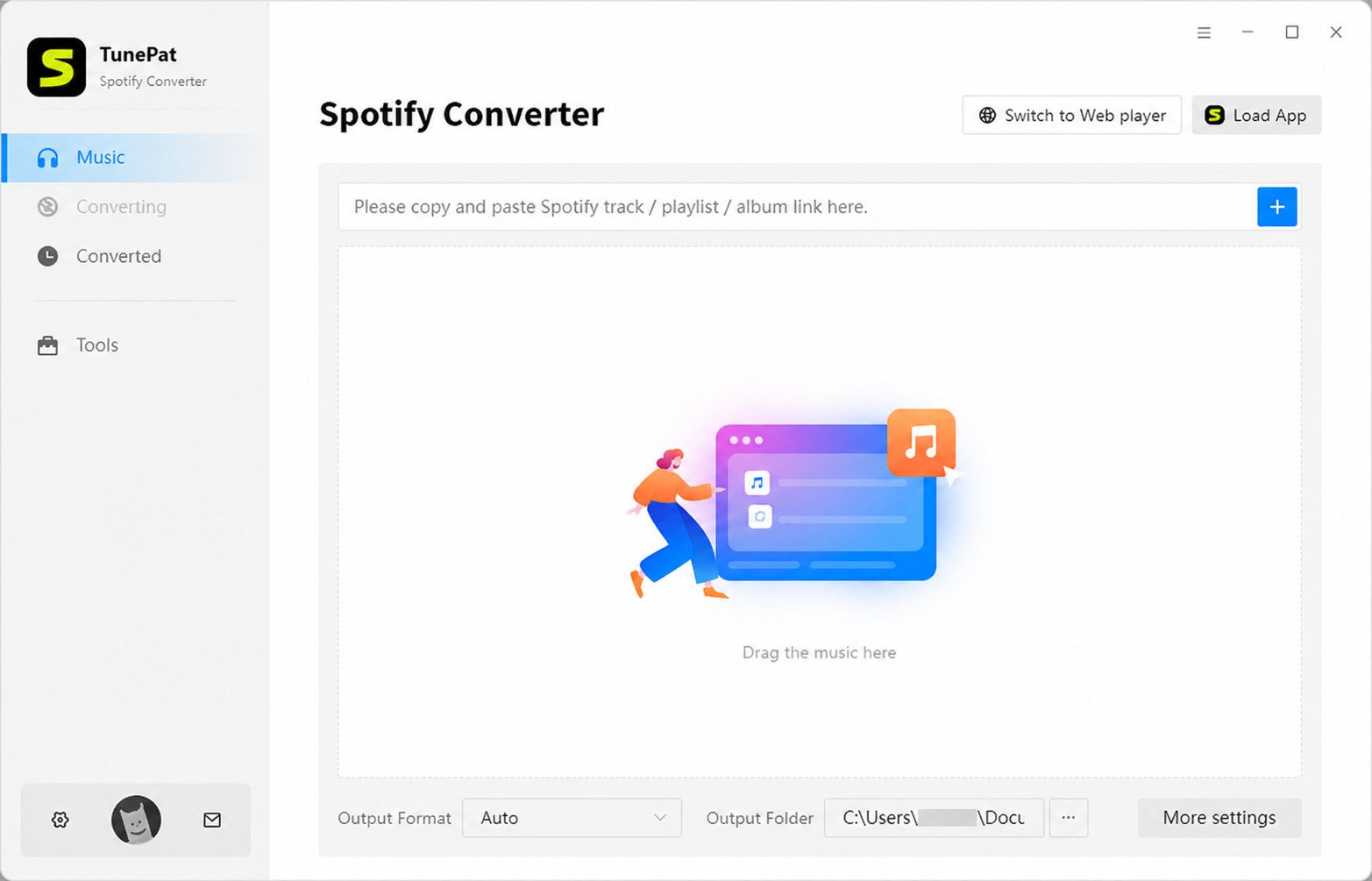
Open TunePat Spotify Converter and log into your Spotify account. You can browse Spotify’s catalog within TunePat or drag and drop playlist links directly into the software.
Select the songs you want, verify your output settings, and click Convert. TunePat captures the Spotify stream and converts it to your chosen format.
How to Download Amazon Music With TunePat
TunePat Amazon Music Converter works similarly. Log into your Amazon Music account within the software. Browse your library or search for content.
Select albums or playlists to download, check your format settings, and start the conversion. Downloaded files save to your specified output folder.
How to Convert Apple Music With TunePat
Apple Music requires the iTunes app (Windows) or Music app (Mac) to be installed. TunePat integrates with iTunes/Music to access your library.
Select the Apple Music tracks you want to convert within TunePat, choose your format, and convert. The software removes DRM and creates standard audio files.
DRM removal note. Converting Apple Music strips its DRM protection — check your local copyright rules before relying on this for anything beyond personal offline backups.
How to Download YouTube Music With TunePat
TunePat YouTube Music Downloader accesses YouTube Music through your subscription. Log in through the software and browse the catalog.
Select songs or playlists to download. TunePat extracts the audio and converts it to your preferred format, discarding the video components.
How to Download Streaming Videos With TunePat
- Launch the appropriate TunePat video downloader and log into the streaming service.
- Browse the catalog and add movies or episodes to the download queue.
- Configure resolution, subtitle, and audio preferences.
- Start the download and let TunePat convert the file automatically.
How to Download Netflix Videos With TunePat
TunePat Netflix Video Downloader logs into Netflix through a built-in browser. Search for the content you want and add it to the download list.
You can select specific episodes from series or queue entire seasons. Choose video quality, subtitle languages, and audio tracks before starting the download.
How to Download Amazon Prime Videos With TunePat
The Prime Video downloader works with Amazon’s catalog of included Prime content and purchased videos. Log in with your Amazon account credentials.
Search for movies or shows, add them to the download queue, and configure quality settings. TunePat downloads and converts the video to MP4.
How to Download Playlists and Albums
For playlists and albums, you can copy the URL from your streaming service and paste it directly into TunePat. The software automatically detects all tracks in the collection.
You can review the track list, deselect any you don’t want, then download everything else with one click.
How to Choose MP3 or MP4 Output
In the settings or preferences menu, you’ll find output format options. For music, choose between MP3 (most compatible), AAC (better quality at same file size), FLAC (lossless quality), or WAV (uncompressed).
For video, MP4 is the standard format. You can usually adjust the video codec and quality level within MP4 format.
How to Download Videos With Subtitles
Before downloading video content, check the subtitle options. TunePat shows available subtitle languages for each video.
Select which languages you want included. You can choose to embed subtitles in the video file or save them as separate SRT files for more flexibility.
How to Adjust Download Quality and Speed
Audio quality settings typically range from 128kbps to 320kbps. Higher bitrates mean better quality but larger files. For most listening, 256kbps or 320kbps provides excellent quality.
Video quality settings let you choose resolution from 480p to 1080p or higher. Download speed depends mainly on your internet connection and the streaming service’s servers.
TunePat MP3, MP4, and Audio/Video Formats
TunePat MP3 Downloader
MP3 remains the most universal audio format, compatible with every device and media player. TunePat converts streaming music to MP3 with customizable bitrate settings.
The MP3 encoder maintains good quality while keeping file sizes reasonable, making it ideal for large music libraries.
TunePat MP3 Converter
Converting existing audio to MP3 is built into all TunePat music tools. The software handles the technical conversion process automatically.
You don’t need audio engineering knowledge — just select MP3 as your output format and let TunePat handle the rest.
TunePat MP4 Downloader
MP4 is the standard video format for all TunePat video downloaders. It offers excellent compression efficiency and universal compatibility.
MP4 files play on smartphones, tablets, computers, smart TVs, game consoles, and virtually every modern device.
TunePat MP4 Converter
Video conversion to MP4 happens automatically when you download video content. TunePat uses efficient encoding to balance quality and file size.
The resulting MP4 files maintain the visual quality of the original stream while remaining manageable in size.
TunePat Audio Converter
Beyond MP3, TunePat supports AAC, FLAC, WAV, AIFF, and ALAC audio formats. Each format has specific advantages depending on your priorities.
AAC provides better quality than MP3 at the same bitrate. FLAC offers lossless quality for audiophiles. WAV is uncompressed but creates large files.
TunePat Video Converter
The video conversion engine handles resolution scaling, codec conversion, and container formatting. It can downscale higher resolution source material if you want smaller file sizes.
The converter maintains aspect ratios and frame rates to preserve the original viewing experience.
TunePat Music to MP3
This is the core use case for TunePat music tools — converting streaming music from proprietary, DRM-protected formats to standard MP3 files.
The conversion process removes encryption, re-encodes the audio, and adds ID3 tags with metadata.
TunePat Video to MP4
Similarly, video tools convert streaming video from protected formats to standard MP4 files you can play anywhere.
The video conversion includes audio track conversion and subtitle processing when applicable.
Choosing the Best Output Format and Quality
For music, MP3 at 320kbps offers an excellent balance of quality and compatibility. If you’re an audiophile with high-end equipment, FLAC provides lossless quality.
For video, 1080p MP4 provides great quality for most displays. If storage space is limited, 720p significantly reduces file size with acceptable quality.
TunePat Pricing, Free Trial, and License
Is TunePat Free?
TunePat is not free software, but it offers free trial versions of all tools. The trials let you test functionality with limitations.
Typically, free trials limit the number of conversions or the duration of converted content, giving you enough access to evaluate the software.
TunePat Free Trial
The free trial doesn’t require payment information or credit card details. Simply download the software and start using it.
Trial limitations vary by product but generally allow converting a few songs or video clips to verify the software works with your streaming service and meets your quality expectations.
TunePat Pricing and Subscription Plans
Pricing varies by product and plan duration. Individual tools typically cost between $14.95-$44.95 for monthly subscriptions, with discounts for annual or lifetime licenses.
Bundle deals offer multiple tools at reduced prices if you use several streaming services. Check TunePat’s website for current pricing as it occasionally changes.
TunePat License
| License type | Best for | Trade-off |
|---|---|---|
| Monthly subscription | Short-term or trial-heavy use | Costs more long-term |
| Annual subscription | Regular yearly use | Mid-range upfront cost |
| Lifetime license | Long-term, permanent access | Higher upfront payment |
Lifetime licenses require a higher upfront payment but provide permanent access without recurring fees. Annual licenses fall in between.
TunePat Full Version
The full version removes all trial limitations, allowing unlimited conversions. You get access to all features, faster conversion speeds, and full customer support.
Full version licenses are tied to your email address and can typically be used on one or two computers depending on your license type.
TunePat Activation
After purchasing, you receive an activation code via email. Enter this code in the software’s registration window along with your email address.
The software verifies your license online and unlocks full functionality immediately. You stay activated even when offline after the initial verification.
TunePat Activation Code
Your activation code is a unique string of characters provided after purchase. Keep this code safe, as you’ll need it if you reinstall the software or activate it on another computer.
Lost codes can usually be recovered by contacting TunePat support with your purchase information.
TunePat Registration
Registration is simple — just your email and activation code. There’s no lengthy account creation process or unnecessary personal information collection.
The registration process takes under a minute once you have your activation code.
Is TunePat Worth Paying For?
If you regularly want to enjoy streaming content offline, TunePat can be worth the investment. The time saved compared to manual recording methods and the high-quality results justify the cost for many users.
Consider how often you’d use it and whether the convenience of offline access to your favorite content is valuable to you.
TunePat Review
TunePat Music Downloader Review
TunePat’s music downloaders perform well overall. They reliably capture music at high quality with intact metadata. The interface is straightforward enough for non-technical users.
Conversion speeds are reasonable, and batch downloading works smoothly. The main downside is the cost if you need multiple tools for different streaming services.
TunePat Video Downloader Review
Video downloaders are similarly effective. They successfully download content from major streaming platforms with good video quality.
Subtitle and audio track support works well. The main limitation is that some streaming services frequently update their systems, occasionally requiring TunePat updates to maintain compatibility.
TunePat Converter Review
The conversion quality across both audio and video tools is excellent. Output files maintain the quality of the source material without unnecessary compression.
The conversion process is automated and reliable, though very large batches can take considerable time depending on your computer’s performance.
Download Speed and Conversion Performance
Download speeds typically match 1x playback speed — a 3-minute song takes about 3 minutes to download and convert. This is slower than simple file downloads but necessary due to how streaming protection works.
Batch downloads process sequentially, so large collections require patience. Overnight batch downloads are practical for building extensive libraries.
Audio and Video Quality
Output quality is a strong point for TunePat. Music downloads preserve the bitrate available from your streaming service, up to 320kbps for most platforms.
Video downloads maintain resolution and encode with quality settings that preserve detail without creating excessively large files.
Supported Platforms and Services
TunePat covers all major music streaming services (Spotify, Amazon Music, Apple Music, YouTube Music) and video platforms (Netflix, Amazon Prime, Disney Plus, Hulu, HBO Max, Paramount Plus).
This comprehensive coverage means you can likely find a TunePat tool for whatever service you subscribe to.
Supported Formats and Output Options
Format support is excellent, covering all common audio formats (MP3, AAC, FLAC, WAV) and video formats (MP4 primarily, with codec options).
Customization options for bitrate, sample rate, and video resolution let you tailor output to your specific needs.
Ease of Use and User Experience
TunePat’s interface is clean and logical. Most users can figure out the basic operation without reading documentation.
The learning curve is gentle, with clear buttons and straightforward workflows. Advanced options are available but tucked away so they don’t overwhelm beginners.
TunePat Pros and Cons
Pros
- High-quality audio and video downloads
- Preserves metadata and subtitles
- Batch downloading capability
- Wide platform support
- Regular updates
- Clean, user-friendly interface
Cons
- Costs add up with multiple tools
- Slower than direct file downloads
- Legal gray area regarding DRM removal
- Occasional compatibility issues after streaming service updates
- Trial version limitations
Is TunePat Worth Using?
For users who value offline access to streaming content and don’t mind the cost, TunePat delivers solid performance. It’s particularly valuable for frequent travelers or people with unreliable internet.
The main consideration is whether you’re comfortable with the legal implications of removing DRM protection, even for personal use of content you’re paying to access.
TunePat Not Working: Common Problems and Fixes
TunePat Not Working
If TunePat stops working entirely, first check that you’re running the latest version. Streaming services frequently update their systems, and TunePat must update to maintain compatibility.
Also verify that your internet connection is stable and that you can access the streaming service normally through its official app or website.
TunePat Downloader Not Working
When the downloader fails to capture content, try logging out and back into your streaming account within TunePat. Expired sessions are a common cause of download failures.
Check that your streaming subscription is active and that you haven’t exceeded any account limits the streaming service imposes.
TunePat Converter Not Working
Conversion failures often relate to corrupted downloads or unsupported source material. Try re-downloading the content or selecting different quality settings.
Ensure you have sufficient disk space in your output folder for the converted files.
TunePat Download Error
Generic download errors may indicate network problems, authentication issues, or incompatibility with the current version of the streaming service.
Check TunePat’s website or user forums to see if others are experiencing similar issues, which might indicate a service-wide problem requiring an update.
TunePat Download Failed
When individual downloads fail, note the error message. Common causes include region-restricted content, temporary streaming service issues, or content that’s no longer available.
Try downloading different content to determine if the problem is specific to certain items or a general failure.
TunePat Conversion Error
Conversion errors during the encoding process might indicate codec problems or corrupted source files. Try updating TunePat to the latest version.
If specific files repeatedly fail while others succeed, the issue likely relates to those particular source files rather than TunePat itself.
TunePat Conversion Failed
Complete conversion failures across all attempts usually indicate software conflicts, missing system components, or installation problems.
Try reinstalling TunePat or restarting your computer to clear temporary issues.
TunePat Video Download Failed
Video download failures are often related to DRM or streaming service authentication. Verify that you can stream the video normally before attempting to download it.
Some newly released content may have enhanced protection that TunePat hasn’t yet been updated to handle.
TunePat Music Download Failed
For music downloads, verify that your streaming music subscription is active and that the specific tracks are available in your region.
Some content restrictions prevent downloading even when streaming is allowed.
TunePat Downloader or Converter Error
Generic errors require systematic troubleshooting. Check your internet connection, verify your subscription status, update TunePat, restart the software, and try again.
If problems persist, contact TunePat support with specific error messages and details about what you were trying to download.
TunePat Installation Problem
Installation failures on Windows often relate to permissions. Right-click the installer and choose “Run as Administrator” to bypass permission issues.
On Mac, check System Preferences > Security & Privacy to approve the installation if macOS blocks it.
TunePat Activation Problem
If activation fails, verify that you entered the email address and activation code exactly as provided, including correct capitalization and no extra spaces.
Check that your internet connection is working, as activation requires online verification.
TunePat License Problem
License problems after activation may indicate using the software on more computers than your license allows. Check your license terms.
If you’ve replaced your computer, you may need to deactivate the old installation or contact support to reset activations.
TunePat Login Problem
Login issues usually relate to your streaming service credentials, not TunePat itself. Verify that you can log into the streaming service directly.
Two-factor authentication can sometimes interfere with TunePat logins. You may need to use an app password or temporarily disable 2FA.
TunePat Slow Download Speed
Slow speeds are normal — most streaming downloaders work at around real-time playback speed. A 3-minute song takes about 3 minutes.
You can’t significantly speed this up, as it’s limited by how quickly TunePat can capture and process the streaming content.
TunePat Subtitles Not Working
If subtitles aren’t downloading, check that they’re actually available for the content. Not all videos include subtitles.
Verify that you’ve enabled subtitle downloading in TunePat’s settings and selected specific languages before downloading.
TunePat Windows Not Working
Windows-specific problems might relate to Windows updates, security software interference, or corrupted TunePat installation files.
Try temporarily disabling antivirus software, updating Windows, and reinstalling TunePat.
TunePat Mac Not Working
On Mac, permission issues are common. Check System Preferences > Security & Privacy > Privacy and ensure TunePat has necessary permissions.
Also verify compatibility with your macOS version, as very old or very new macOS versions might have issues.
TunePat vs Other Downloaders and Converters
TunePat vs ViWizard
ViWizard offers similar functionality to TunePat with downloaders for Spotify, Apple Music, and video streaming services. The interface and feature sets are comparable.
TunePat generally has a wider selection of individual tools for different services, while ViWizard focuses on fewer platforms with deeper integration.
TunePat vs TuneBoto
TuneBoto is another competitor in the streaming downloader space. It supports many of the same platforms as TunePat with similar quality output.
Pricing is competitive between the two. TuneBoto sometimes offers slightly faster conversion speeds, while TunePat has a more polished interface.
TunePat vs StreamFab
StreamFab offers a more comprehensive suite with broader video streaming support. It’s generally more expensive but covers more obscure streaming services.
For mainstream services like Netflix, Spotify, and Amazon, both perform similarly. StreamFab appeals more to users who subscribe to many different platforms.
TunePat vs KeepStreams
KeepStreams focuses primarily on video streaming downloads with high-quality output. It’s strong for Netflix, Amazon Prime, and Disney Plus.
TunePat offers more balanced coverage of both music and video platforms, making it better for users who want both capabilities.
TunePat vs NoteBurner
NoteBurner is one of TunePat’s closest competitors, offering very similar products for the same streaming services. Quality and performance are comparable.
Pricing is similar, so choosing between them often comes down to which has better current deals or which interface you prefer.
TunePat vs AudFree
AudFree specializes in audio downloads and conversion with excellent quality preservation. It’s particularly strong for Apple Music and Spotify.
TunePat offers broader coverage including video platforms, while AudFree focuses specifically on perfecting music downloads.
TunePat vs TuneFab
TuneFab is another direct competitor with similar product offerings. Both companies update regularly to maintain compatibility with streaming services.
User reviews suggest similar satisfaction levels with both, making them largely interchangeable options for most users.
TunePat vs Macsome
Macsome has been in the streaming converter market longer and has established reliability. Its tools work well but the interface feels slightly more dated.
TunePat has a more modern interface and arguably better user experience, while Macsome wins on track record and stability.
TunePat vs Sidify
Sidify is a well-known competitor offering downloaders for major music and video platforms. Quality and features are very similar to TunePat.
Pricing and license terms vary, so it’s worth comparing current offers from both companies before choosing.
| Alternative | Key difference from TunePat |
|---|---|
| ViWizard | Fewer platforms, deeper per-platform integration |
| TuneBoto | Occasionally faster conversion speeds |
| StreamFab | Broader, pricier video platform coverage |
| KeepStreams | Video-focused, strong on Netflix/Prime/Disney+ |
| NoteBurner | Very similar tools and pricing |
| AudFree | Audio-only focus, strong Apple Music/Spotify quality |
| TuneFab | Largely interchangeable feature set |
| Macsome | Longer track record, more dated interface |
| Sidify | Comparable quality and features |
Which TunePat Alternative Is Better for Your Needs?
The “best” alternative depends on your specific needs. If you only need music downloads, NoteBurner or AudFree might be ideal. For comprehensive video platform coverage, consider StreamFab.
For balanced music and video capability with good value, TunePat, Sidify, and TuneFab are all solid choices. Try free trials of several options before committing.
Best TunePat Alternatives
Best TunePat Alternative
For a single comprehensive alternative, StreamFab offers the broadest platform coverage with consistently high quality. It’s pricier but handles almost any streaming service you might subscribe to.
For budget-conscious users, NoteBurner provides excellent music downloading capabilities at competitive prices.
Best TunePat Downloader Alternative
Sidify Music Converter matches TunePat’s downloading capabilities across major music platforms with similar quality and performance.
For video, KeepStreams and StreamFab both offer robust downloading with high-quality output.
Best TunePat Converter Alternative
AudFree stands out for audio conversion quality, particularly for lossless format output. The conversion engine is sophisticated with excellent quality preservation.
For video conversion, any professional video converter like HandBrake (free) or Wondershare UniConverter (paid) can convert downloads from any source.
Best Music Converter Alternatives
- Sidify Music Converter
- NoteBurner Music Converter
- AudFree Audio Converter
- TuneFab Apple Music Converter
- Macsome Music Converter
All offer similar functionality with quality output and regular updates.
Best Video Downloader Alternatives
- StreamFab Video Downloader
- KeepStreams Video Downloader
- FlixPal Video Downloader
- Y2Mate DRM Downloader
- AnyStream Video Downloader
These alternatives support various streaming platforms with high-quality downloads.
Best Streaming Downloader Alternatives
For comprehensive streaming support across both music and video, consider:
- StreamFab — Broadest platform coverage
- KeepStreams — Excellent video quality and reliability
- Sidify — Strong music focus with expanding video support
- NoteBurner — Reliable with competitive pricing
Best Spotify Converter Alternatives
- Sidify Spotify Converter
- NoteBurner Spotify Music Converter
- AudFree Spotify Music Converter
- TuneFab Spotify Music Converter
These tools specialize in Spotify, often providing optimized performance for that specific platform.
Best Amazon Music Downloader Alternatives
- Sidify Amazon Music Converter
- AudFree Amazon Music Converter
- TuneFab Amazon Music Converter
Each offers reliable Amazon Music downloading with metadata preservation.
Best Netflix Downloader Alternatives
- StreamFab Netflix Downloader
- KeepStreams Netflix Downloader
- FlixPal Netflix Downloader
- Y2Mate Netflix Downloader
These specialized tools handle Netflix’s robust DRM protection effectively. For comprehensive tools that work across multiple platforms, you might also want to explore SoundSwitch for audio routing and management needs.
How to Choose the Best TunePat Alternative
- Platform coverage — Does it support your specific streaming services?
- Quality — Does it maintain high audio/video quality?
- Price — Is it within your budget, including any subscription costs?
- Updates — Does the developer regularly update for compatibility?
- Ease of use — Is the interface intuitive and user-friendly?
Read recent user reviews and try free trials before purchasing any alternative.
TunePat FAQs
TunePat downloads and converts music and video content from streaming platforms into standard formats for offline use.
No, TunePat is paid software with free trial versions that have limitations on conversion amount.
The software itself is safe and doesn’t contain malware, though using it may violate streaming service terms of service.
Yes, TunePat fully supports Windows 11 along with Windows 7, 8, and 10.
Yes, TunePat offers Mac versions of all tools compatible with recent macOS versions including Apple Silicon Macs.
Yes, TunePat Spotify Converter downloads Spotify music at up to 320kbps quality with metadata.
Yes, TunePat Amazon Music Converter downloads content from Amazon Music Unlimited and Prime Music.
Yes, TunePat Apple Music Converter removes DRM and converts Apple Music to common formats.
Yes, TunePat YouTube Music Converter downloads audio from YouTube Music subscriptions.
Yes, TunePat Netflix Downloader captures Netflix content in up to 1080p quality.
Yes, TunePat Amazon Video Downloader works with Amazon Prime Video content.
Yes, TunePat supports batch downloading of entire playlists and albums with one click.
Yes, MP3 is the primary music output format and MP4 is the standard video format.
Yes, TunePat video downloaders support HD and 1080p quality depending on the source material.
Yes, you can download videos with subtitles in multiple languages either embedded or as separate files.
Common causes include outdated software versions, streaming service updates, or authentication problems with your account.
Download failures usually result from network issues, expired login sessions, or region-restricted content.
Conversion failures often indicate corrupted downloads, insufficient disk space, or software conflicts.
StreamFab offers the most comprehensive alternative, while Sidify and NoteBurner provide excellent focused alternatives at competitive prices.
Final Verdict: Is TunePat Worth Using?
Bottom line
TunePat delivers on its core promise of downloading and converting streaming content with good quality and reasonable ease of use. The software works reliably when maintained with regular updates, and the output quality meets expectations for both music and video content. For people who genuinely need offline access to their streaming subscriptions, TunePat provides real value.
The decision ultimately comes down to your specific needs and comfort level with the legal gray areas. If you travel frequently, have unreliable internet, or simply want backup copies of content you’re paying for, TunePat can be a worthwhile investment. Just be aware of the costs if you need multiple tools for different services, and stay informed about your streaming services’ terms of use and your local copyright laws.