Contents
SSuite Office Explained: Is This Free Office Suite Worth Downloading?
Paying a yearly fee just to write a letter or total a column of numbers feels wrong to a lot of people. That is exactly the itch SSuite Office was built to scratch.
It is a free office suite for Windows that bundles a word processor, a spreadsheet, a browser, email tools and more. No account, no trial clock, no subscription.
In this guide, you will learn what each app does, which edition fits your PC, how to install it, and where it falls short. I have kept it honest, so you can decide quickly.
What Is SSuite Office?
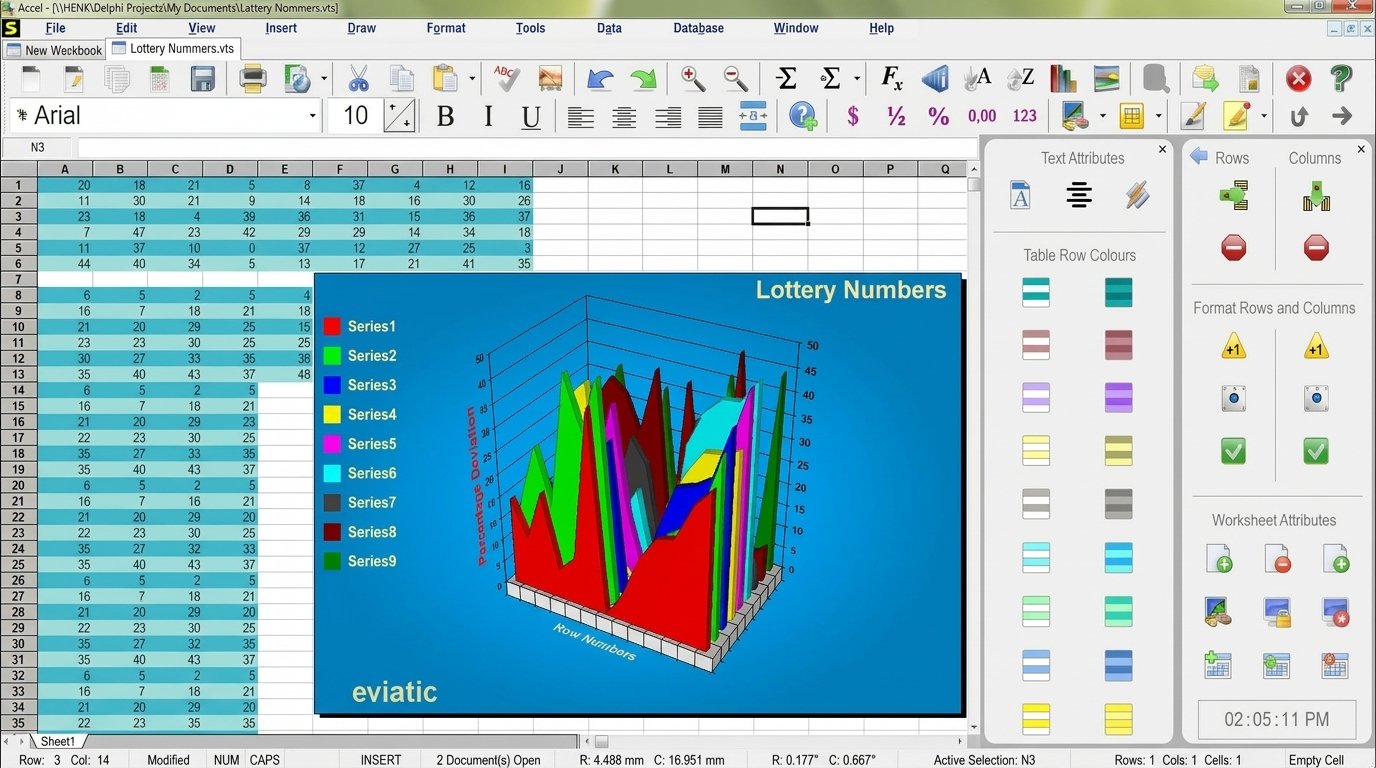
SSuite Office is a family of free productivity software from Van Loo Software. Its suites combine WordGraph (word processor), Accel (spreadsheet), a web browser and utilities, all written as native Windows programs.
What Is SSuite Office Used For?
People use it for everyday desk work. Think school assignments, invoices, household budgets, simple reports and printable memos.
It also suits anyone who wants to open common document formats without paying for a license. If your needs are basic, it covers a surprising amount.
How SSuite Office Works
The desktop programs use the native WIN32 API, which is the same programming layer Windows itself uses. That is why they do not need Java or .NET installed.
Because nothing has to be interpreted by another platform, the programs start fast and stay small. Each app is separate, so you open only what you need.
SSuite as a Free Productivity Suite
Free software often hides a catch. Here, the catch is simply that you get fewer advanced extras than a paid suite offers.
In return, you skip the sign-up forms and payment screens. For many households, that trade feels fair.
Who Is SSuite Office Designed For?
It is built for home users, students, small offices and anyone running an older computer. It also appeals to people who dislike sign-ins and cloud accounts.
Power users who live inside collaborative cloud tools may find it too simple. That is not a flaw, just a different target audience.
What Makes SSuite Different From Other Office Suites?
Most big suites push subscriptions and accounts. SSuite says it offers no trial versions, no recurring fees and no registration.
It also stresses a consistent, colorful interface across all its apps. Once you learn one program, the rest feel familiar.
| Point | SSuite Office | Typical paid suite |
|---|---|---|
| Price | Free | Subscription or license |
| Account needed | No | Usually yes |
| Java or .NET | Not required | Varies |
| Footprint | Small | Large |
| Cloud collaboration | Limited | Strong |
SSuite Office Features
SSuite Office offers word processing, spreadsheets, PDF export, email, browsing, notes, databases and portable apps, all without a subscription.
Word Processing and Document Creation
WordGraph handles letters, essays and reports. It reads and writes common formats, so sharing files with Microsoft Office users is usually painless.
You can insert emoticons and special characters, and the programs remember your recent documents. Some editions add an unlimited document history feature.
Spreadsheet and Data Management
Accel covers the classics: formulas, sorting, formatting and charts. It is meant for budgets, grade sheets, inventories and simple data tables.
It is also described as compatible with Excel files. For heavy macros or advanced pivot work, expect limits.
PDF Creation and Document Export
Several editions let you make PDF files without installing Adobe software. Personal Edition listings also mention export to image formats such as PNG, JPG, BMP, EMF and TIFF.
If you want a dedicated virtual printer for PDFs, you may also like this guide to the Bullzip PDF Printer, which pairs well with any word processor.
Email and Internet Tools
Older editions include My EZMail, a POP3/SMTP email client. It suits people who prefer a simple desktop mail program over a browser tab.
Some suites also carry LAN chat and network tools. These are handy in small offices without a server.
Web Browsing With SSuite NetSurfer
NetSurfer is the suite’s web browser. Newer releases include a modernized build called NetSurfer Prometheus, which the company promotes as fast and streamlined.
Treat any “fastest in the world” claim as marketing. Test it yourself on your own connection.
Personal Information and Contact Management
CleverNote PIM keeps notes and personal data in one place. It is the kind of tool you open daily, not weekly.
Database and Productivity Tools
A personal database tool such as MonoBase handles small record collections. Think a book list, a client list or a home inventory.
Portable Office Applications
Many SSuite apps are offered as portable versions. They can run from a USB drive, which is useful on shared or locked-down computers.
Lightweight and Low-Resource Design
The company says its programs have a very small system footprint. Reviews of the Personal Edition show a download around 21 MB, which is tiny by modern standards.
No Subscription or Registration Requirements
The official site states there are no trials, no recurring fees and no registration. It also says the software has no bundled third-party toolbars or add-ons.
SSuite Office Applications and Tools
The core apps are WordGraph, Accel and NetSurfer. Extra tools include CleverNote PIM, MonoBase, Penumbra Editor and several PDF and graphics utilities.
| App | What it does | Best for |
|---|---|---|
| WordGraph | Word processor | Letters, reports |
| Accel | Spreadsheet | Budgets, lists |
| NetSurfer | Web browser | Light browsing |
| CleverNote PIM | Notes and personal data | Daily organizing |
| MonoBase | Database | Small record sets |
| Penumbra Editor | Text editor | Quick edits |
| PDF tools | PDF creation | Sharing files |
Other SSuite Productivity Applications
Beyond the core, SSuite offers a screen recorder, a file copy tool, a label printer, a GIF animator and an online office suite. The online suite runs as a progressive web app inside your browser.
SSuite WordGraph
What Is SSuite WordGraph?
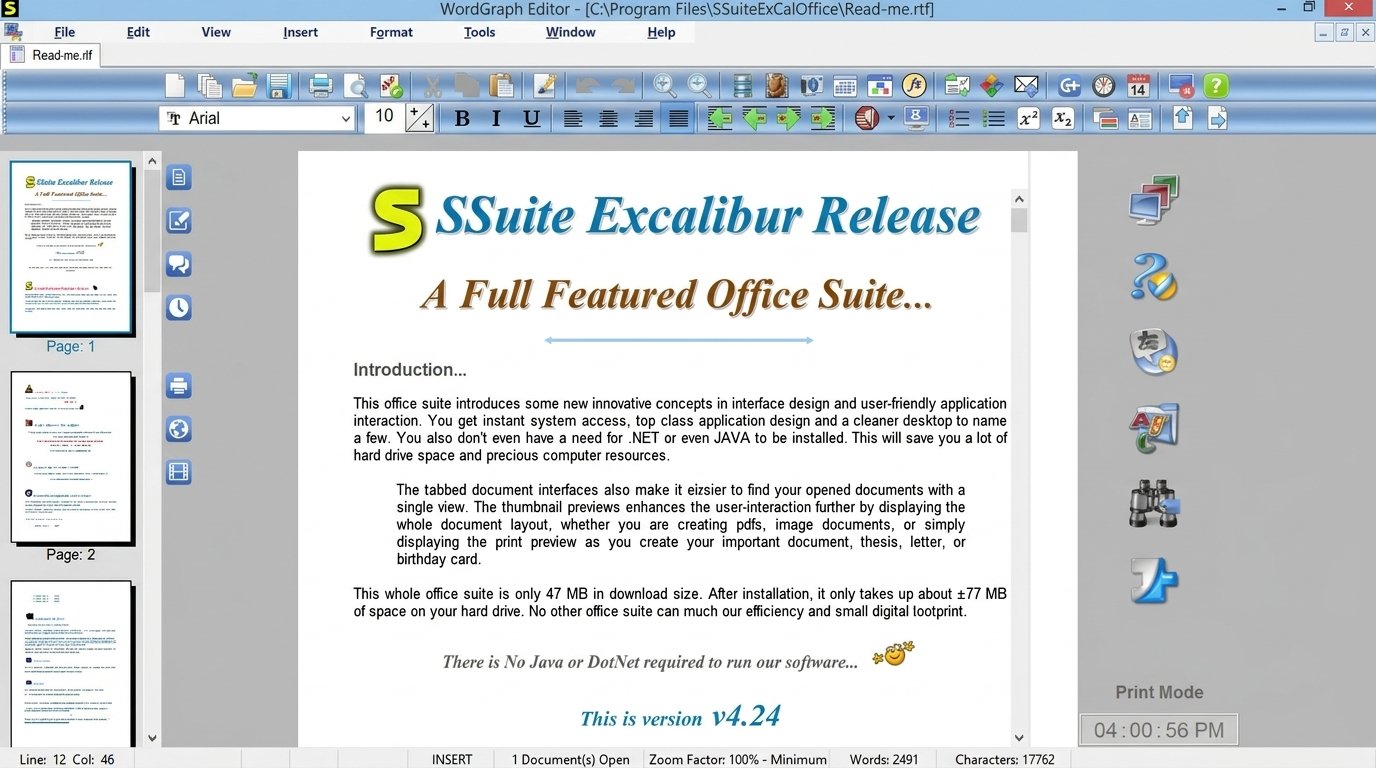
WordGraph is the word processor at the heart of most suites. It aims to feel familiar if you have used Word or WordPad before.
WordGraph Word Processor Features
Expect fonts, paragraph styles, tables, images, find and replace, and a spell checker. It also opens common document types, including RTF-style files.
Creating and Editing Documents With WordGraph
Open the app, start typing, then use the toolbar for formatting. It behaves much like other desktop writers, so the learning curve is gentle.
A good habit is to save early and often. Small programs can still crash.
WordGraph PDF Export
Some editions advertise built-in PDF creation. That means you can finish a resume and send it as a PDF in one sitting.
WordGraph Portable Edition
A portable build lets you carry your writing tool on a flash drive. It is a lifesaver in a school computer lab.
How to Download and Use WordGraph
Visit the official SSuite website, open the WordGraph page and download the installer or portable file. Run it, then open the program and start a new document.
SSuite Accel Spreadsheet
What Is SSuite Accel?
Accel is SSuite’s spreadsheet program. It is positioned as a full-featured option that stays compatible with Excel files.
Accel Spreadsheet Features
You get cell formatting, standard functions, sorting, filtering and charts. That covers most homework and household needs.
Creating and Editing Spreadsheets
Start a new sheet, type labels in row one, then add formulas. For example, enter =SUM(B2:B10) to total a column of expenses.
Managing Spreadsheet Data
Keep related data on one sheet and sort by date or amount. Clean tables make charts easier to build later.
Accel as a Free Spreadsheet Program
For basic work, it replaces a paid spreadsheet well. For large datasets or advanced automation, a heavier tool may serve you better.
How to Use SSuite Accel
Open Accel, enter data, apply number formats, then save. If you need to share, export in a format your recipient can open.
SSuite NetSurfer
What Is SSuite NetSurfer?
NetSurfer is a browser from the SSuite family. The latest version, NetSurfer Prometheus, is promoted on the official homepage.
NetSurfer Web Browser Features
Older reviews mention pop-up blocking. Newer releases promise a modernized, fast experience. Check the current page for exact features.
SSuite NetSurfer Prometheus
Prometheus is the company’s newer browser line. Try it alongside your usual browser before switching.
NetSurfer for Windows
NetSurfer is built for Windows, and SSuite says its software supports systems from Windows 95 through Windows 11.
Portable NetSurfer Editions
Portable builds are handy for guest PCs. You keep your settings with you instead of leaving traces on a shared machine.
How to Use SSuite NetSurfer
Install or unzip it, open the program, type an address and browse. Keep your main browser handy for sites that need the newest web features.
SSuite CleverNote, MonoBase and Penumbra
What Is CleverNote PIM?
CleverNote is a personal information manager. It stores notes, contacts and personal details in an organized layout.
Organizing Contacts and Personal Data
Group entries by topic, such as family, work or school. Short, consistent titles make searching quick later.
How to Use SSuite CleverNote
Open it, create a new note, choose a category and save. Review it weekly so it stays useful.
What Is SSuite MonoBase?
MonoBase is a small database tool for personal and small-scale records. It fits collections, simple customer lists and household inventories.
Creating and Managing Databases
Define your fields first, such as name, date and notes. Then enter records one by one and use search to find them.
What Is SSuite Penumbra Editor?
Penumbra is a lightweight editor for quick text work. Details change between releases, so confirm current features on the official page before relying on it.
How to Use SSuite Penumbra Editor
Open a file, make your edits and save. It is best for notes and short documents, not long formatted reports.
SSuite Office Editions
SSuite offers several editions. Personal and Advanced suit most people, while the HD and HD+ editions enlarge the interface for bigger or high-resolution screens.
| Edition | Highlights | Best for |
|---|---|---|
| Personal Edition | Word processor, spreadsheet, email, browser | Beginners |
| Advanced Edition | WordGraph, Accel, browser, graphics tools | General use |
| Premium HD | Enlarged interface, EZPhoto HD, NetSurfer HD | HD screens |
| OmegaOffice HD+ | Larger interface for Full HD and Surface Pro | Tablets, Full HD |
| The Fifth Element | Broad bundle including PDF Memo Creator | Multi-tool fans |
Edition names and versions change over time. Always check the official download page for what is current. You can also visit the official SSuite Excalibur page.
SSuite Personal Office
Personal Office is the simplest entry point. Listings describe a Windows 7 styled look, no yearly fees and easy installation without restarts.
SSuite Advanced Edition
Advanced Edition adds a fuller toolset. It includes WordGraph, Accel, a browser and graphics utilities for everyday projects.
SSuite Office Premium and HD+ Editions
These versions enlarge menus and buttons. If text looks tiny on your monitor, an HD edition is the better pick.
How SSuite Office Editions Differ
The differences are mostly about bundle size and screen design. Some editions add extra utilities, while HD versions enlarge menus so they stay readable on big displays.
Which SSuite Edition Should You Choose?
Pick Personal if you are new. Choose Advanced if you want more tools. Choose an HD or HD+ edition if your screen is large or touch-friendly.
SSuite Personal Office
What Is SSuite Personal Office?
SSuite Personal Office is the friendliest starting point in the family. It packs the essentials into one compact download, so you can start typing within minutes.
Think of it as a starter toolbox. It is not flashy, but it covers the jobs most people do every week.
Word Processor, Spreadsheet and PDF Tools
The bundle includes a word processor and a spreadsheet that both open common office formats. It also includes tools for creating PDF files and exporting images, so sharing a finished page is simple.
Older listings describe a Windows 7 styled interface. If you like clean, uncluttered menus, you will feel at home quickly.
Email, Browser and Beginner Appeal
An email client and a web browser sit beside the writing tools, along with a few small utilities. A new user can learn the whole set in a single afternoon.
Because no sign-in is needed, a parent can install it for a child without creating yet another account.
SSuite Personal Office Download
Download it from the official SSuite site, run the installer and follow the prompts. The file is small, so even a slow connection finishes quickly.
SSuite Advanced Edition
What Is SSuite Advanced Edition?
Advanced Edition is the step up for people who want more tools. It combines WordGraph, Accel, a web browser and graphics utilities in one package.
Productivity Features and Windows Support
Its listing states compatibility with major office formats, so you can open and save files that other programs understand. That matters when a teacher or client sends you a document.
It targets Windows, and older listings show support reaching back to legacy versions. Check the current download page before installing on a very old system.
Low-Resource Computers and Download
Because the apps are small, this edition runs happily on modest hardware. A typical download is under 30 MB according to third-party listings, though sizes change with each release.
SSuite Office for Windows
Windows Compatibility
The company says its native code works from Windows 95 up to Windows 11. Some third-party listings show older version support, so treat those as dated.
Windows 10 and Windows 11
Most modern installs work, but run the installer as administrator if prompted. Windows may show a SmartScreen warning for small publishers.
32-Bit and 64-Bit Support
Third-party listings describe the software as full 32-bit code that runs on both 32-bit and 64-bit Windows. That is a plus if you still own an older laptop.
On a modern 64-bit system, a 32-bit program normally runs without extra setup.
Older Windows PCs and System Requirements
Older machines are where SSuite shines. Because the programs are small, they run on modest memory and processors.
| Item | Typical need |
|---|---|
| Operating system | Windows (older to 11) |
| Java or .NET | Not required |
| Disk space | Roughly tens of MB per suite |
| Internet | Only for download and browsing |
SSuite Office Download and Installation
Step-by-Step Download Guide
- Open the official SSuite Office website in your browser.
- Go to the downloads or software page.
- Choose your edition and click the download link.
- Save the installer to your computer.
How to Install SSuite Office
- Double-click the downloaded file.
- Follow the setup prompts.
- Pick a folder or accept the default.
- Finish, then open the program from your Start menu.
Listings note easy installation with no restart needed. That keeps setup quick.
SSuite Office Free Download and Installer
The installer is a single file, so you do not need a download manager. Keep a copy on a USB stick, and you can reinstall later without going online.
Check the version number on the download page, then compare it with the file you saved.
Portable and Offline Options
Portable versions run without a traditional install. Download the installer once and you can reuse it on other PCs offline.
How to Set Up SSuite Office on Windows
After installing, open WordGraph first and set your default font. Then link file types to the apps you prefer in Windows settings.
How to Use SSuite Office
Open and Create Documents
Launch WordGraph, choose New, type your text and use the toolbar to format it. Use Open to load existing files.
Create and Edit Spreadsheets
Open Accel, enter data, format cells and add formulas. Save regularly.
Export Documents as PDF
Use the PDF or export option inside the app. Name the file clearly, such as Resume-2026.pdf, and check the result before sending.
Manage Files and Updates
Keep documents in a dedicated folder. To update, download the latest installer from the official site and install over the old one.
Uninstall SSuite Office
Open Windows Settings, go to Apps, choose the SSuite program and click Uninstall. Portable copies can simply be deleted.
SSuite Office for Low-End and Older Computers
Is SSuite Office Lightweight?
Yes. The developers highlight a tiny footprint and low resource use, and the small download sizes support that.
Memory and Resource Usage
Native Windows code avoids the overhead of Java or .NET. That helps on machines with limited RAM.
Why Choose a Small Office Suite?
A small suite opens fast, uses less storage and rarely slows the rest of your system. On an old laptop, that difference is obvious.
Another benefit is predictability. A small program updates rarely, changes its layout slowly and does not nag you with pop-ups. That calm routine suits older relatives who just want to type a letter, print it and move on. Fewer surprises mean fewer support calls from family, which is a quiet win for everyone involved. Simple habits like these keep any suite running smoothly.
Picture a ten-year-old netbook. A heavy suite crawls, while a lightweight one lets you finish your homework.
A Student’s Week With a Small Suite
Imagine a student with a hand-me-down laptop. On Monday she drafts an essay, on Wednesday she tracks her pocket money in a sheet, and on Friday she exports a PDF for her teacher.
Nothing needed an account or an upgrade. The laptop stayed responsive the whole week, which is exactly the point.
Memory Tips for Old PCs
- Close other programs before opening large files.
- Keep one document open at a time.
- Save to a local folder instead of a crowded desktop.
- Restart the PC once a day.
SSuite Office Portable Applications
What Is a Portable Office Suite?
A portable app runs without a full installation. You copy it to a folder or USB drive and launch it directly.
When to Use Portable Applications
Use them on school computers, internet cafes or locked-down office PCs. They also work as a backup toolkit.
Running SSuite Apps Without Traditional Installation
Download the portable file, extract it and double-click the program. Save your documents on the same drive to take everything with you.
Is SSuite Office Free?
Yes. SSuite Office is freeware. The official site says there are no trials, no recurring fees and no registration.

Does SSuite Office Require a Subscription or Registration?
According to the developers, no. They also state their desktop, Android and web apps need no login or account.
Free vs Premium Editions
“Premium” in an edition name refers to the interface and bundle, not a paid tier. Check each download page to confirm.
What Is Included Without a Subscription?
Everything the editions list is yours to use: the word processor, spreadsheet, browser and the extra utilities. There is no locked feature tier waiting behind a paywall.
The only optional extra is a donation, which the site invites but never demands.
SSuite Office Privacy and Security
Is SSuite Office Safe to Use?
The official site describes its software as safe, with no bundled third-party add-ons. Still, safe computing depends on where you download.
How to Download SSuite Software Safely
- Use the official SSuite website whenever possible.
- Avoid unknown mirror sites.
- Scan the file with your antivirus before running it.
- Keep Windows updated.
For general guidance on safe habits, see the CISA Secure Our World resources.
Does SSuite Office Require an Account?
No. The developers say none of their desktop, Android or web apps ask for a login. You open the program and start working.
SSuite Office and User Privacy
Because no account is needed, you share less personal data. The company says its online apps run inside your browser rather than in the cloud.
SSuite Office Review
Performance and Ease of Use
Programs open quickly and menus are easy to find. The bright design is friendly, though some people may find it dated.
Office Applications and Productivity Features
Taken together, the suite covers writing, calculating, browsing, mail and note keeping. If you need presentation slides, check each edition’s app list before downloading.
Word Processing and Spreadsheet Experience
Writing feels quick because the program loads almost instantly. Spreadsheets handle everyday formulas without fuss, though very large files can feel slower than in heavyweight tools.
Lightweight Performance on Older PCs
On older machines, speed is the headline benefit. Small installers and native code mean less waiting and fewer freezes.
Portable Software Experience
Portable copies are convenient, but your settings stay with the drive. Back up your USB stick regularly, because one lost drive can mean lost work.
Pros and Cons
Pros
- Free, no account
- Very small and fast
- Portable options
- Works on older PCs
Cons
- Limited collaboration
- Dated look in older editions
- Fewer advanced features
- Some listings are outdated
Is SSuite Office Worth Using?
For simple documents and spreadsheets, yes. For teams that depend on real-time editing or complex macros, probably not.
Which App for Which Task?
| Your task | Best SSuite app | Tip |
|---|---|---|
| Write a school essay | WordGraph | Export as PDF before submitting |
| Track monthly expenses | Accel | Use SUM for totals |
| Keep contact details | CleverNote | Group by family and work |
| Store a book collection | MonoBase | Define fields first |
| Browse on a spare PC | NetSurfer | Keep a second browser too |
A table like this saves guesswork. Match the job to the tool and you will waste far less time.
SSuite Office Alternatives
LibreOffice, Apache OpenOffice, WPS Office and SoftMaker FreeOffice are popular free alternatives.
| Suite | Strength | Trade-off |
|---|---|---|
| LibreOffice | Full-featured, open source | Larger install |
| Apache OpenOffice | Familiar tools | Slower updates |
| WPS Office | Modern interface | Has optional paid features |
| SoftMaker FreeOffice | Polished, compatible | Fewer extras in free version |
SSuite Office vs Other Free Office Suites
LibreOffice offers a broader feature set and a large community. SSuite counters with a smaller install and no account requirement.
On a modern PC where you need advanced features, LibreOffice may suit you better. On a weak machine, SSuite often feels snappier.
Portable and Lightweight Choices
If portability matters, pick a suite that offers a portable build and test it on your own files first. Always download from the publisher’s official site.
How to Choose the Right Office Suite
Match the tool to your task. Choose SSuite for lightness and simplicity, and a larger suite when you need presentations, templates and advanced features.
SSuite Office Troubleshooting
Installation and Compatibility Problems
Right-click the installer and run it as administrator. If Windows blocks it, check SmartScreen and confirm the file came from the official site.
WordGraph, Accel and NetSurfer Not Working
Restart the program, then restart your PC. Reinstall the latest version if the problem persists, and try a different edition if your screen scaling looks wrong.
SSuite Office Not Working
If nothing opens, check whether your antivirus quarantined the file. Small publishers sometimes trigger false alarms, so restore a file only if you trust the source.
SSuite Accel Problems
When a spreadsheet looks wrong, check number formats and column widths first. If formulas show as text, reformat the cells and retype the formula.
SSuite NetSurfer Problems
If a page will not load, test the same address in another browser. That tells you whether the problem is the site or the program.
Fixing Common Errors
- Update Windows.
- Disable conflicting security software briefly while testing.
- Use the portable version as a workaround.
- Contact SSuite support through the official site.
Frequently Asked Questions About SSuite Office
Yes. The developers state it is freeware with no trial, subscription or registration.
It is generally considered safe when downloaded from the official site. Always scan files with antivirus.
The developers say their native software works up to Windows 11. Run the installer as administrator if needed.
For basic writing and spreadsheets, yes. For advanced features and cloud collaboration, probably not.
Several editions include PDF creation tools, and WordGraph can create PDFs in some versions.
Yes. Many apps are available as portable downloads that run without a full install.
Yes. Its small size and native code make it a strong fit for older computers.
Key Things to Know Before Downloading
- Download only from the official SSuite website.
- Check that your edition matches your screen size.
- Expect simple tools, not cloud collaboration.
- Back up your documents to a second location.
Final Verdict on SSuite Office
SSuite Office will not win a feature war against the giants, and it never tries to. What it offers is freedom from fees, accounts and heavy installs. It does that in a friendly package that runs well on older hardware.
If you want to write, calculate and export a PDF without fuss, it earns a place on your computer. Download from the official site and start with WordGraph. Give it an afternoon with a real task, and you may be surprised how much you finish.