Extension Guide
MaxAI.me Download: AI Assistant, Browser Extension & AI Productivity Tools
If you’ve ever wished you could summarize a long article, fix an awkward email, or ask an AI a quick question without leaving the page you’re on, that’s exactly the gap MaxAI.me tries to fill. It’s a browser extension that turns your entire browser into an AI workspace — no tab-switching, no copy-pasting into ChatGPT.
In this guide, you’ll learn what MaxAI actually does, how to download and install it, how to use its writing and research tools, and how it compares to alternatives like Merlin, Monica AI, and HARPA AI — so you can decide if it’s worth adding to your browser. You can also check the official MaxAI site for the latest release notes.
01What Is MaxAI.me?
MaxAI AI Assistant Overview
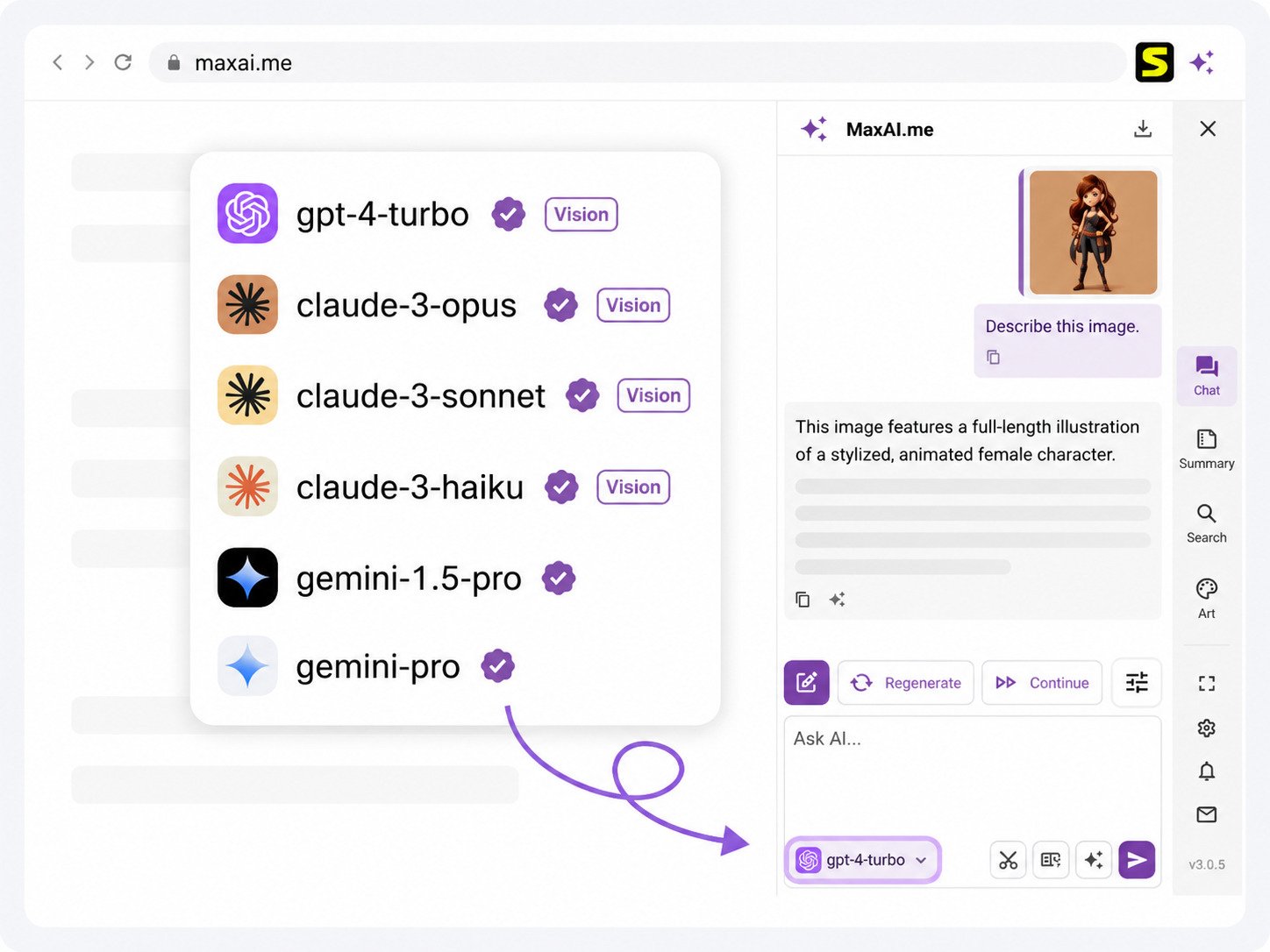
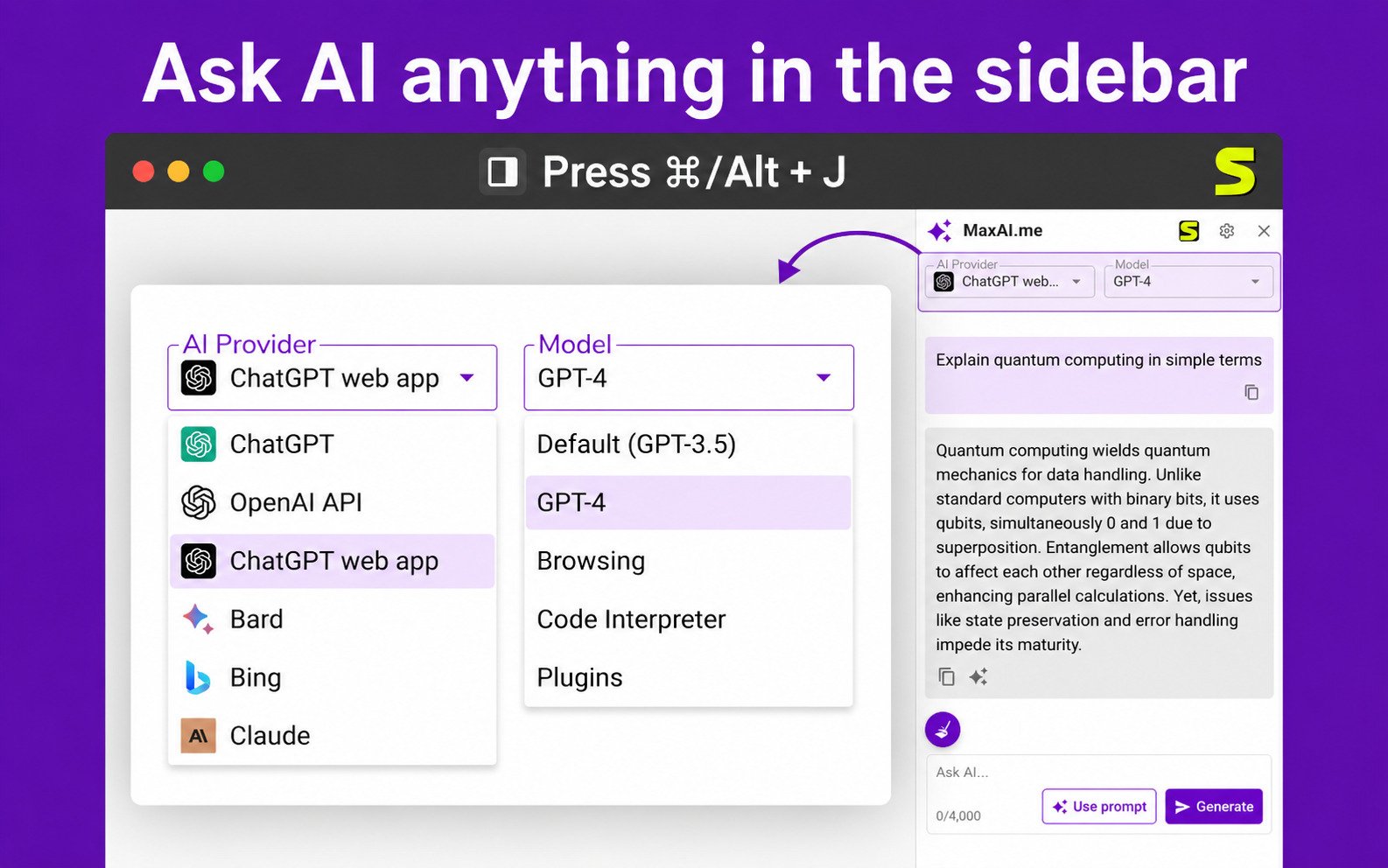
MaxAI is a browser extension and web app that adds an AI sidebar to any website you visit. Instead of opening a separate AI chat tab, you press a shortcut (Cmd/Alt + J) and a chat panel appears right next to the page you’re reading.
It’s built around one simple idea: AI should meet you where you already are — your inbox, your search results, a PDF, a YouTube video — rather than forcing you into a separate app.
How MaxAI Works as a Browser AI Assistant
Once installed, MaxAI sits quietly in your browser toolbar. You can:
- Select any text on a page and get a right-click or pop-up menu to rewrite, explain, or translate it
- Open the sidebar to chat with an AI model about the page you’re currently viewing
- Drop in a PDF or paste a YouTube link for an instant summary
Because it works inside the page, it keeps your original context — you don’t lose your place or have to re-explain what you’re working on.
MaxAI AI Tools and Productivity Features
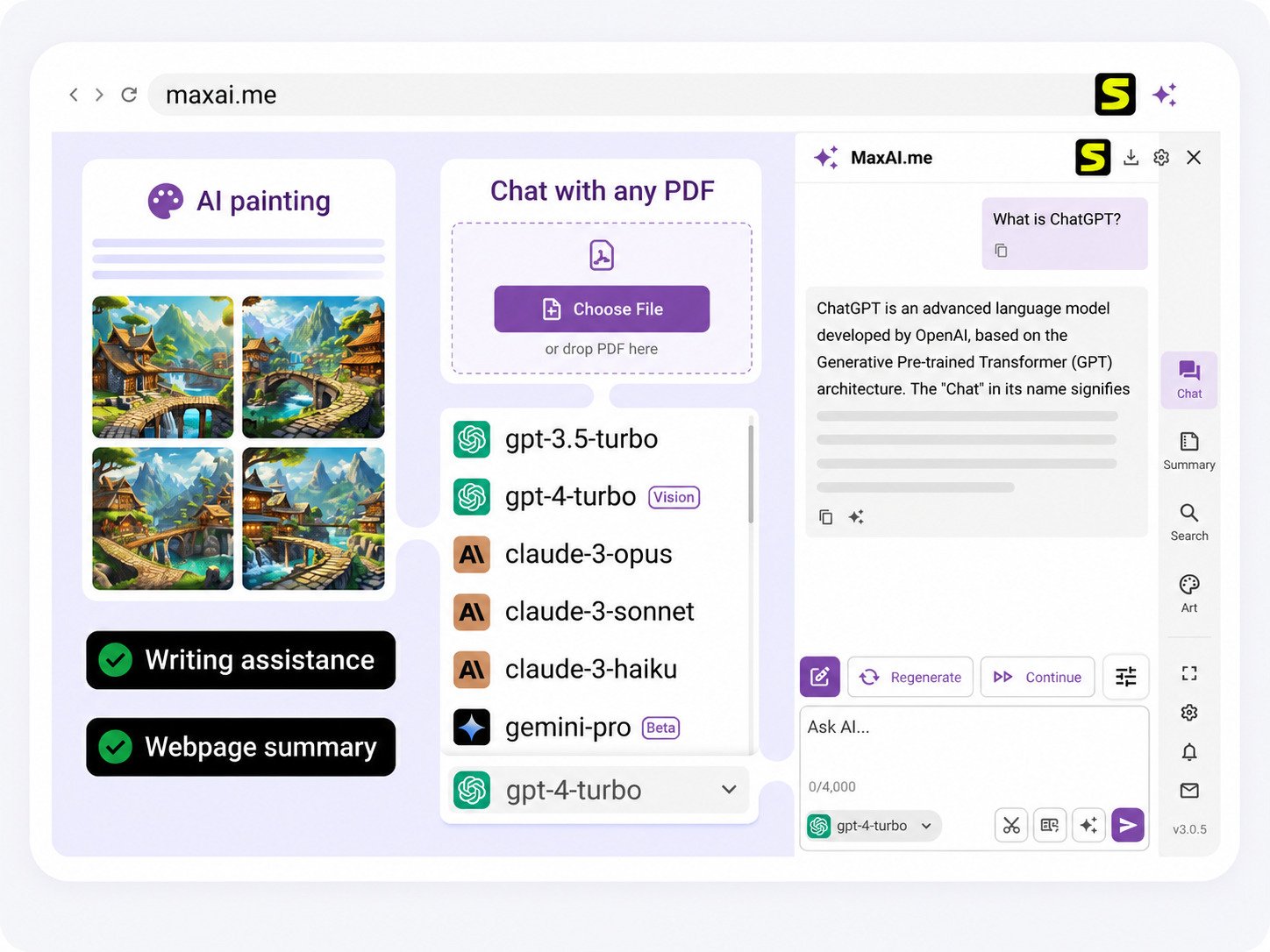
MaxAI bundles several tools into one extension:
- Summarizer for web pages, PDFs, and videos
- Writing assistant for rewriting, proofreading, and tone changes
- Email assistant for quick, context-aware replies
- AI search with cited sources
- Image generation from text prompts
- Translation, including side-by-side bilingual text
MaxAI Multiple AI Models Explained
A standout feature is model choice. Rather than locking you into one AI, MaxAI lets you pick from several leading models, including options from OpenAI (GPT-4.1/GPT-4o), Anthropic (Claude), Google (Gemini), xAI (Grok), and DeepSeek, depending on your plan. That’s useful if you have a preferred model for certain tasks — say, one for coding and another for writing.
02MaxAI Extension and Browser Support
MaxAI Chrome Extension
MaxAI’s primary home is the Chrome Web Store, where it’s listed as a one-click AI assistant. It integrates directly with Chrome’s toolbar and context menu, so it behaves like a native browser feature rather than a bolted-on add-on.
MaxAI Extension for Edge
MaxAI also supports Microsoft Edge, since Edge is Chromium-based. Installation works the same way — through Edge’s extension store or by adding the Chrome version manually through developer mode, depending on your setup.
MaxAI Browser AI Assistant
Because the extension runs at the browser level, it works consistently whether you’re in Gmail, LinkedIn, a news site, or a work dashboard — the sidebar and toolbar shortcuts stay the same everywhere.
AI Assistant That Works Across Websites
This cross-site consistency is one of MaxAI’s biggest selling points. You don’t need a different tool for email versus research versus writing — one shortcut and one interface cover all of it.
MaxAI Extension Features for Web Browsing
Beyond chat, the extension adds small but genuinely time-saving touches: one-click replies on social platforms, quick explanations of confusing text, and instant translation of foreign-language pages.
03MaxAI Download and Installation
MaxAI Download and Latest Version
MaxAI is distributed through official browser extension stores rather than a direct .exe or .dmg download. This is actually a safety plus — it means updates are automatic and the extension goes through the store’s review process.
Only install MaxAI from the official Chrome Web Store or Edge Add-ons listing. Avoid third-party “download” sites offering standalone installers — browser extensions don’t need them, and unofficial packages carry unnecessary risk.
MaxAI Extension Free Download
The extension itself is free to download and comes with a free usage tier. You don’t need a credit card to install it or try the basic features.
MaxAI Chrome Extension Download
To get MaxAI on Chrome:
- Go to the Chrome Web Store listing for MaxAI
- Click Add to Chrome
- Confirm the permissions prompt
- Pin the extension icon to your toolbar for quick access
MaxAI Browser Extension Download
The same basic flow applies to Edge and other Chromium browsers — search the extension store, install, and pin.
How to Install the MaxAI Extension
| Step | What to Do |
|---|---|
| 1 | Open the Chrome Web Store (or Edge Add-ons) |
| 2 | Search “MaxAI” |
| 3 | Click Add to Chrome / Get |
| 4 | Sign in with Google or email |
| 5 | Pin the icon and set your preferred AI model |
04How to Use MaxAI
How to Use MaxAI AI Assistant
Press Cmd/Alt + J on any page to open the sidebar, then type your question. You can ask about the page you’re on or start a fresh conversation.
How to Use the MaxAI Chrome Extension
Click the toolbar icon for quick actions, or select text on a page to trigger the floating menu with rewrite, explain, and translate options.
MaxAI Extension Tutorial for Beginners
If you’re new to it, start simple: highlight a paragraph you don’t understand and hit Explain. That single action shows you most of what the tool can do.
MaxAI AI Assistant Tutorial
For deeper use, try:
- Summarizing a long PDF report before a meeting
- Drafting a first version of an email, then editing the tone
- Asking a research question and checking the cited sources
How to Use MaxAI Across Websites
Because the shortcut and sidebar are consistent everywhere, once you learn it on one site, you already know it on every site.
05MaxAI AI Writing Assistant and Content Tools
MaxAI AI Writer
The writing assistant helps turn rough notes into a clean first draft — useful for articles, social posts, or internal documents.
AI Writing Assistant for Chrome
Because it runs inside the browser, you can improve writing directly inside Gmail, Google Docs, LinkedIn, or a CMS text box, without switching windows.
AI Text Generator and Content Writer
It can generate drafts from a short prompt, which is handy for outlines, product descriptions, or social captions you’ll then personalize.
AI Email Writer and Email Assistant
The email assistant reads the message you’re replying to and suggests a context-aware response, saving the “staring at a blank reply box” moment.
AI Grammar Checker
Selecting text and running the proofreading option catches spelling and grammar issues on the spot, similar to a lightweight Grammarly-style check.
AI Paraphrasing and Rewriting Tool
You can rewrite a sentence for clarity, formality, or a different tone with a single click — useful when your first draft feels stiff or too casual.
AI Summarizer for Web Pages
Long articles, research papers, and reports can be condensed into a short summary directly in the sidebar.
AI Tool for Rewriting Text in the Browser
This is the everyday utility most users lean on — fixing awkward phrasing in comments, messages, or forms without leaving the page.
06MaxAI for Research and Web Search
MaxAI AI Research Assistant
MaxAI’s search feature returns AI-generated answers with cited sources, which matters if you need to verify information rather than take it at face value.
AI Search and Browser Research Tools
You can ask a question directly from the sidebar instead of opening a new search tab, keeping your research flow in one place.
AI Assistant for Researching Websites
While reading an article, you can ask follow-up questions about it directly — the AI treats the open page as context.
AI Extension for Summarizing Web Pages
This is especially useful for students and analysts who need to scan many sources quickly and decide which ones are worth reading in full.
AI Copilot for Browser Research
Think of it as a research assistant sitting beside your browser tab, ready to explain, summarize, or fact-check on demand.
07MaxAI for Productivity and Workflows
MaxAI Productivity Extension
Beyond writing and research, MaxAI positions itself as a general productivity layer for anyone who spends most of their workday in a browser.
AI Productivity Assistant
It reduces the number of small tasks — drafting, summarizing, checking grammar — that used to require separate tools or tabs.
AI Workflow and Automation Assistant
Custom prompts let you save frequently used instructions (like “shorten this to 3 bullet points”) and reuse them instantly.
AI Assistant for Work
Professionals use it for meeting prep, report summaries, and faster email turnaround — small time savings that add up across a workday.
AI Tools for Productivity
Students, marketers, and developers each tend to use a different slice of the toolset — summarization, content drafting, and code help, respectively.
Browser AI Tools for Everyday Tasks
Even outside “work” use cases, people use it to explain confusing forms, translate foreign pages, or double-check a confusing paragraph.
08MaxAI Chatbot and AI Assistant Features
MaxAI Chatbot
The chat sidebar functions like a standard AI chatbot but with the added benefit of page-level context.
MaxAI ChatGPT Extension
Because it can route requests to GPT-4o and other OpenAI models, MaxAI is often used as a lighter, browser-native alternative to opening ChatGPT directly.
MaxAI AI Copilot
The combination of chat, writing help, and research makes it function like a general-purpose copilot rather than a single-task tool.
MaxAI AI Assistant for Chrome
Chrome users get the most complete feature set, since it’s the extension’s primary platform.
MaxAI AI Assistant for Edge
Edge users get the same core functionality, making it a solid option if you’re not on Chrome.
09MaxAI Free Version, Trial and Login
Is MaxAI Free?
Yes, MaxAI offers a free plan with basic access to its core tools, alongside paid tiers for higher usage limits and premium models.
MaxAI Free Trial
New users can try the extension immediately after installing it, without upfront payment, and upgrade later if they need more usage.
MaxAI Free AI Tools
The free tier typically covers everyday tasks — quick summaries, basic rewriting, and limited AI chat — enough for casual or occasional use.
MaxAI Login and Account Access
You can sign in with Google or an email account, and your settings sync across devices where the extension is installed.
MaxAI App and Browser Access
MaxAI is available as a browser extension and a web app, so you can use it even from a browser where you haven’t installed the extension.
10MaxAI Review: Features, Benefits and Limitations
MaxAI Features and AI Capabilities
MaxAI’s core strength is breadth — writing, summarizing, research, translation, and image generation are all packed into one tool instead of five.
MaxAI Productivity and Writing Benefits
For people who write a lot of short-form content (emails, posts, replies), the in-context editing is a genuine time-saver compared to switching tabs.
MaxAI Ease of Use
The interface is straightforward: a keyboard shortcut, a sidebar, and a text-selection menu. There’s a short learning curve, but it’s minimal.
MaxAI Pros and Cons
Pros
- Works across almost any website
- Multiple AI models to choose from
- Fast, in-context editing and summaries
- Cited sources for AI search
Cons
- Free tier usage is limited
- Some features gated behind paid plans
- Requires browser permissions to function
- Heaviest features favor Chrome/Edge users
Is MaxAI Worth Using?
If you regularly write, research, or read long content in your browser, MaxAI can meaningfully cut down on tab-switching. If you only need occasional AI help, the free tier may already be enough.
11MaxAI Alternatives and Comparisons
MaxAI vs ChatGPT
ChatGPT is a standalone chat app; MaxAI brings similar model access into your browser context, which is more convenient for quick, page-related tasks but less suited to long, open-ended conversations.
MaxAI vs Monica AI
Both are browser-based AI assistants with writing and chat tools. Monica is also known for its all-in-one positioning, so the choice often comes down to interface preference and pricing.
MaxAI vs Merlin
Merlin similarly offers multi-model access and page-aware chat. MaxAI tends to emphasize writing and productivity workflows a bit more heavily.
MaxAI vs HARPA AI
HARPA leans more toward automation and web scraping tasks, while MaxAI focuses more on writing, summarizing, and everyday research.
MaxAI vs Sider
Sider is another sidebar-style AI assistant; the two are close competitors, and the decision often comes down to which model lineup and pricing structure fits your usage.
Best MaxAI Alternatives
MaxAI as a ChatGPT Alternative
For users who want ChatGPT-style answers without opening a separate tab, MaxAI offers a lighter, embedded alternative — though it’s not a full replacement for ChatGPT’s standalone app for deep, long-form conversations.
12Frequently Asked Questions About MaxAI
What Is MaxAI.me? +
Is MaxAI Free to Use? +
How Do I Install the MaxAI Extension? +
Does MaxAI Work With Chrome? +
Does MaxAI Work With Microsoft Edge? +
Can MaxAI Summarize Web Pages? +
Can MaxAI Rewrite and Improve Text? +
Final Verdict
MaxAI.me won’t replace every AI tool you use, but it solves a very specific annoyance well: constantly switching tabs just to get a quick answer or fix a sentence. For everyday browsing, writing, and research, that convenience adds up fast.
If you spend most of your day in a browser, it’s worth installing the free version and seeing how naturally it fits into your workflow before deciding whether a paid plan makes sense for you.