JPEXS Free Flash Decompiler Download, Features, Setup, and Alternatives
Flash may be officially dead, but millions of SWF files old games, animations, and interactive projects are still sitting on hard drives with no easy way to open them. That’s where JPEXS Free Flash Decompiler comes in, and it remains one of the few tools that can actually crack open an SWF and let you see, edit, or rescue what’s inside.
This guide walks through what JPEXS does, how to download and install it, how to use its core features, and how it compares to alternatives if you need a different fit.
What Is JPEXS Free Flash Decompiler?
JPEXS Free Flash Decompiler (often shortened to FFDec) is a free, open-source tool built to decompile, view, and edit SWF (Shockwave Flash) files. It was created by developer Jindřich Petřík and has been maintained as an active open-source project for over a decade.
Unlike simple SWF players, JPEXS actually breaks a file down into its underlying components code, images, sounds, shapes, and fonts and lets you inspect or modify each piece individually.
What Can You Do With JPEXS Free Flash Decompiler?
In practical terms, JPEXS lets you:
- Decompile ActionScript code back into readable source
- Extract images, sounds, fonts, and shapes from an SWF
- Edit and re-save modified SWF files
- Convert SWF files to FLA for use in Adobe Animate
- Export content to formats like SVG or HTML5 Canvas
JPEXS Flash and SWF Decompiler
At its core, JPEXS is a decompiler it reverse-engineers the compiled bytecode inside an SWF and reconstructs human-readable ActionScript, which is invaluable for developers trying to recover lost source code or understand how an old project was built.
JPEXS SWF Viewer and Editor
Beyond decompiling, JPEXS also works as a direct SWF viewer and editor, letting you preview animations, timelines, and assets without needing the original Flash authoring software at all.
JPEXS Free Flash Decompiler Features
JPEXS packs a surprising amount of functionality into a free, open-source package.
SWF File Decompilation
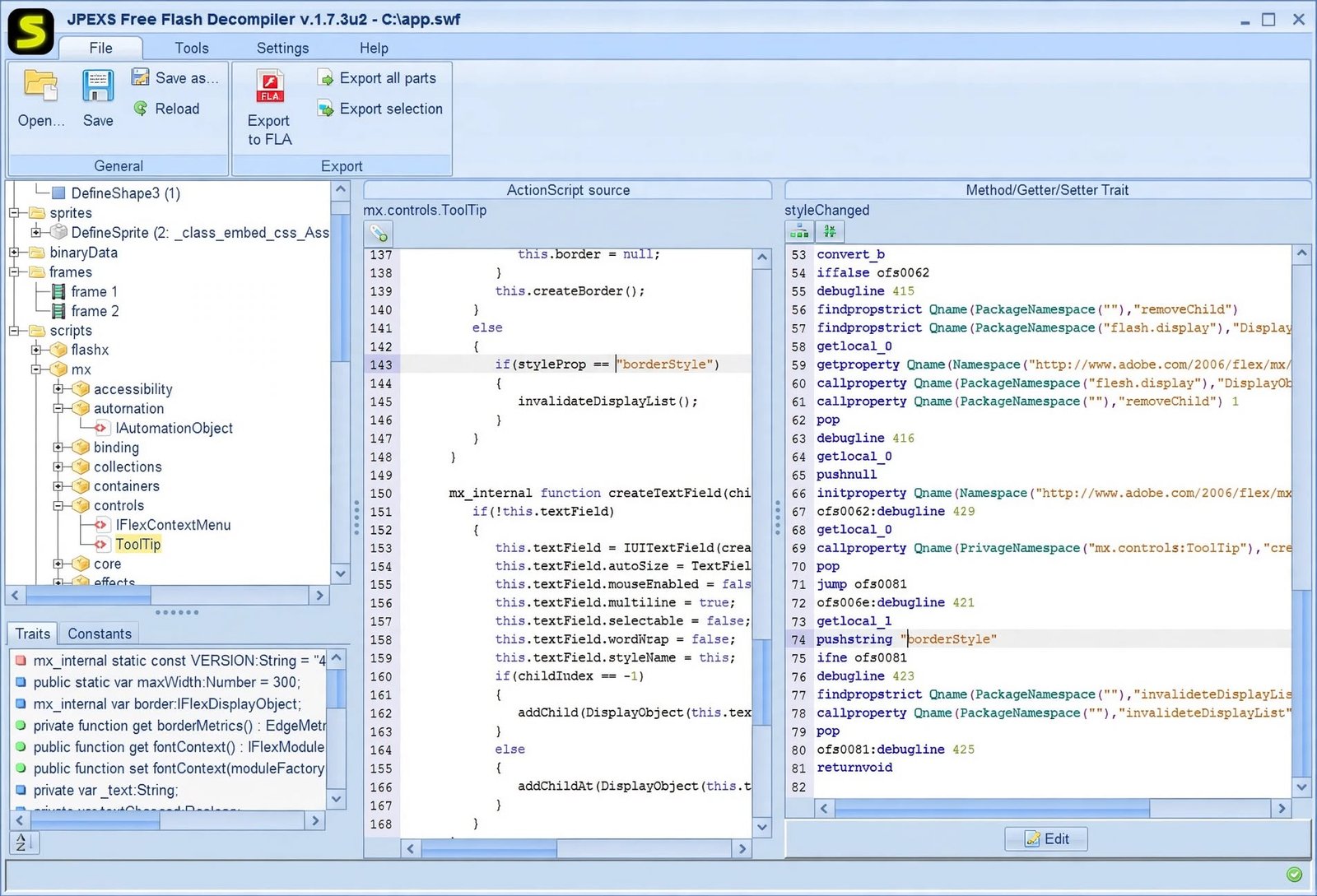
The flagship feature converts compiled ActionScript bytecode (both AS2 and AS3) back into readable script, complete with syntax highlighting and a linked P-code view for deeper inspection.
Decompile and Edit SWF Files
You’re not limited to just reading code JPEXS supports direct editing of decompiled ActionScript, along with an assembler view for making lower-level changes when needed.
Extract SWF Resources
Need just the assets? JPEXS can pull out images, sounds, shapes, fonts, and text individually, which is one of the most common reasons people reach for this tool in the first place.
SWF Viewer and Flash Editing Tools
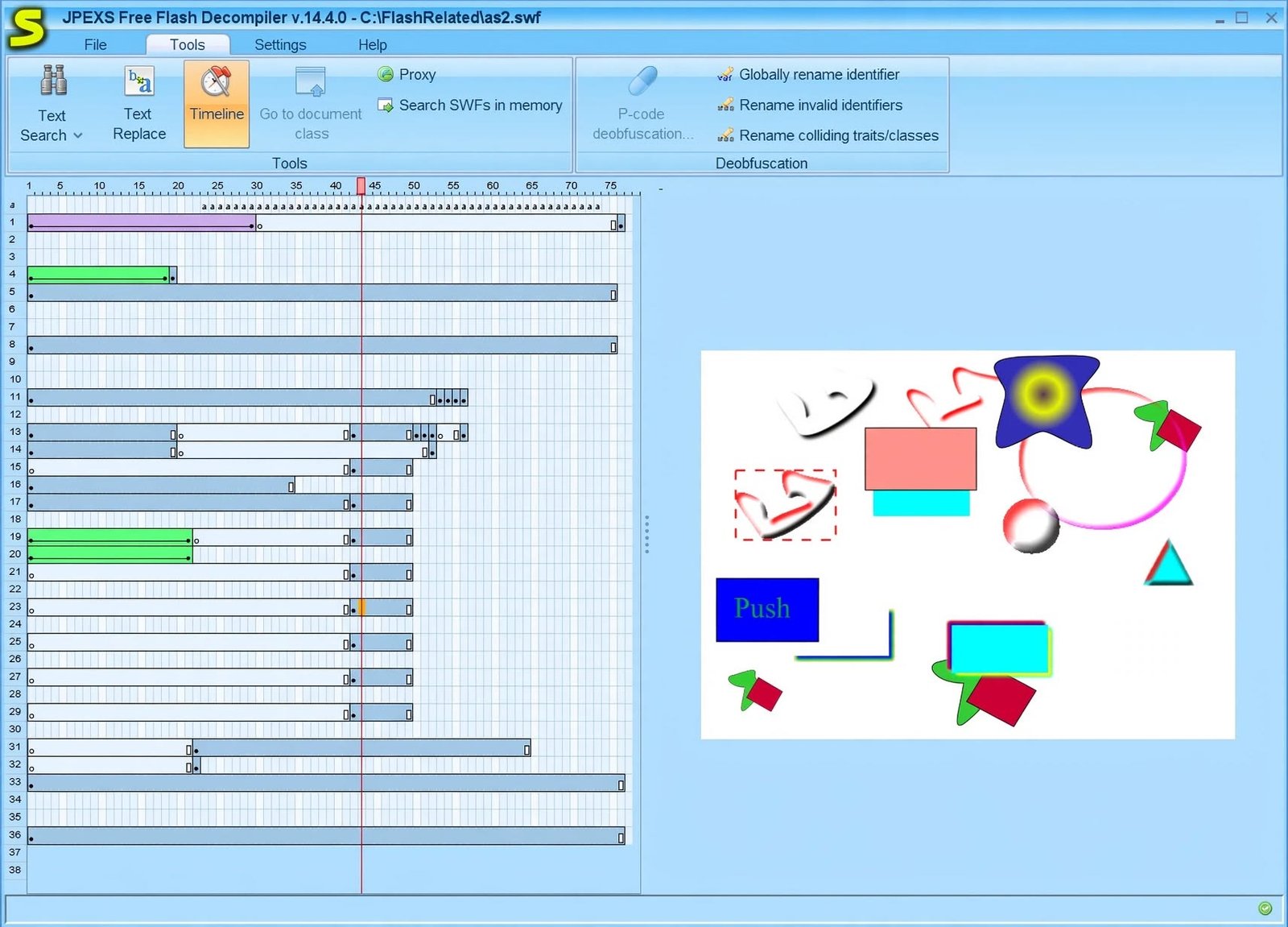
A built-in timeline editor resembles the classic Flash Pro interface, letting you drag objects on stage, select multiple elements, and adjust frames visually rather than through raw code alone.
ActionScript Decompilation and Editing
For AS3 projects specifically, JPEXS includes an ABC Explorer that lets you dig into the constant pool, methods, classes, and metadata at a granular level.
Working With Images, Sounds, Shapes, and Other SWF Assets
Whether you’re replacing a logo, swapping out audio, or updating text inside an old SWF, JPEXS handles asset replacement without requiring you to rebuild the file from scratch.
JPEXS Free Flash Decompiler for Windows
JPEXS is cross-platform, but Windows remains its most common environment.
JPEXS for Windows 11
On Windows 11, JPEXS runs through Java and installs without any special compatibility settings for most users.
JPEXS for Windows 10
Windows 10 support is equally solid, and given how many legacy Flash projects live on older machines, this remains a heavily used platform for the tool.
JPEXS SWF Decompiler on Windows
Because JPEXS is Java-based, the Windows experience is consistent with other platforms the same interface, the same feature set, just running through the Java Virtual Machine.
JPEXS Free Flash Decompiler Download
Getting JPEXS onto your machine is a quick process once you know where to look.
JPEXS Download Options
The safest source is the project’s official GitHub releases page, which offers both stable builds and nightly builds for users who want the newest features.
JPEXS Free Flash Decompiler Download for Windows
Windows users can download a packaged installer or a portable ZIP version, depending on whether they want a permanent install or a run-anywhere option.
Always grab JPEXS from the official GitHub releases page rather than third-party download sites, which sometimes bundle unrelated software with the installer.
How to Install JPEXS Free Flash Decompiler
- Install Java if it isn’t already on your system
- Download the JPEXS installer or ZIP from the official release page
- Run the installer or extract the ZIP to a folder
- Launch the application
- Open an SWF file to confirm everything works
JPEXS System Requirements
JPEXS requires a working Java Runtime Environment (JRE), modest RAM, and runs comfortably on Windows, Linux, or macOS without demanding hardware.
How to Use JPEXS Free Flash Decompiler
Once installed, using JPEXS follows a logical, file-first workflow.
How to Open SWF Files With JPEXS
Use File > Open or simply drag and drop an SWF file into the main window, and JPEXS will immediately break its contents into categorized panels.
How to Decompile SWF Files With JPEXS
Select the Scripts tab, click on any ActionScript class, and JPEXS displays the decompiled source automatically no extra command needed.
How to Edit SWF Files
Right-click on any element to access editing options, or double-click a script to modify it directly in the built-in code editor before saving your changes.
How to Extract Resources From an SWF File
Select the asset type you want images, sounds, fonts, or shapes then use the Export Selection option to save them individually or in bulk.
How to Export Decompiled SWF Content
For a full project rebuild, use the Export to FLA option, which packages decompiled assets and code into a format Adobe Animate can open directly.
JPEXS Free Flash Decompiler Tutorial
If you’re new to the tool, this quick walkthrough covers the basics.
Getting Started With the JPEXS Interface
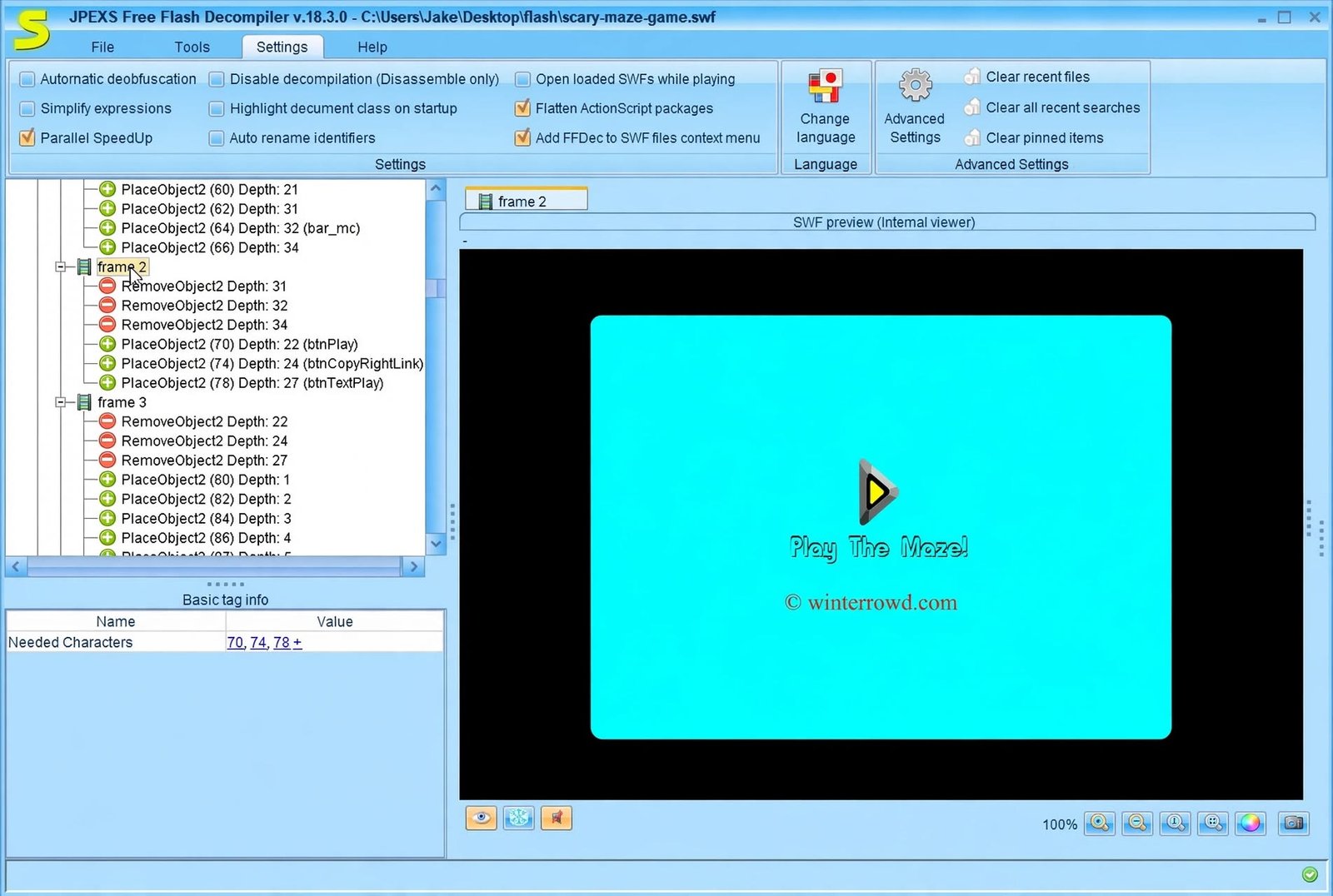
The main window splits into a resource tree on the left and a preview/editing panel on the right, so you always know what you’re looking at and where it lives inside the file.
Opening and Inspecting an SWF File
After loading a file, expand categories like Shapes, Sprites, Images, and Scripts to explore exactly what the SWF contains before making any changes.
Decompiling ActionScript With JPEXS
Click any script node, and the decompiled code appears instantly, with clickable links between the readable source and the underlying P-code for advanced debugging.
Editing and Saving SWF Content
Make your edits, then use File > Save to write changes back into the SWF, or Save As to preserve the original file while creating a modified copy.
JPEXS Free Flash Decompiler Review
So does JPEXS actually hold up as a daily-use tool?
Is JPEXS Free Flash Decompiler Easy to Use?
The interface takes a little getting used to if you’ve never worked with SWF internals before, but the categorized layout makes navigation intuitive once you understand the basic structure.
JPEXS Features, Performance, and Usability
For an open-source tool, JPEXS punches well above its weight regular updates, active GitHub maintenance, and a genuinely comprehensive feature set make it a serious utility rather than an abandoned relic.
JPEXS Free Flash Decompiler Pros and Cons
Pros
- Completely free and open-source
- Supports both AS2 and AS3
- Strong asset extraction tools
- Active development and updates
Cons
- Interface feels dated by modern standards
- Requires Java to be installed
- Learning curve for non-developers
- Some obfuscated code can be hard to decompile
Who Should Use JPEXS?
Developers recovering lost source code, archivists preserving old Flash projects, and hobbyists digging into retro games are the people who get the most value from this tool.
JPEXS Free Flash Decompiler FAQ
It’s used to decompile, view, edit, and extract content from SWF (Flash) files, including code, images, sounds, and fonts.
Yes, JPEXS decompiles both ActionScript 2 and ActionScript 3 code back into readable, editable source.
Yes, you can edit scripts, replace assets, and save changes directly back into the SWF file.
Open the app, then use File > Open or drag and drop the SWF file directly into the main window.
Yes, JPEXS is completely free and open-source, with no paid tier or license required.
Yes, it runs on both versions through Java, along with support for Linux and macOS.
Yes, images, sounds, shapes, fonts, and text can all be exported individually or in bulk.
JPEXS Free Flash Decompiler Alternatives
If JPEXS doesn’t quite fit your workflow, a few alternatives are worth considering.
Best JPEXS Alternatives
Options range from other decompilers to Flash Player preservation projects, depending on whether you need to edit files or simply view them.
Best SWF Decompiler Alternatives
Tools like Sothink SWF Decompiler offer a more polished, commercial interface, though without the open-source flexibility JPEXS provides.
Best Flash Decompiler Alternatives
For pure archival viewing rather than editing, projects like the Ruffle Flash emulator let you run SWF content directly in a browser without decompiling anything.
JPEXS vs FFDec
This one’s a bit of a trick comparison FFDec is simply the shortened name for JPEXS itself, so there’s no actual difference between the two.
JPEXS vs Other SWF Editors and Decompilers
| Tool | Best For |
|---|---|
| JPEXS (FFDec) | Free, full decompiling and editing |
| Sothink SWF Decompiler | Polished commercial interface |
| Ruffle | Running SWF files without editing |
Final Verdict on JPEXS Free Flash Decompiler
Should You Download JPEXS Free Flash Decompiler?
If you need to open, understand, or rescue content from an old SWF file, JPEXS remains the most capable free option available. It’s not the flashiest interface you’ll ever use, but the depth of its decompiling, editing, and extraction tools is hard to match without paying for commercial software.
For developers preserving old work, archivists documenting Flash history, or hobbyists exploring retro projects, JPEXS earns its reputation as the go-to tool. Give it a try on a file you already have, and you’ll quickly see why it’s stayed relevant so long after Flash itself was retired.
Looking for more file-handling utilities? Check out our File Juggler guide for another tool worth having on your system. For the official source and latest releases, visit the JPEXS Free Flash Decompiler GitHub repository.