Email Clients
Betterbird: Free Desktop Email Client and Thunderbird Alternative
If Thunderbird has ever left you waiting on a slow update, missing a feature you really wanted, or just wishing the app felt a little more polished, there’s a good chance someone has already fixed that for you. That’s exactly what Betterbird is: a free, open-source email client built directly on top of Thunderbird, with extra features and bug fixes layered on. In this guide, you’ll learn what Betterbird actually is, how it compares to Thunderbird, how to install and set it up on Windows, Linux, or Mac, and how to fix the most common problems people run into.
What Is Betterbird?
Betterbird Email Client Overview
Betterbird is a soft fork of Mozilla Thunderbird. In plain terms, a “soft fork” means Betterbird doesn’t go off and build its own separate codebase — it stays tightly synced with Thunderbird’s Extended Support Release (ESR) line, then adds its own bug fixes, tweaks, and features on top. The project was started in 2021 by a small group of developers who wanted a version of Thunderbird that moved faster and felt more refined, without losing any of Thunderbird’s core strengths.
The developers describe the goal in three parts: exclusive new features, exclusive bug fixes, and fixes that Thunderbird itself will eventually ship but hasn’t gotten to yet. Some Betterbird changes have already been merged back upstream into Thunderbird, which shows the project isn’t trying to compete with Thunderbird so much as push it forward.
How Does Betterbird Work?
Because Betterbird tracks Thunderbird’s ESR releases so closely, it behaves almost identically under the hood. It uses the same profile format, the same account configuration system, and the same extension architecture. That means Betterbird isn’t reinventing email — it’s refining an app millions of people already trust.
Practically speaking, this also means you can install Betterbird right alongside Thunderbird on the same computer and point it at your existing Thunderbird profile. There’s no migration required just to try it out.
Is Betterbird Free and Open Source?
Yes. Betterbird is completely free to download and use, and its source code is publicly available. There’s no premium tier, no subscription, and no feature paywall. It also strips out Thunderbird’s built-in telemetry and data-collection prompts, which appeals to privacy-conscious users who’d rather not send usage data anywhere.
Who Should Use Betterbird?
Betterbird makes the most sense for:
- Long-time Thunderbird users frustrated by slow bug fixes or missing quality-of-life features
- People who manage multiple email accounts and want better tools for organizing them
- Anyone who wants a free, ad-free, no-telemetry desktop email client
- Users who like Thunderbird’s philosophy but want a more actively maintained experience
Betterbird Key Features
Unified Inbox and Multiple Email Account Support
Betterbird lets you connect several email accounts — Gmail, Outlook, iCloud, or any standard IMAP/POP provider — and view them from one interface. You can keep folders separate per account or use a unified view for everything at once, which is useful if you’re juggling a personal inbox and a couple of work addresses.
Email Calendar, Tasks and Scheduling Tools
Because Betterbird shares Thunderbird’s foundation, it also inherits calendar and task-management functionality. You can track events, set reminders, and see upcoming items in a “Today Pane,” so you’re not switching between a separate calendar app just to check what’s next on your schedule.
Advanced Email Search, Filters and Tabs
This is where Betterbird starts to separate itself. It supports complex search terms, including regular expressions, so power users can build precise filters instead of relying on basic keyword matching. Combined with tabbed browsing for messages, it’s easier to keep several conversations open at once without losing your place.
Email Templates and Message Management
Betterbird includes a multi-line message list view — a frequently requested feature that shows more of each email’s preview text directly in the inbox, rather than forcing you to open every message to see what it’s about. This alone makes scanning a busy inbox noticeably faster.
Add-Ons and Customizable Email Settings
Betterbird supports the same extension ecosystem as Thunderbird, so existing add-ons generally work without modification. On top of that, it offers extra customization options like account colors, vertical tabs, and a more flexible header button/toolbar layout.
Secure Email Features and Encryption Support
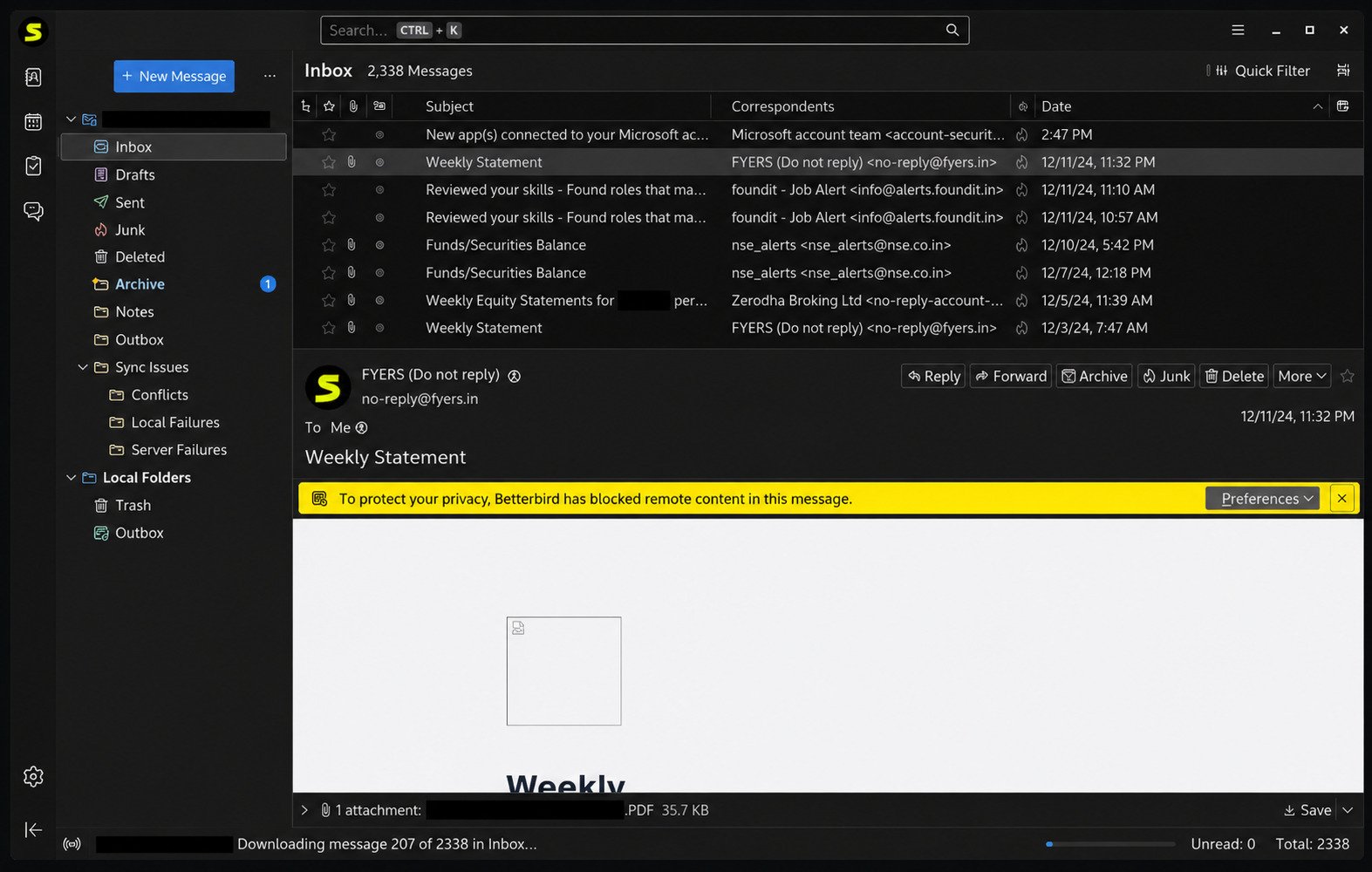
Betterbird retains Thunderbird’s full OpenPGP support, so you can sign and encrypt messages natively without installing a third-party plugin. Remote content is blocked by default too, which helps prevent tracking pixels from loading automatically when you open an email.
Offline Email Access and Local Mail Storage
Like Thunderbird, Betterbird stores your mail locally on your device by default. That means you can read previously downloaded messages without an internet connection, and your data isn’t tied to a browser tab or someone else’s server.
Betterbird vs Thunderbird
Betterbird vs Thunderbird: Key Differences
| Feature | Thunderbird | Betterbird |
|---|---|---|
| Base cost | Free | Free |
| Codebase | Original Mozilla project | Soft fork tracking Thunderbird ESR |
| Multi-line message view | Limited | Built in |
| Regex / complex search | No | Yes |
| System tray tooltip | Basic | More detailed, cross-platform |
| Telemetry / data prompts | Present | Removed |
| Release speed for fixes | Standard Mozilla cadence | Often faster |
| Profile compatibility | N/A | Fully compatible with Thunderbird |
Which Is Better: Betterbird or Thunderbird?
There’s no wrong choice here — both are free, open-source, and built on the same engine. If you’re happy with Thunderbird and don’t mind waiting for updates, there’s no urgent reason to switch. But if you want faster bug fixes, extra customization, and a couple of genuinely useful features Thunderbird hasn’t adopted yet, Betterbird is the more refined option, without asking you to give up anything you already rely on.
Betterbird Features Compared with Thunderbird
The two apps share the same account setup wizard, the same calendar and contacts tools, and the same extension support. The differences show up mostly in day-to-day usability: search power, message list readability, and how quickly annoying bugs get patched.
How to Migrate from Thunderbird to Betterbird
Migration is unusually painless because both apps can literally share the same profile folder. Most people don’t need a formal export/import process at all — they simply point Betterbird at their existing Thunderbird data.
How to Import a Thunderbird Profile into Betterbird
- Install Betterbird without uninstalling Thunderbird.
- On first launch, choose to use an existing profile when prompted (or launch Betterbird with a profile manager flag if it doesn’t detect one automatically).
- Select your current Thunderbird profile folder.
- Let Betterbird index your accounts, folders, and messages.
- Confirm your accounts, filters, and add-ons all carried over correctly before removing Thunderbird, if you choose to.
Betterbird for Windows, Linux and Mac
Betterbird for Windows 11 and Windows 10
Betterbird runs natively on both Windows 11 and Windows 10, with a standard installer that mirrors Thunderbird’s setup experience.
Betterbird for Linux
On Linux, Betterbird is distributed as a binary that works across most distributions, along with a Flatpak build available on Flathub, which is generally the recommended option since it offers better sandboxing and isolation.
Betterbird for Ubuntu, Debian and Fedora
Whether you’re on Ubuntu, Debian, or Fedora, the Flatpak version is the most consistent way to install Betterbird without worrying about dependency conflicts between distributions.
Betterbird for Mac and macOS
Betterbird also ships a native macOS build, so Mac users get the same feature set as Windows and Linux users without relying on a browser-based workaround.
System Requirements and Platform Compatibility
Because Betterbird is built on the same engine as Thunderbird, its system requirements are essentially identical — modest RAM and storage needs, with no dependency on high-end hardware.
Betterbird Download and Installation
Betterbird Free Download for PC
Betterbird can be downloaded directly from the official Betterbird website, which lists builds for every supported platform.
Download Betterbird for Windows
The Windows installer walks through a standard setup flow: choose an install location, wait for files to extract, and launch the app.
Betterbird Latest Version Download
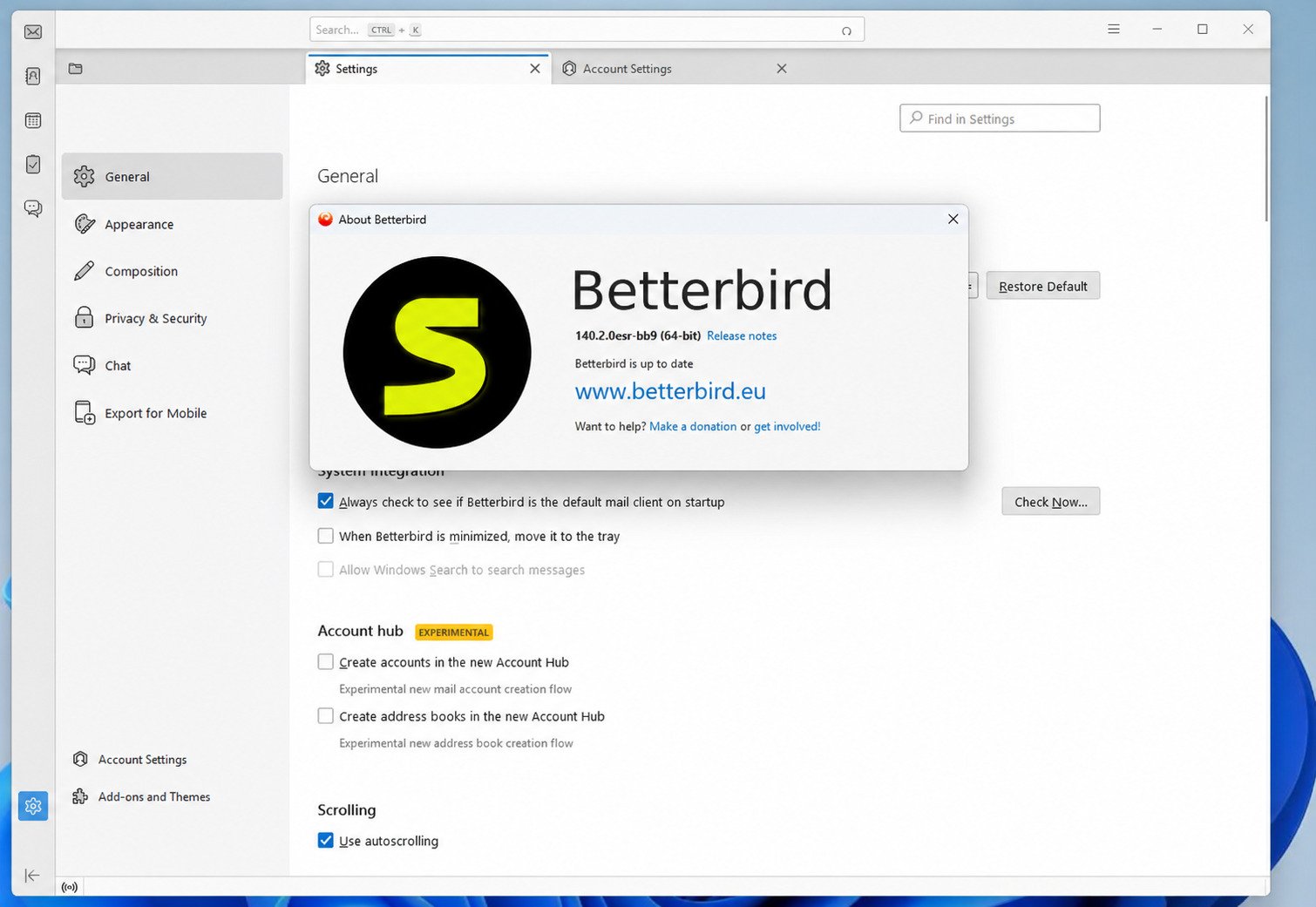
Betterbird follows Thunderbird’s ESR version numbers closely, so the “latest version” label on the download page will typically match whatever ESR line Thunderbird is currently shipping, with Betterbird’s own point-release number appended.
Betterbird Linux Download
Linux users can grab either the raw binary or install via Flathub, depending on how much sandboxing they want.
Betterbird macOS Download
macOS users download a .dmg file, then drag the app into Applications like any other Mac software.
How to Install Betterbird
- Go to the official Betterbird download page and pick your operating system.
- Download the installer or package file.
- Run the installer and follow the on-screen prompts.
- Launch Betterbird once installation finishes.
- Choose whether to create a new profile or import an existing Thunderbird profile.
How to Set Up Betterbird
Betterbird Email Client Setup Guide for Beginners
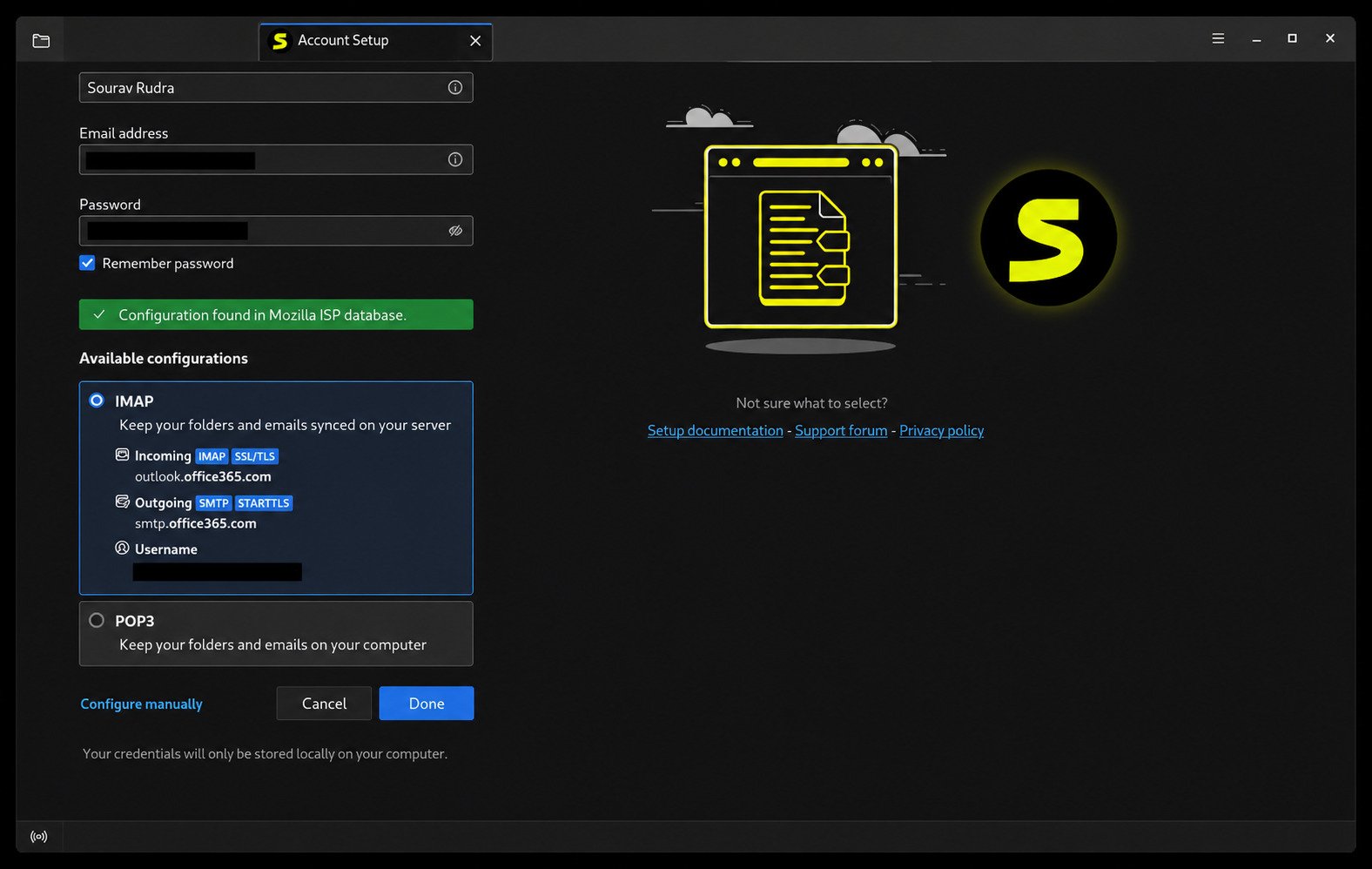
The first-run setup wizard asks for your name, email address, and password, then automatically detects your provider’s IMAP and SMTP settings in most cases — no manual server configuration required for common providers like Gmail or Outlook.
How to Add an Email Account to Betterbird
Go to Account Settings > Account Actions > Add Mail Account, then enter your email and password. Betterbird pulls the correct server settings automatically for most major providers.
How to Configure IMAP and POP Email Accounts
If automatic detection doesn’t work, you can switch to manual configuration and enter your IMAP or POP hostname, port, and authentication method directly — useful for smaller or self-hosted email providers.
How to Set Up Multiple Email Accounts
Repeat the “Add Mail Account” process for each address you want to connect. Betterbird lists them separately in the left-hand sidebar, and you can enable a unified inbox view if you’d rather see everything together.
How to Customize Betterbird Settings
From Preferences, you can adjust the message list layout, enable multi-line previews, set account colors, switch to vertical tabs, and control whether remote content loads automatically.
How to Use Betterbird Email Client
Betterbird Tutorial for Beginners
Once your accounts are connected, Betterbird’s layout will feel immediately familiar if you’ve used Thunderbird, Outlook, or any traditional desktop mail client: a folder sidebar on the left, a message list in the middle, and a reading pane showing the selected email.
How to Send and Receive Emails
New mail arrives automatically based on your sync settings. To compose a new message, click Write, fill in the recipient and subject, and send. Attachments can be dragged directly into the compose window.
How to Organize Emails with Folders, Tags and Filters
You can create custom folders, apply color-coded tags, and set up filters that automatically sort incoming mail — for example, moving newsletters into a dedicated folder or flagging messages from a specific sender.
How to Use Search, Tabs and Message Tools
Betterbird’s search bar supports advanced queries, including regular expressions, so you can search for patterns rather than just exact keywords. Opening messages in separate tabs lets you reference multiple emails side by side.
How to Create and Use Email Templates
Draft a message the way you want it formatted, then save it as a template from the compose window’s menu. Templates appear in a dedicated folder and can be reused whenever you need to send similar messages repeatedly.
Migrating Emails from Thunderbird to Betterbird
How to Migrate from Thunderbird to Betterbird
Because both apps use compatible profile structures, migration usually just means pointing Betterbird at your existing Thunderbird profile folder rather than exporting and reimporting individual messages.
How to Transfer Emails and Accounts to Betterbird
If you’d rather keep the two apps fully separate, you can export mailboxes from Thunderbird and import them into Betterbird using the built-in import tools, though sharing a profile is faster for most people.
How to Import a Thunderbird Profile
Locate your Thunderbird profile folder (found via about:profiles in Thunderbird), then select that same folder when Betterbird’s profile manager asks where your data lives.
What to Check After Migrating Your Email Data
After migrating, confirm that all accounts sync correctly, that filters and folders carried over, and that any extensions you rely on are still active and updated for compatibility.
Betterbird Common Problems and Fixes
Betterbird Not Opening or Starting
Try launching it in Safe Mode to rule out a problematic extension, and confirm your operating system meets the minimum requirements. Reinstalling the latest build often resolves startup crashes tied to a corrupted installation.
Betterbird Not Receiving Emails
Check your account’s sync settings and internet connection first. If mail still isn’t arriving, verify your IMAP server settings haven’t changed on your provider’s end, and try a manual “Get Messages” refresh.
Betterbird Not Sending Emails
Sending issues are usually tied to SMTP settings or an expired app password. Double-check your outgoing server port and authentication method, especially if your provider requires an app-specific password for third-party clients.
Betterbird Sync Issues and Account Problems
If folders or messages seem out of sync, try re-indexing the affected account through Account Settings > Server Settings > Advanced, or temporarily disable and re-enable the account.
Betterbird Update Problems and Troubleshooting
Update issues are often caused by permission conflicts on the install folder. Running the installer with administrator rights (Windows) or reinstalling via Flathub (Linux) typically clears this up.
Betterbird as a Thunderbird Alternative
Why Choose Betterbird Instead of Thunderbird?
If you already like Thunderbird’s approach to email but wish bugs got fixed faster and a few extra features were built in, Betterbird gives you that without asking you to learn a new app or abandon your existing setup.
Is Betterbird a Good Free Thunderbird Alternative?
Yes — it’s arguably one of the safest alternatives to try, since it shares Thunderbird’s codebase and profile format so closely that switching back is just as easy as switching over.
Best Thunderbird Alternative for Windows, Linux and Mac
Across all three major desktop platforms, Betterbird is one of the few alternatives that offers full feature parity with Thunderbird plus additional refinements, rather than a stripped-down or reimagined experience.
Lightweight and Customizable Desktop Email Client
Despite the added features, Betterbird doesn’t feel noticeably heavier than Thunderbird. Startup and browsing performance have both been areas of active optimization for the project.
Betterbird vs Other Email Clients
Betterbird vs Outlook
Outlook usually requires a Microsoft 365 subscription for full functionality, while Betterbird is entirely free and open source. Outlook integrates more tightly with Microsoft’s ecosystem, but Betterbird gives you more control over your data and no recurring cost.
Betterbird vs eM Client
eM Client offers a more modern interface out of the box and bundles chat and calendar integrations, but its free tier is limited by account count. Betterbird has no such limit and is fully free regardless of how many accounts you connect.
Betterbird vs Mailbird
Mailbird focuses heavily on app integrations (like Slack and Google Calendar) and AI-assisted drafting, and it runs on a paid model for full features. Betterbird stays closer to a traditional, privacy-first email client with no subscription required.
Best Betterbird Alternatives
If Betterbird isn’t quite right for you, reasonable alternatives include Thunderbird itself, K-9 Mail (mobile-focused), Evolution (popular on Linux desktops), and FairEmail (privacy-focused, Android).
Best Free Email Clients for PC and Windows
For a completely free desktop experience on Windows, the strongest contenders are Thunderbird, Betterbird, and eM Client’s limited free tier — with Betterbird standing out for combining zero cost with no account limits.
Betterbird Pros and Cons
Advantages
- Completely free and open source
- No telemetry or forced data collection prompts
- Faster bug fixes than mainline Thunderbird in many cases
- Fully compatible with existing Thunderbird profiles and extensions
- Advanced search, multi-line message view, and better customization
Limitations
- Smaller development team than Mozilla’s Thunderbird project
- Interface still closely resembles Thunderbird, so it won’t feel dramatically “new”
- Some newer features may take time to reach non-Flatpak Linux builds
Is Betterbird the Best Email Client for Your Needs?
If you value privacy, want a free client with no subscription strings attached, and appreciate small quality-of-life improvements over Thunderbird, Betterbird is a strong pick. If you specifically need built-in AI drafting or deep third-party app integrations, a tool like Mailbird might suit you better.
Betterbird Security and Privacy
Is Betterbird a Secure Email Client?
Because it tracks Thunderbird’s ESR releases, Betterbird receives the same underlying security patches Thunderbird ships, keeping it aligned with current security standards rather than drifting behind.
Email Encryption and Privacy Features
Native OpenPGP support lets you sign and encrypt emails without a separate plugin, and remote content is blocked by default to reduce tracking through embedded images.
Managing Local Data and Offline Email Storage
Your mail is stored locally rather than exclusively in the cloud, giving you more control over backups and offline access — useful if you travel or work in areas with unreliable internet.
Tips for Securing Your Betterbird Email Accounts
- Enable two-factor authentication on your email provider’s account, not just the client
- Use app-specific passwords where your provider supports them
- Keep Betterbird updated to receive the latest security patches
- Avoid enabling remote content loading unless you trust the sender
Frequently Asked Questions About Betterbird
Betterbird is used as a free desktop application for sending, receiving, and organizing email, along with built-in calendar and task management.
It builds directly on Thunderbird and adds extra features and faster bug fixes, so many users find it a smoother experience, though both apps are solid choices.
Yes, Betterbird is completely free to download and use, with no subscription or premium tier.
Yes. It tracks Thunderbird’s security patches closely and removes built-in telemetry, which many users see as a privacy plus.
Yes, Betterbird has a native installer for both Windows 11 and Windows 10.
Yes, through a binary install or the recommended Flatpak build available on Flathub.
Yes, Betterbird offers a native macOS build alongside its Windows and Linux versions.
Yes, Betterbird can use an existing Thunderbird profile directly, so migration usually requires no export or reimport step.
Go to Account Settings > Account Actions > Add Mail Account, then enter your email and password for automatic configuration.
Thunderbird, K-9 Mail, Evolution, and FairEmail are commonly recommended alternatives, depending on your platform and privacy priorities.
Final Verdict
Switching email clients can feel like a hassle, but Betterbird makes that decision almost risk-free. It’s free, open source, built on a codebase millions of people already trust, and it can run right alongside Thunderbird using the same profile — so trying it costs you nothing but a few minutes.
If you’ve ever wished Thunderbird moved a little faster or felt a little more thought-out, Betterbird is worth the download. Whether you’re on Windows, Linux, or Mac, it’s a genuinely solid, privacy-respecting way to manage your inbox without paying a cent.
For more free software tools and utilities, check out DefenderUI on SoftFolders.
Sources: Betterbird official site