Software Guide
Alfa eBooks Manager Download, Features, Setup, and Alternatives
If your ebooks are scattered across three folders, two hard drives, a Kindle, and a “Downloads” pile you’re afraid to open, Alfa eBooks Manager was built for exactly that mess. It’s a Windows book organizer that scans your computer, reads metadata from your files, and turns thousands of loose EPUB, PDF, and MOBI files into one searchable digital library, with covers, authors, genres, and ISBNs attached.
This guide walks through what the software actually does, how to install and set it up, what it costs, where it struggles, and how it compares to Calibre and other alternatives. Everything here is based on the developer’s current documentation and hands-on workflow testing.
What Is Alfa eBooks Manager and How Does It Work?
Quick answer: Alfa eBooks Manager is paid Windows software from Alfa.NetSoft that catalogs ebooks, paper books, and audiobooks in a single database. It scans your drives, pulls metadata from files and web sources like Amazon and Google Books, and lets you browse everything as a visual bookshelf.
The core idea is simple. Your files stay where they are. Alfa builds a database that points to them and stores the information about each book separately, so you can reorganize your library without ever moving a file.
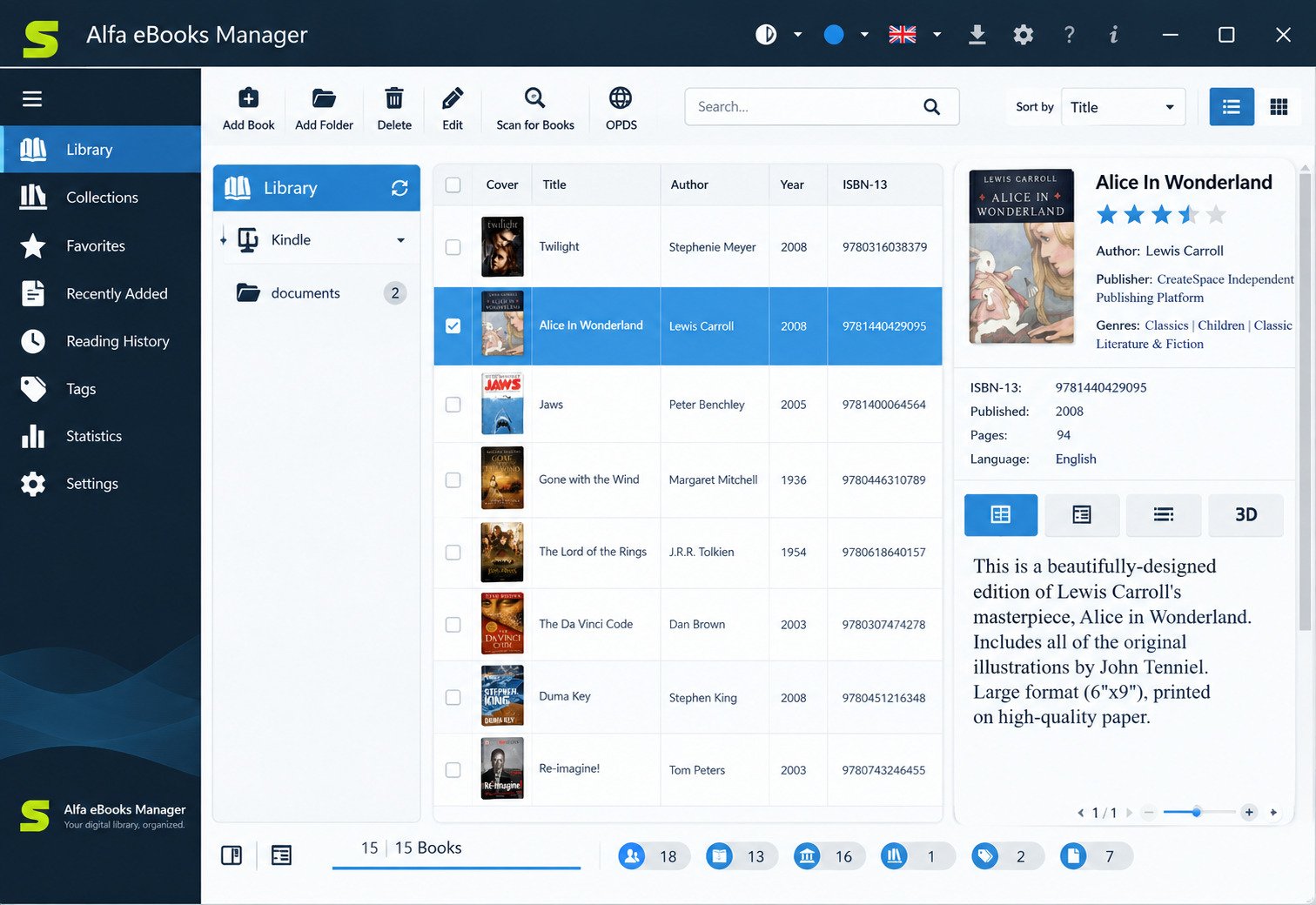
The program works on two layers. The bottom layer is file handling: scanning folders, detecting duplicates, parsing embedded metadata. The top layer is cataloging: authors, series, genres, tags, and custom fields.
That split matters. Most people don’t actually want file management, they want to find a book. Alfa is designed around finding.
Ebook Library, Catalog, and Collection Management
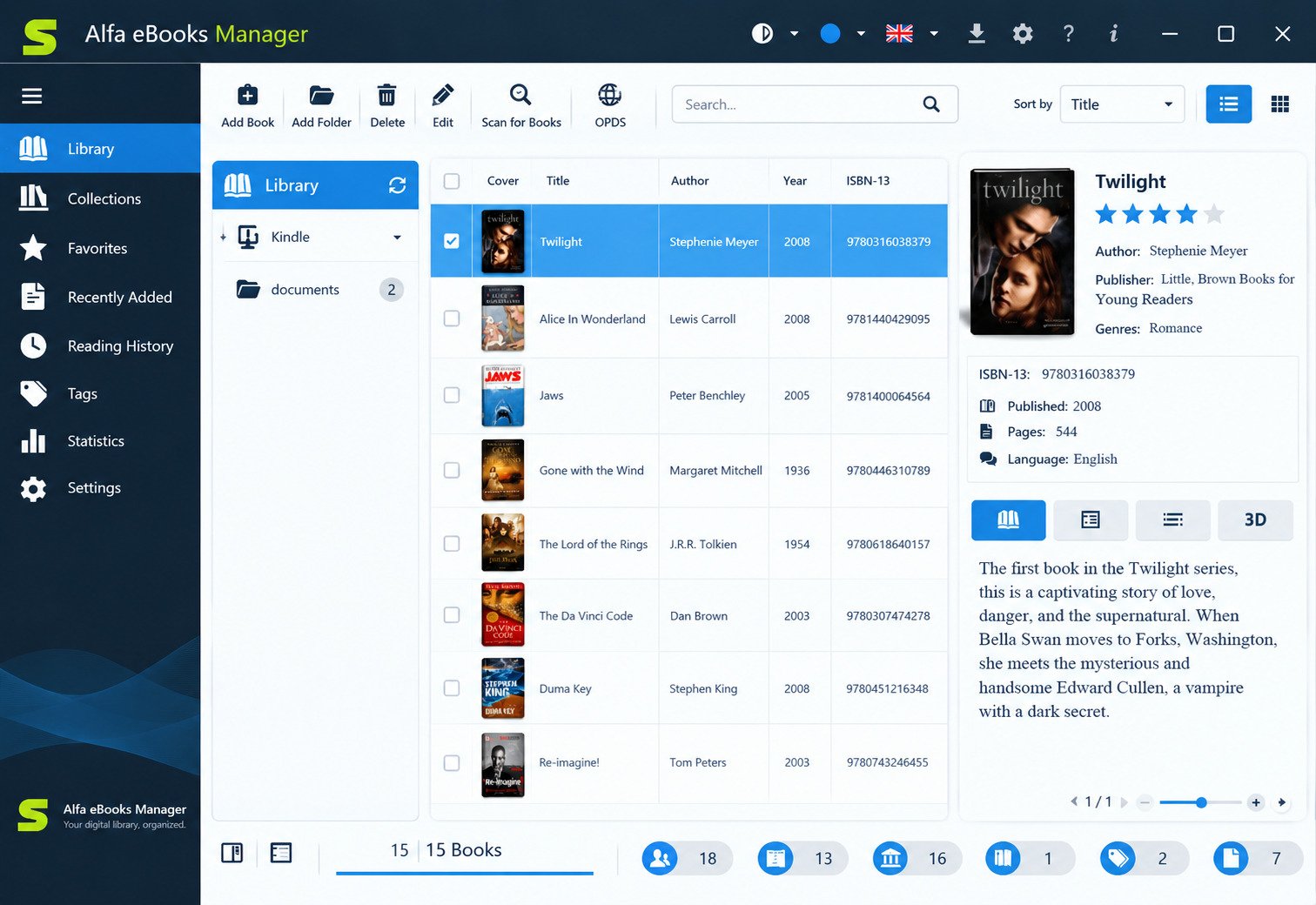
Every book becomes a Book Card, a detailed profile holding title, authors, publisher, series, ISBN, page count, price, description, cover image, and table of contents. You can attach multiple files to one record.
That means a single title can hold its EPUB, its PDF, and its audiobook version together, instead of appearing three times.
Personal Digital Library and Book Database
The database is local. Nothing is uploaded, nothing requires a subscription, and your catalog keeps working offline. The developer recommends libraries of up to roughly 20,000 books, with a built-in tool to split larger databases into parts.
Who Is Alfa eBooks Manager For?
| User type | Why it fits |
|---|---|
| Heavy ebook collectors | Bulk scanning, duplicate detection, batch editing |
| Students and researchers | Quote extraction, notes, full-text search across PDFs |
| Mixed print + digital readers | Catalogs paper books via ISBN scanning |
| Audiobook listeners | Handles MP3 and M4B with a built-in player |
| Small libraries and schools | Local network access through the web interface |
It’s less useful if you own fifty ebooks and already know where they are.
Alfa eBooks Manager Features
Ebook Organization and Collection Management
Books can be viewed as a bookshelf, a list, a table, or a cover grid, and the layout, scale, panels, and color scheme are all adjustable. There’s a light and dark theme.
There’s also a 3D book view, which renders realistic models of your covers. It’s decorative rather than practical, but collectors tend to love it.
Ebook Cataloging and Digital Library Management
The Library Explorer groups your collection by author, genre, series, publisher, or tag on the fly. A Filter Builder lets you construct precise conditions, like “PDF files added this year, unread, over 400 pages.”
Ebook Metadata Management and Editing
The Metadata Editor reads and writes metadata for the most common formats: PDF, EPUB, MOBI, AZW, and FB2. Fixing a wrong author in Alfa can write that correction back into the file itself.
Note: This is a Pro-edition feature, not included in the entry-level license.
Ebook Cover Management and Organization
Covers can be extracted from files automatically, pulled from web sources, or picked from Google Images in one click. The same tool works for author photos and publisher logos.
Ebook Library Search and Filtering
Beyond field search, Alfa offers full-text search inside the books themselves. Searching a phrase returns the titles containing it, genuinely useful for a research library.
Book Categories, Genres, Tags, and Authors
Each book supports multiple authors with different roles (writer, translator, editor, narrator), several genres, and unlimited tags. Custom fields let you track anything the developer didn’t think of: shelf number, lending status, reading priority.
Book Information, ISBN, and Publication Details
Enter an ISBN and the Web Update tool fills in the rest from Google Books, Amazon, Barnes & Noble, and other sources. You can combine fields from different sites when one has a better description and another a better cover.
Alfa eBooks Manager Supported Ebook Formats
Quick answer: Any file type can be added to the database. Metadata parsing and editing work best with EPUB, MOBI, AZW, FB2, and PDF.
EPUB and MOBI Ebook Management
EPUB and MOBI are the best-supported formats. Metadata reads cleanly, covers extract reliably, and the built-in reader handles both without conversion.
PDF Book and Ebook Organization
PDFs are where a cataloging tool earns its money. Academic PDFs usually carry no usable metadata, so the File Parser tries to retrieve ISBNs and details from the document content, then you fill gaps through web update.
Managing Different Ebook File Formats
| Capability | Formats covered |
|---|---|
| Add to library | Any file |
| Read in-app | Most popular text formats |
| Parse metadata | EPUB, MOBI, FB2, PDF, AZW and more |
| Edit metadata | PDF, EPUB, MOBI, AZW, FB2 |
| Convert | Selected format pairs |
| Audio | MP3, M4B |
Kindle devices connect as USB drives, so books can be imported, edited, and sent back. If you also publish or preview Kindle files, pairing Alfa with a formatting checker like Kindle Previewer covers both sides of the workflow.
Ebook Files and Folder Organization
By default, Alfa does not move or rename your files. It links to their existing paths. When you do want tidy folders, the built-in File Manager can rearrange them using naming patterns.
Alfa eBooks Manager Ebook Library and Catalog
Create and Organize an Ebook Library
Setup starts with creating a database, then scanning a drive or folder. A test run on a 2,000-file folder takes a few minutes; the program parses metadata and generates covers as it goes.
Create an Ebook Catalog and Book Database
Once scanned, you refine. Group by author, spot the records with missing covers, select them all, and batch-update from the web. Ten minutes of cleanup transforms a raw scan into a real catalog.
Organize an Ebook Collection on PC
Duplicates control is quietly one of the best features. Large collections accumulate the same title in three formats under four filenames, and Alfa flags them instead of letting them pile up.
Manage a Personal Book Collection
Print books can be added manually or by scanning barcodes with the free Alfa ISBN Scanner Android app, which produces a list you import through CSV.
Home Library and Digital Book Management
The Web edition runs a local server, so family members can browse the household library from a phone or tablet on the same network, and read in the browser.
Alfa eBooks Manager Metadata and Book Information
Edit Ebook Metadata and Book Details
Editing happens in the Book Card or in the dedicated Metadata Editor. The Batch Book Editor applies changes to many books at once: fixing a misspelled publisher across 300 records takes seconds.
Manage Ebook Titles, Authors, and Publishers
Authors, genres, publishers, and series are stored as lookup lists, not free text. Rename “J.R.R. Tolkien” once and every linked book updates. This single design choice prevents most library chaos.
ISBN, Genre, Category, and Tag Management
Genres can be layered with tags for softer categorization: “to reread,” “office shelf,” “cited in thesis.” Tags are searchable and filterable like any other field.
Organize Ebook Metadata and Library Information
The Manage Knowledge feature stores extracted quotes and your comments inside the book card. For students, that turns a library into a citation workspace.
Alfa eBooks Manager Ebook Cover Management
Organize Ebook Covers and Cover Images
A cover-first library is faster to navigate than any list. Alfa generates covers during scanning, and missing ones can be filled from the web in bulk.
Manage Book Cover Information
Covers can be replaced, cropped, or set from a local image file. Resolution matters here: low-quality thumbnails look rough in bookshelf and 3D views.
Ebook Cover Database and Collection
Cover images are stored alongside the database rather than inside your ebook files, so your originals stay untouched unless you deliberately write metadata back.
Alfa eBooks Manager Search and Library Organization
Search an Ebook Library and Collection
Quick search covers title, author, and ISBN. Results appear as you type, which is the behavior most people actually want.
Find Ebooks and Books on Your PC
The File Finder locates library entries whose files have gone missing, after a drive letter change or a folder move, and relinks them. Anyone who has reorganized a hard drive will appreciate this.
Search Ebook Metadata and Book Information
Advanced filters combine fields, dates, formats, and custom values. Saved filters behave like smart shelves you can return to.
Practical tip: tag books at import, not later. Assigning a “source” tag during each scan gives you permanent context about where a file came from, and it costs nothing at the time.
Alfa eBooks Manager Import, Export, and Ebook Files
Import Ebooks and Existing Collections
Scanning is the fastest route for loose files. Point it at a drive, choose formats, and let it run.
Import an Ebook Library or Database
Existing catalogs come in through CSV, Calibre, Google Books, or OPDS. The Calibre importer reads the library database directly, preserving metadata rather than re-scanning files.
Export an Ebook Library and Catalog
The Export tool outputs your catalog for backup, printing, or spreadsheets. Exporting before any major cleanup is sensible insurance.
Manage Ebook Files and Folders
Database tools handle backup, repair, and compacting. Because everything lives in one database file, backups are straightforward: copy it somewhere safe on a schedule.
Alfa eBooks Manager Download and Latest Version
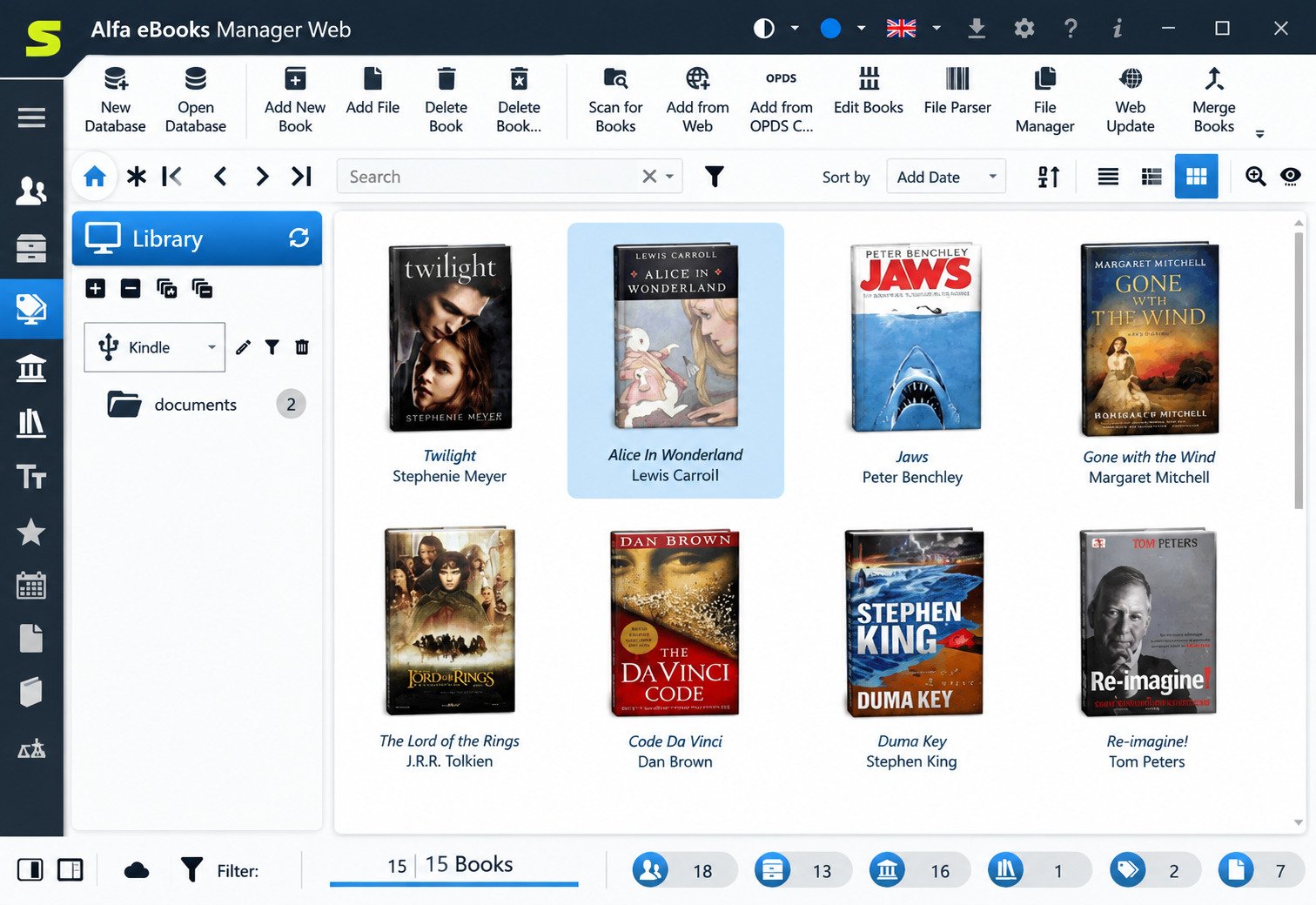
Alfa eBooks Manager Download for Windows
Download the installer from the official site, alfaebooks.com, or install it from the Microsoft Store. Both are legitimate sources; the Store version updates automatically.
Avoid third-party “full version” or cracked downloads. They’re the most common vector for bundled malware in this software category.
Alfa eBooks Manager for Windows 11 and Windows 10
Current releases officially target Windows 10 and Windows 11, both 64-bit. Older Windows versions are no longer supported by recent builds.
Alfa eBooks Manager Latest Version
The software has been in continuous development since 2007 and is currently in its version 9 line. Major updates typically arrive about once a year; minor updates and fixes land more often.
Alfa eBooks Manager Free Download and Trial
The trial is full-featured and free, which is the right way to evaluate it. Install it, scan a real folder from your collection, and judge it on your own files rather than on screenshots.
Alfa eBooks Manager System Requirements
Windows Compatibility and Hardware Requirements
| Requirement | Recommendation |
|---|---|
| OS | Windows 10 or 11 (64-bit) |
| RAM | 4 GB minimum, 8 GB for large libraries |
| Storage | Modest for the app; covers grow the database |
| Display | 1366×768 or higher |
| Internet | Needed only for web updates |
| Mac/Linux | Not supported natively |
Storage and Database Requirements
The program itself is light. What grows is the cover and metadata database: a 10,000-book library with high-resolution covers can reach several gigabytes. An SSD makes browsing noticeably smoother.
Alfa eBooks Manager Portable Version
There’s no official portable build. However, because the database is a self-contained file, you can keep it on an external or network drive and access the same library from multiple installations.
How to Install and Set Up Alfa eBooks Manager
Alfa eBooks Manager Installation on Windows
- Download the MSI installer from the official site.
- Uninstall any older Alfa version first if one exists.
- Run the installer; if Windows SmartScreen warns about an unrecognized app, choose Run anyway.
- Follow the wizard and launch the program.
Initial Ebook Library Setup
On first run, create a new database and give it a clear name. A sample library is included so you can explore the interface before committing your own files.
Import and Organize Your Existing Ebook Collection
Start with one folder, not your whole drive. Reviewing 200 results teaches you how the parser behaves before you unleash it on 20,000 files.
Configure Metadata, Covers, Categories, and Search
Set your preferred web sources, decide whether metadata should be written back to files, and define your tag vocabulary early. Consistency beats cleverness in any catalog.
Alfa eBooks Manager Tutorial: How to Organize Your Ebook Collection
How to Organize Ebooks on Windows
Consolidate first. Move everything into one parent folder, even messy subfolders are fine, then scan that single location. One scan beats six.
How to Create a Digital Book Library
Create the database, scan, review duplicates, batch-update metadata from the web, then fill in covers. That order minimizes rework.
How to Catalog Ebooks
Catalog in passes, not all at once. Pass one: titles and authors. Pass two: genres and series. Pass three: tags and notes. Trying to perfect every field on every book in one sitting is how people abandon the project.
How to Manage Ebook Metadata
Select a group of books, open the batch editor, and update shared fields together. For anything with an ISBN, web update is faster and more accurate than typing.
How to Organize Ebook Covers
Filter for books without covers, select all, and fetch images in one operation. Then spot-check: automated cover matching occasionally attaches the wrong edition.
How to Manage and Search a Large Ebook Collection
For libraries beyond roughly 20,000 titles, split the database by theme: fiction, technical, archive. Smaller databases stay responsive and are quicker to back up.
Alfa eBooks Manager Free Version, Trial, Full Version, and License
Is Alfa eBooks Manager Free?
No. It’s commercial software with a free trial. Some download sites describe it as free, which is misleading: the trial is free, the license is not.
Alfa eBooks Manager Trial and Full Version
The trial gives you the full feature set for evaluation. Buying converts the same installation into a licensed copy; you don’t reinstall or rebuild your library.
Alfa eBooks Manager License and Activation
Licenses are lifetime, delivered by email as a key, usually within minutes of payment. One license covers up to five computers for a single user.
Minor updates and bug fixes are free. Major yearly upgrades are paid, but existing customers receive a large discount and can skip versions.
Alfa eBooks Manager Price and Purchasing Options
| Edition | Price | Key additions |
|---|---|---|
| Basic | $29.95 | Unlimited books, reader, audiobook player, Kindle integration, ISBN scanner |
| Pro | $49.95 | Metadata editor, batch web update, file parser, file manager, knowledge tools |
| Web | $69.95 | Web server, web interface, web reader, OPDS server and client |
Prices are list prices; the developer runs frequent 50% promotions. Check the official site before buying.
Which to choose? Pro is the practical sweet spot for most collectors: the metadata editor and batch web update are the features that save real hours.
Alfa eBooks Manager Not Working and Common Problems
Alfa eBooks Manager Not Opening
Usually a database or permissions issue. Launch as administrator, or open a fresh database to confirm the program itself is fine. If a new database opens, the original file is the problem.
Alfa eBooks Manager Installation and Download Errors
SmartScreen blocks are the most common complaint. Choose More info → Run anyway. If the MSI fails, download again: incomplete downloads produce misleading errors.
Alfa eBooks Manager Windows 11 and Windows 10 Problems
Blurry text or oversized panels on high-DPI screens are display scaling issues. Adjust the program’s compatibility settings under Properties → Compatibility → Change high DPI settings.
Alfa eBooks Manager Database and Library Errors
Run the built-in database repair and compact tools. Corruption usually traces back to an interrupted write: a sudden shutdown or a disconnected external drive mid-operation.
Alfa eBooks Manager Metadata, Import, and Export Errors
Failed web updates often mean a source site changed or rate-limited requests. Try another source. Broken CSV imports are nearly always encoding problems: save as UTF-8.
Alfa eBooks Manager Activation and License Errors
Check your spam folder for the key email first. Keys are blacklisted if shared publicly, so keep yours private. Support responds by email for legitimate activation issues.
Alfa eBooks Manager Update and Uninstall
Updates install over the existing version and keep your database. To remove the program, uninstall it from Control Panel → Programs. Your database file survives uninstallation: delete it separately if you want a clean slate.
Alfa eBooks Manager Review: Features, Usability, and Performance
Ebook Organization and Library Management Experience
The interface is genuinely pleasant, which sounds trivial until you’ve spent an evening cataloging books. Visual bookshelves, adjustable layouts, and dark mode make long sessions bearable.
Metadata and Cataloging Workflow
This is the strongest area. Lookup lists, batch editing, and multi-source web updates combine into a workflow that’s faster than Calibre for bulk cleanup.
Search, Covers, and Collection Management
Full-text search, duplicate detection, and file relinking solve the three problems that actually plague large libraries. Performance stays comfortable up to five figures of titles.
Pros and Limitations to Consider
Pros
- Excellent metadata and batch editing tools
- Handles ebooks, print books, and audiobooks together
- Local, offline, no subscription
- Clean, customizable interface
- Lifetime license on up to five machines
Cons
- Windows only; no Mac or Linux version
- Paid, with yearly paid major upgrades
- Best features are gated to Pro and Web editions
- Conversion is weaker than Calibre’s
- Learning curve for the advanced tools
Alfa eBooks Manager vs Calibre
Alfa eBooks Manager vs Calibre for Ebook Organization
| Factor | Alfa eBooks Manager | Calibre |
|---|---|---|
| Price | $29.95–$69.95 lifetime | Free, open source |
| Platforms | Windows | Windows, macOS, Linux |
| File handling | Leaves files in place | Reorganizes into its own folders |
| Print books | Full support | Limited |
| Audiobooks | Yes, with player | Limited |
| Conversion | Basic | Extensive |
| Device sync | Kindle and USB readers | Broad device support |
| Interface | Polished, customizable | Functional, dense |
Alfa eBooks Manager vs Calibre on Windows
Calibre wins on conversion, plugins, price, and device support. Alfa wins on interface, cataloging depth, print and audio integration, and not touching your folder structure.
Ebook Library, Metadata, and Cataloging Differences
Calibre is a conversion and device tool that also catalogs. Alfa is a catalog tool that also reads. Choose based on which job you do more often. And since Alfa imports Calibre libraries directly, trying both costs nothing but time.
Alfa eBooks Manager vs BookFusion
Library Organization and Ebook Management
BookFusion is cloud-first: your library syncs across phone, tablet, and web, with reading progress and annotations following you. Alfa is desktop-first and local.
Desktop Features and Platform Differences
BookFusion runs on a subscription and works across every platform. Alfa is a one-time purchase confined to Windows, but offers deeper cataloging and no ongoing cost. Alfa’s Web edition covers local network access, not internet sync.
Alfa eBooks Manager Alternatives and Competitors
Alfa eBooks Manager Alternative to Calibre
Alfa markets itself directly as the comfortable Calibre alternative, and for users who value interface quality over plugin ecosystems, that positioning is fair.
Free Alfa eBooks Manager Alternatives
- Calibre: the free standard, unmatched feature breadth
- Koodo Reader: free, open source, cross-platform reader with library features
- Bookshelf-style apps: lightweight but limited cataloging
Ebook Manager and Organizer Alternatives
| Tool | Best for | Cost |
|---|---|---|
| Calibre | Conversion, device sync | Free |
| Alfa eBooks Manager | Cataloging, mixed collections | Paid, lifetime |
| BookFusion | Cross-device cloud reading | Subscription |
| Kavita | Self-hosted server libraries | Free |
| Libib | Casual catalog for print and digital | Freemium |
Ebook Library and Collection Management Alternatives
Self-hosted options like Kavita or Calibre-Web suit people who want browser access from anywhere and don’t mind server setup.
Ebook Management Software for Windows
For Windows specifically, the realistic shortlist is Calibre, Alfa eBooks Manager, and a self-hosted server. Everything else is either a reader or a general file manager.
Frequently Asked Questions About Alfa eBooks Manager
It organizes ebooks, printed books, and audiobooks into one searchable digital library with covers, metadata, and tags.
No. It offers a free full-featured trial, but full use requires a lifetime license starting at $29.95.
Yes. Current versions officially support both Windows 10 and Windows 11.
Yes. EPUB and MOBI are fully supported for scanning, metadata parsing, editing, and in-app reading.
Yes. The Pro edition edits metadata in PDF, EPUB, MOBI, AZW, and FB2 files, individually or in batches.
Yes. Covers are extracted automatically during scanning and can be fetched in bulk from web sources or Google Images.
Yes, and it imports Calibre libraries directly. It’s stronger on cataloging; Calibre is stronger on conversion.
Calibre if you want free and powerful. Alfa if you want polished cataloging across digital, print, and audio.
Final Verdict: Should You Use Alfa eBooks Manager?
Bottom line
If your collection has outgrown folders and you actually enjoy the act of curating a library, Alfa eBooks Manager is worth the money. It respects your files, handles print and audio alongside digital, and turns cataloging into something closer to a pleasure than a chore.
If you mostly convert formats, sync to many devices, or work outside Windows, Calibre remains the better fit, and it’s free.
The honest advice is to test before you buy. Install the trial, scan one real folder from your collection, and spend thirty minutes cleaning it up. You’ll know within that half hour whether this is the tool you’ve been missing.
Either way, taking control of a scattered library is one of those small projects that keeps paying you back. Every time you find a book in two seconds instead of twenty minutes, the effort justifies itself.
One Response