Trading Software Guide
Quantower Download, Features, Setup, and Alternatives
If you have spent any time comparing trading platforms, you have probably run into one name over and over: Quantower. It shows up in forums about order flow, footprint charts, and futures trading, and for good reason — it packs professional-grade market analysis tools into a single, free-to-download terminal.
This guide walks through what Quantower actually does, how its charts and order flow tools work, how to download and set it up on Windows, what it costs, and how it stacks up against alternatives like TradingView, NinjaTrader, and Bookmap.
What Is Quantower and How Does the Trading Platform Work?
Quantower Trading Platform Overview
Quantower is a broker-neutral, multi-asset trading platform built for traders who want deep market analysis rather than a basic charting app. It connects to dozens of brokers and data feeds instead of locking you into one.
Quantower Trading Software and Terminal
At its core, Quantower is a desktop terminal for Windows. You get charting, order execution, watchlists, and analytics panels inside one workspace that you can rearrange to match your workflow.
Quantower Market Analysis and Trading Tools
Beyond standard candlesticks, Quantower is built around order flow and volume-based analysis — footprint charts, volume profile, DOM trading, and VWAP are all native, not bolted-on add-ons.
Who Is Quantower Best For?
Quantower suits:
- Futures and day traders who rely on order flow and volume data
- Multi-asset traders juggling forex, crypto, and futures accounts
- Developers who want to build and test automated strategies via API
Casual, buy-and-hold investors probably won’t need this level of depth.
Quantower Supported Markets and Asset Classes
Quantower supports futures, forex, stocks, options, and cryptocurrencies through a single interface, letting you monitor multiple markets without switching software. Visit the official Quantower website for the full, current list of supported markets.
Quantower Features for Trading and Market Analysis
Advanced Trading Charts and Charting Tools
Charts support multiple timeframes, tick-based charts, Renko, and range bars, alongside drawing tools like Fibonacci, Gann, and harmonic patterns.
Quantower Indicators and Technical Analysis
The platform ships with a broad indicator library covering trend, volatility, volume, and oscillators, and it supports fully custom indicators for traders who want their own formulas.
Order Flow Trading and Market Analysis
Order flow analysis studies real-time buying and selling pressure directly from the order book, rather than relying only on price action after the fact.
Volume Profile and Volume Analysis
Volume profile plots how much volume traded at each price level, helping identify the point of control and value area — the prices where the most business actually happened.
Footprint Charts and Order Flow Surface
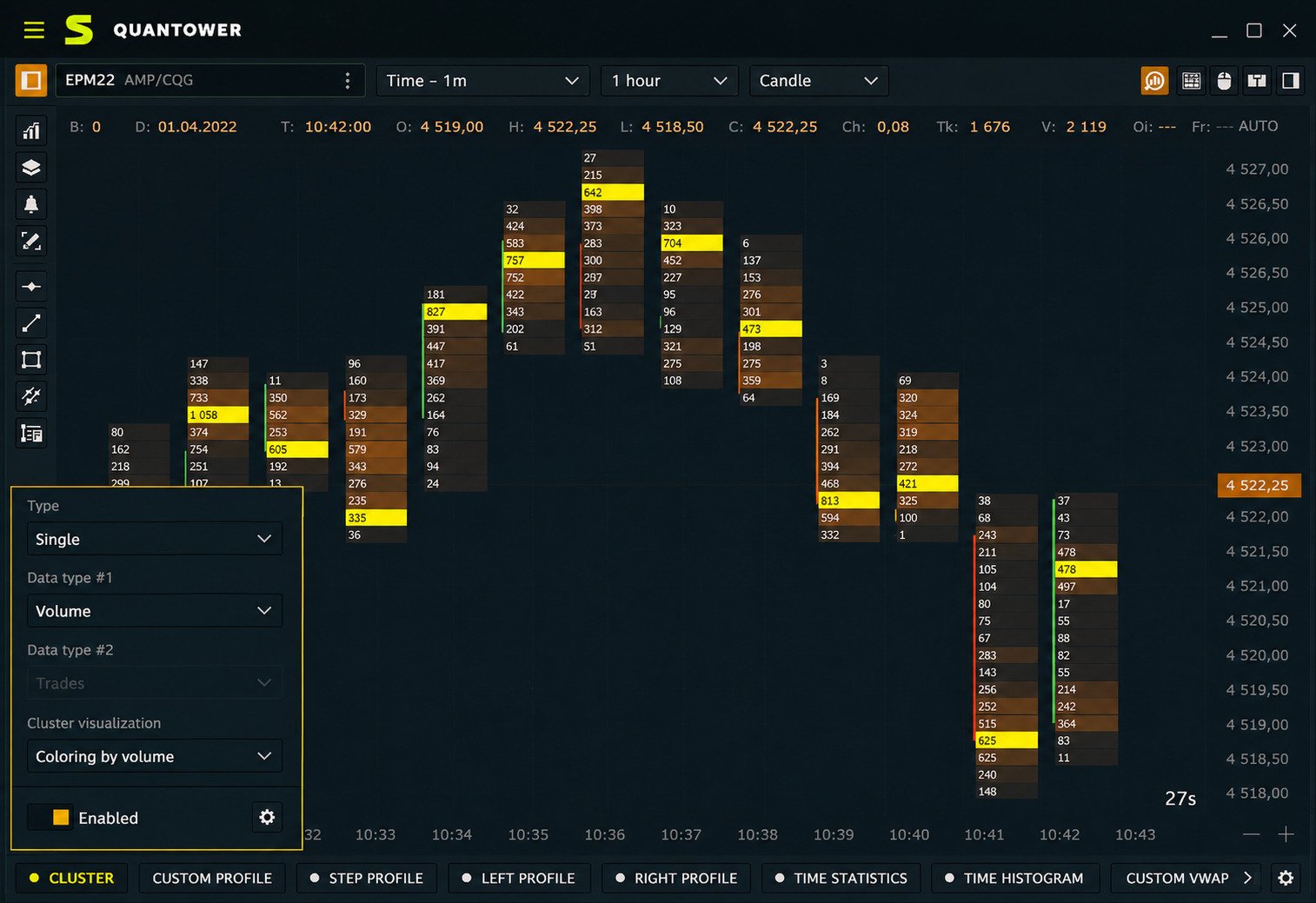
The footprint (cluster) chart overlays buy and sell volume directly onto each candle, while the Order Flow Surface visualizes changing limit orders in the book as a heatmap.
DOM Trading and Depth of Market
The DOM (Depth of Market) panel lets you place, modify, and cancel orders directly from the price ladder while watching live bid/ask depth.
Market Depth and Order Book Analysis
Market depth data shows resting orders at multiple price levels, which helps traders spot where large participants may be defending a price.
VWAP and Anchored VWAP
VWAP (Volume Weighted Average Price) gives a volume-adjusted benchmark price. Anchored VWAP lets you start that calculation from any custom point, such as a major news event.
Trading Tools, Analytics, and Custom Indicators
Additional analytics include a trading simulator, options analytics with Greeks, and a scripting environment for building custom tools in C#.
Quantower Order Flow and Footprint Charts
What Is Order Flow Trading?
Order flow trading means reading live buy and sell order activity — not just candle patterns — to gauge short-term supply and demand imbalances.
Quantower Order Flow Analysis
Quantower’s order flow tools track bid-ask imbalances and aggressive market orders, helping traders anticipate short-term price moves.
Quantower Footprint Chart
The footprint chart shows exact traded volume at each price inside every bar, making buyer/seller aggression visible at a glance.
Quantower Order Flow Surface
This heatmap-style panel displays the full depth of the order book over time, revealing where large limit orders are being added, pulled, or filled.
Quantower Volume Profile Trading
Traders combine volume profile with order flow to confirm whether a price level is genuinely being defended or simply being tested.
Quantower DOM Trader and Market Depth
The DOM Trader panel is fully customizable, supporting one-click order placement, bracket orders, and visual order flow overlays.
Using Order Flow Tools for Futures Trading
Order flow tools are especially popular with futures scalpers, since futures markets typically provide full depth-of-market data that stocks and forex often don’t.
Quantower Volume Profile and Volume Analysis
What Is Volume Profile Trading?
Volume profile trading uses horizontal histograms of traded volume by price, instead of by time, to find “true” support and resistance zones.
Quantower Volume Profile Indicator
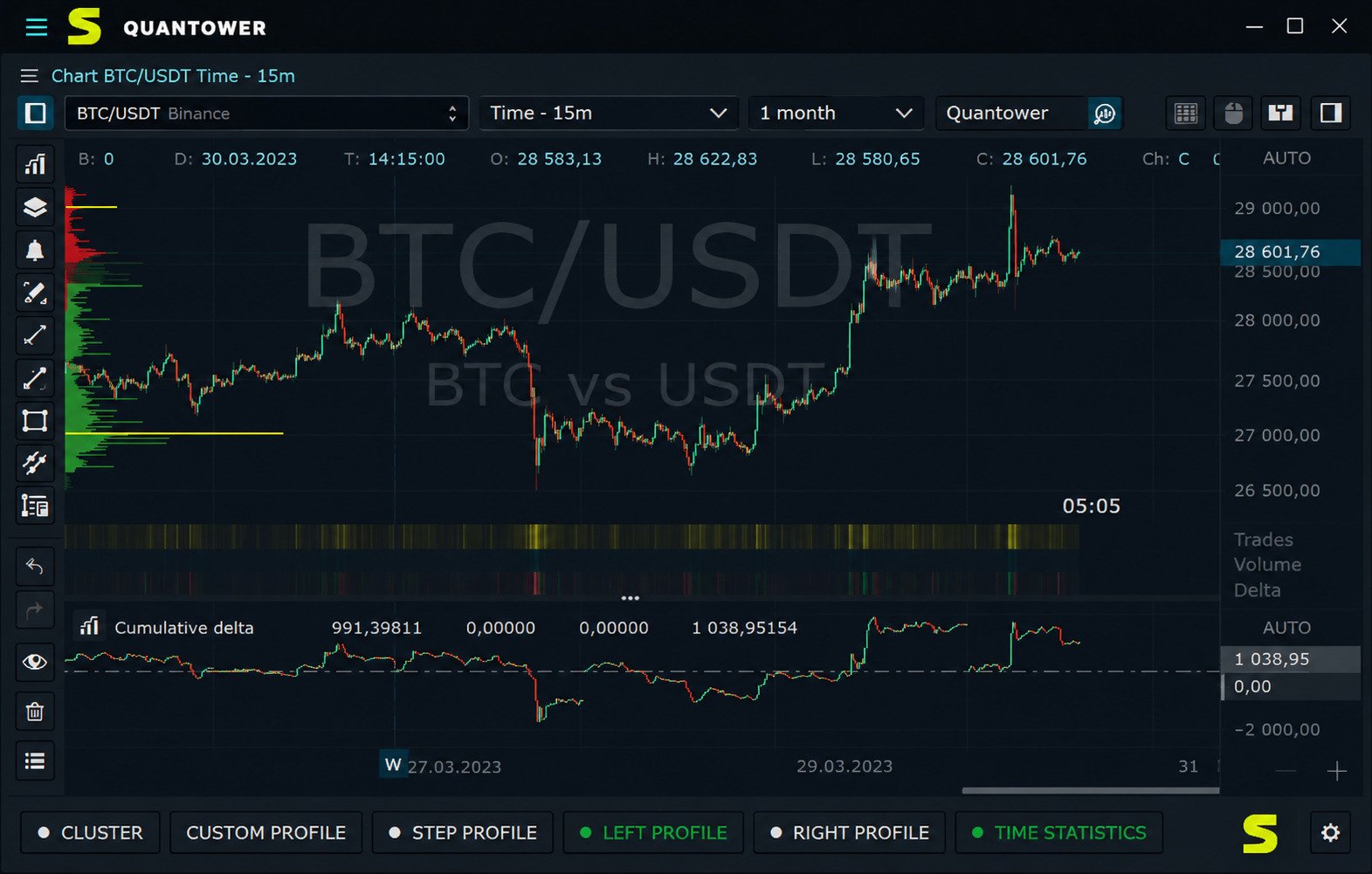
Quantower offers Step, Left, Right, and Custom volume profiles, each configurable by session, day, week, or custom time range.
Quantower Volume Profile Chart
Profiles can be layered onto any chart, combined into a “combo” profile, or displayed independently for cross-session comparison.
Quantower Volume Analysis Tools
Other volume tools include the cluster (footprint) chart, historical time and sales, and a volume/delta histogram per bar.
Volume Profile for Futures, Forex, and Crypto
Volume profile works across asset classes, though it is most reliable in markets with centralized, transparent volume — futures and crypto exchanges typically fit that better than spot forex.
Quantower VWAP and Volume-Based Indicators
VWAP, anchored VWAP, and volume-based oscillators round out the platform’s volume toolkit for confirming trend strength.
Quantower Futures, Forex, and Crypto Trading
Quantower’s multi-asset design means the same charting and order flow tools apply across markets, though data quality depends on your connected broker or feed.
| Asset Class | Order Flow Support | Typical Use Case |
|---|---|---|
| Futures | Full depth-of-market data | Scalping, day trading, order flow analysis |
| Forex | Limited (broker-dependent) | Swing trading, technical analysis |
| Crypto | Strong on major exchanges | Spot and crypto futures trading |
| Stocks & Options | Varies by data feed | Options analytics, Greeks, swing trading |
For futures traders, Quantower connects to feeds like CQG and Rithmic, giving full market depth for footprint and DOM tools. Forex traders get solid charting and indicators, though true order flow depends on the broker’s data. Crypto traders can connect major exchanges directly for spot and futures trading with volume profile and footprint support.
Quantower Trading Simulator and Backtesting
Before risking real money, Quantower lets you test ideas in a built-in trading simulator using live or replayed market data. This is useful for:
- Practicing order execution and DOM trading without financial risk
- Testing a new indicator or strategy idea in real market conditions
- Getting comfortable with the platform’s layout before going live
Strategy backtesting is handled through Quantower’s algorithmic trading module rather than a separate backtester, so testing and automation live in the same workflow.
Quantower Algorithmic Trading and API
Quantower includes a C#-based API for building automated trading strategies, custom indicators, and trading bots directly inside the platform. Developers can:
- Build and debug strategies using a familiar .NET environment
- Backtest strategy logic against historical data
- Deploy the same code to live or simulated accounts
This makes Quantower appealing to traders who eventually want to move from manual order flow trading into semi- or fully-automated systems.
Quantower Brokers, Exchanges, and Market Data Connections
Quantower connects to a large and growing list of brokers, exchanges, and data providers — reportedly more than 60 connections at once. It supports simultaneous multi-broker connections, meaning you can trade futures through one provider and crypto through another inside the same workspace. Supported categories include:
- Futures brokers and data feeds (e.g., CQG, Rithmic)
- Forex and CFD brokers
- Major crypto exchanges
- Stock and options brokers, depending on region
Quantower Download, Installation, and Setup
How to Download Quantower
Quantower is downloaded directly from the official Quantower website as a free Windows installer — no account is required just to install the base application.
How to Install Quantower
- Download the installer from the official site
- Run the setup file and follow the on-screen prompts
- Launch Quantower and create a free account
- Connect a broker, exchange, or demo feed
- Customize your workspace with charts and analytics panels
Quantower Windows 11 and Windows 10 Compatibility
Quantower runs natively on Windows 10 and Windows 11.
How to Use Quantower for Trading
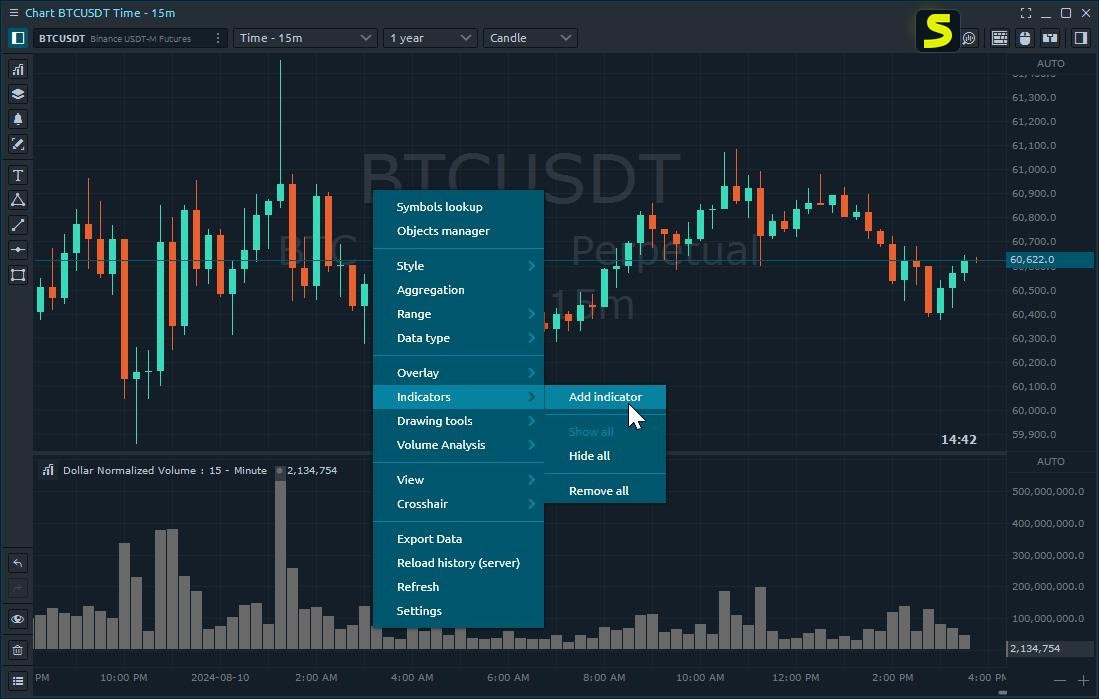
Getting started generally follows this order: connect a broker or demo account, open a chart, add the indicators or volume tools you want, then set up your DOM Trader panel for order execution. From there, most traders layer in volume profile or footprint charts once they’re comfortable with basic navigation.
Quantower Pricing, Free Version, and License Options
Quantower offers a genuinely usable free tier, alongside paid plans that unlock advanced analytics.
| Plan Type | Approximate Cost | What You Get |
|---|---|---|
| Free | $0 | Core charting, basic indicators, demo trading |
| Paid subscription | Monthly fee (varies by broker/region) | Full order flow, footprint, volume profile, DOM tools |
| Lifetime license | One-time fee | Full feature access without recurring payments |
Quantower Review: Pros, Cons, and Who Should Use It
Strengths
- Genuinely deep order flow, footprint, and volume profile tools
- Multi-broker, multi-asset support in one platform
- Free tier is functional, not just a stripped-down demo
- Built-in API for algorithmic trading
Limitations
- Windows-only, no native Mac or Linux version
- Learning curve for traders new to order flow concepts
- Best data quality depends heavily on your broker/feed choice
Quantower is a strong fit for futures and order-flow-focused traders, but casual investors or those who only need simple charting may find it more platform than they need.
Quantower Alternatives and Competitors
If Quantower doesn’t quite fit your workflow, several platforms cover similar ground.
| Platform | Best Known For | How It Compares to Quantower |
|---|---|---|
| TradingView | Charting, social features, web-based | Easier to use, weaker order flow tools |
| NinjaTrader | Futures trading, strategy automation | Similar depth, steeper learning curve |
| Sierra Chart | Highly customizable charting | More technical setup, loyal power-user base |
| ATAS | Order flow specialist | Closer competitor, strong footprint tools |
| Bookmap | Visual order flow heatmaps | More visual, less traditional charting |
For traders comparing mining or crypto-adjacent software alongside trading tools, resources like this Awesome Miner overview can be a useful next read if crypto infrastructure is part of your setup.
As an authoritative external reference on order flow and volume-based trading concepts, the CME Group’s education hub (cmegroup.com) offers helpful primers on futures market data.
Quantower and ProjectX Integrations
Quantower also connects with third-party trading infrastructure providers such as ProjectX, which bundles market data, order routing, and prop-trading account access behind a single connection. For traders using a funded or prop trading account, this kind of integration means you can keep using Quantower’s charts and order flow tools without switching platforms just because your account provider changed. It’s worth checking with your specific prop firm or data provider to confirm which connection type — direct feed, ProjectX, or a broker-hosted bridge — they support, since setup steps can vary slightly between them.
Best Trading Platforms Like Quantower
If you’re still exploring options before settling on one platform, it helps to think in terms of what you actually trade most:
- Best for futures order flow: Quantower, ATAS, and NinjaTrader all specialize here, with Quantower and ATAS leaning more heavily on footprint and DOM visualization.
- Best for visual heatmap-style order flow: Bookmap stands out for its liquidity heatmap, though it’s less focused on traditional indicator-based charting.
- Best for social and cross-device charting: TradingView wins on ease of use, mobile access, and community-shared strategies, even though its order flow tools are lighter.
- Best for highly customizable, historical-data-heavy analysis: Sierra Chart appeals to traders who want granular control over every chart setting, at the cost of a steeper setup process.
- Best for automated and algorithmic strategies: Quantower and NinjaTrader both offer solid coding environments, with Quantower using C# and NinjaTrader using its own NinjaScript language.
None of these platforms is objectively “best” — the right pick depends on whether you value order flow depth, ease of use, automation, or visual heatmaps most.
Frequently Asked Questions About Quantower
Quantower is used for multi-asset trading and market analysis, especially order flow, footprint charts, and volume profile trading.
Yes, Quantower has a free version with core charting and demo trading; advanced order flow tools require a paid plan or bundled broker offer.
For traders who want deep order flow and volume analysis, Quantower is considered one of the stronger options on Windows.
Yes, futures trading is one of Quantower’s core strengths, especially through CQG and Rithmic connections.
Yes, Quantower supports forex and crypto trading, though order flow depth depends on the specific broker or exchange feed used.
Yes, both footprint (cluster) charts and multiple volume profile types are built directly into the platform.
Yes, Quantower includes a C#-based API for building, testing, and running automated trading strategies.
Final Verdict on Quantower
Quantower earns its reputation among order flow traders for a simple reason: it gives you professional-grade volume and depth-of-market tools without a professional-grade price tag. The free version alone is enough for many traders to get a real feel for footprint charts and DOM trading before committing to anything paid.
If your trading style leans on reading order flow, volume profile, or futures market depth, Quantower is worth the download. If you mainly need simple charting or you’re on a Mac, an alternative like TradingView may serve you better — but for Windows-based, data-driven traders, Quantower remains one of the more complete platforms available today.
One Response