Sophos Home Premium Review: Is It the Right Antivirus for Your Family in 2026?
Picking antivirus software can feel like standing in a supermarket aisle with fifty types of cereal everyone claims to be the best, and none of the boxes tell you what actually matters. Sophos Home Premium takes a different approach.
It skips the marketing noise and focuses on one thing: keeping every device in your house safe from malware, ransomware, and shady websites, all from a single dashboard you can check from your phone.
If you’ve been searching for a straightforward answer to “is Sophos Home Premium worth it,” this guide walks through everything — features, pricing, installation, real-world performance, and whether it deserves a spot on your computer. We’ll also compare it honestly against the competition so you’re not making a decision in the dark.
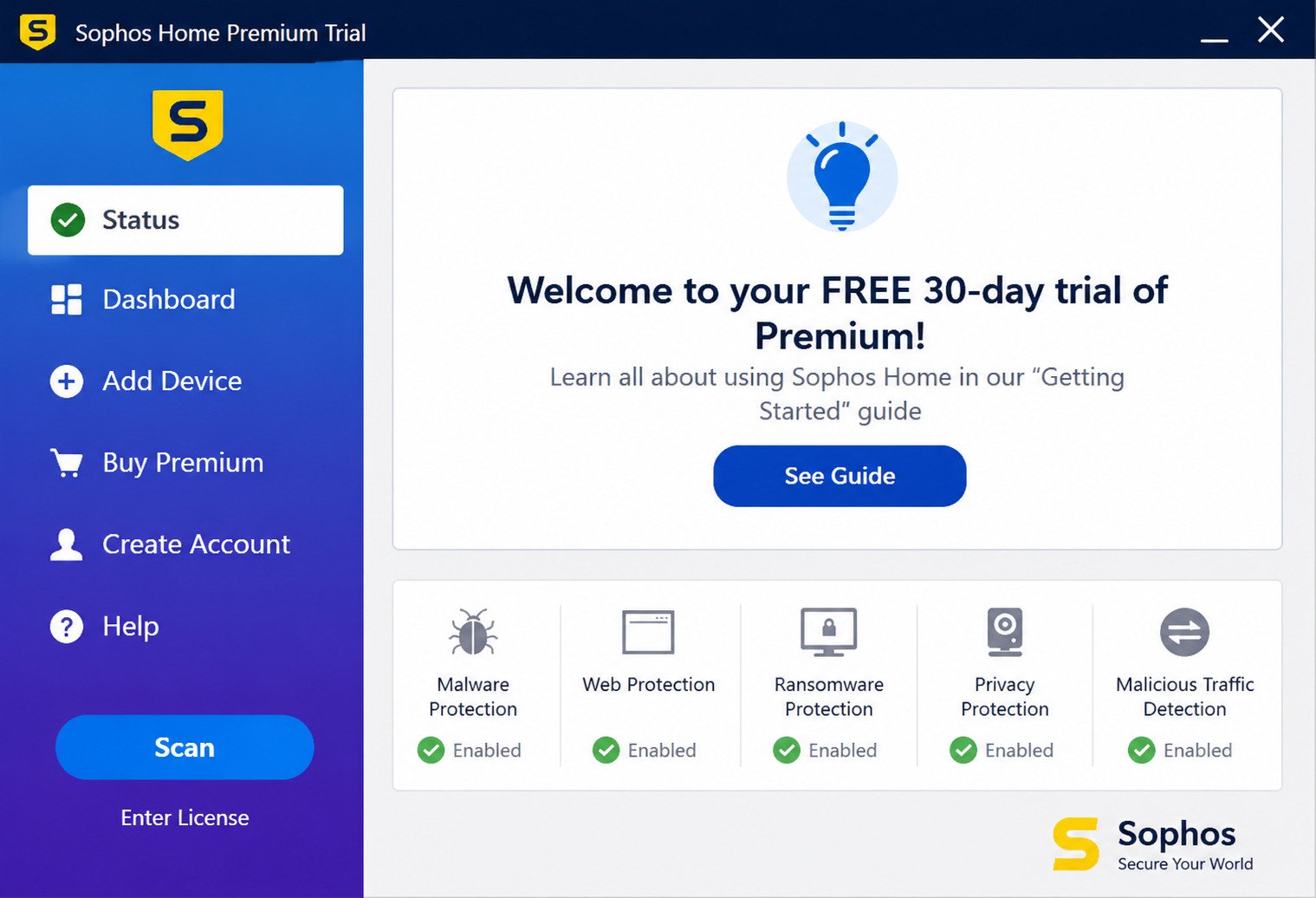
What Is Sophos Home Premium?
Sophos Home and Sophos Antivirus Overview
Sophos has spent over three decades building security tools for banks, hospitals, and Fortune 500 companies. Sophos Home Premium takes that same enterprise-grade engine and repackages it for everyday households.
That lineage matters. Instead of a stripped-down “lite” version built for consumers, you’re getting the same detection technology that protects corporate networks — just with a friendlier interface and a price tag that won’t make you wince.
Sophos Home Premium Features Explained
At its core, Sophos Home Premium bundles together several layers of protection into one subscription:
- Real-time malware and virus scanning
- Ransomware protection with rollback capability
- Web filtering and phishing protection
- Remote device management from any browser
- Parental controls for family-friendly browsing
- Webcam protection against snooping
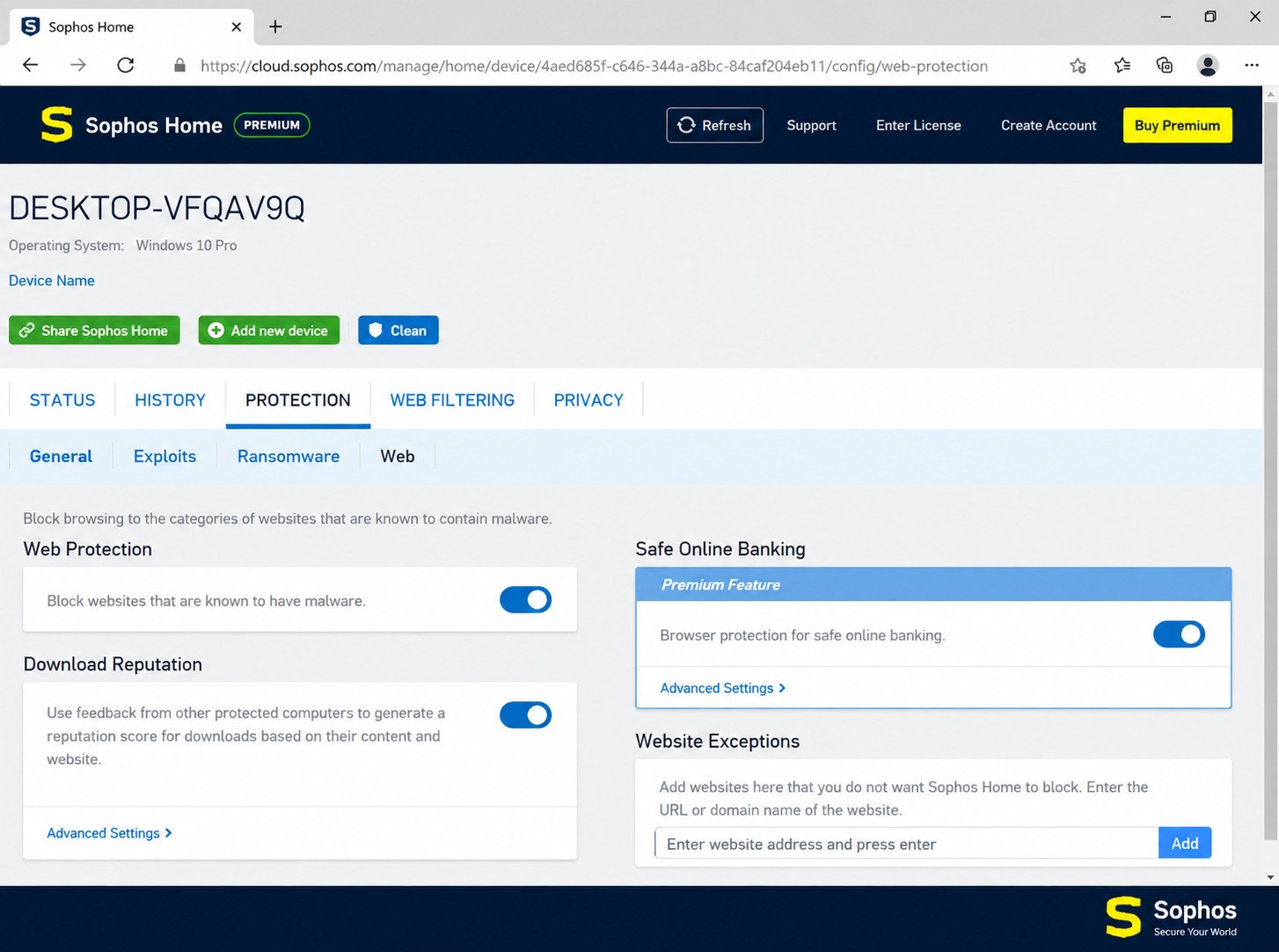
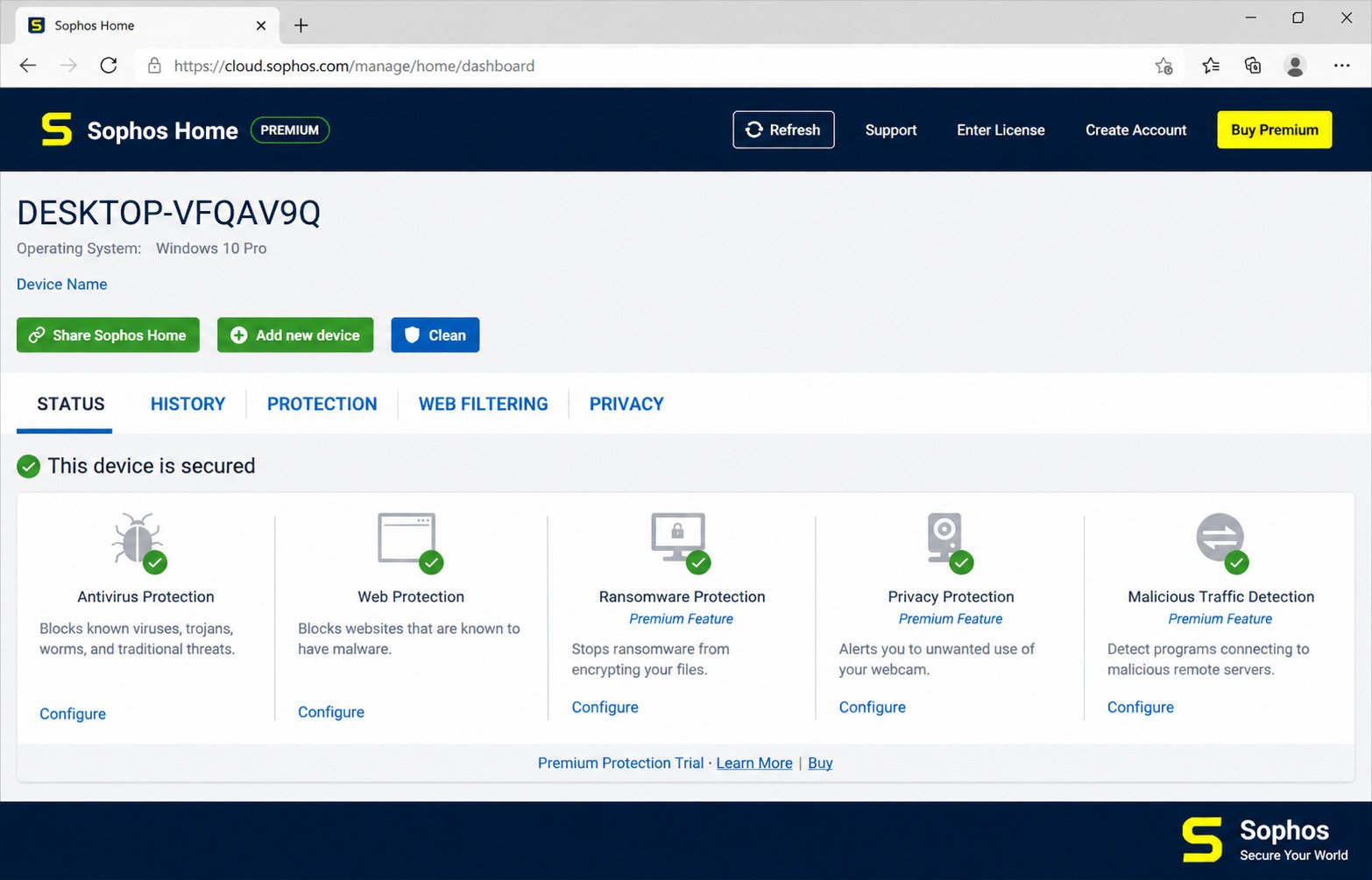
Every feature lives inside a cloud dashboard, so you don’t need to sit in front of each computer to check its status.
What Devices and Threats Does Sophos Home Premium Protect Against?
Sophos Home Premium covers Windows and Mac computers — up to 10 devices on a single plan — plus free mobile protection through the Sophos Intercept X app for iOS and Android.
On the threat side, it defends against viruses, trojans, spyware, keyloggers, ransomware, phishing sites, and malicious downloads. It’s built to catch both well-known malware signatures and brand-new, never-seen-before (“zero-day”) threats using machine learning.
Sophos Home Premium Antivirus and Malware Protection
Sophos Malware Scanner and Malware Protection
The malware engine inside Sophos Home Premium doesn’t just rely on a database of known viruses. It uses behavioral analysis and machine learning to flag files that act suspicious, even if they’ve never been catalogued before.
Why it matters: Roughly 450,000 new malware variants appear every single day. A scanner that only checks against a known-threats list will always be playing catch-up.
Sophos Virus Scanner and Virus Removal
Running a scan is simple: open the dashboard, click “Scan,” and let it work in the background. In independent lab testing, Sophos consistently posts near-perfect detection rates against widespread and zero-day malware samples.
If a virus is found, Sophos quarantines it automatically rather than deleting it outright — giving you a chance to review what was caught before it’s permanently removed.
Sophos Malware Removal and Spyware Removal
Beyond viruses, Sophos actively hunts for spyware, adware, and keyloggers — the quieter threats that steal passwords and browsing habits without obvious symptoms.
Removal is largely automated. You’ll get a notification, a quarantine log, and the option to restore anything you believe was flagged by mistake.
Ransomware Protection and Advanced Threat Detection
Ransomware is arguably the scariest threat facing home users today, since it can lock every photo and document on your PC behind a paywall. Sophos includes CryptoGuard, a feature that monitors for the tell-tale signs of file encryption and can roll back affected files to their pre-attack state.
Caution: It’s not flawless — like any security tool, it isn’t a substitute for regular backups — but it adds a meaningful safety net that many budget antivirus tools skip entirely.
Sophos Web Protection and Phishing Protection
How Sophos Web Protection Works
Sophos Home Premium checks every website you visit against a constantly updated database of malicious and compromised domains. If a site is flagged, the browser connection is blocked before the page even loads.
This happens silently in the background, so there’s no noticeable slowdown to your normal browsing.
Sophos Phishing Protection and Malicious Website Blocking
Phishing emails and fake login pages are one of the most common ways people get hacked. Sophos’s phishing filter scans links in real time, comparing them against known scam patterns rather than just a static blocklist.
That proactive approach means it can catch newly created phishing pages that haven’t been reported yet — a meaningful edge over antivirus tools that rely purely on blocklists.
Protection Against Online Threats and Unsafe Downloads
Every file you download gets scanned before it finishes saving to your computer. Combined with the web filter, this creates two checkpoints: one at the browser level, and one at the file level.
For anyone who shops, banks, or streams frequently online, this dual-layer approach closes a lot of the gaps that cause infections in the first place.
Sophos Home Premium Parental Controls
How Sophos Parental Controls Work
Parents can set web-filtering rules per device or per family member, blocking categories like violence, gambling, or adult content. Everything is managed remotely, so you don’t have to physically sit at your kid’s laptop to adjust settings.
Website Filtering and Online Safety Features
Filtering works by category rather than a manual list of sites, which saves time and adapts automatically as new websites appear. You can also schedule browsing time windows for younger children.
These controls are best suited for younger kids. Tech-savvy teenagers can sometimes find workarounds, so pairing this with an open conversation about internet safety is still a smart move.
Managing Family Computer Security
Because everything routes through the same cloud dashboard used for antivirus management, parents get a single view of every device’s security status and browsing activity instead of juggling separate apps.
Sophos Home Premium Features
Antivirus and Computer Security Features
| Feature | Included in Premium? | Notes |
|---|---|---|
| Real-time malware scanning | Yes | Machine-learning based |
| Ransomware rollback (CryptoGuard) | Yes | Restores encrypted files |
| Web and phishing protection | Yes | Blocks malicious URLs |
| Parental controls | Yes | Category-based filtering |
| Remote device management | Yes | Up to 10 devices |
| Webcam protection | Yes | Windows only |
| VPN | No | Not included |
| PC optimization tools | No | Not included |
Malware, Virus, and Spyware Protection
As covered above, this is the backbone of the product — and it’s consistently the strongest part of the Sophos Home Premium package in independent testing.
Ransomware Protection
CryptoGuard remains one of the more distinctive features in this price range, especially since many rival budget antivirus products only offer basic ransomware detection without a rollback option.
Web and Phishing Protection
Solid, consistent, and low-maintenance — it just works in the background without demanding attention.
Sophos Home Premium Security Features Explained
Put simply: Sophos Home Premium hands you enterprise-style protection layers (malware, ransomware, web, and device management) wrapped in a consumer-friendly dashboard, minus the extras like a VPN or system tune-up tools that some competitors bundle in.
How Good Is Sophos Home Premium?
Is Sophos Home Premium Good?
Quick answer: Yes, Sophos Home Premium is a genuinely strong antivirus for households managing multiple Windows and Mac devices, thanks to near-perfect malware detection and a low resource footprint, though it lacks extras like a built-in VPN.
How Effective Is Sophos Home Premium for Malware Protection?
Independent testing labs regularly place Sophos among the top performers for both known and zero-day threat detection. Its machine-learning engine is genuinely competitive with premium-tier antivirus brands, not just budget ones.
Sophos Home Premium Performance and Ease of Use
One of the most pleasant surprises with Sophos is how light it feels. During a full system scan, it typically uses around 15–20% of CPU resources — noticeably less demanding than some competitors that can spike above 50% during scans.
The interface itself avoids clutter. There’s no barrage of upsell pop-ups, which is refreshing compared to some “free” antivirus tools that nag you constantly.
Who Should Use Sophos Home Premium?
- Families managing several Windows or Mac computers
- The designated “family tech support” person who wants remote control
- Anyone who values strong malware detection over flashy extras
- Small households wanting affordable, no-frills protection
It’s less ideal for Linux users (unsupported) or anyone who specifically needs a bundled VPN.
Is Sophos Home Premium Safe and Legit?
Is Sophos Home Premium Safe?
Yes. Sophos Home Premium is developed by Sophos Ltd., a publicly recognized cybersecurity company that also serves enterprise and government clients. The software itself doesn’t introduce security risks when downloaded from the official Sophos website.
Is Sophos Home Premium Legit?
Absolutely. Sophos has been in the cybersecurity industry since 1985 and is regularly evaluated by independent testing organizations like AV-Test and AV-Comparatives, which lend credibility beyond just marketing claims.
Is Sophos a Trusted Antivirus Software Provider?
Sophos’s enterprise products protect networks for organizations across healthcare, finance, and government sectors — industries where security failures carry real legal and financial consequences. That track record carries over into the consumer product.
How Secure Is Sophos Home Premium?
Account access is protected through your Sophos Home login, and the dashboard itself uses encrypted connections. As with any account-based service, using a strong, unique password is still your responsibility as a user.
Is Sophos Home Premium Worth It?
Sophos Home Premium Advantages and Disadvantages
Advantages
- Strong malware and ransomware detection
- Covers up to 10 devices on one plan
- Low system resource usage
- Simple, uncluttered interface
- Remote management dashboard
Disadvantages
- No built-in VPN
- No PC optimization or cleanup tools
- Parental controls can be bypassed by tech-savvy teens
- No Linux support
- Full system scans can run long on older hardware
Sophos Home Premium Pros and Cons
Pros
- Enterprise-grade detection engine
- Affordable multi-device pricing
- Low CPU impact during scans
- Clean, simple dashboard
Cons
- No VPN included
- No Linux support
- Parental controls have limits
- Longer scan times on old PCs
Sophos Home Premium Value for Home Users
For households juggling several devices, the per-device cost works out to be quite competitive compared to buying separate single-device licenses from other brands.
Should You Buy Sophos Home Premium?
If your priority is dependable malware and ransomware protection across multiple computers without paying for a VPN you might not use — Sophos Home Premium is a smart, budget-conscious pick.
Sophos Home Premium Review and Features
Sophos Home Premium Review 2025
Across independent reviews, a consistent theme emerges: Sophos nails the fundamentals of antivirus protection while deliberately skipping the extras. It’s built for people who want their security software to do its job quietly, not put on a show.
Sophos Home Premium Review and Feature Analysis
The feature set leans heavily toward protection rather than convenience add-ons. That’s a deliberate trade-off — and for many households, it’s the right one, since core protection is what actually keeps you safe.
Malware Detection and Virus Removal Performance
Testing labs consistently rank Sophos’s detection engine near the top of the pack, matching or beating several well-known premium competitors in blocking both common and emerging malware.
Web Protection and Ransomware Protection Review
The combination of real-time web filtering and CryptoGuard’s rollback feature gives Sophos a well-rounded defense against two of the most common ways home users get compromised: malicious links and ransomware attacks.
Sophos Home Premium Download
Sophos Home Download
You can download Sophos Home Premium directly from the official Sophos website. Always download antivirus software from the vendor’s own site — third-party download portals sometimes bundle unwanted extras.
Sophos Home Premium Download
After creating a free Sophos Home account, you’ll be prompted to download the installer, which is a small file that pulls the rest of the program components during setup.
Sophos Home Premium Download for Windows 11
Sophos Home Premium fully supports 64-bit Windows 11 and Windows 10 systems. If you’re running an older 32-bit system or Windows 7/8.1, you’ll want to check compatibility first, since support for legacy versions has been phased out.
How to Download Sophos Home Premium Safely
- Go to the official Sophos Home website
- Create or log into your Sophos Home account
- Choose Premium (or start the 30-day free trial)
- Download the installer directly from your dashboard
Avoiding third-party mirrors keeps you from accidentally downloading a tampered installer — a smart habit for any software, not just antivirus tools.
Sophos Home Premium Free and Free Download Options
Sophos Home Free: What You Should Know
Sophos does offer a free tier with basic antivirus protection, but it’s noticeably more limited — no ransomware rollback, no advanced web filtering, and no remote management across multiple devices.
Sophos Antivirus Free Download Options
If you just want basic malware scanning for a single device, the free version can work as a starting point. But most households outgrow it quickly once they realize how much more Premium offers.
Sophos Home Premium 2025 Free Download
There’s no permanent free version of Premium itself — but Sophos offers a generous 30-day free trial with full Premium features and no credit card required upfront.
Free Trial vs Premium Antivirus Protection
| Free | 30-Day Trial | Premium | |
|---|---|---|---|
| Devices covered | 1 | Up to 3 | Up to 10 |
| Ransomware rollback | No | Yes | Yes |
| Web filtering | Limited | Yes | Yes |
| Parental controls | No | Yes | Yes |
| Remote management | No | Yes | Yes |
How to Install Sophos Home Premium
Sophos Home Premium Installation Guide
Installation is designed to be beginner-friendly. Once downloaded, the installer runs a guided setup wizard that takes just a few minutes on most systems.
Sophos Home Premium Setup Guide
- Run the downloaded installer file
- Sign in with your Sophos Home account
- Allow the program to complete its initial setup
- Let it run the first automatic scan
How to Install Sophos Home Premium on Windows 11
The process on Windows 11 mirrors older versions of Windows, though you may need to approve a Windows security prompt during installation — this is standard for any antivirus software making system-level changes.
Sophos Home Premium Not Installing: Common Problems and Fixes
| Problem | Likely Fix |
|---|---|
| Installer won’t launch | Run as administrator |
| Setup freezes midway | Temporarily disable conflicting antivirus software |
| “Already protected” error | Uninstall other antivirus programs first |
| Slow installation | Check your internet connection stability |
Running two antivirus programs at once is one of the most common causes of installation failures — always uninstall the old one first.
How to Activate Sophos Home Premium
How to Activate a Sophos Home Premium License
After purchasing, your license key is automatically tied to your Sophos Home account — there’s usually no manual code entry required, since activation happens through your logged-in dashboard.
Sophos Home Premium License Key Activation
If you did receive a specific license key (for example, from a retail purchase), you can enter it directly on the Sophos Home account page under subscription settings.
Troubleshooting Sophos Home Premium Activation Problems
- Double-check you’re logged into the correct Sophos account
- Confirm your subscription payment went through successfully
- Restart the application after activation
- Contact Sophos support if the license still shows as inactive after 24 hours
How to Reinstall Sophos Home Premium
When Should You Reinstall Sophos Home Premium?
Reinstalling is usually necessary after a fresh operating system install, when replacing an old computer, or if the software becomes corrupted and stops functioning correctly.
How to Uninstall Sophos Home Premium
- Open Windows/Mac system settings
- Locate Sophos Home Premium in installed applications
- Select uninstall and follow the prompts
- Restart your computer to complete removal
How to Reinstall Sophos Home Premium on Your Computer
Simply log back into your Sophos Home account, download the installer again, and run through the same setup process. Your subscription and device count remain tied to your account, not the individual installation.
Fixing Common Sophos Home Installation and Setup Issues
If reinstallation doesn’t resolve a persistent issue, clearing leftover configuration files (or using Sophos’s official removal tool) before reinstalling often solves stubborn problems.
Sophos Home Premium Price and License
Sophos Home Premium Price
Sophos Home Premium is sold as a single plan covering up to 10 devices, with pricing that scales by subscription length rather than device count:
| Plan Length | Introductory Price | Renewal Price |
|---|---|---|
| 1 Year | ~$44.99 | ~$59.99 |
| 2 Years | ~$74.99 | ~$99.99 |
| 3 Years | ~$104.99 | ~$139.99 |
Pricing is periodically adjusted by Sophos — always confirm current rates on the official site before purchasing.
Sophos Home Premium Subscription and License Options
Unlike many competitors that charge per device, Sophos bundles up to 10 devices into one license — a real advantage for larger households or anyone managing computers for extended family.
What Is Included With Sophos Home Premium?
Every plan length includes the same full feature set: malware protection, ransomware rollback, web filtering, parental controls, and remote management. You’re only paying extra for a longer commitment, not additional features.
Is Sophos Home Premium Worth the Price?
When you divide the annual cost across 10 devices, Sophos becomes one of the more affordable multi-device antivirus options on the market — a strong value proposition for families.
Sophos Home Premium Login and Account Management
How to Log In to Sophos Home Premium
You can log in through the official Sophos Home web dashboard using the email and password you registered with. From there, every connected device is visible in one place.
Managing Devices From Your Sophos Home Account
The dashboard lets you view scan status, threat history, and settings for every device tied to your account — no need to physically access each computer to check on it.
How to Manage Your Sophos Home Premium Subscription
Billing, renewal dates, and plan changes are all handled from the account settings page, where you can also add or remove devices as your household’s needs change.
Sophos Antivirus for Complete Computer Security
Why Antivirus Software Is Important
Even careful internet users can be caught off guard by a convincing phishing email or a compromised download link. Antivirus software acts as a safety net that catches what human vigilance alone sometimes misses.
Sophos Computer Security and Threat Protection
By layering malware scanning, web filtering, and ransomware defense together, Sophos reduces the number of ways an attack can slip through rather than relying on just one line of defense.
Malware Scanner vs Virus Scanner
The terms are often used interchangeably, but there’s a subtle difference: a virus scanner typically checks against known virus signatures, while a malware scanner (like Sophos’s engine) also uses behavior-based detection to catch broader threats, including spyware, adware, and zero-day attacks.
How Sophos Protects Against Modern Cyber Threats
Modern threats evolve quickly, which is why Sophos leans on machine learning rather than static signature lists alone. This adaptive approach is closer to how enterprise-grade security tools operate, according to independent testing from organizations like AV-Test, one of the most respected antivirus testing labs in the industry.
If you’re also managing digital media alongside your security setup — say, converting or organizing your streaming downloads — tools like StreamFab can be a useful companion for handling your media library safely once your system is properly protected.
Frequently Asked Questions About Sophos Home Premium
Yes, it offers near-perfect malware detection, low system impact, and solid ransomware protection, making it a reliable pick for most households.
Yes. Sophos is a long-established cybersecurity company, and its software is regularly validated by independent testing labs.
For multi-device households, yes — the per-device cost is competitive, and the core protection features are genuinely strong.
Download it directly from the official Sophos Home website after creating a free account, then choose Premium or start the free trial.
Run the downloaded installer, sign into your Sophos Home account, and follow the setup wizard — it typically takes just a few minutes.
Activation is usually automatic through your logged-in Sophos Home account once your subscription payment is confirmed.
Yes, it automatically detects, quarantines, and removes malware, viruses, spyware, and keyloggers in real time.
Yes, through its CryptoGuard feature, which can detect ransomware behavior and roll back affected files.
Yes, both are included — real-time web filtering blocks malicious sites, while parental controls let you manage browsing by category.
Final Verdict
Should You Get Sophos Home Premium?
Choosing antivirus software doesn’t have to be complicated, and Sophos Home Premium proves that point well. It focuses on doing the essentials — malware protection, ransomware defense, and web safety — exceptionally well, rather than piling on features you may never touch.
For families and multi-device households looking for dependable, low-maintenance protection at a fair price, Sophos Home Premium earns its place as one of the smarter choices available in 2026. If you value simplicity backed by genuinely strong detection rates, it’s well worth the download.