Ham Radio Deluxe Download, Features, Setup, and Alternatives
Ask any amateur radio operator what turned their shack from a pile of cables into an actual station, and there’s a good chance Ham Radio Deluxe comes up in the answer. It’s one of the most widely used software suites in the hobby, handling everything from logging contacts to steering an antenna rotor.
If you’re new to the software or trying to decide whether it’s worth the investment, this guide covers exactly what it does, how to get it running, and how it stacks up against the alternatives without the jargon overload that trips up a lot of newcomers to the hobby.
What Is Ham Radio Deluxe and How Does It Work?
Ham Radio Deluxe (HRD) is an integrated software suite for amateur radio station automation, combining rig control, logging, digital modes, satellite tracking, and antenna rotor control into one connected system rather than five separate programs.
Ham Radio Deluxe Software Overview
The suite is built around five core modules: Rig Control, Logbook, Digital Master (DM-780), Satellite Tracking, and Rotor Control. They’re designed to work together, so logging a contact automatically pulls in the frequency and mode your radio is set to.
Originally developed as freeware by Simon Brown (HB9DRV) starting in 2003, the software was acquired by HRD Software, LLC in 2011 and has been under active development since, now supporting close to 50,000 licensed operators across roughly 130 countries.
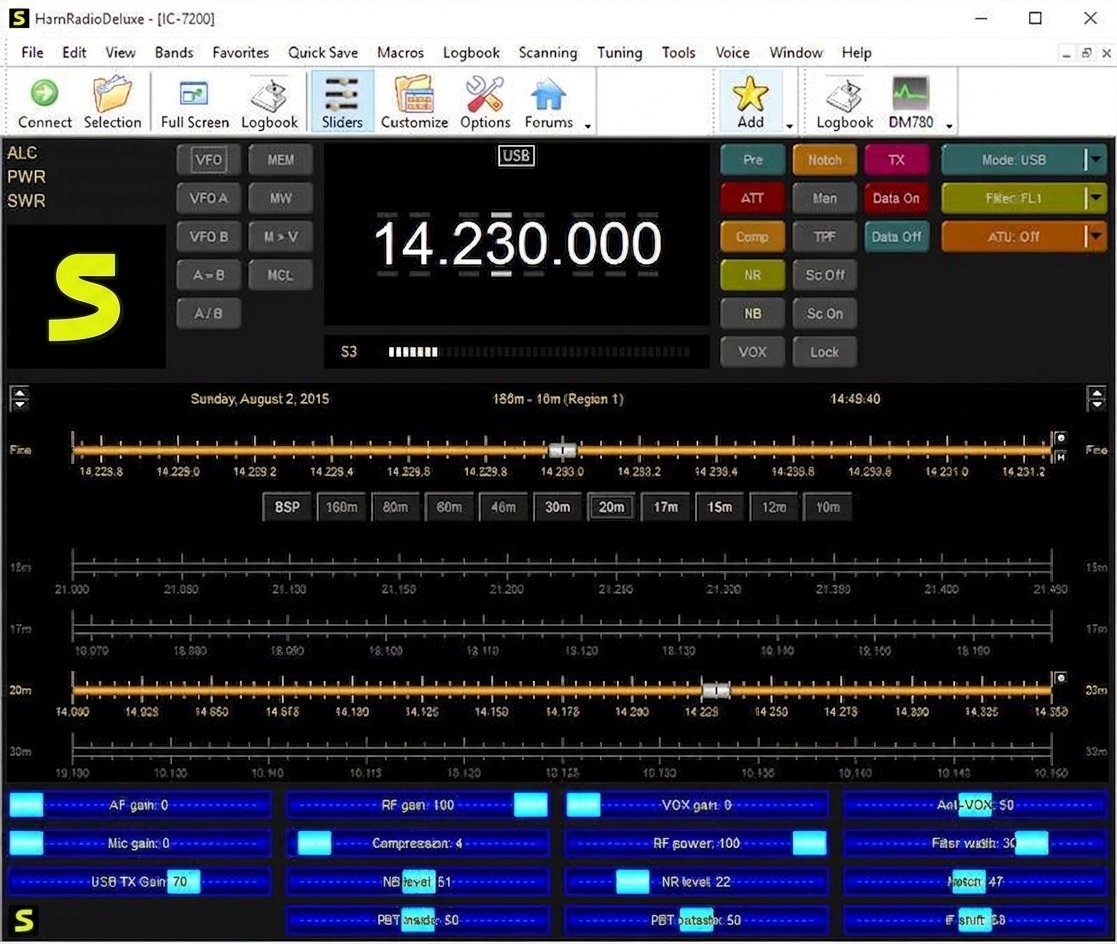
Ham Radio Software for Amateur Radio Operators
HRD supports CAT control for over 100 transceivers from major manufacturers including Yaesu, Icom, Kenwood, Elecraft, FlexRadio, and Ten-Tec, which is part of why it’s become a default choice for operators running mixed equipment setups.
Ham Radio Logging, Rig Control, and Digital Modes
In practice, most operators use three modules the most: Logbook for keeping QSO records, Rig Control for hands-free frequency and mode changes, and DM-780 for digital communication modes like PSK31, RTTY, and FT8.
Ham Radio Deluxe System Requirements
HRD runs on Windows and doesn’t demand high-end hardware — a standard modern PC with a free USB or serial port for radio connection is generally sufficient.
Ham Radio Deluxe Features
The suite’s popularity comes from how much of a station’s workflow it can automate in one place.
Ham Radio Logging Software and Logbook
The Logbook module records QSOs with detailed fields — callsign, frequency, mode, signal report, location — and can pull much of that data automatically from your connected radio.
Ham Radio Rig Control and CAT Control
CAT (Computer Aided Transceiver) control lets you change frequency, mode, and other radio settings directly from your PC, which is especially useful when running digital modes that need precise, repeatable tuning.
Digital Ham Radio and Digital Modes
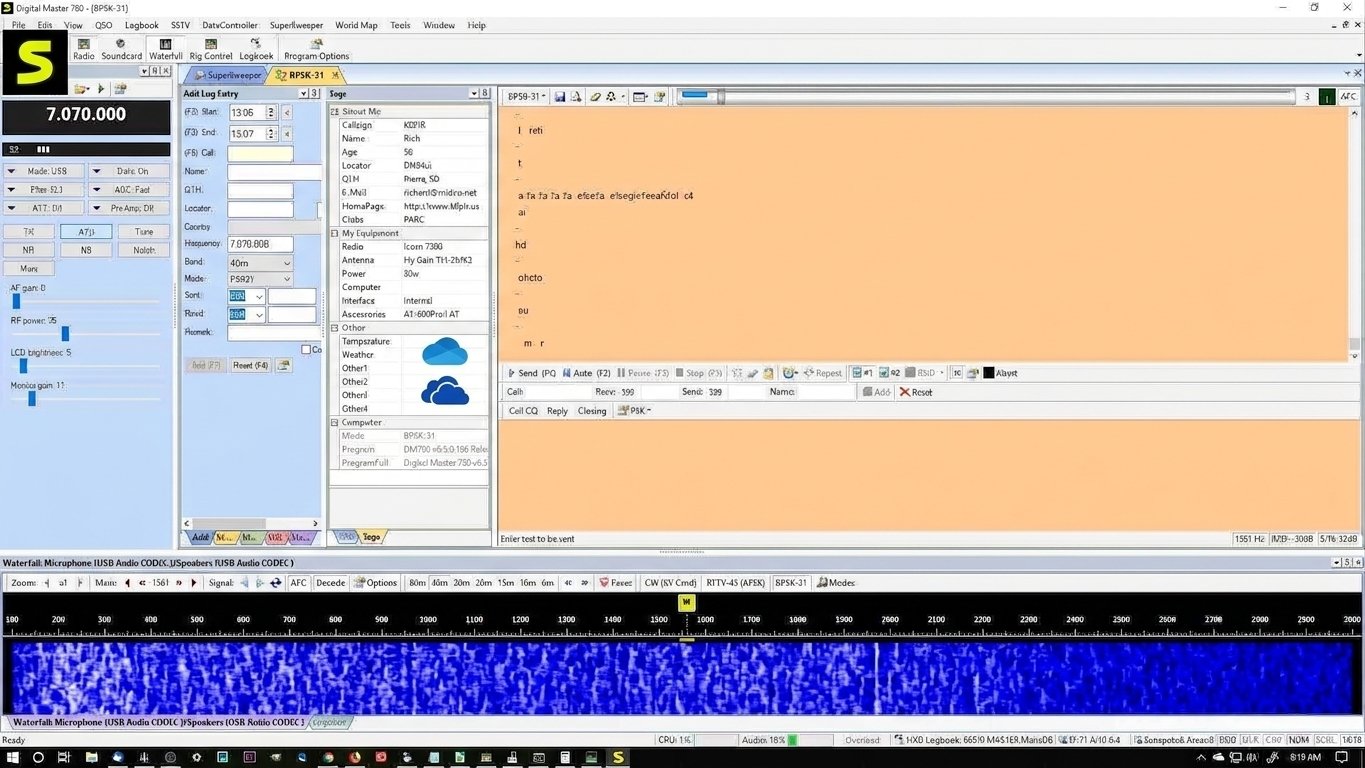
Through the DM-780 module, HRD supports a wide range of digital modes, letting operators send and decode text-based transmissions without needing separate standalone software for each mode.
DX Logging and DX Cluster
The DX Cluster feature displays real-time spots of active stations being worked around the world, helping operators chasing rare or distant contacts find them faster.
Satellite Tracking and Radio Control
The Satellite Tracking module calculates satellite passes and automatically adjusts frequency for Doppler shift, syncing your radio in real time as a satellite moves overhead.
Antenna Rotor and Rotator Control
For stations with a directional antenna, HRD can control a rotor automatically, pointing the antenna toward a target station, satellite, or DX spot without manual adjustment.
QSL, LoTW, eQSL, ClubLog, and QRZ Integration
Logged contacts can sync directly with major confirmation services including Logbook of The World (LoTW), eQSL, ClubLog, and QRZ — cutting out a lot of manual data entry when confirming contacts for awards.
Awards and DXCC Tracking
HRD can track progress toward amateur radio awards like DXCC automatically, based on confirmed contacts already logged in the system.
Ham Radio Deluxe Download
Ham Radio Deluxe Latest Version
As of 2026, the current release is Ham Radio Deluxe v6.9, described by its developer as the most stable version in the software’s two-decade history, with improvements across all five modules.
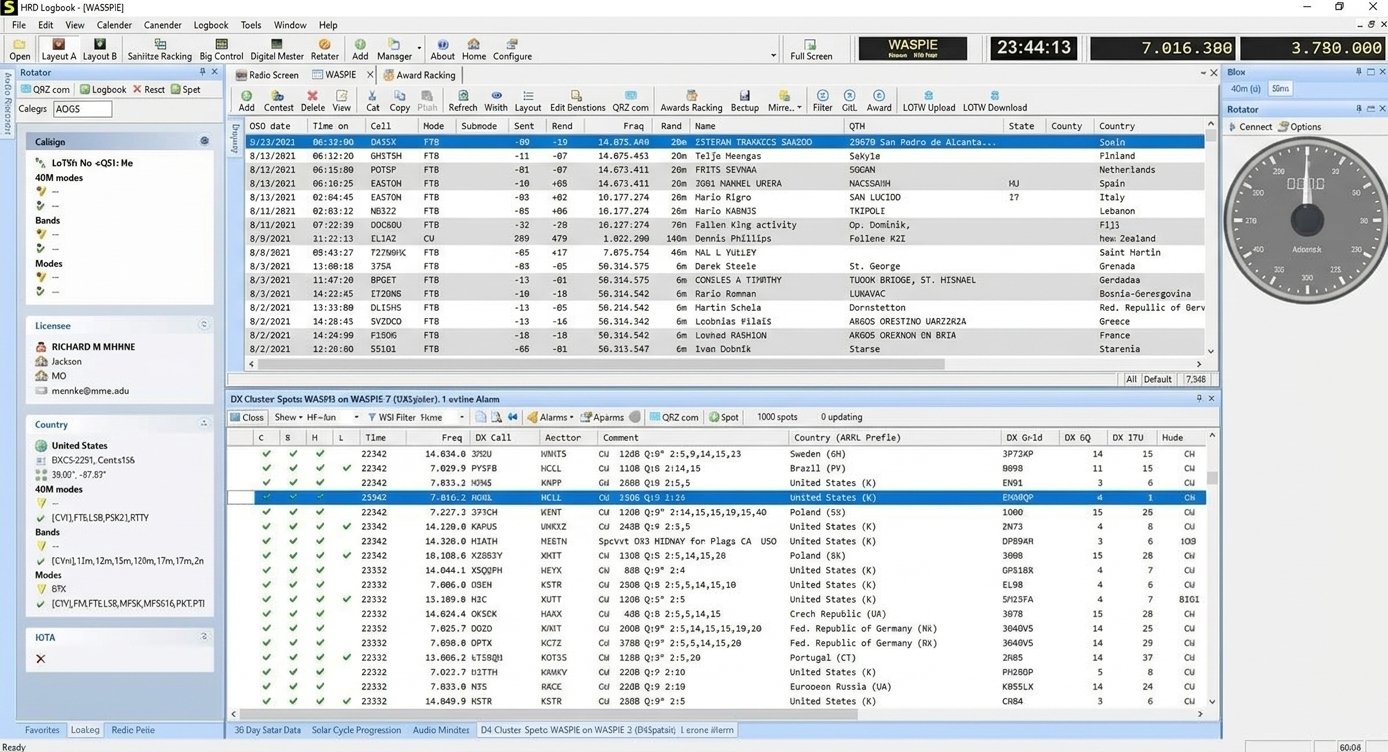
Ham Radio Deluxe Free vs Licensed Version
Here’s a distinction that trips up a lot of newcomers: version 5.24, released back in 2012, was the last fully free version and is still available from some archives, but it lacks the features and stability improvements of the modern paid releases.
Ham Radio Deluxe License and Activation
Since version 6.0, HRD has used a perpetual license model rather than a subscription — you buy the software once, and your activation key works with any current or future version.
Ham Radio Deluxe Free Trial
A 30-day free trial is available directly from the official site, letting you test the full feature set with your own radio before purchasing.
Good to know: purchasing HRD includes 12 months of New Features & Support, covering technical support and access to new feature development. Bug fixes and the latest builds remain free to install for any past customer even after that period expires — it’s an optional renewal, not a required subscription to keep the software running.
Ham Radio Deluxe for Windows
Ham Radio Software for Windows and Windows 11
HRD is built specifically for Windows and is actively maintained to run on current Windows 11 systems, alongside continued support for Windows 10.
Ham Radio Rig Control Software for Windows
Because rig control depends on stable serial or USB communication, Windows remains the platform with the broadest transceiver driver support for HRD’s CAT control features.
How to Install and Set Up Ham Radio Deluxe
Ham Radio Deluxe Installation
- Download the installer from the official HRD Software website.
- Run the installer and follow the setup wizard.
- Enter your activation key if you’ve purchased a license, or select the trial option.
- Launch HRD and proceed to rig setup.
Connecting Your Radio to Ham Radio Deluxe
Most radios connect via USB or a serial-to-USB adapter cable, which Windows recognizes as a COM port that HRD then uses to send and receive CAT commands.
Ham Radio Deluxe COM Port and CAT Setup
- Open the Rig Control module.
- Select your radio’s make and model from the supported list.
- Choose the correct COM port (visible in Windows Device Manager).
- Set the matching baud rate specified in your radio’s manual.
- Test the connection — frequency and mode should sync between HRD and your radio.
Ham Radio Deluxe Rig Setup
Getting CAT control right the first time usually comes down to matching baud rate and COM port settings exactly to your radio’s manual — a mismatch here is the most common reason rig control fails on first setup.
Watch out: if your radio connects but commands don’t respond correctly, double-check that no other program (like a separate logging app or WSJT-X) is also trying to access the same COM port at the same time — most radios only allow one active CAT connection unless a port-sharing utility is used.
Ham Radio Deluxe Logbook and Logging
Ham Radio QSO Logging
Each contact can be logged with as much or as little detail as you want, though most operators record at minimum the callsign, band, mode, and signal reports exchanged.
Importing and Managing Ham Radio Logs
HRD supports importing logs from other logging software via standard ADIF (Amateur Data Interchange Format) files, which makes switching from another program relatively painless.
Ham Radio Logbook Backup and Restore
Because a logbook can represent years of contacts, HRD includes built-in database backup tools.
Back it up: it’s worth scheduling regular backups, since logbook data isn’t something you want to risk losing to a hard drive failure.
Ham Radio Deluxe Rig Control
Controlling Frequency, Mode, and Transceiver Settings
Beyond basic frequency changes, rig control also extends to mode switching, power output adjustments, and other settings depending on what your specific radio model supports through CAT.
Remote Rig and Computer-Controlled Ham Radio
Combined with remote access software, HRD’s rig control features also make it possible to operate a home station’s radio from another location — a setup increasingly popular for operators who travel but don’t want to leave their station idle.
Ham Radio Deluxe FT8 and WSJT-X Integration
Ham Radio Deluxe and WSJT-X Integration
FT8, one of the most popular digital modes in modern amateur radio, is typically operated through WSJT-X software rather than HRD directly — but HRD integrates with it closely.
Automatic FT8 QSO Logging
Once configured, contacts made in WSJT-X can log automatically into HRD’s Logbook, meaning you don’t need to manually re-enter every FT8 contact after a digital operating session.
Ham Radio Deluxe FT8 Setup
Setup typically involves pointing WSJT-X’s logging output toward HRD’s logbook via its ADIF network logging feature, a one-time configuration step that then runs automatically going forward.
Ham Radio Deluxe DM-780 and Digital Modes
What Is DM-780?
DM-780 (Digital Master 780) is HRD’s built-in digital communications module, supporting a range of modes without needing separate third-party software for each one.
RTTY, PSK31, SSTV, and CW Software
DM-780 handles RTTY and PSK31 text modes, SSTV image transmission, and CW (Morse code) decoding and sending, making it a genuinely multi-purpose digital mode tool within the suite.
Ham Radio Deluxe Digital Mode Configuration
Each digital mode has its own settings for audio input/output levels and decoding sensitivity, which usually need some fine-tuning against your specific sound card setup for reliable decoding.
Tuning tip: a good starting point is setting audio levels moderately low rather than maxed out — overdriven audio is one of the most common causes of poor decode rates in PSK31 and RTTY specifically.
Ham Radio Deluxe DX Cluster and DX Logging
DX Cluster Software and Spotting
The DX Cluster window aggregates real-time spot reports from other operators worldwide, letting you see which rare or distant stations are active right now.
DX Cluster Band Map
Spots display visually along a band map, making it easy to see activity across a band at a glance rather than scrolling through a plain text list.
Ham Radio Deluxe Satellite Tracking
Satellite Frequency and Doppler Tracking
Satellite communication requires constant small frequency adjustments to compensate for Doppler shift as a satellite moves — HRD automates this in real time, which would otherwise require manual tuning throughout a pass.
Amateur Radio Satellite Software
Combined with rig control, satellite tracking turns what used to be a two-person job (one tracking the pass, one tuning the radio) into something a single operator can manage alone.
Ham Radio Deluxe Rotor and Antenna Control
Automatic Antenna Rotor Control
Rotor Control links to HRD’s tracking data, whether that’s a DX spot, satellite pass, or manually entered target, and adjusts antenna azimuth and elevation automatically.
Azimuth and Elevation Control
For stations running dedicated satellite or EME (moonbounce) antennas, precise elevation control is just as important as azimuth, and HRD’s rotor module supports both where hardware allows.
Ham Radio Deluxe LoTW, eQSL, ClubLog, and QRZ
Uploading QSO Logs to LoTW
Logged contacts can be signed and uploaded to Logbook of The World directly from HRD, streamlining what used to be a manual export-and-upload process through separate software.
Ham Radio Awards and DXCC Tracking
As confirmations come back through LoTW, eQSL, or ClubLog, HRD can update your award progress automatically, showing which countries or entities you still need for DXCC or similar awards.
Ham Radio Deluxe Tutorial and User Guide
Ham Radio Deluxe Beginner Tutorial
New users generally get the most value from setting up rig control first, confirming stable communication with their radio, before moving on to logging and digital modes.
Ham Radio Deluxe Configuration Guide
Official documentation and user guides are maintained on the HRD Software site and cover module-specific configuration in more depth than most general tutorials.
Ham Radio Deluxe Privacy, Security, and Updates
Keeping Ham Radio Deluxe Updated
Since all past customers are entitled to install the latest build regardless of when they purchased their license, it’s worth updating regularly to benefit from ongoing bug fixes and stability improvements.
License and Activation Security
Your activation key is tied to your purchase and works across current and future versions, so there’s no need to repurchase software just to stay on the latest release.
Ham Radio Deluxe Review
Ham Radio Deluxe Performance and Ease of Use
For a suite covering five distinct functions, HRD is reasonably approachable — most of the complexity comes from configuring your specific radio hardware correctly rather than the software’s interface itself.
Ham Radio Deluxe Pros and Cons
Pros
- Supports over 100 transceivers via CAT control
- All-in-one suite (logging, rig, digital, satellite, rotor)
- Perpetual license, no forced subscription
- Strong LoTW/eQSL/ClubLog/QRZ integration
- Active, ongoing development
Cons
- Windows-only, no native Mac or Linux version
- Initial setup can be fiddly depending on radio/cable combo
- Full feature set requires a paid license
- Interface feels dated compared to some newer competitors
- Free legacy version (5.24) lacks modern features
For operators who want logging, rig control, digital modes, and satellite/rotor automation in a single connected suite rather than juggling separate programs, HRD remains one of the most complete options in the hobby — and the perpetual licensing model means you’re not locked into ongoing payments just to keep using what you bought.
Ham Radio Deluxe Not Working? Common Problems and Fixes
| Problem | Likely Cause | Fix |
|---|---|---|
| Not connecting to radio | Wrong COM port or baud rate | Verify settings in Device Manager match your radio’s manual |
| Rig control not responding | Cable or driver issue | Reinstall USB-to-serial driver; try a different USB port |
| FT8/WSJT-X not logging | ADIF network logging not configured | Recheck WSJT-X’s reporting settings point to HRD’s logbook |
| DM-780 not decoding | Incorrect audio input levels | Adjust sound card input/output levels for the digital mode |
| Logbook not saving | Database file permissions or corruption | Restore from your most recent backup |
| Installation problems | Conflicting older version | Fully uninstall prior versions before reinstalling |
Ham Radio Software for Linux and Other Platforms
Linux Ham Radio Software
HRD itself is Windows-only, but Linux users have a strong ecosystem of alternatives, including Xlog, CQRLOG, and fldigi for digital modes.
Windows vs Linux Ham Radio Software
Windows-based suites like HRD tend to offer broader single-package integration, while Linux tools are often more modular — you might combine separate programs for logging, digital modes, and rig control rather than one unified suite.
Ham Radio Deluxe Alternatives
If HRD’s Windows-only requirement or license cost doesn’t fit your setup, a few respected alternatives are worth considering:
- Ham Radio Deluxe v5.24 — the last free version, workable for basic logging and rig control, but without modern feature updates
- N1MM Logger+ — free, contest-focused logging software popular in competitive amateur radio
- fldigi — free, cross-platform digital mode software (Windows, Mac, Linux)
- CQRLOG — a free, Linux-native logging program with solid CAT support
Best free alternative: N1MM Logger+ for contest logging, or fldigi if digital modes are your primary focus.
Best for Linux users: CQRLOG, since it’s built natively for Linux rather than relying on compatibility layers.
For more general software recommendations and utility comparisons, SoundSwitch is worth a look if you’re also managing audio device switching alongside your radio setup — a common need for operators juggling multiple sound cards for digital modes.
According to the American Radio Relay League (ARRL), amateur radio software like logging and digital mode tools has become central to how most licensed operators manage contacts, awards, and station automation today.
Ham Radio Deluxe vs Other Ham Radio Software
Ham Radio Deluxe vs Free Ham Radio Logging Software
Free logging tools like N1MM Logger+ are excellent for their specific niche (contesting, in N1MM’s case), but HRD’s advantage is combining logging with rig control, digital modes, satellite tracking, and rotor control under one connected system.
Ham Radio Deluxe vs Linux Ham Radio Software
Linux tools are typically free and modular, appealing to operators who prefer assembling their own toolchain, while HRD trades that flexibility for a single, integrated Windows application.
Ham Radio Deluxe FAQs
A free legacy version (5.24) exists from 2012, but the modern, actively maintained version requires a one-time perpetual license purchase.
As of 2026, the current release is version 6.9, covering improvements across all five modules of the suite.
Yes, HRD is actively maintained for compatibility with Windows 11 as well as Windows 10.
Yes, once configured to receive ADIF data from WSJT-X, FT8 contacts log into HRD’s Logbook automatically.
Yes, all four are supported for confirming contacts and tracking award progress directly from the Logbook module.
Yes, the Rotor Control module can automatically point a compatible antenna rotor based on DX spots, satellite passes, or manual targets.
N1MM Logger+ and fldigi are both free and widely used, though neither replicates HRD’s full combined feature set in one package.
Final Verdict: Is Ham Radio Deluxe Worth Using?
For operators who want one piece of software handling logging, rig control, digital modes, satellite tracking, and rotor automation together, Ham Radio Deluxe has earned its reputation over two decades for good reason. The perpetual licensing model also means the cost is a one-time decision, not an ongoing subscription you have to keep justifying.
If your needs are narrower — just contest logging, or just digital modes — a free, specialized alternative might serve you better. But for a station that’s grown to include multiple radios, satellite work, or rotor-controlled antennas, HRD’s all-in-one approach genuinely saves the kind of juggling that comes from running five separate programs at once.