adbLink Download, Features, Setup, and Alternatives
If you’ve ever tried to sideload an app onto a Fire TV Stick or manage an Android TV box without wrestling with the full Android SDK, you’ve probably run into adbLink. It’s one of those quiet little tools that Kodi users, Firestick tinkerers, and Android hobbyists have relied on for years — not flashy, but genuinely useful once you know what it does. In this guide, we’ll walk through what adbLink actually is, how to download and install it safely, what it can do, and what to try if something doesn’t work the first time.
What Is adbLink?
adbLink as an Android ADB Tool
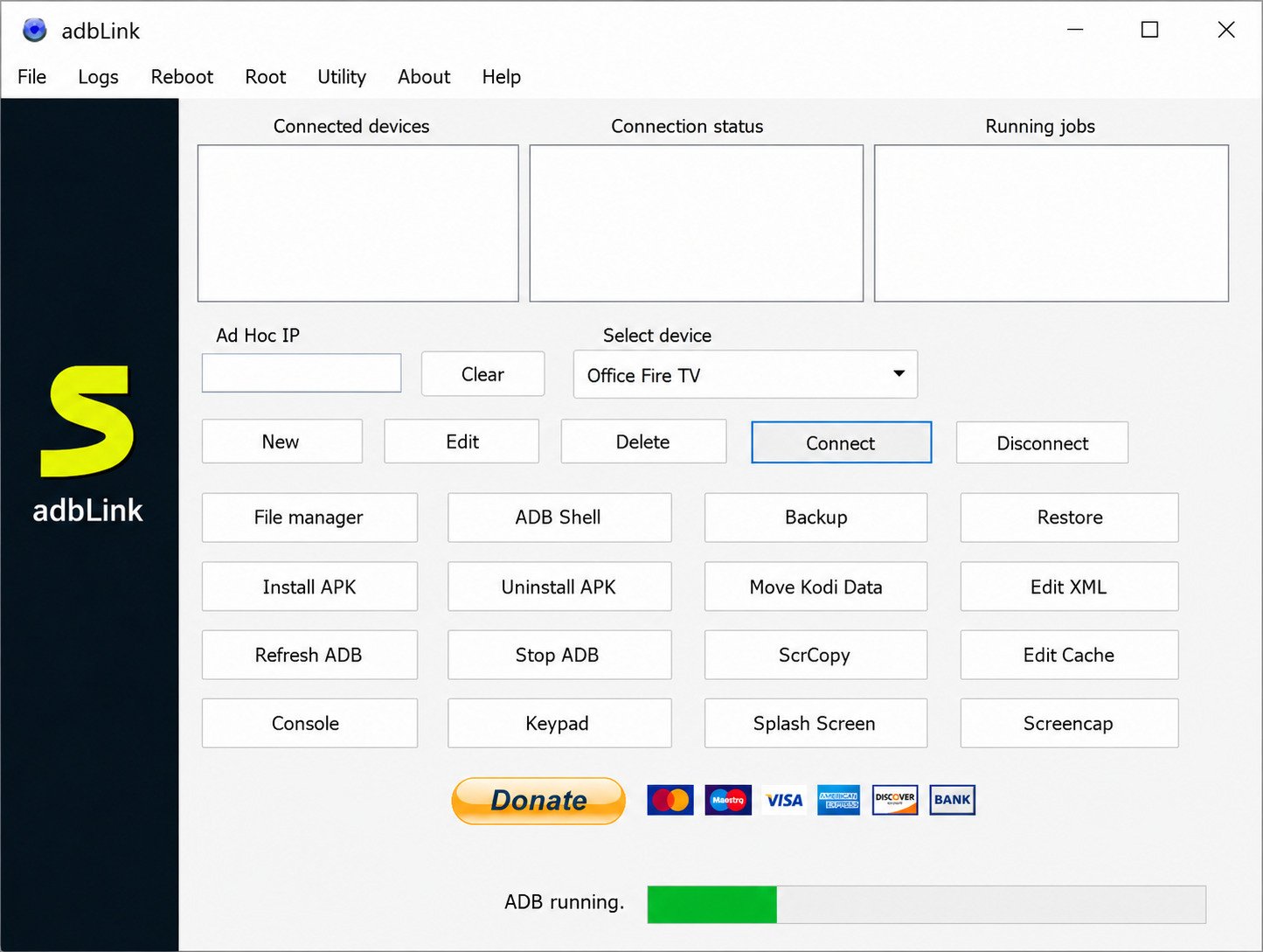
At its core, adbLink is a desktop application built on top of ADB (Android Debug Bridge), the command-line protocol Google built for developers to communicate with Android devices. Instead of typing ADB commands into a terminal, adbLink gives you buttons, menus, and a device list you can click through.
That matters because raw ADB is not friendly to beginners. One typo in a command and nothing happens, with no clue why. adbLink wraps that complexity in a normal desktop interface.
Android Debug Bridge and Device Management
ADB itself is a client-server tool: a small “server” process talks to your Android device (over USB or Wi-Fi), and a “client” sends it instructions — install this app, copy this file, reboot, and so on. adbLink is essentially a graphical front end for that client, built specifically with streaming boxes and Kodi setups in mind rather than general app development.
adbLink for Android, Android TV, and Fire TV
While adbLink works with almost any Android device that has ADB debugging enabled, it’s especially popular with:
- Fire TV and Fire TV Stick devices
- Android TV boxes (Nvidia Shield, Mi Box, generic set-top boxes)
- Regular Android phones and tablets, though there are more mainstream tools for those
The common thread is devices that don’t have an easy app store for sideloaded software, where ADB is the practical way in.
Is adbLink Safe to Use?
adbLink itself is a legitimate, long-standing utility, and it doesn’t require rooting your device. That said, “safe” comes down to two things:
- Where you download it from. Stick to the developer’s official page or well-known, reputable download mirrors — never a random third-party site bundling extra installers.
- What you use it to install. adbLink is just a delivery mechanism. Installing a sketchy APK through adbLink carries the same risk as installing it any other way.
adbLink Download and Latest Version
adbLink Download for Windows
Windows is by far the most common platform for adbLink, and it’s where the tool gets the most active support and testing.
adbLink Free Download
adbLink is free to use. It has historically been distributed as donationware — free to download and use, with an optional donation to the developer.
adbLink Latest Version and Latest Release
adbLink’s version numbering has been inconsistent across different download mirrors and review sites, with some older archives still listing versions like 4.3 or 5.4 long after newer releases existed. Because of that, don’t rely on a version number alone to judge whether you have the current build — instead:
- Check the file’s release or “last updated” date on the download page
- Compare it against the developer’s own changelog if one is listed
- Prefer the official homepage over generic software-aggregator sites, which are frequently out of date
adbLink 4.3 for Windows
Version 4.3 was, for a long time, one of the most widely mirrored releases and still shows up on several download sites today. If you land on a page still serving 4.3, it will generally still work for basic ADB and Kodi management tasks, but it’s worth checking if a newer build is available first — later versions have included bug fixes for connection issues.
adbLink Installer and Setup Files
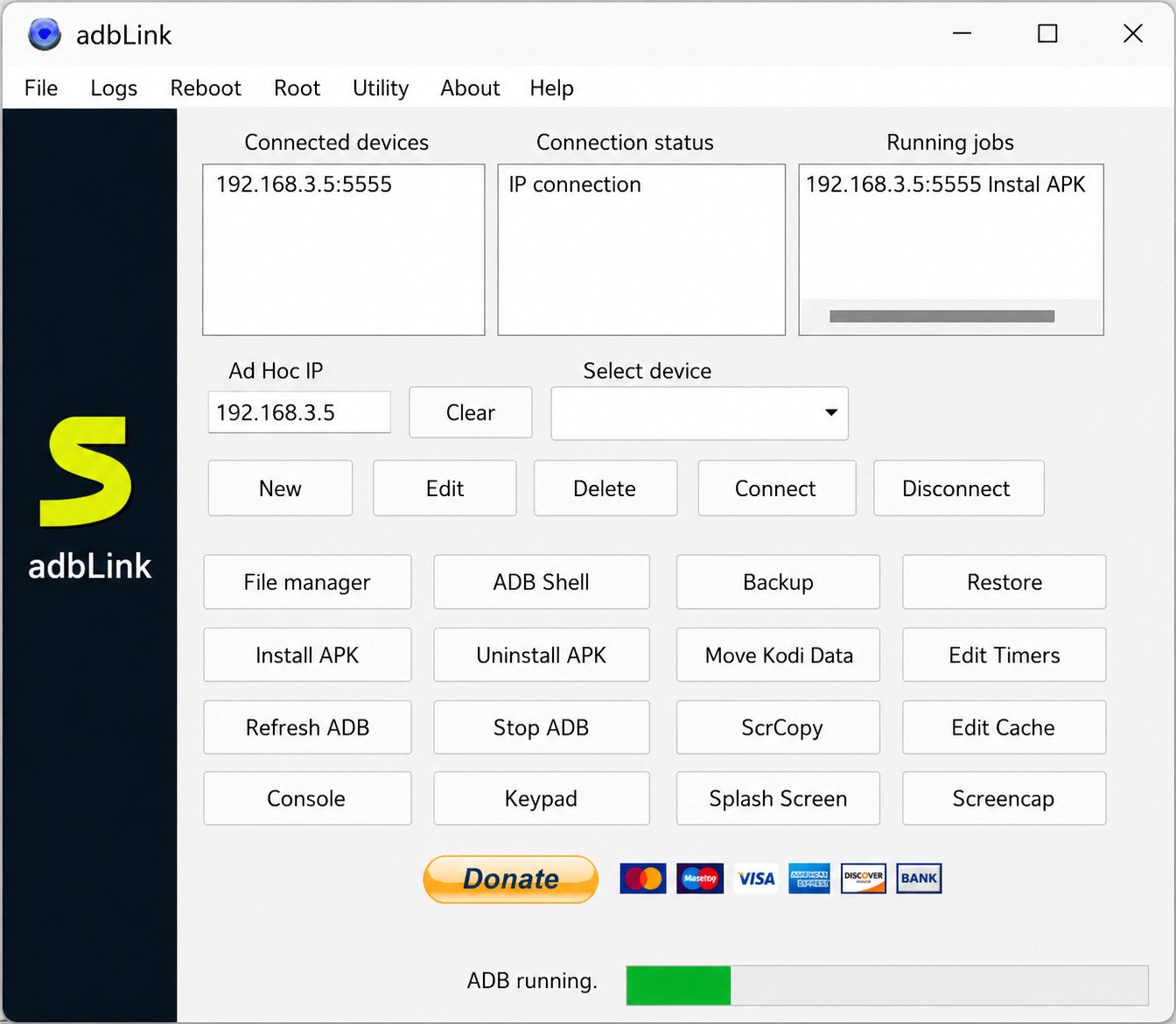
adbLink typically ships as a straightforward .exe installer for Windows, with separate downloads for Mac and Linux. There’s no complicated dependency chain to install first — no need to download the full Android SDK.
adbLink Features and ADB Tools
ADB Client and Android Device Manager
The main screen of adbLink functions as a device manager: it lists every Android device it can see, whether connected by USB or over your local network by IP address, and lets you switch between them without re-typing connection details each time.
APK Installer and App Management
One of the most-used features is APK sideloading. Instead of running an ADB install command manually, you point adbLink at an .apk file and it pushes it to the connected device.
Android File Transfer and Device Management
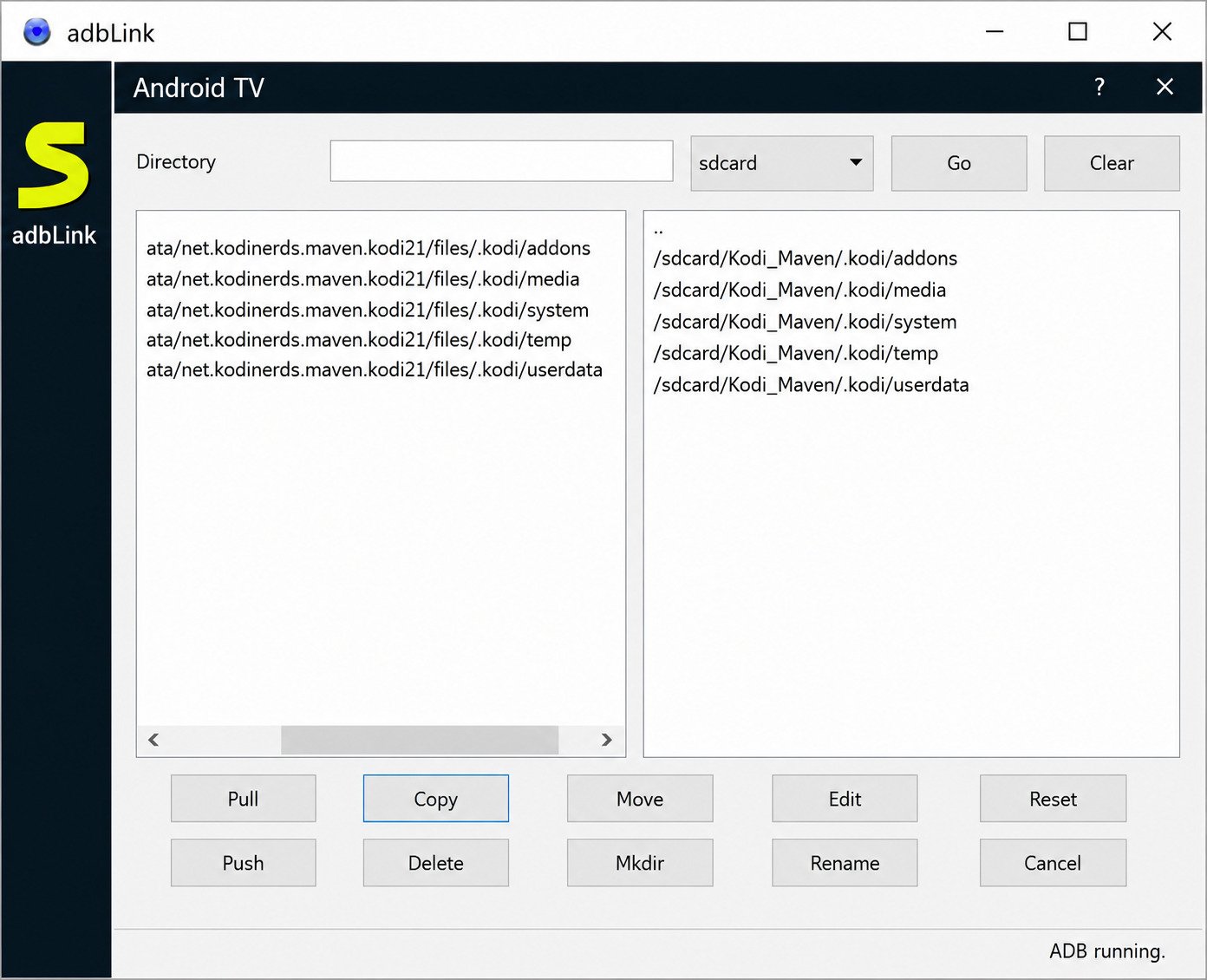
Beyond installing apps, adbLink lets you browse a connected device’s file system, copy files back and forth, and manage storage — handy for pulling logs off a box or moving media files without a separate file-transfer app.
Android Debugging and ADB Connections
Because it’s built on ADB, adbLink can also run basic debugging commands, reboot devices, and check connection status, which is useful when you’re troubleshooting why a device isn’t behaving.
Fire TV and Android TV Management Tools
adbLink includes tools tailored to streaming-box quirks specifically — things like mounting USB drives on Fire TV or handling permissions that regular ADB commands don’t smooth over on their own.
Kodi Installation and Management
This is arguably adbLink’s signature use case: sideloading Kodi onto Fire TV and Android TV devices, plus backing up and restoring Kodi configurations so you don’t lose your add-ons and settings when you reset or replace a device.
| Feature | What It Does |
|---|---|
| Device manager | Lists and connects to Android devices via USB or IP |
| APK installer | Sideloads apps without SDK commands |
| File transfer | Move files to/from the device |
| Kodi backup/restore | Saves and reloads Kodi configurations |
| ADB command shortcuts | Runs common ADB actions through buttons/menus |
adbLink for Windows, Mac, and Linux
adbLink for Windows 11
adbLink runs on Windows 11 without issue for most users, since it doesn’t depend on legacy Windows components.
adbLink for Windows 10
Windows 10 is the platform adbLink has been most tested and used on historically, so compatibility here is generally solid.
adbLink Windows Download
Whichever Windows version you’re on, the setup process is the same: download the installer, run it, and grant it permission through your firewall so it can talk to devices over your network.
adbLink for Mac and macOS
A macOS build is also available, packaged as a standard .dmg you drag into Applications.
adbLink for Linux
Linux users get a downloadable package as well, though it typically requires manually placing the extracted folder somewhere with read/write access rather than a guided installer.
adbLink Firestick Management From Windows
For most people, the practical use case is simple: run adbLink on a Windows PC, connect over the same Wi-Fi network as a Firestick or Android TV box, and manage that box from the desktop — no separate remote-control app needed.
adbLink for Fire TV and Firestick
adbLink Fire TV Download
You don’t install adbLink on the Fire TV itself — it stays on your computer. It connects to the Fire TV over ADB.
adbLink Firestick Download
Same logic applies to the Firestick: adbLink lives on your PC or Mac, and the Firestick just needs ADB debugging turned on so it can be found on the network.
Fire TV ADB Tool for PC
This PC-to-device model is exactly what makes adbLink appealing over doing everything by remote control on the TV screen — typing with a remote is painful, and adbLink avoids most of that.
Firestick ADB Software and Device Management
Once connected, you can install apps, pull logs, and manage storage on the Firestick from your computer’s keyboard and mouse.
Fire TV APK Installer
Installing an APK is typically a matter of selecting the file in adbLink and clicking install — the tool handles pushing it over ADB in the background.
Install Apps on Firestick With ADB
A quick, direct answer for anyone skimming: to install an app on a Firestick with adbLink, you enable ADB debugging on the Firestick, connect it to adbLink using its local IP address, then use the app’s install/sideload option and select your APK file.
adbLink for Android TV
adbLink Android TV Setup
Setup on Android TV mirrors the Fire TV process closely, since both run on Android under the hood — enable developer options, turn on ADB debugging, and connect.
Android TV ADB Tool and Device Manager
Once connected, the same device-manager interface applies: app installs, file transfers, and basic debugging.
Install APK Files on Android TV
Sideloading on Android TV through adbLink saves you from having to use a USB flash drive or a separate file-manager app just to get an APK onto the box.
Connect Android TV to adbLink
Most Android TV boxes need to be on the same local network as the computer running adbLink, with debugging enabled in the device’s developer settings.
Android TV APK Installation and File Management
Beyond installs, you can also use adbLink to move media, screenshots, or configuration files to and from an Android TV box.
adbLink and Kodi
adbLink Kodi Download
adbLink doesn’t include Kodi itself — you’ll still need the Kodi APK from Kodi’s official site — but adbLink is the tool many people use to get it onto a streaming device.
Kodi Installation With adbLink
The process is the same general APK-install flow: connect the device, select the Kodi APK, install.
Install Kodi on Firestick With adbLink
This is one of the most searched adbLink use cases, largely because Kodi isn’t available through the standard Fire TV app store.
Install Kodi on Fire TV With adbLink
Identical process to the Firestick, since both run the same Fire OS.
Kodi Android TV Installation
On Android TV, Kodi is sometimes available through the Play Store depending on the device, but adbLink is still useful for installing a specific version or a build not listed there.
Kodi Backup and Restore With adbLink
This feature deserves more attention than it usually gets. Before doing a factory reset or switching devices, adbLink can back up your Kodi setup — add-ons, skins, and settings — so you’re not rebuilding everything from scratch.
How to Install and Set Up adbLink
How to Install adbLink
- Download the installer for your operating system from a trusted source.
- Run the installer and follow the prompts.
- Allow the app through your firewall when prompted — this is required for network device discovery.
How to Use adbLink
Once installed, adding a device is the main first step, followed by choosing what you want to do — install an app, browse files, or back up Kodi.
adbLink Setup Guide
For a first-time setup, it helps to have your device’s local IP address ready (found in its network settings) before opening adbLink.
How to Connect an Android Device to adbLink
You can connect via USB with a data cable, or wirelessly by entering the device’s IP address, provided ADB debugging is enabled.
How to Enable ADB Debugging
On most Android-based devices: go to Settings > Device (or About) > Build number, tap it several times to unlock Developer Options, then enable USB Debugging (or ADB Debugging on Fire TV/Android TV) inside Developer Options.
How to Connect Firestick to PC With ADB
Direct answer: enable Developer Options and ADB debugging on the Firestick, find its IP address under Settings > My Fire TV > About > Network, then enter that IP into adbLink’s “add device” field.
How to Use adbLink With Firestick and Fire TV
How to Connect adbLink to Firestick
Add the Firestick’s IP address in adbLink, confirm the connection prompt on the TV screen the first time, and the device will appear in your list from then on.
How to Connect adbLink to Fire TV
The steps are identical to the Firestick, since both are the same underlying OS in different hardware form factors.
How to Install APK on Firestick Using adbLink
Select the connected Firestick, choose the install/APK option, browse to the file on your computer, and confirm.
How to Install APK on Fire TV Using adbLink
Same steps as above — connect, select install, choose the file.
How to Transfer Files to Firestick Using ADB
Use adbLink’s file-manager panel to drag files between your computer and the connected device’s storage.
How to Install Apps on Firestick With ADB
If an app isn’t available as a single APK (some apps need companion “OBB” data files), adbLink’s file transfer tools can help place those in the right folder after installing the base APK.
How to Install APK Files With adbLink
How to Install APK Using adbLink
Point adbLink at the .apk file on your computer, select the target device, and click install. It’s genuinely close to a one-step process once a device is connected.
How to Install APK on Android TV
Identical flow to Fire TV — the install tool doesn’t care which brand of Android TV device you’re using.
Android APK Installer and ADB Installation
Under the hood, adbLink is running the equivalent of adb install, just without you needing to open a terminal.
APK Installation on Fire TV and Firestick
Because both platforms share Fire OS, any APK compatible with one is generally compatible with the other, assuming it doesn’t need Google Play Services.
ADB APK Installer Setup
No extra setup is needed beyond having the device connected — the installer tool is available as soon as adbLink recognizes the device.
adbLink Troubleshooting
adbLink Firestick Not Connecting
This is the most common complaint, and it’s usually one of a few culprits:
- The Firestick and computer aren’t on the same Wi-Fi network
- ADB debugging got toggled off after a reboot or update
- A firewall is blocking adbLink’s network access
adbLink Fire TV Not Connecting
Same troubleshooting checklist as the Firestick applies here, since it’s the same underlying platform.
adbLink Device Not Detected
Try re-entering the device’s IP address (it can change after a router reboot), and confirm the device still shows ADB debugging as enabled in its settings.
Android Device Not Showing in adbLink
For USB connections, try a different cable — some cables are charge-only and don’t support data transfer, which silently breaks ADB.
APK Installation Problems in adbLink
If an install fails, check that the APK matches the device’s processor architecture, and that there’s enough free storage on the target device.
ADB Debugging Connection Problems
If a device keeps asking to “authorize” the connection and never sticks, try revoking USB debugging authorizations in the device’s developer settings and reconnecting from scratch.
adbLink Alternatives and Similar ADB Tools
Best adbLink Alternatives
If adbLink doesn’t fit your workflow, a few other tools cover similar ground:
| Tool | Best For | Interface |
|---|---|---|
| adbLink | Kodi/Fire TV focused management | Graphical |
| Android Debug Bridge (raw ADB) | Full control, scripting | Command line |
| ADB AppControl | General Android app management | Graphical |
| Bugjaeger | On-device ADB debugging | Android app (no PC needed) |
adbLink vs Android Debug Bridge
Raw ADB gives you more granular control and is the standard developers use, but it has a real learning curve. adbLink trades some of that flexibility for a much gentler interface.
adbLink vs ADB AppControl
ADB AppControl leans more toward general Android app management across many device types, while adbLink is more tightly focused on Kodi and streaming-box workflows.
adbLink vs Bugjaeger
Bugjaeger runs directly on an Android device and can perform ADB-like actions on itself without a computer at all, a different approach that suits people who don’t want a desktop tool in the loop.
Best ADB Tools for Android
For general Android app installs and debugging, raw ADB paired with a simple GUI wrapper (adbLink or a similar tool) covers most home users’ needs.
Best ADB Tools for Firestick and Fire TV
For Fire TV specifically, adbLink remains one of the most established options because of its Kodi-specific backup and restore tools.
Best APK Installer for Firestick
Beyond adbLink, some users prefer file-manager apps installed directly on the Firestick itself (like Downloader) for one-off sideloads without touching a computer at all. For a similar lightweight utility approach on the desktop side, see this walkthrough on Jocala.
Best Android TV APK Installer
For Android TV boxes with more open app-store access, sideloading tools are less essential, but adbLink is still handy for installing specific builds not listed in the store.
Frequently Asked Questions About adbLink
adbLink is used to manage Android-based devices — installing apps, transferring files, and backing up Kodi setups — through a graphical interface built on ADB.
Yes, when downloaded from a trusted source; the tool itself doesn’t require rooting and only does what you direct it to do.
Yes, adbLink is free, historically distributed as donationware with an optional developer donation.
Yes, connecting to a Firestick over the same Wi-Fi network (with ADB debugging enabled) is one of its most common uses.
Yes, Fire TV and Firestick share the same underlying OS, so the setup and features work the same way on both.
Yes, sideloading APK files onto connected devices is one of its core features.
Yes, as long as the Android TV device has ADB debugging enabled and is reachable on the network.
Yes, this is one of adbLink’s most popular use cases, especially for Fire TV and Firestick devices.
Yes, it runs on Windows 11 without special workarounds needed.
Yes, there are separate builds available for macOS and Linux, alongside the Windows version.
Conclusion
adbLink isn’t the flashiest piece of software out there, but for anyone managing a Fire TV, Firestick, or Android TV box, it fills a genuinely useful gap between “type scary command-line instructions” and “give up and factory reset.” A little patience during setup goes a long way toward a smooth experience.
If you’re just starting out, take it one step at a time: get ADB debugging turned on, connect one device, and try a single APK install before diving into backups and file transfers. Once you’ve done it once, the rest starts to feel routine.
Related: for another lightweight Windows utility guide, see GRUB2Win on Softfolders.