GSA Search Engine Ranker Download, Features, Setup, and Alternatives
If you’ve spent any time researching automated link building, you’ve probably come across GSA Search Engine Ranker (GSA SER). It’s one of the oldest and most talked-about SEO automation tools on the market, loved by some marketers and avoided by others. In this guide, we’ll break down everything you need to know—what GSA SER actually does, how to set it up, its pricing, common errors, and whether it’s still worth using in today’s SEO landscape.
What Is GSA Search Engine Ranker and How Does It Work?
GSA Search Engine Ranker (GSA SER) Overview
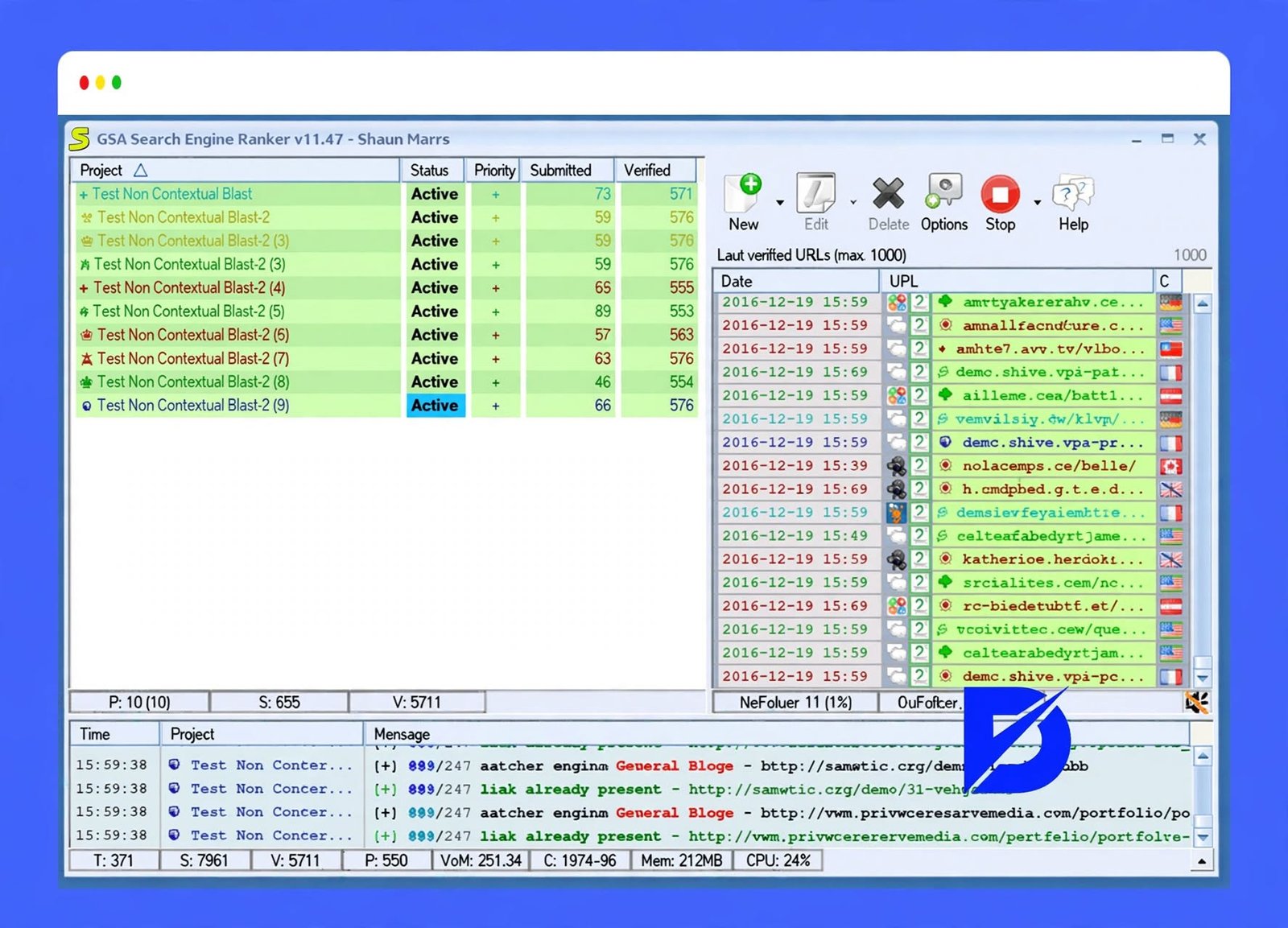
GSA Search Engine Ranker is a Windows-based desktop software built for automated link building. It was created by GSA, a German software company, and has been around for over a decade.
Instead of manually submitting your website to hundreds of directories, forums, and blogs, GSA SER does it automatically at a scale no human could match manually.
What Is GSA SER Used For?
Most users rely on GSA SER for one core purpose: building backlinks automatically. It’s commonly used to:
- Boost rankings for money sites or tier-2/tier-3 support sites
- Index existing backlinks faster
- Build link networks for affiliate or PBN-style websites
GSA SER as an SEO Automation and Link Building Tool
Beyond backlinks, GSA SER also automates content submission, CAPTCHA solving, and verification. It essentially runs an entire link building campaign on autopilot once configured correctly.
How GSA Search Engine Ranker Creates and Manages Projects
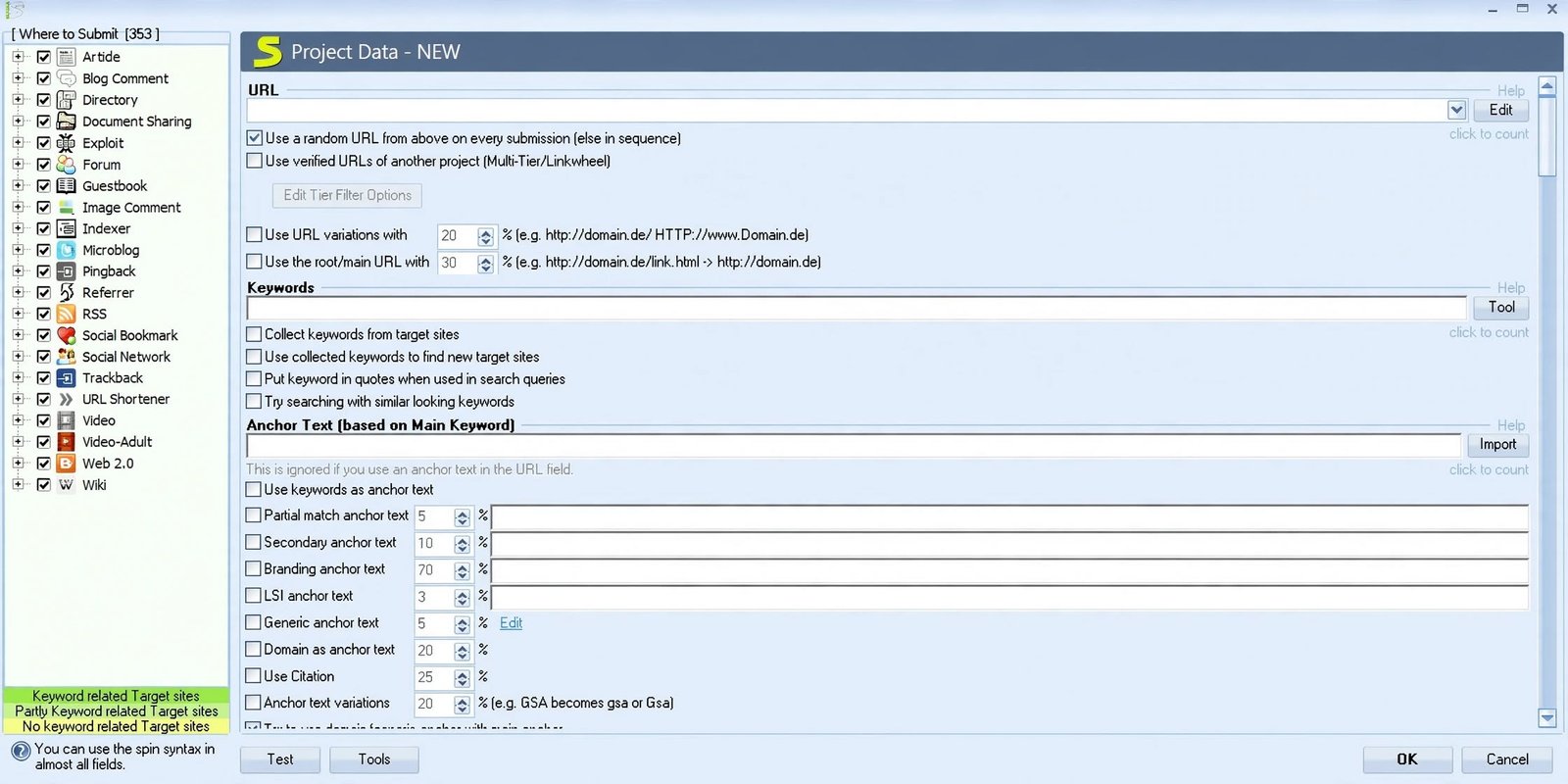
Every website you promote in GSA SER is called a project. Inside each project, you define target keywords, anchor text, URLs, and the types of platforms you want links from.
GSA SER vs Traditional Link Building
Traditional link building relies on outreach, guest posting, and relationship-building—slow but safer. GSA SER trades that safety for speed, automating thousands of submissions daily.
| Method | Speed | Risk Level | Effort Required |
|---|---|---|---|
| Manual Link Building | Slow | Low | High |
| GSA SER Automation | Very Fast | Medium–High | Low |
GSA Search Engine Ranker Features
Automated Link Building and Backlink Generation
The core feature of GSA SER is fully automated backlink generation across hundreds of platform types, including forums, blogs, wikis, and social bookmarks.
SEO Campaign and Project Management
You can run multiple projects simultaneously, each targeting different keywords, anchor texts, and websites—all managed from one dashboard.
Backlink Submission and Verification
GSA SER doesn’t just submit links; it also verifies whether the backlink went live successfully, saving you from tracking things manually.
Multi-Tier Link Building
You can build tiered link structures, sending links to your other links instead of directly to your money site—a safer approach we’ll cover in detail later.
Proxy and CAPTCHA Support
Since GSA SER submits to hundreds of sites per hour, it needs proxies and CAPTCHA solving services to avoid getting blocked.
Content Generation and Article Submission
The built-in content generator creates spun or unique text for article submissions, blog comments, and forum posts.
Backlink Indexing and SEO Indexer Integration
GSA SER can connect with third-party indexing services to help Google discover your new backlinks faster.
Keyword Research and Project Targeting
You can import keyword lists directly into projects, helping GSA SER target relevant anchor text and pages automatically.
Customizable SEO Automation Settings
Nearly every setting—submission speed, thread count, verification frequency—can be customized to match your risk tolerance and server power.
GSA SER Backlink Building and Link Building
GSA SER Backlink Builder
At its heart, GSA SER functions as a backlink builder, scanning the web for submission opportunities matching your chosen platform types.
GSA SER Automated Backlinks
The automation engine works continuously once configured, finding new sites and submitting your links without manual input.
GSA SER Link Building Software
It’s often described as an all-in-one link building software because it handles discovery, submission, and verification in a single tool.
Build Backlinks Automatically With GSA SER
Set your project parameters once, and GSA SER will keep building backlinks in the background, even while you’re not at your computer.
Automated SEO Link Building
This automation is a double-edged sword—it saves time but requires careful configuration to avoid spammy, low-quality link patterns.
Backlink Submission and Website Promotion
Beyond pure SEO, GSA SER can also help with general website promotion, submitting your site to directories and bookmarking platforms.
GSA Search Engine Ranker Backlink Campaigns
Campaigns can be scheduled, paused, and prioritized, giving you control over which projects get the most submission resources.
Managing and Verifying Backlinks
Regularly checking your verified vs. submitted link ratio helps you understand how effective your campaign actually is.
GSA SER Tiered Link Building
What Is Tiered Link Building?
Tiered link building means creating layers of backlinks—Tier 1 links point to your money site, Tier 2 links point to Tier 1, and so on.
GSA SER Tiered Backlinks
This structure adds a buffer between spammy automated links and your main website, reducing direct risk.
GSA SER Tier 2 Backlinks
Tier 2 links support your Tier 1 links, helping them gain authority and get indexed faster.
GSA SER Tier 3 Backlinks
Tier 3 is usually the largest and lowest-quality layer, built purely to strengthen Tier 2 links in bulk.
Creating a GSA SER Tier Project
Inside GSA SER, you can set a project to target “URLs from other projects,” which automatically builds tiers without manual list management.
Tiered Backlink Structure and Campaign Management
A typical structure looks like this:
| Tier | Purpose | Link Quality |
|---|---|---|
| Tier 1 | Direct support to money site | Higher quality |
| Tier 2 | Support Tier 1 links | Medium quality |
| Tier 3 | Bulk support for Tier 2 | Lower quality, high volume |
GSA SER Web 2.0, Forum, Blog, and Article Backlinks
GSA SER Web 2.0 Link Building
Web 2.0 backlinks come from platforms like blogging networks where you create a free account and publish content with links back to your site.
Web 2.0 Backlinks
These are generally considered higher quality than forum or bookmark links since they resemble real content.
GSA SER Forum Backlinks
GSA SER can post in forum profiles or signatures automatically, generating quick backlinks at scale.
Forum Link Building
While useful for lower tiers, forum links are often seen as spammy by search engines if overused.
GSA SER Blog and Blog Commenting Backlinks
Blog comment backlinks are created by leaving automated comments containing your website link on relevant blog posts.
GSA SER Article Backlinks
The tool can submit spun or AI-generated articles to article directories, embedding your backlink within the content.
Article Directory Link Building
This method has declined in effectiveness over the years but still works reasonably well for lower-tier link support.
GSA SER Wiki Backlinks
Wiki backlinks come from editable wiki-style pages, another common lower-tier link type.
Social Bookmarking and Other Link Types
GSA SER also supports social bookmarking, image submission, and RSS feed backlinks for added link diversity.
GSA SER Proxies and Proxy Setup
Why Use Proxies With GSA SER?
Without proxies, your IP address would get blocked almost instantly due to the high volume of submissions GSA SER performs.
GSA Search Engine Ranker Proxy Settings
Proxy settings are found under the “Options” tab, where you can add public, private, or rotating proxy lists.
GSA SER Proxy Setup and Configuration
You’ll need to enter proxy details in the correct format (IP:Port or IP:Port:User:Pass) and test them before running campaigns.
GSA SER Proxy List and Proxy Scraper
GSA SER includes a built-in proxy scraper, though free scraped proxies are often unreliable and slow.
Private Proxies for GSA SER
Most experienced users recommend private proxies for stability, speed, and lower ban rates compared to public options.
Choosing a Proxy Service for GSA SER
Look for providers offering fast rotation, high uptime, and enough IP volume to support your submission speed.
Troubleshooting GSA SER Proxy Errors
If proxies keep failing, check your connection timeout settings and confirm the proxies aren’t already blacklisted.
GSA SER CAPTCHA and Captcha Breaker
GSA SER CAPTCHA Settings
CAPTCHA settings determine which solving service handles the image and text puzzles that block automated submissions.
CAPTCHA Solver for GSA SER
Popular solvers include GSA Captcha Breaker, 2Captcha, and DeathByCaptcha, each with different pricing and accuracy levels.
GSA SER Captcha Breaker Integration
GSA Captcha Breaker is a separate paid add-on made specifically to work with GSA SER’s automation engine.
GSA SER Captcha Breaker Setup
After installing it, you simply link it inside GSA SER’s captcha settings tab, and it starts solving automatically.
CAPTCHA Services and Configuration
Using multiple CAPTCHA services together often improves your success rate compared to relying on just one.
Fixing GSA SER CAPTCHA Errors
Most CAPTCHA errors happen due to expired API keys, insufficient balance, or outdated solver software versions.
GSA SER on VPS and Remote Servers
What Is a GSA SER VPS?
A VPS (Virtual Private Server) lets GSA SER run continuously without depending on your personal computer being switched on.
How to Run GSA SER on a VPS
You install GSA SER on a Windows VPS just like you would on a normal PC, then access it remotely to manage campaigns.
GSA SER Windows VPS Setup
Since GSA SER is Windows-only software, you’ll need a Windows VPS, not a Linux server.
GSA SER VPS Hosting Requirements
For smooth performance, look for at least 4GB RAM, an SSD, and good bandwidth allowances.
GSA SER Remote Desktop Setup
Most VPS providers give you remote desktop access, letting you control GSA SER exactly like a local desktop application.
Choosing a VPS for GSA SER
Pick a provider known for SEO tool compatibility, since some cheap VPS plans struggle with GSA SER’s resource usage.
GSA SER VPS Settings and Optimization
Lower your thread count if the VPS starts lagging, and monitor RAM usage regularly to avoid crashes.
GSA SER Setup and Configuration
GSA SER Setup Guide for Beginners
Getting started involves installing the software, adding proxies, connecting a CAPTCHA solver, and creating your first project.
How to Install GSA Search Engine Ranker
Download the installer from the official GSA website, run it on your Windows PC or VPS, and enter your license key.
GSA SER Beginner Configuration
Beginners should start with a low thread count and fewer platform types to avoid overwhelming their system or getting flagged.
GSA SER Best Settings
The “best” settings vary by goal, but a safe starting point includes moderate submission speed and strict verification checks.
GSA SER Project Setup
Each project needs a target URL, keyword list, anchor text variations, and selected platform engines.
GSA SER Project Settings
Fine-tune settings like article spinning, captcha usage, and scheduling within each individual project.
GSA SER Campaign Setup
Group related projects into campaigns for easier tracking and bulk management.
GSA SER Link Building Setup
Choose your target link types carefully—mixing web 2.0, forums, and articles creates more natural-looking link diversity.
GSA SER Backlink Setup
Set realistic daily submission limits to avoid sudden, unnatural spikes in backlink growth.
GSA SER Tier Setup
Configure lower tiers to point at your Tier 1 links rather than your main site directly.
GSA SER Proxy and CAPTCHA Setup
Always test proxies and CAPTCHA solvers before launching a full campaign to prevent wasted submission attempts.
GSA Search Engine Ranker Tutorial: How to Use GSA SER
A typical first-project workflow looks like this:
- Create a project. Click “New Project,” paste your target URL, add keywords, and choose your preferred link building engines.
- Set up a campaign. Combine multiple projects under one campaign to track overall progress across different websites or tiers.
- Add keywords and target URLs. Import a keyword list via CSV or manually type them into the project’s keyword box.
- Configure submission and verification. Set verification intervals so GSA SER regularly rechecks whether submitted links are still live.
- Build a tiered campaign. Create a Tier 1 project first, then a Tier 2 project set to target “links from other projects” automatically.
- Monitor results. Use the built-in logs and reports to track submitted, verified, and failed links over time.
If you’re new to the tool, start small: test one project thoroughly, then scale up once you understand how the software behaves.
GSA SER Content Generator, Keyword Research, and Indexing
GSA SER Content Generator
This built-in tool creates spun or semi-unique text used for article and comment submissions.
Automated Content for Link Building Campaigns
While convenient, automated content quality varies, so many users combine it with manually written spintax for better results.
GSA SER Keyword Research
You can import keyword lists from tools like Ahrefs or Google Keyword Planner directly into your projects.
GSA SER SEO Indexer
An indexer helps get your newly created backlinks noticed by search engines faster.
GSA SER Backlink Indexing
Faster indexing means your links start passing SEO value sooner rather than sitting unnoticed for weeks.
GSA SER Indexing and Submission Workflow
A typical workflow is: build links → verify links → submit for indexing → monitor ranking changes.
GSA Search Engine Ranker Download and Latest Version
GSA Search Engine Ranker Download
The official download is only available through GSA’s official website, not third-party sites, to avoid malware risks.
GSA SER Download
Always verify you’re downloading from the legitimate source before entering any payment or license information.
GSA Search Engine Ranker Free Download
There’s no permanently free version, but GSA offers a limited trial so you can test core features first.
Be cautious of “cracked” versions online—these often contain malware and offer no support or updates.
GSA Search Engine Ranker Latest Version
GSA regularly updates the software with new submission engines and bug fixes, so keeping it updated matters.
GSA SER Latest Version
Check the changelog on the official site before updating, since major updates sometimes change default settings.
GSA Search Engine Ranker Software for Windows
Remember, GSA SER only runs on Windows OS, either natively or through a Windows VPS/emulator.
GSA SER Trial and Free Options
The trial version limits certain features, giving you a feel for the interface before committing to a full license.
GSA Search Engine Ranker Settings and Advanced Configuration
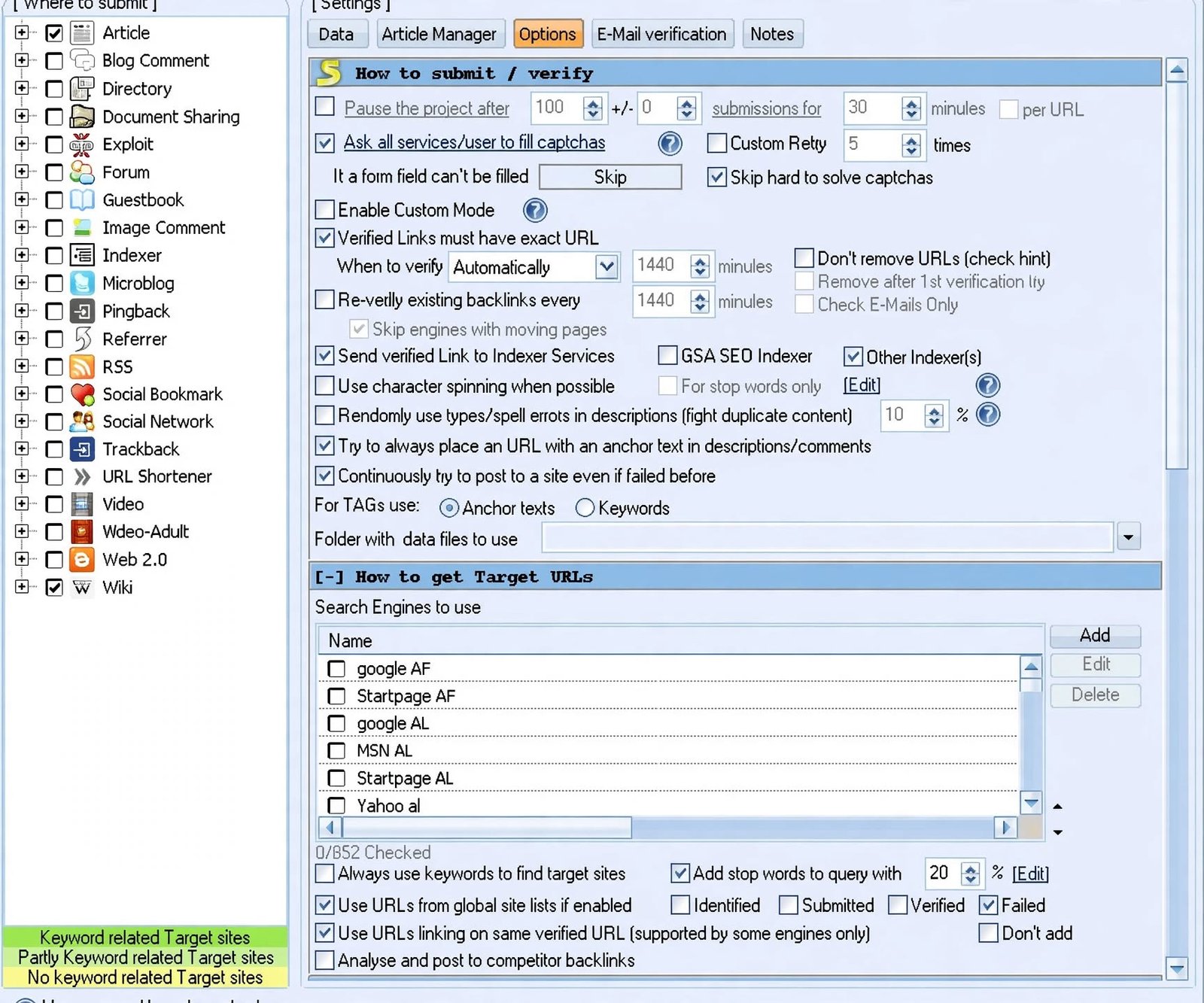
GSA SER Settings
The main settings panel controls global behavior across all your projects, including timeouts and thread limits.
GSA Search Engine Ranker Settings
Take time to explore each settings tab—Options, Proxies, Captcha, and Advanced—before running large campaigns.
GSA SER Best Settings for Link Building
Many experienced users recommend starting conservative: fewer threads, strict filters, and gradual scaling as results improve.
GSA SER Campaign Settings
Adjust scheduling so campaigns run during off-peak hours to reduce server load and detection risk.
GSA SER Project Configuration
Double-check anchor text ratios—too much exact-match anchor text can look unnatural to search engines.
Advanced GSA SER Automation Settings
Advanced users tweak filters like PageRank thresholds, language targeting, and domain age preferences.
Managing Submission, Verification, and Thread Settings
Balancing thread count with your VPS or PC resources prevents crashes and improves overall success rates.
GSA SER Errors and Troubleshooting
GSA SER Not Working / Not Starting
If GSA SER stops responding entirely, check for pending Windows updates or a corrupted installation. Startup issues often relate to missing .NET Framework components or antivirus software blocking the program. Restarting your VPS or PC and reinstalling the latest version usually resolves persistent problems.
GSA SER Not Submitting Links
Check your proxy status first—dead or slow proxies are the most common cause of failed submissions. Also review your project’s target list; outdated or already-saturated platforms often reject repeated submissions.
GSA SER Verification Failed
This usually means the link didn’t go live, or your verification settings are too strict for the platform type.
GSA SER Project Not Working / Failed
Pause the project, review its settings for errors, then restart it after making corrections. A completely failed project often points to blocked proxies or an outdated engine list needing an update.
GSA SER Proxy Error
Test each proxy individually using the built-in proxy tester to isolate which ones are causing failures.
GSA SER CAPTCHA Error
Confirm your CAPTCHA service balance and API key are both valid and correctly entered.
GSA SER Engine Error
Update GSA SER to the latest version, since outdated engines often stop working when target platforms change their code.
GSA SER Download and Installation Errors
Disable antivirus temporarily during installation, as it sometimes flags automation tools incorrectly.
GSA SER License Error
Contact GSA support if your license key isn’t activating—this is often a server-side sync issue, not a user error.
| Common Error | Likely Cause | Quick Fix |
|---|---|---|
| Not submitting links | Dead proxies | Replace proxy list |
| CAPTCHA errors | Expired API key | Renew captcha service |
| Verification failed | Strict settings | Adjust verification interval |
| Engine errors | Outdated software | Update to latest version |
GSA Search Engine Ranker Reviews and User Experience
GSA Search Engine Ranker Review
Long-term users generally praise GSA SER’s flexibility and automation power, though many admit it has a steep learning curve. New users often feel overwhelmed by the sheer number of settings before finding their footing.
GSA SER Pros and Cons
Pros
- Massive automation potential
- One-time license cost
- Highly customizable
Cons
- Steep learning curve
- Requires proxies and CAPTCHA services (extra cost)
- Risk of low-quality links if misused
GSA SER Performance and Automation
Performance largely depends on your VPS power, proxy quality, and how well campaigns are configured.
Is GSA Search Engine Ranker Worth Using?
For experienced SEOs who understand tiered link building and risk management, it can still add value—especially for lower-tier link support.
Who Is GSA SER Best For?
It suits agencies, PBN owners, and affiliate marketers comfortable with automation, rather than beginners chasing quick rankings.
According to Google’s Search Central spam policies, link schemes and automated link building meant purely to manipulate rankings can violate guidelines and lead to penalties. Understand these risks before relying heavily on any automation tool.
GSA Search Engine Ranker Pricing, License, and Coupon Code
GSA Search Engine Ranker License
GSA SER uses a one-time purchase model rather than a monthly subscription, which appeals to long-term users.
GSA SER Pricing
Pricing typically sits around a fixed one-time fee, with optional charges for updates after the first year.
GSA Search Engine Ranker Coupon Code
Occasional discounts appear during sales periods, so checking the official site before purchasing can save money.
GSA SER Trial and Purchase Options
Test the trial version thoroughly before buying, since refunds on automation software are rarely offered.
License Activation and Account Management
Your license ties to your GSA account, letting you reinstall the software on a new PC or VPS if needed.
GSA Search Engine Ranker Alternatives
Best GSA SER Alternatives
If automation feels too risky, tools focused on outreach and content marketing offer a safer long-term strategy.
GSA SER Alternative for Automated Link Building
Some marketers use a mix of manual outreach plus lighter automation tools for a balanced approach.
Best Backlink Building Software Alternatives
Platforms like Ahrefs and SEMrush help identify quality link opportunities manually rather than through bulk automation.
SEO Automation Tools Like GSA SER
Other automation tools exist, but few match GSA SER’s sheer scale of supported platform types.
Manual vs Automated Link Building Tools
| Approach | Pros | Cons |
|---|---|---|
| Manual (Outreach) | Higher quality, safer | Time-consuming |
| Automated (GSA SER) | Fast, scalable | Higher penalty risk |
Choosing the Right GSA SER Alternative
Your choice should depend on your risk tolerance, budget, and how central automation is to your overall SEO strategy.
If you’re managing multiple GSA SER projects, you’ll also end up with logs, reports, and backlink lists piling up on your VPS. A file organization tool like File Juggler can automatically sort these files into the right folders, saving you time on manual cleanup.
Frequently Asked Questions
It’s used mainly for automated backlink building, submitting your website to hundreds of platforms without manual effort.
No, it requires a one-time license purchase, though a limited trial version is available for testing.
Yes, proxies are essential to prevent your IP from getting blocked due to high submission volume.
Yes, but most serious users prefer a Windows VPS for 24/7 uptime and better performance.
It can be risky if used carelessly; tiered link building and quality control help reduce penalty risks.
GSA Captcha Breaker is the official add-on, though third-party services like 2Captcha also work well.
Manual outreach combined with tools like Ahrefs offers a safer, more sustainable link building approach.
Final Verdict: Is GSA Search Engine Ranker the Right SEO Automation Tool?
GSA Search Engine Ranker isn’t for everyone, and that’s okay. It’s a powerful, flexible tool that rewards patience, proper configuration, and a solid understanding of tiered link building—but it can quickly backfire if used carelessly or without safety nets like proxies and quality filters.
If you’re an experienced SEO comfortable managing automation risks, GSA SER can still play a useful role, especially for lower-tier link support. But if you’re newer to SEO or prefer safer, long-term growth, pairing manual outreach with careful automation might serve you better in the long run.