Substance 3D Painter: Download, Features, Setup, and Alternatives
If you’ve ever wondered how a game character’s armor gets that convincing scratched-metal look, or how a movie prop looks like it’s actually been through a war, there’s a good chance Substance 3D Painter was involved. It’s the industry-standard app for painting realistic textures onto 3D models, and it’s used everywhere from indie game studios to major VFX houses.
This guide walks through what Substance 3D Painter actually does, its core features, how to download and install it, and — importantly — what to use instead if it’s not the right fit for your budget or workflow.
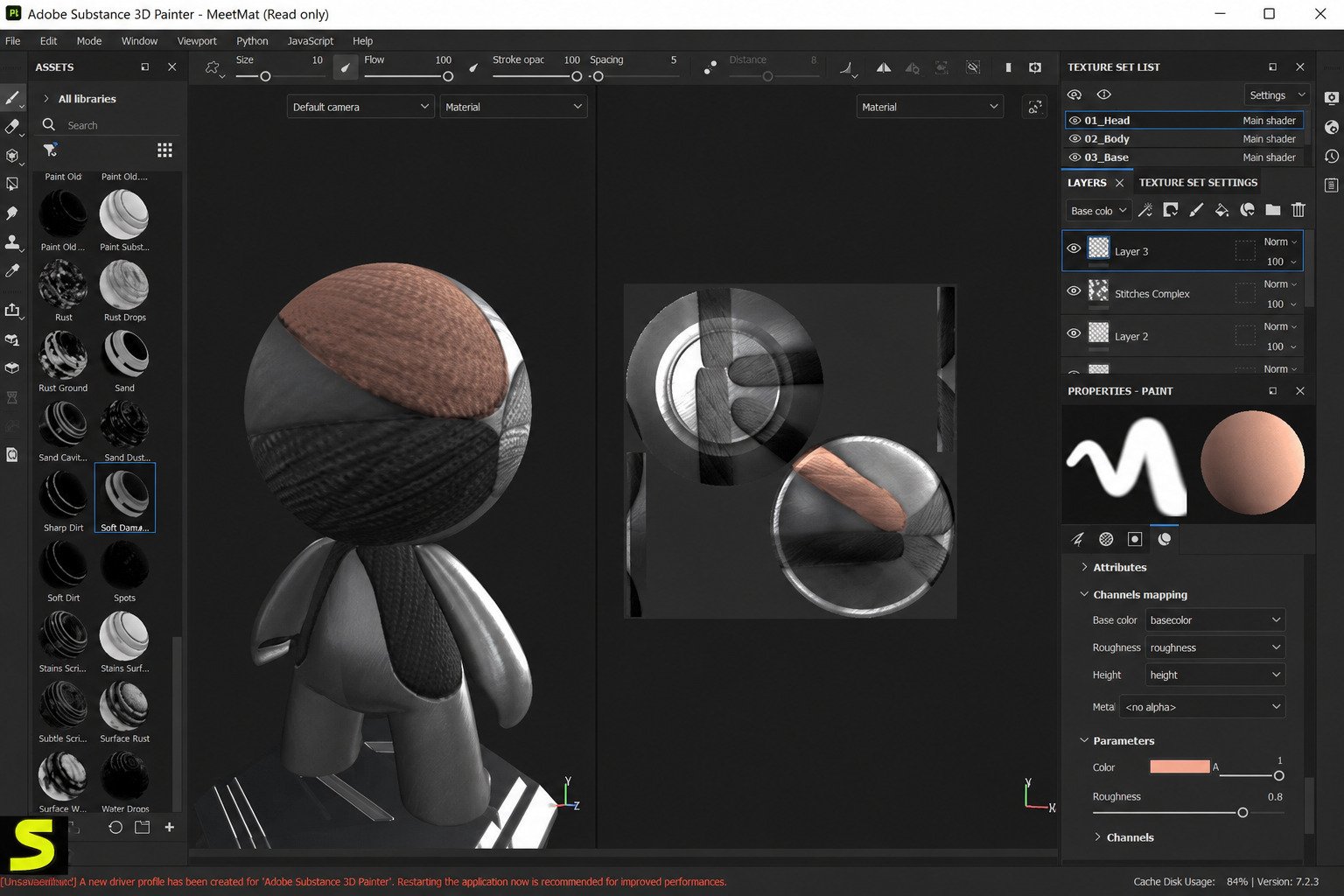
What Is Substance 3D Painter?
Substance 3D Painter is a texturing application made by Adobe (originally by Allegorithmic) that lets artists paint materials, colors, and surface detail directly onto a 3D model, in real time, and see exactly how it will look under different lighting.
What Is Adobe Substance 3D Painter Used For?
Painter is used to turn a plain, gray 3D mesh into something that looks like real wood, rusted steel, worn leather, or scaled skin. It’s the step between “the model is built” and “the model looks believable,” and it’s used across:
- Game development — character skins, weapons, environment props
- Film and animation — texturing assets for VFX shots
- Product visualization — realistic renders for marketing
- 3D printing prep and hobbyist art
How Does Substance 3D Painter Work?
You import a 3D model (usually an FBX or OBJ file), and Painter treats its surface like a canvas. You paint directly onto the mesh using brushes, stencils, and procedural “smart materials” that automatically react to the model’s shape — for example, rust that pools naturally in crevices instead of sitting flat on the surface. Everything you do stays non-destructive, meaning you can go back and tweak any layer later without repainting from scratch.
Who Should Use Substance 3D Painter?
It’s built for people working with 3D assets that need to look real or stylized in a specific, controlled way: game artists, character artists, environment artists, product designers, and VFX texture painters. If you only need to add a flat color or a single texture to a model, it’s overkill — but for anything requiring layered, physically believable surfaces, it’s hard to beat.
Substance Painter for 3D Models and Game Assets
Game engines like Unity and Unreal expect textures in specific formats (PBR maps — more on that below), and Painter exports directly into those formats, which is a big part of why it became the standard in game texturing pipelines.
Pros
- Industry-standard, non-destructive PBR texturing workflow
- Smart materials automate hours of manual masking
- Real-time viewport shows near-final results as you paint
- Direct export presets for Unity, Unreal, and Blender
- Huge community library of materials, masks, and brushes
Cons
- Subscription-only — no permanent free tier
- Steep learning curve for complete beginners
- Needs a modern, VRAM-heavy dedicated GPU
- Intel-based Macs are no longer supported
Substance 3D Painter Features
3D Texture Painting and Editing
You paint straight onto the 3D model rather than a flat 2D UV template, which makes it far easier to judge where details should go — no more guessing how a flat texture will wrap around a curved surface.
PBR Texturing and Materials
Painter is built around Physically Based Rendering (PBR), a texturing standard that simulates how real materials interact with light, so a render looks consistent under any lighting setup.
Smart Materials and Smart Masks
Smart materials are pre-built, physically reactive material presets — apply “rusted steel” and it automatically accumulates rust in seams and edges based on the model’s geometry, saving hours of manual masking.
Brushes and Stencils
A large brush library (plus support for custom brushes) covers everything from fine detail work to broad base coats, while stencils let you stamp repeatable patterns like fabric weaves or panel lines.
Procedural Material Creation
Instead of relying only on hand-painted detail, you can build materials from procedural generators, which stay editable and resolution-independent.
UV Texture Painting
Painter automatically handles UV seams and texture sets, and its “Follow the Path” tools help detail flow naturally across seams that would normally be tricky to paint over.
Real-Time 3D Viewport
Because rendering happens live in the viewport with realistic lighting, you see the near-final result as you paint, rather than exporting and re-checking constantly.
Texture Baking and Mesh Maps
Before painting, Painter “bakes” mesh maps (ambient occlusion, curvature, normal, and more) from your high-poly or low-poly model — these maps drive smart materials and masking effects automatically.
Layer-Based Non-Destructive Workflow
Every paint stroke, mask, and material sits on its own editable layer, similar to Photoshop, so you can adjust opacity, blending, or masks at any point without starting over.
Substance 3D Community Assets
Adobe’s community library and marketplace offer thousands of pre-made materials, smart masks, and brushes that you can drop straight into a project.
Substance 3D Painter for 3D Texturing
3D Model Texturing
Whether it’s a hero character or a background prop, the core workflow stays the same: import, bake maps, apply base materials, then layer in hand-painted and procedural detail.
Character Texture Painting
Character work leans heavily on skin shaders, cloth materials, and fine detail brushes, often combined with reference photos projected directly onto the mesh.
Hard Surface Texturing
For vehicles, weapons, and machinery, Painter’s edge-wear and metal-generator smart materials do a lot of the heavy lifting, since hard-surface wear patterns are fairly predictable.
Environment and Prop Texturing
Environment art benefits from tileable, procedural materials (ground, rock, foliage) that can cover large areas without visible repetition.
Realistic 3D Texture Creation
Realism comes from layering multiple imperfections — dust, grime, fingerprints, scratches — rather than one “perfect” material, and Painter’s layer stack is built exactly for that kind of stacking.
Game Asset Texturing
Game assets need to look good and stay within a texture-memory budget, so Painter’s texture-set and resolution controls matter as much as the painting tools themselves.
Substance 3D Painter PBR Workflow
What Is PBR Texturing?
Physically Based Rendering texturing means building materials from maps that describe real physical properties — roughness, metalness, base color — instead of faking highlights and shadows by hand.
How to Create PBR Textures
Bake your mesh maps first, apply a base material, then build up detail with smart materials and hand-painted layers — the roughness and metallic channels are what really sell the realism, more than color alone.
| PBR Map | What It Controls |
|---|---|
| Base Color (Albedo) | The raw color of the surface, without lighting baked in |
| Roughness | How sharp or blurry reflections appear |
| Metallic | Whether a surface behaves like metal or a non-metal |
| Normal | Simulated small-scale surface bumps and dents |
| Height | Depth detail used for more advanced displacement |
| Ambient Occlusion | Soft shadowing in crevices and contact points |
How to Create PBR Materials
Custom materials can be built from scratch using Painter’s procedural generators or by blending several existing smart materials and adjusting their channel outputs.
PBR Texture Painting Workflow
A typical pass looks like: import model → bake mesh maps → block in base materials → add wear and grime → fine-tune with hand-painted detail → export.
Physically Based Rendering Materials
Because PBR materials follow real-world physics, they look correct in any render engine or game engine that supports the standard — a major reason PBR became the industry norm.
Best Substance Painter Settings for Texturing
For most work, exporting at 2K or 4K resolution with 16-bit normal maps balances quality and file size well; going higher only matters for close-up hero assets or film work.
Substance 3D Painter Brushes, Stencils, and Smart Materials
Substance Painter Brushes
Brushes range from simple round soft brushes to alpha-based brushes that stamp complex shapes like bolts, scratches, or fabric texture with a single stroke.
How to Use Brushes for Texture Painting
Set the brush’s blending mode and channel target (color, roughness, height) before painting, since a brush stroke only affects the channels you’ve selected.
Substance Painter Stencils
Stencils act like paint masks you project onto the model, useful for repeating patterns like stitching, grates, or decals.
How to Apply Stencils to 3D Models
Load a stencil, position and scale it over the model in the viewport, then paint through it — the stencil restricts paint to only the areas it covers.
Substance Painter Smart Materials
Smart materials combine multiple layers, masks, and generators into a single reusable preset that adapts to whatever mesh you drop it onto.
How to Customize Smart Materials
Double-click into a smart material’s layer stack to adjust individual generators, colors, or mask intensity without losing the underlying automation.
Smart Masks and Material Generators
Generators like “Metal Edge Wear” or “Dirt” analyze the model’s curvature and ambient occlusion data to decide where effects should appear — no manual masking required.
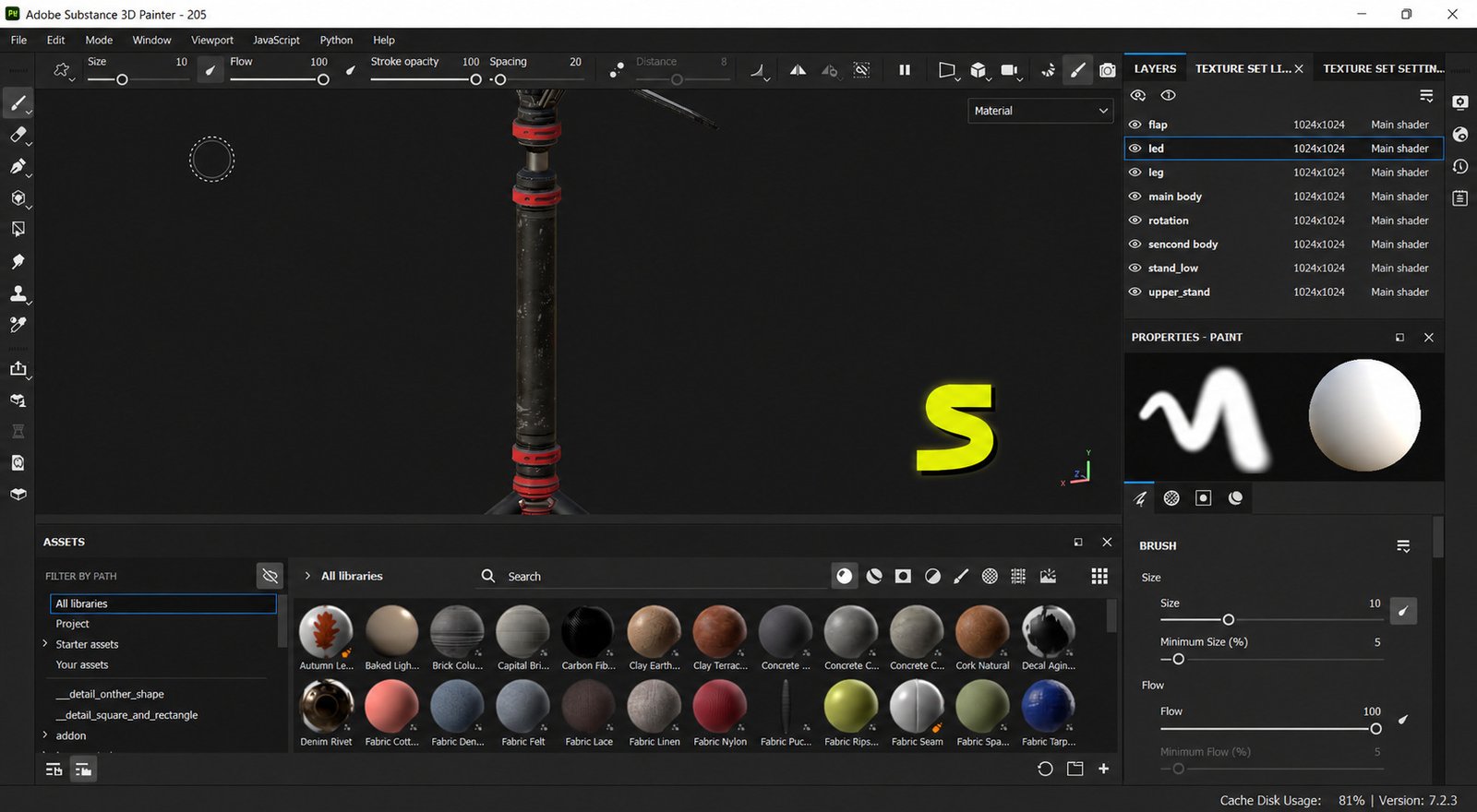
Substance 3D Painter Download
Substance Painter Latest Version
Adobe now ships Substance 3D Painter 2026 as the current release, following Adobe’s yearly versioning naming convention.
Substance 3D Painter Free Trial
Adobe offers a free trial period before requiring a paid subscription, giving you enough time to test the workflow before committing.
Is Substance 3D Painter Free?
No — Painter is subscription-based. The standalone Texturing plan runs $24.99 a month, or $249.88 prepaid annually, and bundles Painter with Designer and Sampler. The full Substance 3D Collection, which adds Stager and Modeler, costs $59.99 a month or $599.88 a year. Steam also offers a perpetual-license option, which can work out cheaper long-term if you don’t need Adobe’s cloud extras.
See official pricing on Adobe’s site →Substance Painter System Requirements
! Before you installWindows Server and virtual machines are not officially supported, and only official Apple hardware configurations are supported on macOS. Recent versions dropped support for Intel-based Macs entirely. On the GPU side, a modern dedicated card with several gigabytes of VRAM is expected — older or entry-level GPUs increasingly struggle to launch the newest builds.
Substance Painter Download for PC
Windows remains the most fully supported platform and generally gets driver and feature updates first.
Substance Painter Windows 11
Painter runs natively on Windows 11 with no special configuration, provided your GPU drivers are current.
Substance Painter Windows 10
Windows 10 is still supported, though as Adobe shifts focus toward newer DirectX and Vulkan features, staying on Windows 11 is the safer long-term bet.
Substance Painter Windows Download
Download directly from Adobe’s Creative Cloud desktop app or through Steam — both keep the app updated automatically.
3D Texturing Software for Windows
Windows has the widest GPU driver support of any platform, which is part of why most professional Painter users run it there.
PBR Texturing Software for Windows
Alongside Painter, Windows also hosts most of its direct competitors (Marmoset, Mari, Quixel Mixer’s successor tools), making it the most flexible platform if you switch tools often.
Substance 3D Painter for Mac and Linux
Substance Painter for Mac
Painter runs on Apple Silicon Macs, but as noted above, Intel Mac support has been phased out in the newest releases.
Substance Painter for macOS
Keep macOS itself updated, since Apple — not Adobe — provides the GPU driver layer on Mac.
Substance Painter for Linux
Linux support exists mainly through Steam Proton rather than a fully native build, and results (especially tablet pressure sensitivity) can vary by distribution.
Substance Painter Platform Compatibility
| Platform | Support Level |
|---|---|
| Windows 10/11 | Fully supported, primary platform |
| macOS (Apple Silicon) | Supported |
| macOS (Intel) | Dropped in newer versions |
| Linux | Unofficial, via Steam Proton |
How to Install Substance 3D Painter
Substance 3D Painter Setup Guide
Install through the Adobe Creative Cloud app (for a subscription license) or Steam (for a perpetual license), then sign in to activate.
How to Install Substance Painter on Windows
Download the installer, run it, and let it install any required Visual C++ redistributables automatically.
How to Install Substance Painter on macOS
Download the .dmg from Adobe or Steam, drag the app to Applications, and grant it permission when macOS prompts for security access.
How to Set Up a New Project
Choose your template (PBR Metallic Roughness is the default for most game and film pipelines), then set your document resolution before importing your mesh.
How to Import a 3D Model
Use File > New, select your mesh file, and Painter will prompt you to bake mesh maps before you start painting.
How to Use Substance 3D Painter
Substance Painter Beginner Tutorial
Start with a simple prop rather than a character — it’s the fastest way to learn baking, layers, and smart materials without getting overwhelmed by anatomy or UDIMs.
How to Texture a 3D Model in Substance Painter
Bake your maps, drop in a smart material as a base, then refine with fill layers, paint layers, and masks until the surface reads correctly under different lighting presets.
How to Paint Textures in Substance Painter
Select a brush, choose which channels it affects, and paint directly on the model — use the 2D UV view alongside the 3D viewport to catch anything hidden from the current camera angle.
How to Create Realistic 3D Textures
Layer imperfections gradually: base material, then large-scale wear, then small-scale grime and scratches — realism comes from variation, not a single “perfect” pass.
How to Texture Game Assets
Keep an eye on your texture set count and resolution budget throughout, since game engines have hard memory limits that renders for film don’t.
How to Texture Characters
Combine skin/cloth smart materials with hand-painted detail for eyes, tattoos, or scars, and always check the model under multiple lighting rigs before finalizing.
How to Paint Materials on 3D Models
Materials are just layers with generators attached — build your own by stacking a base fill, a mask generator, and detail layers on top.
Substance 3D Painter Texturing Workflow
- Prepare and import your 3D model — clean UVs make everything downstream easier.
- Check UVs and texture sets — overlapping or stretched UVs cause visible seams later.
- Bake mesh maps — normal, curvature, and AO maps drive most automated effects.
- Add smart materials and masks — establish the base look quickly.
- Paint and refine textures — hand-paint the details that make it feel unique.
- Create PBR texture maps — export base color, roughness, metallic, and normal maps.
- Export textures for Blender and game engines — match the export preset to your target engine.
Substance 3D Painter for Game Development
Game Asset Texturing
Painter’s texture-set system maps directly onto how game engines organize materials, which keeps the import process clean.
Character Texturing for Games
Real-time game characters need efficient texture budgets, so Painter’s resolution and channel-packing options matter more here than in film work.
Environment Texture Painting
Tileable procedural materials help environment artists cover large areas without the texture repeating obviously.
PBR Game Materials
Most modern engines (Unity’s URP/HDRP, Unreal Engine) expect Metallic/Roughness PBR maps, which is exactly what Painter exports by default.
Exporting Textures for Game Engines
Painter includes built-in export presets for Unity, Unreal, and other major engines, so you don’t have to manually remap channels.
Substance Painter to Blender Workflow
Export using the “glTF” or “Unreal Engine 4 (Packed)” preset, then bring the maps into Blender’s Principled BSDF shader.
Substance 3D Painter and Blender
Substance Painter to Blender
Blender doesn’t use the exact same channel-packing convention as Painter by default, so the export preset you choose matters.
Export Substance Painter Textures to Blender
Use a Metallic/Roughness export preset, then plug each map into the matching input on Blender’s Principled BSDF node.
Use PBR Materials in Blender
Once imported, Blender’s real-time viewport (EEVEE) or Cycles renderer will display the material close to how it looked in Painter, assuming lighting is set up similarly.
Substance Painter vs Blender for Texturing
Blender’s own texture painting tools are serviceable for simple work, but they lack Painter’s smart materials, procedural generators, and dedicated baking pipeline — most studios use both together rather than choosing one over the other.
Substance 3D Painter Materials and Assets
Substance Painter Material Creation
Materials can be built from scratch, adapted from existing smart materials, or imported from the community library.
PBR Material Creation
Focus on getting roughness and metallic values physically plausible first — color is the easiest channel to fix later.
Procedural Material Creation
Procedural generators stay fully editable at any resolution, which is why many studios prefer them over purely hand-painted textures for base layers.
Realistic Material Creation
Reference photos of real materials are invaluable — matching roughness variation in a photo is far more convincing than guessing.
Substance 3D Community Assets
The community library includes free and paid materials, smart masks, and brushes shared by other artists and Adobe.
Using Community Materials in Substance Painter
Downloaded assets install directly into your local shelf, so they show up alongside your own materials inside the app.
Substance Painter Plugins
What Are Substance Painter Plugins?
Plugins extend Painter with custom scripts, panels, or automation tools built on its Python-based plugin API.
Useful Plugins for Substance Painter
Common examples include batch-export tools, custom UI panels for pipeline integration, and asset-management helpers built by studios or the community.
Managing Plugins and Custom Tools
Plugins are installed by dropping them into Painter’s plugins folder and enabling them from the Python menu inside the app.
Substance 3D Painter Troubleshooting
Substance Painter Failed to Load 3D Scene
! Common causeThis usually points to a corrupted or unsupported mesh file — try re-exporting the FBX or OBJ from your 3D software and re-importing. If the underlying file itself is damaged rather than just the export, a dedicated file-repair tool such as Wondershare Repairit can sometimes recover it before you re-export.
Substance Painter Strange Shadow Problems
Odd shadowing in the viewport is often caused by flipped normals or non-manifold geometry on the source mesh.
Painting Appearing on Multiple Shells
If paint bleeds onto unrelated parts of the model, check your UV padding settings and make sure UV islands aren’t overlapping.
Substance Painter Texture Painting Problems
Brush strokes not appearing usually mean the wrong channel is selected, or the layer’s opacity/mask is unintentionally set too low.
Material and Mask Issues
If a smart material looks wrong on your model, check that the required mesh maps (curvature, AO) were actually baked before applying it.
Common Substance Painter Errors and Fixes
! Most crashesMost crashes trace back to outdated GPU drivers — updating them resolves a large share of reported stability issues.
Substance 3D Painter FAQs
No, it requires a paid subscription or a Steam perpetual license; a free trial is available to test it first.
Yes, Adobe offers a limited-time free trial before you need to subscribe.
Yes, Windows 11 is fully supported and is the primary platform for new features.
Yes, on Apple Silicon Macs — recent versions have dropped support for older Intel-based Macs.
Yes, PBR texturing is Painter’s core workflow, with built-in support for Metallic/Roughness and Specular/Glossiness pipelines.
Yes, export using a Metallic/Roughness preset and load the maps into Blender’s Principled BSDF shader.
Painting realistic or stylized textures and materials onto 3D models for games, film, VFX, and product visualization.
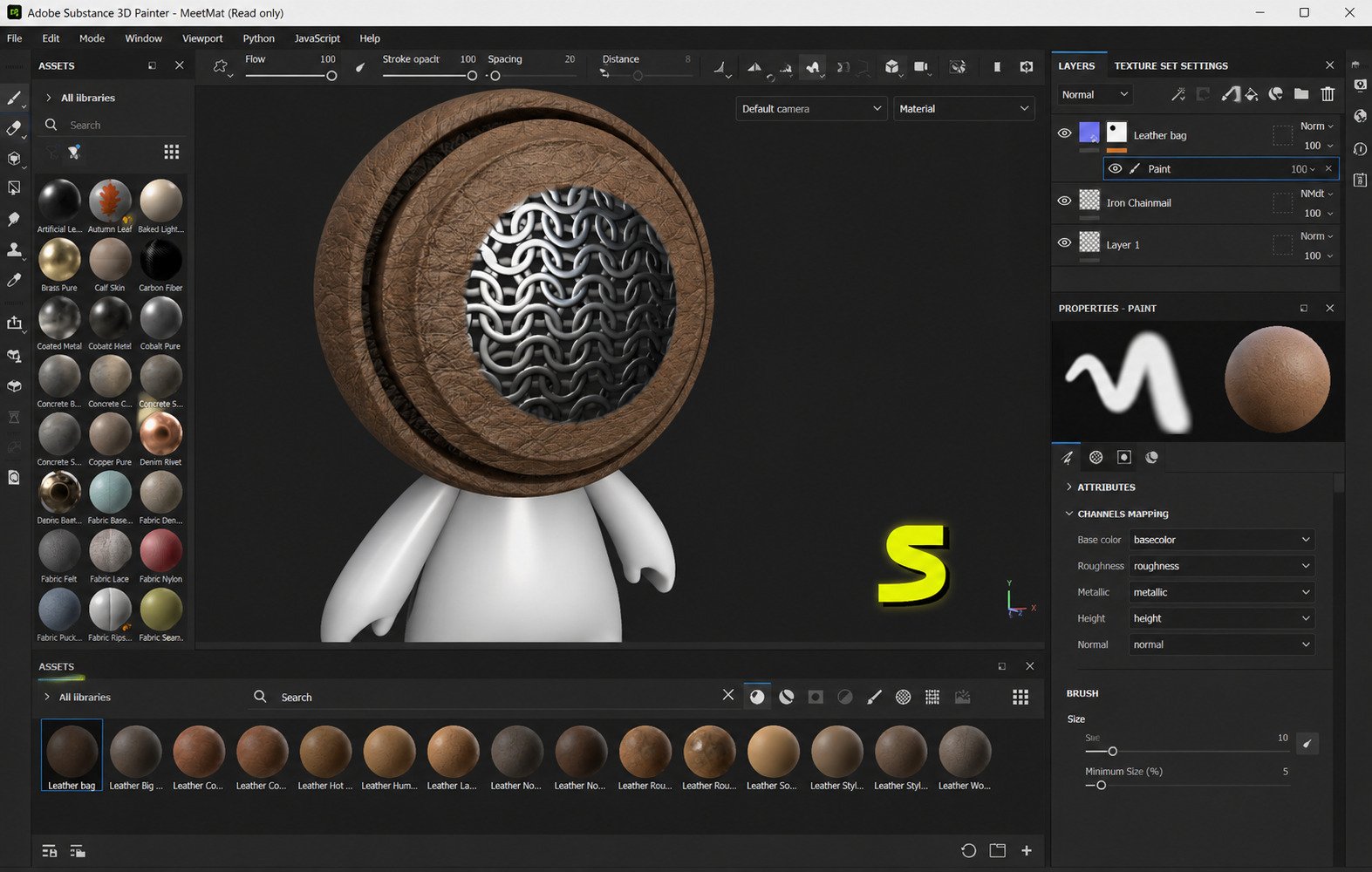
Substance 3D Painter Alternatives
Best Substance Painter Alternatives
| Tool | Best For | Price Model |
|---|---|---|
| Blender (Texture Paint + Shader Editor) | Free, all-in-one 3D + texturing | Free, open source |
| ArmorPaint | Budget-friendly PBR painting | One-time purchase |
| Mari (Foundry) | Large-scale film/VFX texturing | Subscription, high-end |
| Marmoset Toolbag | Baking + real-time rendering | One-time purchase |
| Quixel Mixer successor tools | Photogrammetry-based materials | Varies |
Free Substance Painter Alternatives
Blender and ArmorPaint are the two most viable free or low-cost routes if you’re not ready to commit to a subscription.
Best 3D Texturing Software
For most people starting out, the honest answer depends on budget: Painter for industry-standard results, Blender if cost is the deciding factor.
Best Texture Painting Software
Painter remains the benchmark for smart-material-driven workflows; ArmorPaint is the closest budget alternative built specifically to mimic that workflow.
Best PBR Texturing Software
Anything that exports proper Metallic/Roughness maps qualifies — Painter, Mari, and ArmorPaint all do this well.
Best Free 3D Texturing Software
Blender’s texture paint tools, combined with its shader editor, cover most basic to intermediate PBR texturing needs at zero cost.
Substance Painter vs Blender
Blender is free and integrated with modeling and rendering, but lacks Painter’s smart materials and dedicated baking pipeline — many artists use both in the same project.
Substance Painter vs Mari
Mari is built for massive film-scale texture resolutions and multi-artist pipelines; Painter is faster to learn and better suited to games and mid-size projects.
Substance Painter vs Quixel Mixer
Quixel’s tools lean on photogrammetry-based real-world materials, while Painter leans on procedural, hand-adjustable materials — the choice often comes down to whether you want realism sourced from photos or built from scratch.
Substance Painter vs ArmorPaint
ArmorPaint is a genuinely close open-source alternative for smart-material-style painting, at a fraction of the cost, though its ecosystem and asset library are much smaller.
Substance Painter vs Adobe 3D
“Adobe 3D” isn’t a separate product — Painter is one app within Adobe’s broader Substance 3D suite, alongside Designer (procedural materials) and Modeler.
Which Substance Painter Alternative Is Best?
Best Free Alternative for Beginners
Blender — since you likely already need it for modeling, and its texture tools are enough to learn the fundamentals.
Best Alternative for PBR Texturing
ArmorPaint, if you want a smart-material workflow similar to Painter without the subscription cost.
Best Alternative for Game Asset Texturing
Painter itself remains the strongest choice here due to its direct engine export presets, but ArmorPaint is a reasonable budget substitute.
Best Alternative for Professional 3D Artists
Mari, specifically for large-scale film and VFX pipelines where Painter’s resolution ceiling becomes limiting.
Best Alternative for Blender Users
Blender’s native texture paint tools, simply because they stay in the same application without an export/import round trip.
Final Verdict: Is Substance 3D Painter Worth It?
Who Should Use Substance 3D Painter?
Anyone working professionally or semi-professionally in games, film, or product visualization who needs fast, believable material work will get real value from the subscription cost.
When Should You Choose a Free Alternative?
If you’re a student, hobbyist, or just testing whether 3D texturing is something you enjoy, start with Blender or ArmorPaint before paying for a subscription.
Is Substance 3D Painter Good for Professional 3D Texturing?
Yes, it remains the most widely adopted texturing tool in games and much of film/VFX, which also makes it a practical skill to learn if you’re aiming for industry work.
Conclusion
Substance 3D Painter earns its reputation because it solves a genuinely hard problem — making textures look physically real in a way that’s fast enough for daily production work. Whether it’s worth the subscription really comes down to how often you’ll use it and whether your work depends on that industry-standard PBR pipeline.
If budget is the main concern, Blender or ArmorPaint are worth trying first. But if texturing is a core part of your job or portfolio, the time Painter saves through smart materials and real-time feedback tends to pay for itself fairly quickly.
Explore Substance 3D Painter on Adobe →