MONOCHORD 1.0.6: VST3 Chord Plugin, Harmony Workstation, Features, and Windows Download
Creating convincing chords can take time, especially when you are working with unfamiliar keys, complex voicings, or layered textures. MONOCHORD 1.0.6 is designed around a much simpler idea: press one key and let the instrument produce a complete chord and musical texture.
MONOCHORD is described as a chord instrument, harmony workstation, multisampler, texture engine, and MIDI effect. Its workflow is aimed at producers, composers, songwriters, and sound designers who want to explore harmonic ideas without spending every minute building complicated MIDI setups. The official product information says the instrument includes more than 600 hand-voiced chords, 70 tonal sets, MIDI routing, effects, sampled sounds, and VST3 support for Windows and macOS.
One important detail deserves attention before downloading: current online listings do not agree on the version number. Softpedia’s current listing identifies a Windows download as MONOCHORD 1.0.3, while the official MONOCHORD site and manual describe the current product and its Windows VST3/standalone support without confirming a 1.0.6 build in the pages reviewed for this article.
For that reason, this guide uses MONOCHORD 1.0.6 as the requested search term, but readers should always verify the version shown by the developer or download provider before installing a particular build.
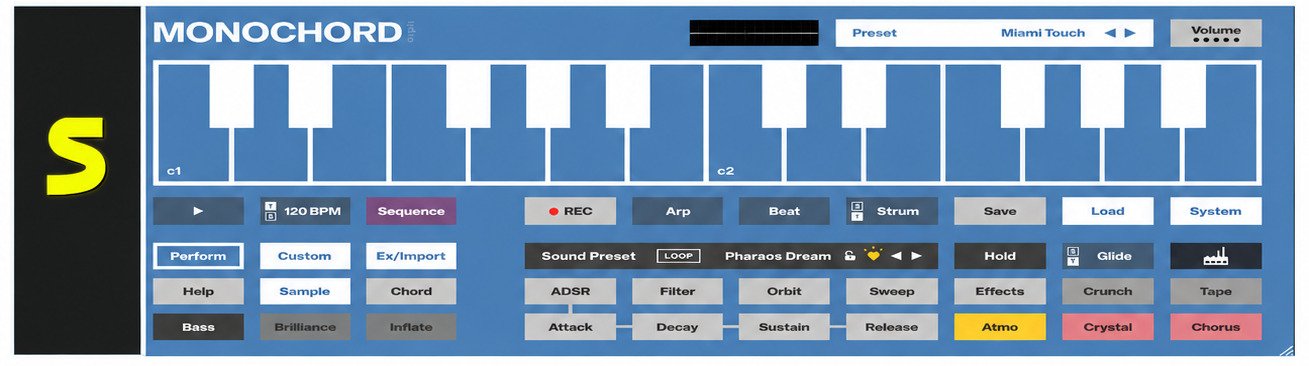
What Is MONOCHORD 1.0.6?
MONOCHORD is a software instrument built around chord-based performance. Instead of requiring the user to play every note of a chord manually, the instrument maps complete voicings to individual keys.
That approach makes it different from a conventional synthesizer. A traditional synth normally responds to the individual notes you play. MONOCHORD can turn one input key into a complete harmonic performance while also shaping the sound with its internal instruments and effects.
MONOCHORD Audio Plugin Overview
At its core, MONOCHORD is an audio plugin for music production. It can operate as a VST3 plugin inside a compatible digital audio workstation, while the Windows version can also run as a standalone application. The official manual specifies Windows 10 or later and 64-bit operation.
The instrument combines several roles that would normally be handled by separate tools. It can generate chord voicings, provide sampled and synthesized sounds, apply effects, create rhythmic or arpeggiated movement, and send MIDI performance information to other equipment or software.
This makes it especially interesting when the goal is fast experimentation rather than building a large chain of separate plugins.
MONOCHORD as a Chord Synthesizer and Harmony Workstation
The phrase harmony workstation is useful because MONOCHORD is more than a simple chord trigger.
Its library includes over 600 chord voicings and 70 tonal sets. These range from simple triads to much richer voicings, including nine-note arrangements. Users can adjust individual chord choices rather than being locked into one fixed harmony system.
For a songwriter, this can turn a basic melody idea into a fuller harmonic sketch. For a producer, it can provide a quick starting point for pads, cinematic textures, ambient passages, electronic music, or chord-driven sections.
MONOCHORD VST3 Plugin for Music Production
The MONOCHORD VST3 plugin is intended to work inside compatible DAWs. VST3 is a widely used plugin format for Windows music software, and Steinberg’s official documentation explains that Windows VST3 plugins use the .vst3 format and are normally placed in recognized VST3 locations.
Once installed, MONOCHORD can be loaded like other virtual instruments. The exact menu name differs between DAWs, but the general process is similar: install the plugin, scan the VST3 location if necessary, create an instrument track, and select MONOCHORD.
What Is the Difference Between MONOCHORD and a Monochord Instrument?
The names are easy to confuse.
A monochord is an ancient musical and scientific instrument built around a single stretched string. It has historically been used to demonstrate relationships between musical intervals and frequencies.
MONOCHORD, the modern music software, is a digital chord instrument developed by orph. It is not a virtual reproduction of that historical one-string instrument. The software is designed for chord performance, sound design, sampling, harmony, and MIDI-based production.
That distinction is important when searching online because the same word can lead to two completely different subjects.
MONOCHORD 1.0.6 Features
The main attraction of MONOCHORD is its combination of harmony tools and sound-design features.
Instead of treating chord generation as a separate technical step, the software puts chords, voicings, sounds, effects, and performance controls into one environment.
Chord Generation and Harmony Creation Tools
MONOCHORD provides more than 600 chord voicings across 70 tonal sets. The voicings are designed to cover different musical situations, from straightforward triads to much denser harmonic structures.
The practical benefit is speed. You can experiment with a progression without first working out every individual note.
For example, a producer working on an ambient track might hold one key, hear a wide chord texture, move to another key, and immediately compare the harmonic relationship. That encourages experimentation rather than forcing the producer to stop and calculate every chord.
Chord Progression Tools for Music Production
MONOCHORD can be useful for building chord progressions because individual keys can represent complete harmonic structures.
A simple workflow might look like this:
- Choose a tonal set.
- Select a suitable sound.
- Press a single MIDI key.
- Listen to the generated voicing.
- Move to another key.
- Adjust the voicing or spread.
- Record the performance into the DAW.
The important point is that MONOCHORD does not simply replace musical decision-making. Its developer describes it as reducing setup effort while keeping creative intention with the user.
MONOCHORD MIDI Plugin Features
MIDI is one of the more useful parts of the instrument.
According to the official product information, MONOCHORD can send its performance as MIDI. That includes more than the basic chord notes; the MIDI output can include performance elements such as arpeggiation, strumming, humanization, and timing.
This means you can use MONOCHORD as the starting point for another instrument.
For instance, a producer could create a chord performance in MONOCHORD and route the resulting MIDI to another synthesizer. The second instrument then becomes the sound source while MONOCHORD supplies the harmonic performance.
Chord Synthesizer and Harmonic Control
The software also provides controls for chord position and spread. KVR Audio’s coverage describes a voicing-position control ranging from -12 to +16 and a spread control with close, open, and orchestral-style spacing.
These controls matter because the same chord can feel completely different depending on its register and spacing.
A close voicing may sound compact and direct. A wider voicing can create more space between notes and work better for atmospheric music.
MONOCHORD 1.0.6 Features Explained
| Feature | What it means in practice |
|---|---|
| 600+ chord voicings | Provides many harmonic starting points |
| 70 tonal sets | Helps organize chords around different tonal contexts |
| VST3 | Allows use inside compatible DAWs |
| Standalone mode | Can run without opening a DAW |
| MIDI output | Sends performance information to other instruments |
| Multisampling | Uses recorded sounds as part of the instrument |
| Effects | Shapes the character of the resulting sound |
| Arpeggiator | Adds rhythmic movement to chord performances |
| User samples | Allows personal recordings to be incorporated into the instrument |
| Windows 10/11 support | Targets modern 64-bit Windows systems |
The official product page also lists 425 studio-quality sounds, multiple synthesis engines, effects, and support for user sounds.
How Does the MONOCHORD Plugin Work?
MONOCHORD works by associating keys with complete harmonic structures instead of treating every pressed key as a single isolated note.
That changes the experience of playing chords. You can concentrate on movement, rhythm, sound, and musical direction rather than constantly managing individual notes.
Using MONOCHORD to Create Chords and Harmonies
Start by selecting a tonal set and sound. Then press a key on your MIDI keyboard or click a key in the plugin interface.
The instrument responds with a complete chord. From there, you can try neighboring keys, change the voicing, adjust the spread, or modify the sound.
This makes the plugin particularly approachable for people who understand musical ideas but do not want complex harmony theory to become a barrier.
How MONOCHORD Works With MIDI
MIDI provides the connection between MONOCHORD and the rest of a production setup.
The official documentation states that MONOCHORD can route its MIDI performance to DAWs and external hardware.
That opens several possibilities:
- MONOCHORD can play its own internal sounds.
- Its MIDI performance can drive another virtual instrument.
- MIDI can be routed toward external hardware.
- Performances can be recorded into a DAW for later editing.
This is more flexible than using MONOCHORD only as a preset-based instrument.
Creating Chord Progressions With MONOCHORD
The easiest way to build a progression is to begin with a small idea rather than trying to design an entire song immediately.
Try a four-chord pattern first. Listen to how each voicing moves into the next one. If the progression feels too crowded, use a more open voicing. If it feels weak, try a richer chord or a different sound preset.
This workflow encourages listening before overthinking.
Using MONOCHORD in a Music Production Workflow
A practical workflow could be divided into four stages:
- Idea: Use one-key chord performance to find a harmonic direction.
- Sound: Choose a sampled instrument or synthesized texture that supports the mood.
- Performance: Adjust timing, arpeggiation, spread, or other performance controls.
- Production: Record the part, route MIDI to another instrument, or continue shaping the sound inside the DAW.
The advantage is that these stages can happen quickly without repeatedly switching between separate tools.
MONOCHORD VST and VST3 Plugin
The term “VST” is often used loosely, but the current MONOCHORD product documentation specifically identifies VST3 for Windows. The official manual lists Windows standalone and VST3 formats.
What Is the MONOCHORD VST3 Plugin?
VST3 is a plugin standard used by many modern DAWs.
A VST3 plugin normally has a .vst3 package on Windows. Steinberg’s documentation identifies the standard Windows VST3 locations, including Program Files\Common Files\VST3.
MONOCHORD can therefore be treated like other VST3 virtual instruments once it has been installed correctly.
MONOCHORD VST3 Plugin Compatibility
The official product information lists major hosts including Ableton Live, Cubase, Studio One, Reaper, Bitwig, and FL Studio.
Compatibility can still depend on the exact DAW version, operating system, plugin architecture, and installation path. If a host does not immediately show MONOCHORD, rescanning the VST3 directory is a sensible first step.
How to Load MONOCHORD in a Compatible DAW
After installation:
- Open your DAW.
- Go to the plugin or instrument browser.
- Search for MONOCHORD.
- Create an instrument track if required.
- Load MONOCHORD.
- Play a MIDI keyboard or use the DAW’s piano roll.
- Select a sound and tonal set.
- Test the chord controls.
If the plugin does not appear, check whether the installation completed successfully and whether your DAW scans the standard VST3 location.
MONOCHORD VST3 Plugin System Requirements
The official manual specifies Windows 10 or later, 64-bit, with approximately 13 GB of free space recommended for the complete installation. The sound library alone is listed at about 11.8 GB.
The developer also recommends an SSD and lists 8 GB RAM as a minimum, with 16 GB recommended on the product page.
MONOCHORD 1.0.6 Download
Downloading music software safely is more important than finding the smallest installer.
MONOCHORD’s official product page is the best place to check the developer’s current release information.
A third-party listing can be useful for discovering software, but always compare the version and platform information before installing.
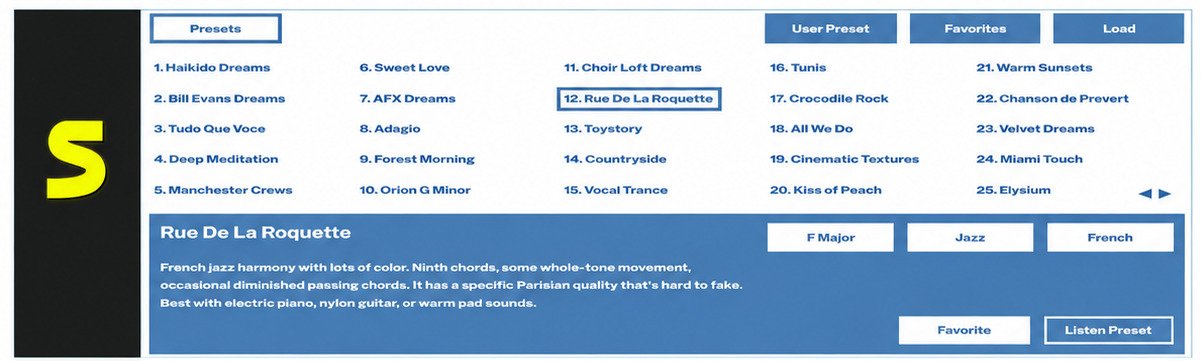
MONOCHORD 1.0.6 Download for Windows
For Windows users, the official manual identifies Windows 10 or later, 64-bit as the supported operating-system baseline.
If you specifically need version 1.0.6, verify that the download page explicitly identifies the installer as 1.0.6 before proceeding. This is especially important because Softpedia’s current listing reviewed for this article displays version 1.0.3 rather than 1.0.6.
MONOCHORD 1.0.6 Free Download
MONOCHORD should not be described as permanently free software without qualification.
The official product currently advertises a 14-day trial, while the full product is commercially licensed.
Therefore, phrases such as “MONOCHORD free download” should be understood carefully. A legitimate trial is different from an unofficial cracked or modified copy.
MONOCHORD 1.0.6 Audio Plugin Download
The safest approach is to obtain the installer from the developer or a reputable software distributor and confirm:
- Product name
- Version number
- Windows compatibility
- 64-bit requirement
- VST3 availability
- License or trial status
- Required disk space
Avoid installers that promise a “full unlocked” version from unknown sources.
How to Download MONOCHORD Safely
A safe download routine is straightforward.
First, confirm that the website belongs to the developer or a reputable distributor. Second, check the exact version. Third, read the installation requirements. Finally, scan unexpected downloads with your security software.
If the installer requests unusual permissions unrelated to installing an audio plugin, stop and investigate before continuing.
How to Install MONOCHORD 1.0.6
Installation is generally simple, but the large sound library makes MONOCHORD different from a tiny synthesizer plugin.
MONOCHORD 1.0.6 Installation Guide
Download the legitimate installer and launch it on a supported Windows system.
Follow the installer instructions and allow enough free storage for the application and sound library. The official manual says the sound library is downloaded after the initial installation rather than being fully contained in the installer.
Once installed, launch the standalone application or load the VST3 version through your DAW.
How to Install the MONOCHORD VST3 Plugin
On Windows, the normal VST3 installation path is commonly under:
C:\Program Files\Common Files\VST3
Steinberg’s VST3 documentation identifies this as the global Windows location used by hosts.
If the MONOCHORD installer offers a location choice, use the location recommended by the developer or your DAW.
Setting Up MONOCHORD on Windows
The first launch may require activation or trial setup. The official manual explains that users can enter a license key or start the 14-day trial, followed by the sound-library download.
Because the library is large, use a stable internet connection during the initial setup.
How to Add MONOCHORD to Your DAW Plugin Folder
In most cases, you should not manually move the .vst3 file after installation. Let the installer place it in the correct VST3 directory. If the DAW cannot find it, open the DAW’s plugin settings and confirm that the standard VST3 path is being scanned. Manual file movement can create unnecessary problems with libraries, updates, or permissions.
MONOCHORD 1.0.6 for Windows
Windows users are a major part of MONOCHORD’s target audience because the software is available as both a Windows standalone application and VST3 plugin.
MONOCHORD Windows Plugin Compatibility
The official manual lists Windows 10 or later and 64-bit operation.
The product page also identifies several popular DAWs, including Ableton Live, Cubase, Studio One, Reaper, Bitwig, and FL Studio.
MONOCHORD 1.0.6 for Windows 10
Windows 10 or later is the developer’s stated operating-system baseline in the current manual.
However, Windows 10 reached end of support on October 14, 2025, according to Microsoft. For a new music-production computer, Windows 11 is therefore the more sensible long-term platform when the hardware supports it.
MONOCHORD 1.0.6 for Windows 11
MONOCHORD’s official documentation supports Windows 10 or later, which includes Windows 11.
Microsoft’s current Windows 11 requirements include a compatible 64-bit processor, at least 4 GB RAM, 64 GB storage, UEFI/Secure Boot capability, TPM 2.0, and compatible graphics hardware. Those are Windows requirements rather than MONOCHORD-specific requirements.
MONOCHORD Audio Plugin for Windows
For Windows producers, MONOCHORD is useful when you want to move quickly from a blank project to a playable harmonic idea.
It can also fit into a more advanced workflow where its MIDI output controls another instrument. That flexibility makes it relevant to both beginners and experienced producers.
MONOCHORD 1.0.6 System Requirements
System requirements matter because MONOCHORD includes a substantial sound library.
Minimum System Requirements
The official product page lists:
| Requirement | Officially listed information |
|---|---|
| Operating system | Windows 10 or later |
| Architecture | 64-bit |
| RAM | 8 GB minimum |
| Recommended RAM | 16 GB |
| Storage | About 13 GB free space |
| Sample library | About 11.8 GB |
| Internet | Required for activation and initial library download |
| Format | VST3 and standalone on Windows |
| Recommended storage | SSD |
These figures come from the developer’s current product and manual information.
MONOCHORD VST3 System Requirements
A compatible VST3 host is necessary when using the plugin inside a DAW.
The computer also needs enough storage for the sound library. This is easy to overlook. An installer that appears small can still require significantly more disk space after the library is downloaded.
Supported Windows Versions
The current manual states Windows 10 or later, 64-bit.
For Windows 11 hardware requirements, consult Microsoft’s official documentation rather than assuming that every older PC can upgrade successfully.
DAW and Plugin Host Compatibility
The developer lists Ableton Live, Cubase/Nuendo, Studio One, Reaper, Bitwig, FL Studio, Logic Pro, GarageBand, and MainStage among supported hosts or platforms, with the exact format varying between Windows and macOS.
On Windows, focus specifically on the VST3-compatible hosts.
MONOCHORD Chord Progression Plugin
Calling MONOCHORD a chord progression plugin is reasonable from a workflow perspective, although its official positioning is broader: it is a chord instrument and harmony workstation rather than only a progression generator.
Creating Chord Progressions With MONOCHORD
Start with a tonal set that matches your musical idea. Then experiment with single-key chord changes.
Instead of immediately creating a long progression, record four or eight bars. Listen for the emotional direction. Once the foundation works, expand it with rhythm, automation, melody, bass, and additional textures.
MONOCHORD Chord Progression Plugin for Windows
On Windows, the VST3 version can sit directly inside the DAW’s instrument workflow.
This is particularly useful when the chord progression needs to remain part of a larger project rather than being developed as a separate sketch.
Building Harmonic Progressions for Songs
A useful technique is to separate harmony from sound selection.
Find a progression using a neutral sound first. Then switch through contrasting sounds. A progression that feels ordinary on piano may become surprisingly effective with a wide synth pad or textured sampled instrument.
Using MONOCHORD for Songwriting and Composition
Songwriters can use MONOCHORD as an idea generator without treating it as a replacement for composition.
For example, a songwriter could build a progression, record it, mute MONOCHORD, and write a vocal melody over the MIDI or audio performance. The software provides the harmonic starting point while the songwriter decides what the song actually becomes.
MONOCHORD Chord Synthesizer and Harmony Workstation
MONOCHORD’s strongest identity is probably found here.
The product combines harmony, sound, MIDI, and texture rather than separating them into unrelated stages.
MONOCHORD Chord Synthesizer Plugin for Windows
A conventional synthesizer asks you to design a sound and then play notes.
MONOCHORD starts from the opposite direction. The chord itself is central, and the sound engine gives that chord a musical identity.
That makes it suitable for producers who want playable harmonic textures without manually programming every note.
MONOCHORD Harmony Workstation for Music Production
A workstation approach can be valuable when you are developing ideas quickly.
Instead of opening a chord generator, a sampler, a synth, an arpeggiator, and several effects separately, MONOCHORD brings many of those functions together.
The official product page describes it as a harmony workstation, chord synthesizer, multisampler, texture engine, and MIDI effect.
Creating Complex Harmonies and Chord Voicings
Rich harmony is one of MONOCHORD’s clearest strengths.
Its library includes more than 600 hand-voiced chords, ranging from triads to complex nine-note voicings.
The advantage is not simply the number. Different voicings can change the character of the same harmonic progression dramatically.
A close chord may work underneath a lead. A widely spread voicing may create the spacious quality needed for film music or ambient production.
MIDI-Based Harmony and Chord Control
The MIDI system adds another layer of flexibility.
Because the instrument can output the performance, you can use MONOCHORD as a controller for another synthesizer or hardware instrument. The result is a workflow where the chord intelligence comes from MONOCHORD while the final sound comes from somewhere else.
MONOCHORD 1.0.6 Review
MONOCHORD is most appealing when speed and harmonic exploration are more important than traditional keyboard technique.
It is not intended to make every producer stop learning music theory. Instead, it reduces the amount of setup needed to explore harmony.
MONOCHORD 1.0.6 Features and Review
The strongest features are its large chord library, tonal sets, sound collection, MIDI output, effects, and one-key chord workflow.
The 425-sound library is particularly notable. The developer describes these sounds as being rooted in vintage studio hardware from the 1980s through the 2000s.
MONOCHORD Ease of Use and Workflow
The interface is designed around immediate experimentation.
Pressing one key and hearing a full chord is easy to understand. More advanced users can then explore voicing, effects, MIDI routing, arpeggiation, and other controls.
That layered approach gives beginners an accessible starting point without removing deeper options.
MONOCHORD for Music Producers, Composers, and Songwriters
Producers can use MONOCHORD for fast harmonic sketches and textures.
Composers may find its rich voicings useful for cinematic or atmospheric ideas.
Songwriters can use it to explore progressions before writing melodies or lyrics.
Sound designers can use the sampled instruments, effects, and user-sample capabilities to build unusual textures.
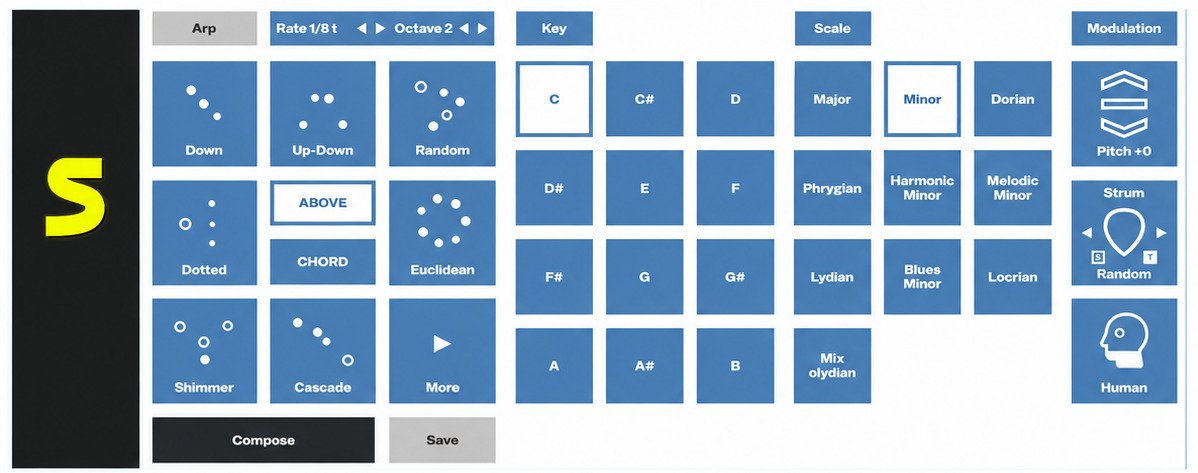
MONOCHORD 1.0.6 Pros and Limitations
- Fast one-key chord workflow
- 600+ chord voicings
- 70 tonal sets
- VST3 and standalone support on Windows
- MIDI output
- Large sound library
- User-sample support
- Large sound library requires substantial storage
- Not simply a traditional synthesizer
- Version information can vary between listings
- Requires compatible 64-bit environment
- Activation/trial setup is required
- Not permanently free software
- Advanced users may still need another synth or DAW
Overall, MONOCHORD makes the most sense for users who value harmonic experimentation and quick musical results.
MONOCHORD vs Monochord Instrument
The shared name creates a surprisingly common search problem.
What Is a Monochord Instrument?
A traditional monochord is a physical string instrument and scientific demonstration device. A string is stretched over a body, and movable bridges can be used to demonstrate relationships between string length and pitch.
The historical instrument has been associated with the study of musical intervals and acoustics.
MONOCHORD Plugin vs Traditional Monochord
The software and the historical instrument have completely different purposes.
| MONOCHORD software | Traditional monochord |
|---|---|
| Digital music-production instrument | Physical string instrument |
| Creates complete chords | Primarily demonstrates pitch relationships |
| Uses samples and synthesis | Uses a physical string |
| Supports MIDI | No native MIDI |
| Runs in DAWs | Used physically |
| Designed for production | Historically linked to music theory and acoustics |
So if someone searches for “instrument monochord,” they may be looking for the historical device rather than the modern audio plugin.
Monochord and Pythagoras: Historical Background
The monochord is strongly associated with ancient investigations into musical intervals and mathematical relationships. It is often discussed in connection with Pythagorean musical theory.
The basic concept is simple: changing the effective length of a vibrating string changes its pitch, allowing relationships between notes to be demonstrated physically.
That historical background is interesting, but it should not be confused with the design purpose of the MONOCHORD software.
Why MONOCHORD Music Software Is Different From a Physical Monochord
The modern software uses the name as a musical identity, but it is fundamentally a digital chord instrument and harmony workstation.
Its purpose is not to reproduce a single-string acoustic experiment. It is to help users create chords, textures, performances, and MIDI parts inside a modern production environment.
Common MONOCHORD Search Terms and Name Variations
Search engines can return several unrelated products for the same word.
MONOCHORD, Monocord, and Monokord
People sometimes spell the name as “Monocord” or “Monokord.” These variations can lead to unrelated software, musical instruments, or historical information.
When searching for the modern plugin, adding terms such as VST3, audio plugin, orph, Windows, or chord instrument can make the search much more precise.
MONOCHORD Plugin vs Monophonic Instruments
MONOCHORD should not be confused with a monophonic synthesizer.
“Monophonic” describes an instrument that normally plays one note at a time. MONOCHORD is specifically built around complete chord voicings.
The names look similar, but the concepts are very different.
Instrument Monochord and Monophone Instrument Searches
Searches for “monophone instrument” may refer to a completely different concept. Likewise, “monochord instrument” usually refers to the historical physical instrument.
Adding “VST3” or “orph MONOCHORD” helps identify the software product.
Finding the Correct MONOCHORD Audio Plugin
The safest search pattern is to combine the product name with its developer or format.
Useful examples include:
- MONOCHORD by orph
- MONOCHORD VST3
- MONOCHORD chord plugin
- MONOCHORD harmony workstation
- MONOCHORD Windows plugin
- MONOCHORD MIDI chord instrument
- MONOCHORD audio plugin download
These phrases better reflect actual user intent than repeatedly using the same exact keyword.
Frequently Asked Questions About MONOCHORD 1.0.6
MONOCHORD is a digital chord instrument and harmony workstation that combines chord voicings, sampled sounds, synthesis, effects, and MIDI performance features.
Yes. The official documentation lists VST3 support on Windows, along with a standalone application.
Yes. The developer lists Windows 10 or later, 64-bit, as the supported Windows environment.
Use the developer’s official download page and verify the exact version before installing, especially because third-party listings may display different release numbers.
MONOCHORD is commercially licensed, although the official manual describes a 14-day trial. Avoid unofficial “cracked” downloads.
The current manual specifies Windows 10 or later and 64-bit operation, while the product page lists 8 GB RAM minimum and about 13 GB free space.
Yes. Its one-key chord workflow, tonal sets, and large collection of chord voicings make it suitable for creating and experimenting with chord progressions.
Conclusion
MONOCHORD stands out because it treats harmony as the center of the production workflow. Instead of making users build every chord note by note, it provides complete voicings, sounds, effects, and MIDI control in one focused instrument. That can make songwriting, sound design, and harmonic experimentation much faster.
If you are looking for a Windows VST3 chord plugin, MONOCHORD is worth exploring, particularly if you want rich voicings and quick musical results. Just verify the exact release number before downloading: the sources reviewed here currently show differing version information, so the developer’s listing should be treated as the final authority.