SurFast Video Downloader Download, Features, Setup, and Alternatives
What Is SurFast Video Downloader and How Does It Work?
You find a video you love, and then it disappears or your Wi-Fi drops. SurFast Video Downloader fixes that by saving media to your computer for offline viewing. Here is how it works.
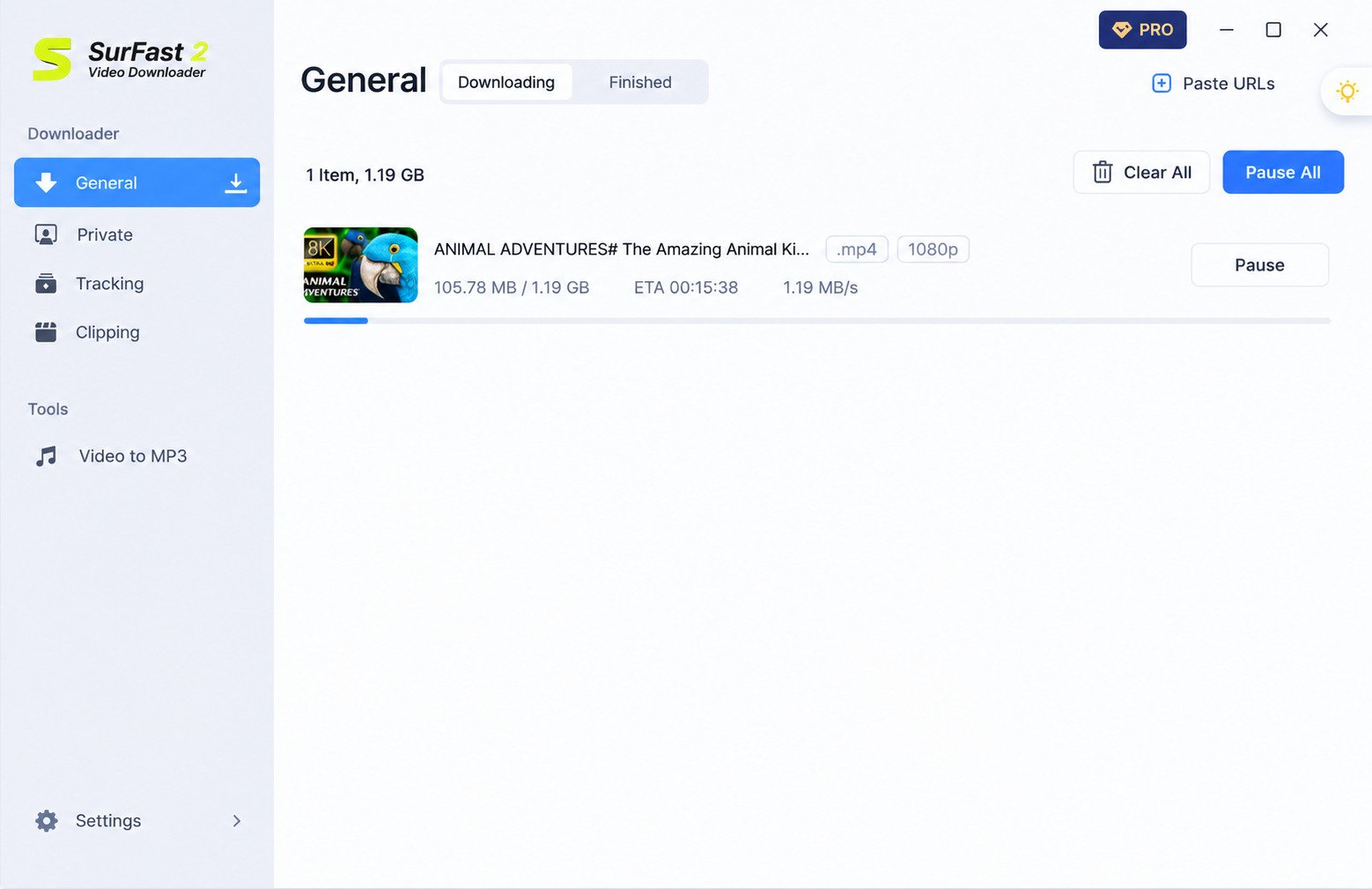
What Is SurFast Video Downloader?
It is a desktop app from Nabla Mind that saves videos, audio, subtitles, and thumbnails from more than 1,000 websites. Think of it as a personal video library builder that works without any browser tricks or shady pop-ups.
How SurFast Works as a Video Downloader
You paste a link, choose a format and quality, and click download. The app reads the page, lists the available options, and saves the file locally. Because everything runs on your computer, batch jobs and clipping tools work better than in most online converters.
SurFast Video Downloader for Windows and PC
The SurFast Video Downloader for PC runs on Windows 7 through Windows 11. A Mac version also exists, but this guide focuses on Windows. Installation is simple, and the app does not need advanced technical knowledge to operate day to day.
What Websites and Video Platforms Does SurFast Support?
Supported sites include YouTube, TikTok, Facebook, Instagram, X, Vimeo, Twitch, Dailymotion, SoundCloud, and Bandcamp. Individual sites can change without notice. Always test a link from your favorite site during the trial before paying for anything.
Who Is SurFast Video Downloader Designed For?
Editors, teachers, students, and casual viewers benefit most. Anyone who wants offline copies of content they are allowed to save will find it useful. Teachers saving lessons and travelers preparing offline playlists are two common examples.
SurFast Video Downloader Features
The feature list is wide, so here is a quick view before the details.
| Feature | What It Offers |
|---|---|
| Resolution | Up to 8K, plus 4K and 1080p |
| Video formats | MP4, MOV, WEBM, FLV, AVI, MKV, GIF |
| Audio formats | MP3, M4A, WAV, AAC, ALAC, FLAC, OGG, OPUS |
| Extras | Clipping, subtitles, thumbnails, live streams |
Download Online Videos From Multiple Platforms
One app covers many sites, so you avoid juggling separate tools for every platform you use. For example, you could save a Vimeo tutorial and a TikTok clip in the same session.
YouTube Video and Audio Downloads
You can save a YouTube video, only its audio, or both. Shorts and full channels are supported too. This is handy for lectures, where you may want the slides in video and the talk in audio.
4K, 8K, HD, and 1080p Video Downloads
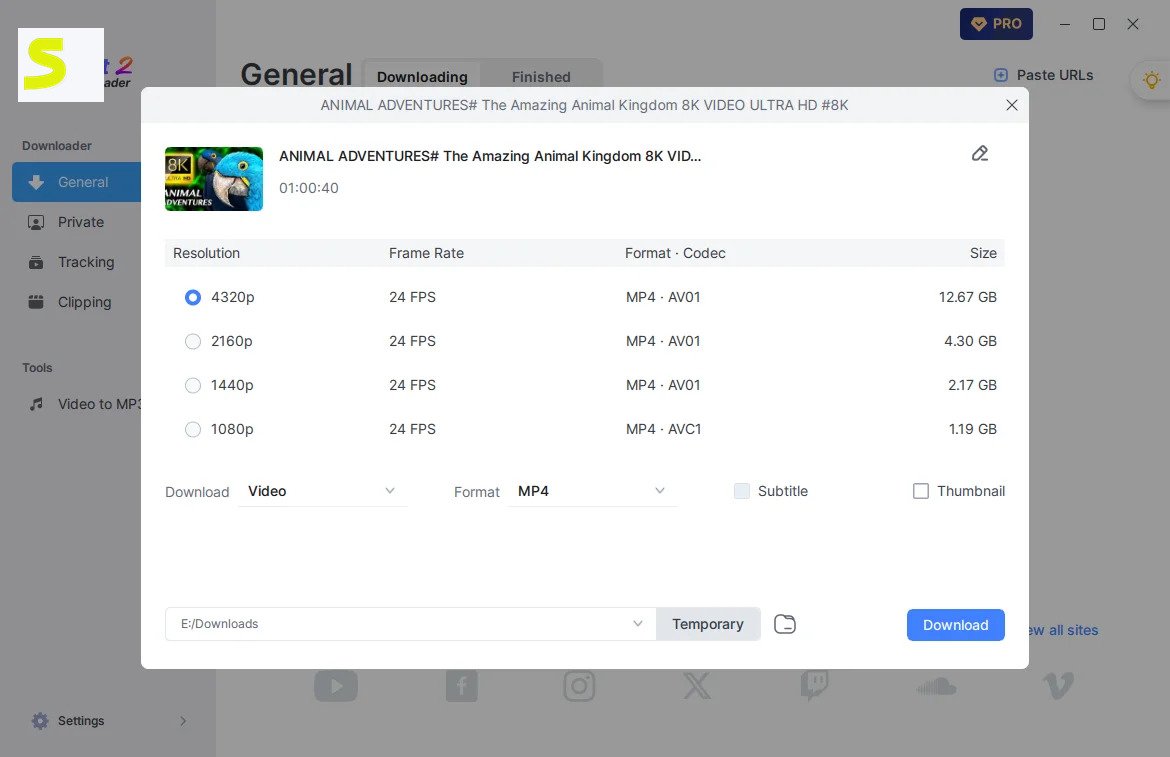
Pick the resolution the source offers. If a video was uploaded in 1080p, no tool can create genuine 8K from it. Higher quality always means bigger files, so plan your storage before you begin.
MP4 Video Downloads and Format Options
MP4 is the safest choice for phones, TVs, and editors. Other formats like MKV or WEBM suit special cases.
MP3 and Online Audio Downloads
Extract sound as MP3 for podcasts, lectures, and music. Lossless options such as FLAC are available when quality matters. Podcast fans and language learners often keep entire series as audio files.
Playlist and Batch Download Support
Paste a playlist or channel link and the app fetches everything. Bulk pasting of multiple links is also supported. That single feature can save hours compared with saving each video by hand.
Subtitle Downloading
Subtitles can be saved separately, embedded as a selectable track, or burned into the picture. This helps language learners, and it also improves accessibility for viewers who are deaf or hard of hearing.
Download Management and Storage Controls
A Finished tab lets you preview files. You can also set a default folder and quality preset. Good organization matters more than most people expect once a library passes a hundred files.
SurFast YouTube Downloader
YouTube is the main reason most people install this tool, so it deserves its own walkthrough.
How to Download YouTube Videos With SurFast
Copy the video link, paste it into the app, pick your settings, and click Download. That is the whole process. Beginners usually finish their first download in under two minutes.
Download YouTube Videos to a PC
Files land in your chosen folder on Windows. Change that folder once in settings and every future download follows it. Keeping downloads on a separate drive also protects your system disk from filling up.
Download YouTube Videos in HD, 1080p, 4K, and 8K
Choose from the resolution list shown after parsing. Higher options only appear if the uploader provided them. Test one short clip first to compare quality against file size.
Download YouTube Videos as MP4
Select MP4 as the output format. It plays almost everywhere without extra codecs. If a file will not play on an old device, MP4 is usually the fix.
Download YouTube Audio as MP3
Switch to audio mode and choose MP3. It works well for music, interviews, and study recordings. Always check the license first, especially for music you did not create.
Download YouTube Subtitles
Enable the subtitle option before downloading. Availability depends on whether the creator or YouTube supplied captions. Downloading captions separately also makes it easy to search a video’s text later.
Manage YouTube Downloads and File Locations
Open the Finished tab to play, locate, or delete items. Keep a dedicated folder to avoid clutter. Sorting by topic or creator makes your library far easier to browse later.
SurFast YouTube Playlist Downloader
Saving a whole course or music mix one video at a time is exhausting. Playlist mode removes that pain.
How to Download a YouTube Playlist With SurFast
Paste the playlist URL, not individual video links. Select the items you want and confirm your settings. This keeps every episode in order, which matters for courses and series.
Download an Entire YouTube Playlist
Keep every item ticked and start the job. The app processes videos in sequence. Deselect any videos you already own to save time and space.
Save YouTube Playlists as MP4
Set the output to MP4 before you begin, and every selected video follows that format. Uniform formatting makes the folder easy to play on TVs and tablets.
Download Playlist Audio as MP3
Choose the audio option to turn a playlist into an offline music library. Workout mixes and study playlists are popular examples of this workflow.
Download Multiple Playlist Videos in Bulk
Bulk mode accepts many links together. Reports mention a cap of about 50 URLs in one batch. Big batches are easier to handle when you keep each session focused on one topic.
Managing Large Playlist Downloads
Split very large playlists into smaller sessions. Check free disk space first, because long lists add up fast. A stable connection and a plugged-in laptop prevent frustrating interruptions.
SurFast Video Downloader for Facebook, Instagram, TikTok, X, and Vimeo
Social platforms behave differently, so results vary slightly from site to site.
Download Facebook Videos With SurFast
Paste the public post link. The developer also says content you can access after logging in can be saved. Copy the link from the share menu, since browser addresses can sometimes fail.
Download Instagram Videos With SurFast
Copy the reel or post link and paste it in. Private accounts require you to have legitimate access. Only save reels that belong to you, or that the creator has allowed you to keep.
Download TikTok Videos With SurFast
TikTok links can be saved in HD or better, and the official page mentions watermark-free downloads. Creators often use this to archive their own videos in the best possible quality.
Download Videos From Twitter and X
Paste the post URL to save the video. The tool also handles GIF-style clips. Sports highlights and news clips are common uses, though usage rights still apply.
Download Vimeo Videos With SurFast
Vimeo is on the supported list. Password-protected videos need your login inside the app. Vimeo often hosts portfolios and courses, so respect the creator’s download settings.
How Cross-Platform Video Downloads Work
The app uses one workflow everywhere: link, parse, choose, download. Only the available options change. That consistency means you only need to learn the interface once.
Platform Compatibility and Download Limitations
Sites update their systems often. If a download fails, update the app first, because fixes usually arrive as component updates. No downloader can promise that every link will work forever.
SurFast 4K, 8K, HD, and High-Quality Video Downloads
Quality matters, but bigger is not always better. Match resolution to your screen.
Download 4K Videos With SurFast
Pick 4K when the source offers it. It looks excellent on large monitors and modern TVs. Make sure your hard drive has room, since a single 4K film can be several gigabytes.
Download 8K Videos With SurFast
8K is supported, but few videos exist in it and few screens can show it. Expect huge files.
Download HD and 1080p Videos
1080p is the sweet spot for most people. It looks sharp and keeps files manageable.
Choosing the Best Video Quality
Use 720p for phones, 1080p for laptops, and 4K only for big screens or editing. When in doubt, start at 1080p and move up only if you notice a difference.
How Resolution Affects File Size and Download Speed
| Resolution | Typical Use | File Size |
|---|---|---|
| 720p | Phones | Small |
| 1080p | Laptops, TVs | Medium |
| 4K | Large screens | Large |
| 8K | Rare, editing | Very large |
SurFast MP4 and MP3 Downloader
Most people only need two formats, so here is when to use each one.
Download Online Videos as MP4
Choose MP4, pick a resolution, and download. The result opens in virtually any player. This is ideal for sharing files with friends or loading them onto a tablet.
Convert or Save Videos as MP4
You can save directly as MP4 or convert from another format such as WEBM or MKV. Conversion keeps the picture quality close to the source when settings are chosen carefully.
Download YouTube and Online Audio as MP3
The same audio mode works for SoundCloud, Bandcamp, and other supported music sources.
SurFast YouTube to MP3 Downloads
Paste the link, choose MP3, and start. A local video-to-MP3 converter is included as well. Long videos convert quickly, though very large files may take longer.
Choosing Between Video and Audio Downloads
Choose audio for talks and music. Choose video when visuals matter, such as tutorials. Audio files are far smaller, so they suit long podcasts and slow storage.
Video Quality, Audio Quality, and File Size
Higher bitrates sound better but take more space. For speech, standard MP3 quality is usually plenty.
SurFast Batch and Bulk Video Downloader
Batch tools save the most time for anyone who downloads regularly.
Download Multiple Videos at Once
Paste several links together. The app queues them and works through the list. This saves you from clicking through the same steps again and again.
Download Multiple YouTube Videos in Bulk
Mix single videos, playlists, and channels in one session to build a study or entertainment library. Batches work best when videos share the same output settings.
Batch Download Videos From Supported Websites
Bulk mode is not limited to YouTube. You can combine links from different supported sites. Mixing sites is possible, but keep an eye on errors from each source.
Managing Multiple Downloads
Watch the progress list, pause when needed, and retry failed items instead of restarting everything. A tidy queue also makes it easier to spot which file caused a problem.
Download Speed and Queue Management
Speed depends on your internet and the source server. Avoid queuing too many huge files at once. If your connection struggles, run smaller batches during quieter hours.
Choosing a Download Folder for Batch Files
Create a folder per project or playlist. It keeps hundreds of files easy to find later. Clear folder names such as Course-Week1 beat vague labels like New Folder.
SurFast Subtitle Downloader
Subtitles turn a good download into a useful one, especially for learning and accessibility.
Download YouTube Subtitles With SurFast
Tick the subtitle option in the download window and choose a language before you start. Auto-generated captions can contain mistakes, so review them before sharing.
Download Subtitles From Supported Videos
Other supported sites work when captions exist. Formats reportedly include SRT, VTT, LRC, and ASS.
Save Video Subtitles With Downloaded Content
Keep them as separate files, embed them as a track, or burn them permanently into the video. Separate files are best if you plan to edit the text later.
Available Subtitle Languages and Limitations
You only see languages the video provides. Also, the free trial reportedly caps subtitle downloads at five.
SurFast Video Downloader Download and Installation
Getting started takes only a few minutes.
Where to Download SurFast Video Downloader
Use the official Nabla Mind website. Avoid random mirror sites, because modified installers are a real risk. A quick search for the developer name helps you confirm you are on the right page.
How to Install SurFast on Windows
Run the installer, accept the prompts, and choose an install location. Then launch the app. If Windows shows a security prompt, confirm the publisher name before you continue.
SurFast Installation and Initial Setup
On first launch, pick your language and review the default settings. Sign in only if you plan to use the in-app browser for private content. Spending two minutes on settings now saves a lot of clicking later.
Configure Video Quality and Download Preferences
Set a preferred format and resolution. Presets let future downloads start faster.
Choose and Change the SurFast Download Folder
Open settings, find the save location, and select a drive with plenty of free space.
Verify the Installation Before Downloading Videos
Test with a short public video. If it downloads and plays, everything is working. This quick check catches missing components before you queue a large batch.
How to Use SurFast Video Downloader
Here is the everyday routine in six quick steps.
Copy and Add a Video URL
Copy the link from your browser’s address bar and paste it into the app. Make sure you copy the full link, because cut-off links cause errors.
Select the Video, Audio, or Subtitle Option
Choose whether you want video, audio only, subtitles, or a thumbnail. You can often combine options, such as video plus subtitles, in a single pass.
Choose Resolution and Output Format
Pick something like 1080p and MP4 for compatibility, or MP3 for audio. Save your choice as a preset so the next download takes seconds.
Start and Monitor the Download
Click download and watch the progress bar. Large files take longer. If a job stalls, cancel it and retry rather than waiting endlessly.
Find and Manage Downloaded Files
Open the Finished tab to preview, open the folder, or remove files.
Download Multiple Videos Efficiently
Use playlist links and bulk paste rather than repeating single downloads.
SurFast Free Version, Full Version, and Activation
Pricing confuses many buyers, so let’s simplify it.
Is SurFast Video Downloader Free?
Not fully. It offers a free trial, but unlimited use needs a paid license. Treat the trial as a test drive, then decide if a paid plan fits your habits.
SurFast Free Features and Limitations
The trial allows a few downloads, with reported limits such as five subtitle downloads. That is enough to judge speed, quality, and interface before you buy.
SurFast Full Version and Premium Features
| Plan (Windows) | Reported Price |
|---|---|
| First month | $9.95 |
| Monthly list | $25.95 |
| Yearly | $35.95 |
| Lifetime | $45.95 |
Lifetime pricing is attractive if you download often, while monthly plans suit short projects. Prices change, so confirm on the official page. Marketplaces such as AppSumo have sold lifetime deals.
How SurFast Activation Works
After purchase you receive a license code. Enter it in the app to unlock the full version. Keep your license email safe, since you may need it if you reinstall.
Where to Enter a SurFast Activation Code
Look for the account or activation option inside the software, then paste your code exactly as sent. If the code fails, check for extra spaces and confirm the plan matches your platform.
Avoiding Unofficial or Pirated Activation Codes
Skip cracks and keygens. They often carry malware, and they can break your installation. Paying a small fee is safer than risking your files and passwords.
SurFast Video Downloader Compatibility
Check compatibility before buying.
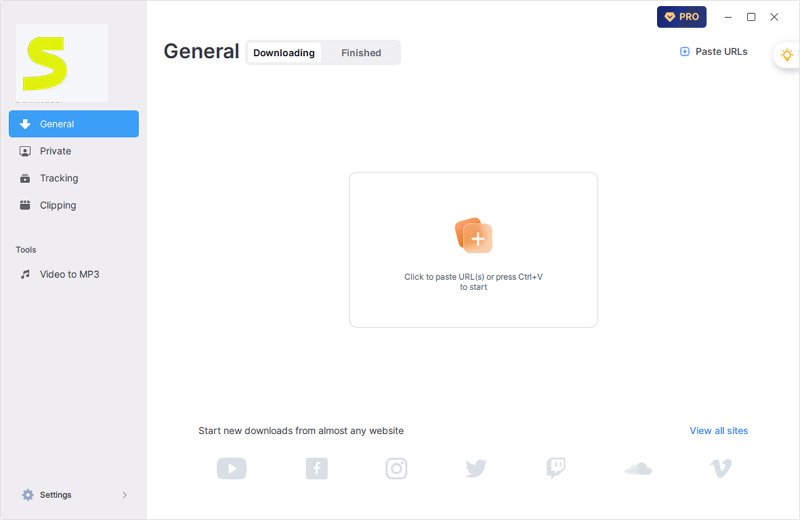
SurFast for Windows and PC
The Windows edition is the main product and receives regular updates. Regular updates matter because video sites change their systems often.
Supported Windows Versions
Reported support covers Windows 7, 8, 8.1, 10, and 11. Windows 10 or 11 gives the smoothest experience. Older systems may receive fewer updates from Microsoft, so security matters there.
SurFast System and Storage Requirements
Requirements are modest, but storage matters. A 4K video can take several gigabytes. An SSD with free space also makes large downloads feel faster.
Internet Connection and Download Performance
A stable connection prevents interrupted downloads. Wired internet helps with big files.
Supported Video Formats and Resolutions
Video formats include MP4, MOV, WEBM, FLV, AVI, MKV, and GIF, from 480p up to 8K where available.
Does SurFast Have an Android App or Chrome Extension?
Many people search for both. The answers differ.
SurFast Video Downloader for Android
There is no Android or iOS app right now. The official site says it is limited to PC and Mac.
SurFast Android APK Search Results and Compatibility
Any APK claiming to be SurFast is unofficial. Avoid it, since fake apps are a common malware route. If you need mobile downloads, transfer finished files from your PC instead.
SurFast Chrome Extension and Browser-Based Downloading
Yes. Since version 2.8.0 there is a Chrome helper extension that sends videos to the desktop app. It is a convenient shortcut when you browse a lot and want one-click saving.
Desktop SurFast Downloader vs. Mobile and Browser Tools
Desktop apps offer batch downloads and higher quality. Browser tools are quicker for one-off saves. If you mostly use a phone, browser tools may fit better.
Is SurFast Video Downloader Safe to Use?
Safety questions are fair, so let’s answer them straight.
Is SurFast Video Downloader Safe?
From the official source, it is generally considered safe, and the developer says it passes major antivirus scans. Still, scan any installer yourself.
Downloading SurFast From the Official Source
Always use the official site. Third-party mirrors may bundle unwanted software.
How to Check the Installer Before Installation
Right-click the file, check its digital signature, and run a virus scan before opening.
Privacy and Security Considerations
Be careful when logging into accounts inside any app. Use unique passwords and keep Windows updated. Log out of accounts you no longer need, and avoid saving passwords on shared computers.
Copyright and Platform Terms to Consider
Download only content you own or have permission to save. Read the platform rules, such as the YouTube Terms of Service.
SurFast Video Downloader Troubleshooting
Downloaders sometimes break when sites change. Most problems have simple fixes.
Why Is SurFast Video Downloader Not Working?
The usual cause is an outdated app component. Restart the software and let it auto-update. Reviewers mention that the latest component version matters for successful downloads.
Fix SurFast When Videos Are Not Downloading
Check the link, try a different video, and confirm your internet works.
Fix YouTube Download Errors
Update the app, then retry. YouTube changes often, so temporary errors are normal. If errors last for days, contact support and share the exact video link.
Fix Download Errors on Other Supported Platforms
Private or region-locked videos may need login access. Retry with a public link to test.
Troubleshoot Failed or Interrupted Downloads
Retry the item, and check disk space. Pause other heavy internet use. Broken partial files should be deleted before trying again.
Fix SurFast Installation Problems
Run the installer as administrator, and temporarily check antivirus settings if it is blocked.
Improve SurFast Download Speed
Close other downloads, choose a lower resolution, and use a stable connection. Speed also drops when your computer runs heavy programs at the same time.
Fix Download Folder and Storage Problems
Pick a writable folder with free space. Avoid protected system directories.
What to Do When a Playlist Will Not Download
Paste the playlist URL directly, check that it is public, and try smaller batches. Private or deleted videos inside a list can block the whole batch.
SurFast Video Downloader Review
Here is an honest look, blending vendor claims with user feedback. On AppSumo the tool holds a 4.3 rating from 116 reviews and a 60-day money-back guarantee.
SurFast Download Performance and Speed
Users praise fast downloads. Speed still depends on your connection and the source site. In everyday use, most clips finish in moments on a healthy connection.
Video and Audio Quality
Quality matches the original upload. Nothing gets upscaled, which is exactly what you want. For most viewers, the difference from streaming quality is easy to spot on big screens.
Supported Platforms and Download Options
The 1,000+ site claim is strong. Coverage on niche sites can vary. Big platforms work best, so test your favorite sites during the trial.
Playlist, Batch, and Subtitle Features
These stand out, with subtitle downloads described as reliable by reviewers. Together they turn a simple downloader into a real time-saver.
Ease of Installation and Everyday Use
The interface is simple. Beginners can start within minutes. Menus are clear, and features like presets remove repetitive steps.
SurFast Limitations to Consider
Reviewers mention occasional failures after platform changes, and support options feel limited.
Who Should Consider SurFast Video Downloader?
Frequent downloaders, editors, and learners fit best. Occasional users may prefer free tools. If you download weekly, the time saved can justify the cost.
SurFast Video Downloader Alternatives
No tool fits everyone. Here is when to look elsewhere.
When Should You Consider a SurFast Alternative?
Consider one if you need a free tool, mobile access, or a different interface. Reliability after site changes is another reason.
Free Alternatives to SurFast Video Downloader
yt-dlp is a free, open-source option, though it uses a command line. Free online tools work for quick saves. Free tools cost less but usually need more patience and technical skill.
Alternatives for YouTube Video Downloads
Popular picks include 4K Video Downloader and YT Saver. If you want a similar tool, see our StreamFab guide. Compare trial limits, resolution support, and update frequency before choosing.
Alternatives for 4K and 8K Video Downloads
Check resolution support before paying. Some competitors stop at 4K. Also confirm that your computer can play these files smoothly.
Alternatives for Playlist and Batch Downloads
Look for queue controls, channel support, and automatic subscriptions.
Alternatives for MP3 and Audio Downloads
Choose tools with many audio formats and bitrate controls. Also check whether metadata and cover art are saved correctly.
Desktop Video Downloaders vs. Online Download Tools
| Factor | Desktop App | Online Tool |
|---|---|---|
| Batch downloads | Strong | Limited |
| Quality | Up to 8K | Often lower |
| Installation | Required | None |
Frequently Asked Questions About SurFast Video Downloader
Is SurFast Video Downloader free?
It has a free trial with limits. Full use requires a paid license.
Is SurFast Video Downloader safe?
Yes, when downloaded from the official site. Always scan installers and avoid cracks.
Can SurFast download YouTube videos, playlists, and MP3s?
Yes. It handles single videos, full playlists, channels, and MP3 audio extraction.
Can SurFast download 4K and 8K videos?
Yes, if the source video is available in those resolutions.
Can SurFast download Facebook, Instagram, TikTok, X, and Vimeo videos?
Yes, these are all on the supported list. Results depend on privacy settings and site changes.
Does SurFast have an Android app or Chrome extension?
There is no Android app, but a Chrome helper extension is available.
Why is SurFast Video Downloader not working?
Usually the app needs an update. Restart it and let the component update finish.
Final Thoughts on SurFast Video Downloader
SurFast Video Downloader is a capable, beginner-friendly tool for saving videos, audio, and subtitles offline. Its 8K support, batch downloads, and wide site coverage make it a strong Windows option, while the free trial lets you test it safely.
Download only from the official source, respect copyright, and compare alternatives before committing. If it fits your routine, you will save time and enjoy your favorite content anywhere, even without a connection.