Pazu StreamGet Download, Features, Setup, and Alternatives
Ever wished your favorite series would simply play on a long flight, with no buffering and no data bill? That is the itch Pazu StreamGet tries to scratch. It is a desktop downloader that saves movies and shows from major streaming sites as MP4 or MKV files.
This guide covers downloading, setup, features, pricing, safety, and alternatives. You will also find a plain note on legal limits, because that part matters.
We checked the vendor’s own pages and several third-party listings, then wrote what a careful buyer would want to know before paying a cent.
Quick answer: Pazu StreamGet is a paid all-in-one video downloader for Windows and Mac that saves streaming videos up to 1080p.
What Is Pazu StreamGet?
Quick answer: It is a single desktop program from Pazu (Pazusoft) that replaces separate Netflix, Prime Video, and Disney+ downloaders.
What Does Pazu StreamGet Do?
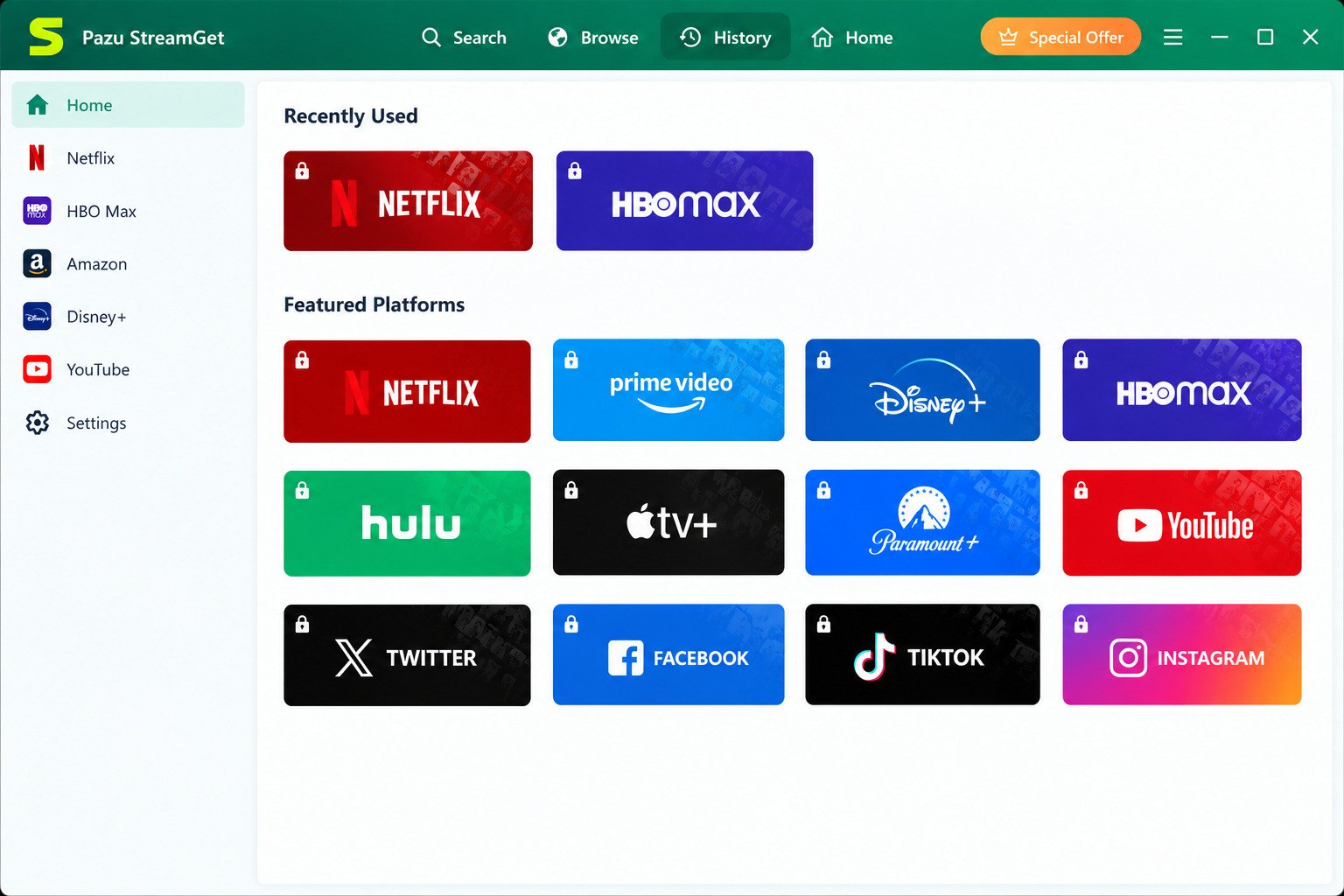
It opens streaming sites inside its own browser, lets you search a title, and saves the video to your computer. You then watch it offline in any player that supports the file. Think of it as a bridge between your streaming account and a local video library you can organize yourself.
All-In-One Video Downloader Overview
Pazu earlier sold one downloader per service. StreamGet merges them, so one license and one interface cover Netflix, Prime Video, Disney+, Max, Hulu, Apple TV+, and more. That convenience is the main selling point, especially for households that subscribe to several platforms at once.
Who Should Use Pazu StreamGet?
Frequent travelers, commuters, and people with weak internet benefit most. Students and families who want shows ready on a laptop or tablet also fit. It is meant for personal, non-commercial use. A parent loading a tablet before a road trip is a typical example. So is a student saving lectures from a licensed service.
Portable App or Desktop Software?
The official product is an installed desktop program.
Warning: “Portable” copies on third-party sites are unofficial repacks, so skip them. They carry real malware and tampering risk. A downloader asks for your streaming login, so a tampered copy could put your accounts at risk.
Pazu StreamGet Features
Supported Streaming Services and Video Platforms
The official pages list Netflix, Prime Video, Disney+, Max, Hulu, Apple TV+, and Paramount+. The Mac page also mentions YouTube and some social sites. Support lists grow over time, so look at the vendor’s page on the day you buy.
Download Movies and TV Shows for Offline Viewing
Pick a title, choose your settings, and press download. The file lands in a folder you control, with no app lock and no expiry timer tied to a subscription app. You decide where the video lives and how long it stays.
Supported Video Formats: MP4 and MKV
MP4 plays almost everywhere, from phones to smart TVs. MKV is better when you want to keep several audio tracks and subtitle languages in one file.
Video Resolution and Download Quality
Pazu advertises downloads up to 1080p. The real result depends on the title, your plan, and what the service offers. Some titles simply are not available in full HD. Older shows and regional releases are the usual culprits, so check one episode first.
Subtitle, Audio Track, and Language Options
You can keep all, or only some, of the available audio tracks and subtitle languages. That helps language learners and multilingual households a lot.
Batch Downloads and Multiple Episodes
The official pages describe downloading whole seasons in a few clicks. Some reviewers report limits on simultaneous downloads, so test this during the trial.
Video Library and Download Management
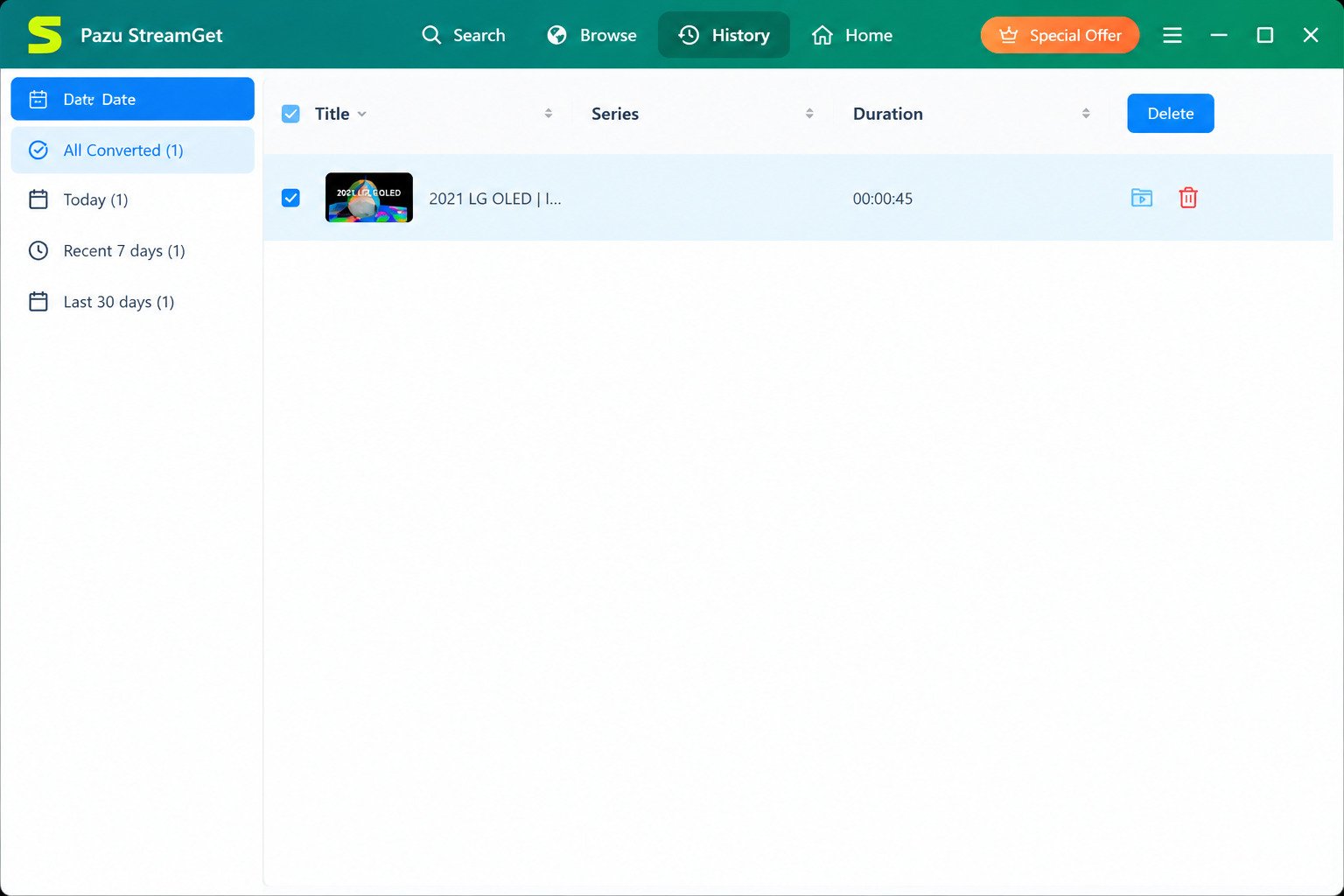
A built-in history shows finished and running tasks. From there you can open the file location, play a video, or remove an entry. This keeps a growing collection from turning into a messy folder.
Built-In Browser and Search
Choose a service on the home screen, type a title or keywords, and the results appear inside the app. You never need a separate browser window, which also cuts down on confusing pop-ups.
Limitations and Supported Features
| Area | What to expect |
|---|---|
| Maximum quality | Up to 1080p |
| Formats | MP4 or MKV |
| Codecs | H.264 or H.265 |
| Use | Personal, non-commercial |
| Limits | Trial limits, service changes, no 4K |
Pazu StreamGet Download and Installation
How to Download From the Official Website
Go to pazu-video.com and open the StreamGet page for your system. Download the installer from there only. Mirror sites often bundle extras. Bookmark the page so you can return for updates later.
Latest Version and Version History
Third-party listings recently show version 3.2.6, after 3.2.4, 3.2.2, and 3.2.0. Updates usually repair compatibility when streaming sites change. If a download suddenly fails, a new build is often the cure.
Version 3.2.6: Update Information
Version 3.2.6 is about 266 MB on Windows. It supports an English, German, Spanish, French, Japanese, and Simplified Chinese interface. Always confirm the newest build on the official site.
Windows Download
The Windows build is an ordinary installer. Download it, run it, and follow the prompts. Windows may ask for permission, which is normal for new software. Installation takes a couple of minutes on most computers.
Mac Download
The Mac version arrives as a standard disk image. Drag the app into Applications, then open it and allow it in your security settings if macOS asks. Restart the app once if the first launch stalls.
System Requirements
| System | Typical requirement |
|---|---|
| Windows | Windows 10 or 11, 64-bit |
| Mac | Recent macOS release |
| Storage | A few GB free, plus space for videos |
| Internet | Stable connection and an active streaming account |
Check the official page for exact numbers. A modern laptop with a solid state drive will feel noticeably faster than an old machine, especially while saving several episodes in a row.
How to Install and Set Up
- Download the installer from the official site.
- Run it and choose a folder.
- Launch the app.
- Pick a streaming service and sign in.
Can You Run It as a Portable App?
Officially, no. Any “portable” or “pre-activated” file you find online is not from Pazu. Using one can expose your streaming passwords and your computer.
How to Use Pazu StreamGet
Add a Streaming Service
Open the home screen and click the service you want. A login page appears inside the app. Sign in with your own account. Your login stays inside the app window, just like in a normal browser.
Find Movies and TV Shows
Type a title or a few keywords into the search bar. You can also paste a video link from the service. Short, exact titles give cleaner results than long phrases.
Download a Movie or TV Episode
Open the title page and press the download button. Pick the settings you want, then confirm. Progress shows in the task list. Wait for the green finished mark before you close the app.
Choose MP4 or MKV Output
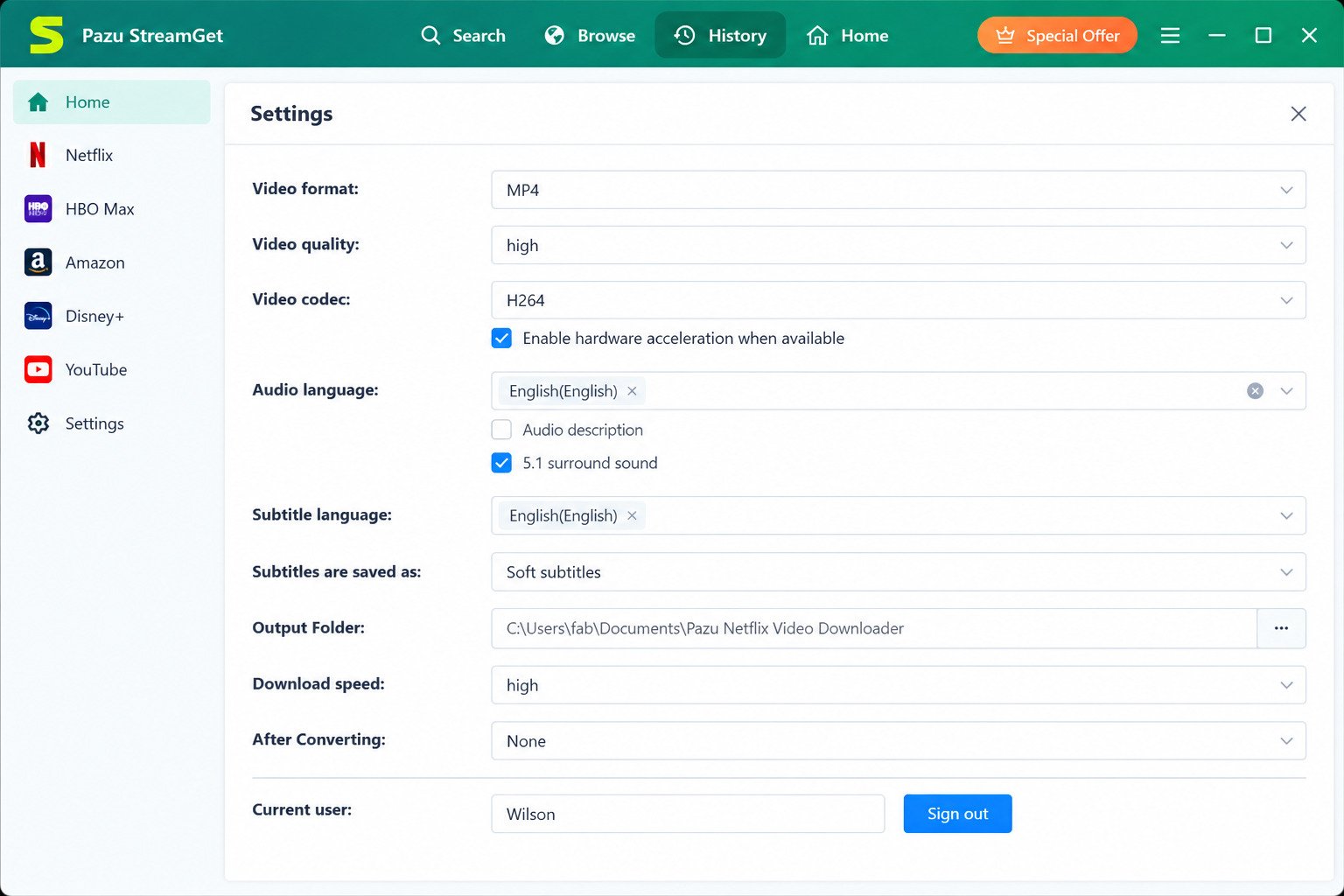
Open Settings and select your output format. Choose MP4 for phones and TVs. Choose MKV when you want multiple audio and subtitle tracks. Test a short clip on your own device first.
Select Video Quality and Resolution
In the settings, pick the video quality, up to 1080p. A higher setting gives sharper video but larger files. A 1080p movie can reach several gigabytes.
Download Subtitles and Choose Audio Tracks
Before downloading, tick the languages you need. Keep only what you will use to save space, or keep everything for travel. For example, a family trip abroad might need English and Spanish tracks together.
Download Multiple Episodes at Once
Open a series and choose a season. Tick the episodes, or select all, then start. Expect the queue to process in order. Start with one season, not an entire library, so you can spot problems early.
Find and Play Downloaded Videos
Open the finished list and click the folder icon. Play the file with VLC or any modern player.
Manage Downloaded Files
Set one dedicated folder, name seasons clearly, and move finished files to an external drive. That keeps your main disk free. A simple Series > Season > Episode folder tree makes later searching painless.
Pazu StreamGet Supported Streaming Services
| Service | Listed support |
|---|---|
| Netflix | Yes |
| Amazon Prime Video | Yes |
| Disney+ | Yes |
| Hulu | Yes |
| Max / HBO Max | Yes |
| Apple TV+ | Yes |
| Paramount+ | Yes (Mac page) |
Netflix Downloader
Netflix is the headline service. The app saves titles from your own account as MP4 or MKV, with your chosen audio and subtitles.
Amazon Prime Video Downloader
Prime Video works, including titles you purchased or rented, according to the vendor. Availability depends on your region and account.
Disney Plus Downloader
Disney+ movies and series can be saved for offline viewing. Quality depends on the title and on your plan.
Hulu Downloader
Hulu downloads are supported, and the vendor says ad-supported plans can still produce ad-free files. Terms of service may restrict that.
Max and HBO Max Downloader
Max, formerly HBO Max, is on the supported list. Region rules apply, so a title missing in your country will stay missing.
Apple TV Plus Downloader
Apple TV+ originals are supported. They are a small catalog, so a full season is quick to save.
Paramount Plus Downloader
Paramount+ appears on the vendor’s Mac page. Check the Windows page too, since support lists can differ between versions.
YouTube and Social Media Videos
The vendor lists YouTube and several social platforms. For ordinary web videos, free tools often do the same job.
Video Quality, Formats, and Subtitles
Can It Download Videos to MP4?
Yes. MP4 is the default choice for most people because phones, tablets, and TVs read it without trouble.
Does It Support MKV?
Yes. MKV holds several audio and subtitle tracks in one file, which suits movies with many languages.
Can You Download in 1080p or HD?
Yes, up to 1080p when the service offers it. Do not expect 4K from this tool.
H.264 or H.265?
Both are supported. H.264 is more compatible. H.265 (HEVC) makes smaller files but needs a newer device or player.
Audio Tracks and Subtitle Languages
Tick the tracks you want before you start. You can set preferred languages once and reuse them.
Subtitles as Separate Files
Options vary by version, so look in the output settings. If separate files are offered, they work well with players like VLC.
Original Audio and Subtitles
The vendor says it can keep original audio and every available subtitle language. One reviewer noted audio quality may be reduced on some surround tracks, so test a short clip.
Pazu StreamGet for Windows and Mac
Windows 11 and Windows 10
It runs on Windows 11 and is the platform most reviewers test. Windows 10 is supported as well. Keep Windows updated for smooth results, and make sure your system is 64-bit, since modern builds target 64-bit only.
macOS, Intel, and Apple Silicon
A separate Mac edition exists with the same core features. Your Windows license may not carry over, so check the license terms. The vendor does not make Intel versus Apple Silicon support obvious in its summaries, so confirm native support on the Mac download page before buying.
Windows vs. Mac: Which Version Should You Choose?
| Point | Windows | Mac |
|---|---|---|
| Features | Full set | Full set |
| Services | Wide list | Wide list, plus social sites |
| Best for | Most users | Mac owners |
Pick the one that matches your computer. If you own both, check whether one license covers both systems.
Pricing, Free Trial, and License
Is It Free to Download?
The installer is free to download, but the full tool is paid software. Anything advertised as “free full version” is a cracked copy.
What Does the Free Trial Include?
Pazu trials are usually limited, and reviewers report that only part of each video can be saved. Use the trial to test your favorite service. Download one short episode, play it, and check picture, sound, and subtitles before paying.
Pricing and License Options
Pricing changes, so read the official page. Expect monthly, yearly, and possibly lifetime plans, and compare single-service tools with the all-in-one pack.
Is There a Lifetime License?
Pazu has offered lifetime-style plans for some tools. Confirm on the current price page, and read what “lifetime” covers, including updates.
Activate or Update Your License
Open the app, click the key icon, and paste the code you received by email. Keep that email somewhere safe, since you may need the code after a reinstall. Update from the official site to keep the license valid.
Is Pazu StreamGet Safe and Legitimate?
Is It Safe to Install?
The official installer from Pazu’s own site is the normal route. Run a malware scan, and avoid repacks, cracks, and “portable” files.
How to Download From a Trusted Source
Type the address yourself, pazu-video.com. Check the page for HTTPS and avoid ads that say “download now” in odd places.
Does It Require a Streaming Account?
Yes. You sign in with your own subscription. The tool saves what your account can already watch, so without an account there is nothing to save.
Privacy and Account Security
You enter streaming credentials inside the app, so only use the official version. Use unique passwords and enable two-step sign-in on your streaming accounts. If a streaming service sends a security alert after you sign in, change your password and review recent devices.
Copyright, DRM, and Streaming Service Terms
Legal risk: Saving DRM-protected video usually breaks the service’s terms of use. In some countries, circumventing protection is illegal even for personal use. See the U.S. Copyright Office on anti-circumvention and check your local law. This article does not offer legal advice.
Review: Performance, Pros, and Cons
Ease of Use
The interface is simple. You pick a service, search, and download. Beginners can finish a first download in minutes. There is no heavy settings maze, which is a big plus for casual users.
Download Speed and Output Quality
Pazu promotes fast, multithreaded downloads. Speed depends on your connection and the source. Picture quality is good at 1080p, though not 4K. Large screens may reveal softness compared with native 4K streams.
Platforms and Format Flexibility
Windows and Mac are covered, and the MP4 or MKV choice is handy. Mobile devices are not supported directly, so transfer files from a computer with a USB cable, cloud folder, or home network share.
Pros and Cons
Pros
- One tool for many services
- MP4 and MKV output
- Keeps audio and subtitles
- Built-in browser
Cons
- Paid, with a limited trial
- No 4K
- May break after service updates
- Legal and terms-of-service risk
What Reddit Users Say
Community opinions are mixed. People praise convenience and subtitles, while others mention price and occasional failures after service changes. Read recent threads from the last few months before buying, because tool behavior changes quickly.
Is It Worth Using?
It is worth a trial if you often travel and you accept the risks. Set a budget and a deadline, then decide while the trial is fresh in your mind. Keep your expectations realistic: a downloader is only as reliable as the streaming sites it works with. If you rarely need offline video, the apps’ own download buttons may be enough.
Pazu StreamGet vs. Other Video Downloaders
vs. StreamFab All-In-One Downloader
StreamFab supports more sites and has more features, but costs more in some plans. Pazu is simpler and focused. Rival blogs push their own tools, so compare trials yourself. A fair test is simple: download the same episode with two tools and compare the file size, audio, and subtitles.
vs. Individual Streaming Service Downloaders
A single-service tool is cheaper if you use only Netflix. StreamGet makes more sense when you use three or more services.
vs. Other Streaming Video Downloaders
| Tool type | Strength | Weakness |
|---|---|---|
| Pazu StreamGet | Simple, all-in-one | Narrower than the biggest rivals |
| StreamFab | Many sites | Higher price |
| MovPilot | Per-service focus | Several licenses |
| Built-in app downloads | Free, legal | Expire and lock to the app |
Which Streaming Downloader Offers Better Value?
Value depends on how many services you use. Count them first. Write down every service you pay for, and note which ones you actually watch each month. Then compare price per month across trials rather than trusting any single review. Also ask whether updates, support, and refunds are included in the price.
Best Pazu StreamGet Alternatives
Best All-In-One Streaming Video Downloaders
StreamFab is the best-known rival. Other brands such as MovPilot and CleverGet also sell broad tools. Compare site lists and refund policies. A longer list of sites is only useful if you actually watch those sites.
Netflix, Prime Video, and Disney+ Alternatives
Netflix’s own app is the free choice for Netflix. Paid options include Pazu’s Netflix-only tool, MovPilot, and StreamFab. The Prime Video app lets you download many titles, and Disney+ includes app downloads on supported plans. Paid tools add file-level control, so you get a file you can move, rename, and back up, but the terms-of-service concern remains. Test one short episode in the trial before you commit.
Best for Windows and Mac
Windows has the widest choice, including Pazu, StreamFab, and MovPilot. Pick based on supported services and trial results, and ignore flashy banners. Mac users should confirm Apple Silicon support first, since slow performance under translation layers is a common complaint with older builds. Many brands now ship Mac editions, but features can lag behind Windows.
Free Alternatives
Use the official download buttons inside each streaming app. For non-protected web videos, open-source tools such as yt-dlp work well. For related guides, see this download tool on SoftFolders.
Pazu StreamGet Troubleshooting
Not Working
Restart the app and your computer. Update to the latest version, because streaming sites change often. Then try a different title. If only one title fails, the problem is the title, not your setup.
Download Failed or Stuck
Check your internet, free disk space, and VPN. A VPN can trigger region checks, so turn it off while testing. Pause the queue, then retry one video only. Large 1080p files can fail when the disk fills up halfway through.
Cannot Download Netflix Videos
Make sure you are signed in and the title is available in your region. Update the app, since Netflix changes break tools often. If the problem lasts for days, check the vendor’s news page for a fix announcement.
Not Downloading Subtitles
Open the settings and confirm the language is ticked. Some titles lack a subtitle track entirely.
Installation Errors
Redownload the installer from the official site. Corrupted downloads are a surprisingly common cause of setup errors. Run it as administrator and temporarily check your antivirus for false blocks.
Update and Activation Problems
Confirm the code matches your edition, and that you used the email you bought with. Contact the vendor’s support if it still fails.
Unsupported Video or Audio Formats
Try VLC, or switch from H.265 to H.264 for older devices. Choosing MP4 also helps on TVs. As a last step, remux the file with a free tool if a device still refuses it.
Frequently Asked Questions About Pazu StreamGet
What Is Pazu StreamGet?
It is a paid desktop tool that saves streaming movies and shows as MP4 or MKV files for offline viewing.
Is Pazu StreamGet Available as a Portable Download?
No official portable edition exists. Portable files online are unofficial and risky.
Is Pazu StreamGet Free?
You can try it, but the full version is paid. Trials usually limit what you can save.
What Is the Latest Version of Pazu StreamGet?
Third-party listings show 3.2.6 recently. Confirm on the official site.
Does Pazu StreamGet Work on Windows 11?
Yes, it supports Windows 10 and 11 on 64-bit systems.
Is Pazu StreamGet Available for Mac?
Yes, there is a Mac edition. Check Apple Silicon support before you buy.
Is Pazu StreamGet Safe and Legal to Use?
The official installer is safe, but saving DRM video may break service terms or local law. Use it carefully.
Conclusion
Pazu StreamGet gives you a simple way to keep shows for flights, trips, and slow internet days. Its MP4 and MKV output, subtitle choices, and built-in browser make it easy to learn. It is not perfect, though.
Always use the official site, respect the rules where you live, and test the trial first. Download only what you have the right to watch, and enjoy your offline movie night.